Repository navigation
Custom Steps
A template with a function: key is a step of your own. Where the same few steps turn up in
placeholder after placeholder, write them once as a function and call it by name, the way you
call upper or friendly_name: [[room|temperature_of]].
On this page:
- The smallest one
- Parameters and defaults
- What a function can see
- Chaining
- What comes out
- Names: the built-in steps win
- A function that calls itself
- Writing one as a template card
- Trying one out
- Limits
decluttering_templates:
  temperature_of:
    function: 'sensor.[[value|slug]]_temperature'
  room_tile:
    card:
      type: tile
      entity: '[[room|temperature_of]]'
      name: '[[room]]'
- type: custom:decluttering-card-plus
template: room_tile
variables:
- room: Living Room
- type: custom:decluttering-card-plus
template: room_tile
variables:
- room: Kitchen
- type: custom:decluttering-card-plus
template: room_tile
variables:
- room: Bedroom
What the step is given goes into the function as [[value]]. Here [[room|temperature_of]]
hands it Living Room, the function makes sensor.living_room_temperature of it, and that is
what the tile gets. function: is what the template builds instead of a card, so a function
template has no card:, badge:, row: or element:. It goes under
decluttering_templates: with the rest, or in a template card.
A bare [[temperature_of]] is not the function's result: a function is only ever a step,
written after a |.
parameters: names what else the function takes, in order. default: gives each of them a
value for when a call leaves it out, as in any template, and let: works things out from them:
decluttering_templates:
  sensor_of:
    parameters: [kind]
    default:
      - kind: temperature
    let:
      sensor: 'sensor.[[value|slug]]_[[kind]]'
    function: '[[sensor|if_exists?]]'
  room_climate:
    card:
      type: entities
      title: '[[room]]'
      entities:
        - '[[room|sensor_of]]'
        - '[[room|sensor_of:humidity?]]'
- type: custom:decluttering-card-plus
template: room_climate
variables:
- room: Living Room
- type: custom:decluttering-card-plus
template: room_climate
variables:
- room: Kitchen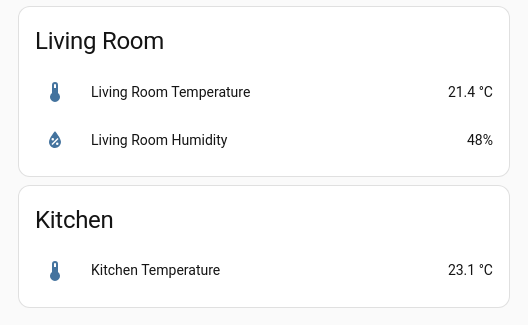
The kitchen has no humidity sensor, so if_exists gives nothing and the function gives
nothing. A function that gives nothing is a gap like any other: the ? on
[[room|sensor_of:humidity?]] takes the row out, and a default: or or: after the step would
stand in. The ? inside the function, on [[sensor|if_exists?]], keeps it quiet: without
it the function's own build writes a warning to the console about the missing sensor, even
though the card goes on to drop the row.
Arguments go after a colon, as with any step. Unnamed ones take the parameters in order;
named ones say which they are for. With room: Bedroom:
| Placeholder | Gives |
|---|---|
[[room|sensor_of]] |
sensor.bedroom_temperature |
[[room|sensor_of:humidity]] |
sensor.bedroom_humidity |
[[room|sensor_of:kind=humidity]] |
sensor.bedroom_humidity |
[[room|sensor_of:pressure|default:none]] |
none |
[[room|sensor_of:humidity,extra]] |
left as written |
[[room|sensor_of:size=big]] |
left as written (v2.11.0+) |
More unnamed arguments than parameters is a mistake, so the placeholder is left as written and the console says:
sensor_of as a step: it takes at most 1 unnamed arguments, one for each name under parameters:
Only the names under parameters: can be passed by name (v2.11.0+). Anything else, a typo or
a name from the function's own default:, is refused the same way:
sensor_of as a step: size= is not one of its parameters (kind); add it under parameters: to pass it by name
So a call can change what parameters: offers and nothing else. A value the function keeps to
itself goes under default: without a parameter, or under let:.
A comma separates arguments, so put an argument that holds one in quotes, single or double:
[[thing|labelled_with:"the hall, upstairs"]]. Unquoted arguments are trimmed.
parameters: on a template without function: does nothing, and the template editor's lint
says so.
Only what it is given: [[value]], its arguments, and its own default: and let:. Nothing
of the card that calls it, not even the dashboard's decluttering_defaults. So the same call
gives the same answer on every card that makes it.
decluttering_templates:
  labelled:
    function: [[value]] in [[place]]'
  labelled_with:
    parameters: [place]
    function: [[value]] in [[place]]'
  sees_demo:
    default:
      - thing: Lamp
      - place: Kitchen
    card:
      type: markdown
      content: |
        [[thing|labelled]]

        [[thing|labelled_with:[[place]]]]
The card has place: Kitchen, but labelled cannot see it, so the first line stays
[[thing|labelled]] and the console names the gap:
template "labelled" uses place, which nothing gives a value to, so it is rendered as written. Set it on the card, or give it a default in the template. To write those brackets on purpose, escape it as !place.
The second line passes it in as an argument, and reads Lamp in Kitchen. When a function
needs something from the card, that is the way: make it a parameter and pass it.
A default: for value itself never wins over what a call hands in, which makes it a good
way to give the editor's placeholder tool something to show.
A function is a step like the others, so steps go before it, after it, and on either side of
another function. With room: Living Room and rooms: Living Room,Kitchen,Bedroom:
| Placeholder | Gives |
|---|---|
[[room|temperature_of|friendly_name]] |
Living Room Temperature |
[[room|lower|temperature_of]] |
sensor.living_room_temperature |
[[rooms|split|temperature_of|join:", "]] |
sensor.living_room_temperature, sensor.kitchen_temperature, sensor.bedroom_temperature |
After a list step such as split, the function runs on each item. One function can call
another, from any template on the dashboard:
decluttering_templates:
  temperature_name:
    function: '[[value|temperature_of|friendly_name]]'
[[room|temperature_name]] gives Living Room Temperature.
A function that asks Home Assistant something, as friendly_name and if_exists do, makes
the card that calls it follow the registry as if it had asked itself.
A function hands on text, a number, or a true or false. A function: that builds a mapping or a
list is refused, the placeholder is left as written, and the console says:
as_map as a step: its function: gave a mapping or a list, and a step only passes on text, a number, or a true or false
A result still holding a placeholder counts as nothing, so the card around it never fills that placeholder with its own variables.
A function named after a built-in step is never called: [[room|upper]] runs the built-in
upper, whatever upper: the dashboard defines. The console says so once:
The template upper has the name of a built-in step, so it is not used as a step. Give it another name to call it as one.
The template editor's lint warns about it too, and the dashboard health counts such a template
as unused, since nothing can reach it. New built-in steps arrive with new releases, so a name
of your own that is unlikely to become one, such as temperature_of rather than temp, saves
a rename later.
A step name that is neither built in nor a function is still an unknown step. The card editor and the lint name it, and suggest a function whose name is close.
Calling itself, straight away or by way of others, would never end, so it is refused:
decluttering_templates:
  countdown:
    function: '[[value|countdown]]'
[[room|countdown]] is left as written, and the console gives the loop:
countdown calls itself (countdown > countdown), so it gives nothing there.
Two functions calling each other are named the same way, ping > pong > ping.
A template card can hold a function as well:
type: custom:decluttering-template-plus
template: humidity_of
default:
  - value: Kitchen
function: 'sensor.[[value|slug]]_humidity'
It shows nothing on the dashboard. In edit mode, and in its own preview, it says it is a function, how to call it, and what its body is. Other cards call it as a step all the same:

In the template editor, Type of thing to template reads Function (used as a step).
Picking it gives the template a function: to start from; picking another type takes
function: and parameters: away again.
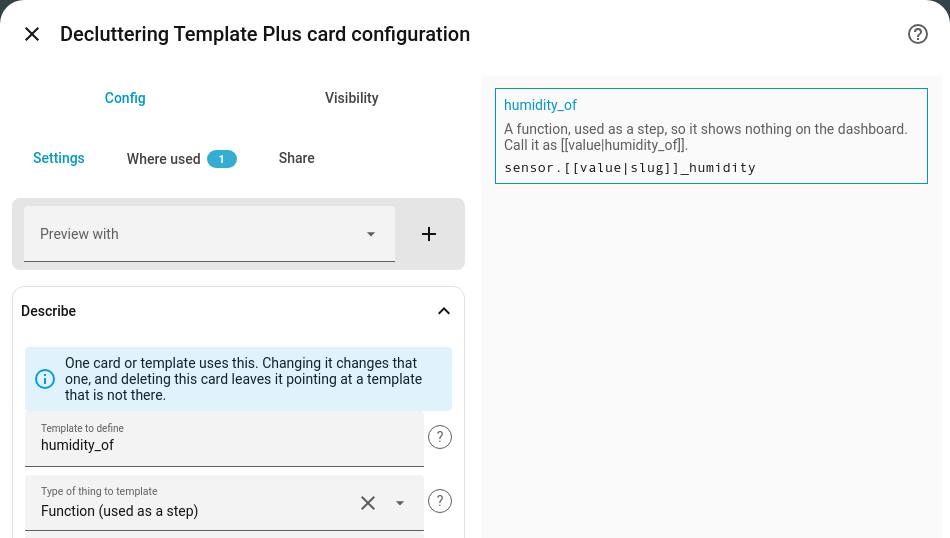
Where used counts the templates and cards that call it as a step. Here it is one, the
humidity_tile template, and the tab says: This template is used by another template:
humidity_tile. Changing it changes that one too.
The template editor's Try a placeholder (under Tools) runs function steps, with the
dashboard's templates to hand, as a card on the dashboard would. In humidity_tile, which
calls [[room|humidity_of]]:

Your functions are among the chips: press … for every step, and they come at the end.
In a function template's own editor nothing hands it a value, so [[value]] shows as unset.
Give value a default:, as humidity_of does above with Kitchen, and the tool shows
what the function makes of it; a real call still hands in its own.
On the docs site, Try a placeholder takes function templates in its Item and function templates box, and Try a template takes them with the rest of your templates. See Trying It Out.
- A function sees only its value, its arguments and its own
default:andlet:. Pass anything else in. - It hands on text, a number, or a true or false; never a mapping or a list.
- A built-in step of the same name always wins.
- A function that calls itself, however indirectly, gives nothing.
-
Sharing a template that calls a function sends the function along under
includes:, as it does a template it extends. - The JSON schema cannot know your function names, so it lets any step name through. The card editor, the lint and the command-line lint know the dashboard's functions and check them.
- Placeholder Reference - every built-in step
-
Variables -
default:,let:and the steps -
List Entries -
with:andrepeat:, for a block rather than a value