Repository navigation
Slots
A template can leave a place for cards it does not know yet. The template draws the frame - a heading, a stack, a footer - and each card that uses it says what goes inside. One frame then serves a kitchen with two tiles and a bedroom with a tile and a note, without a variable per tile.
On this page:
- Leaving a place in a template
- A slot that may stay empty
- What a slot holds
- Slots in a repeat or a group
- Slots or a card-valued variable
'[[body|slot]]', written as an entry of a list, is replaced by the cards the card gives
under slots:, one list entry each:
decluttering_templates:
  room_frame:
    card:
      type: vertical-stack
      cards:
        - type: heading
          heading: '[[area|title]]'
        - '[[body|slot]]'
        - '[[footer|slot?]]'
- type: custom:decluttering-card-plus
template: room_frame
variables:
- area: kitchen
slots:
body:
- type: tile
entity: light.kitchen
- type: tile
entity: sensor.kitchen_temperature
- type: custom:decluttering-card-plus
template: room_frame
variables:
- area: bedroom
slots:
body:
- type: tile
entity: light.bedroom
footer:
- type: markdown
content: The lamp goes off at eleven.
One frame, two cards. Only the bedroom fills the footer.
The frame is the template's and what sits in it is the card's, exactly as written. The two
kitchen tiles land in the stack where [[body|slot]] stood, as if they had been written
there.
Quote the placeholder. Unquoted, YAML reads [[body|slot]] as a list inside a list before
the card ever sees it.
slots: is read the same as variables:, so the cards can also be given as a variable:
variables: [{body: [...]}] works. When both name the same slot, slots: wins.
'[[footer|slot?]]' is a slot the card may leave empty. When nothing fills it, the entry
drops out of the list and nothing is drawn in its place, as with any
optional placeholder.
A slot without the ? that nothing fills is an unset variable like any other. The entry
stays in the list as the text [[body|slot]], Home Assistant shows its configuration error
for it (a stack cannot draw a line of text as a card), and the browser console names the
variable. A default: for the slot in the template gives it cards to fall back on.
| The card gives | The slot becomes |
|---|---|
| a list of cards | every card in the list, in order |
| one card, written as a mapping | that one card |
nothing, with slot?
|
nothing: the entry is gone |
nothing, without the ?
|
the placeholder as written, reported unset |
The cards in a slot are not filled in by the frame. A custom:decluttering-card-plus card
put in a slot keeps its own [[...]] and fills them from its own variables, so a frame
never reaches into what the card handed it.
A repeating card hands its slots to every copy. Each copy builds the frame with its own values and puts the same cards in the slot:
decluttering_templates:
  light_frame:
    card:
      type: vertical-stack
      cards:
        - type: heading
          heading: '[[entity|friendly_name]]'
        - type: tile
          entity: '[[entity]]'
- '[[extra|slot?]]'type: custom:decluttering-card-plus
template: light_frame
for_each:
- entity: light.kitchen
- entity: light.bedroom
slots:
extra:
- type: markdown
content: Lights go off at eleven.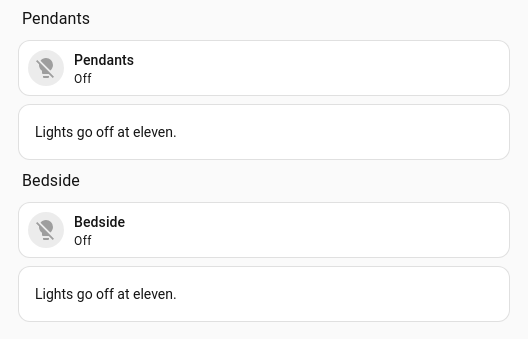
Each copy builds the frame for its own light and puts the same note in the slot.
In a group: template a slot's cards take their places in the section like the group's
other cards, each in a grid cell of its own:
decluttering_templates:
  room_group:
    group:
      - type: heading
        heading: '[[area|title]]'
- '[[body|slot]]'type: custom:decluttering-card-plus
template: room_group
variables:
- area: kitchen
slots:
body:
- type: tile
entity: light.kitchen
- type: tile
entity: sensor.kitchen_temperature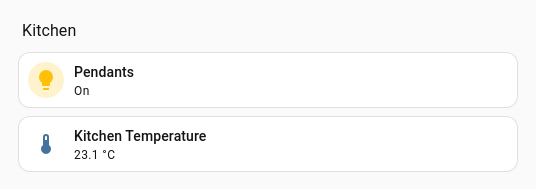
The heading and the two tiles are three cards of the section, as a group always lays out.
A variable can already hold a card: card: '[[inner]]', with inner set to a mapping, puts
that one card under that one key. A slot is for a list. It takes any number of cards and
sits inline, among entries the template wrote itself. Use a variable when the template has
one place for one card; use a slot when the card decides how many.
→ Cards · Variables → List Entries for blocks of configuration inside a card's own list