Repository navigation
Batteries
Battery devices get a Battery tab, and the tracker keeps a daily battery reading for each one for 400 days.
Each battery device can have a battery type and count, for example CR2032 or 2× AAA. The tracker takes it from the first of these that has one:
- What you entered on the device's Battery tab (or when pairing it).
- Battery Notes, if you use that integration and it has a type for the device.
- The built-in library, a copy of the Battery Notes device library, matched on the device's manufacturer and model. Shown as "suggested by the Battery Notes library".
The Battery tab says which one it used. The type also appears as the Battery type entity (see Home Assistant entities) and in the CSV export.
You can also note the date the batteries were first installed.
Each battery device keeps a list of battery replacements, with the date, where the record came from and an optional note. A replacement is recorded when:
- you add one on the device's Battery tab (any date);
- you press the device's Battery replaced button entity in Home Assistant (today's date);
- you tick its battery type on the battery to-do list, or call the
z2m_tracker.battery_replacedaction (needs the integration); - the tracker sees the battery level jump by 25 points or more, recorded as "Detected".
If the device is also set up in Battery Notes, recording a replacement in the tracker also sets Battery last replaced in Battery Notes, so the two stay in step. The newer of the two dates is shown as last replaced.
You can delete a replacement record from the Battery tab.
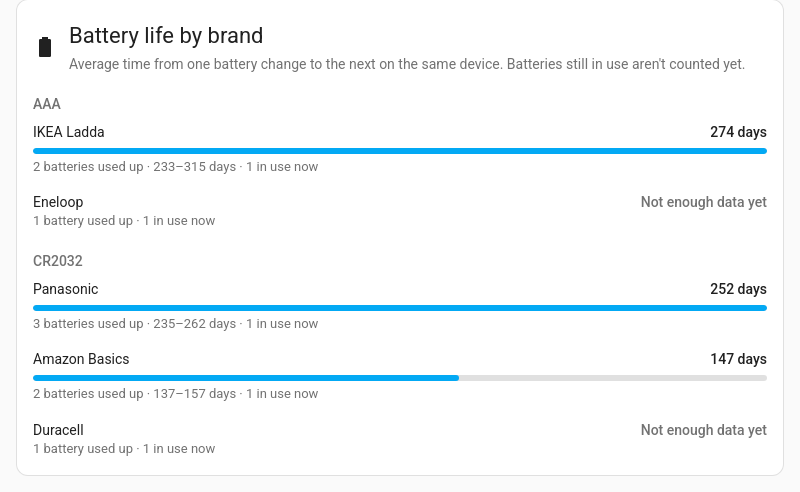
A battery change can record the brand of the new batteries, so you can see which ones last.
- Keep your list of brands under Settings → Battery brands, or with Manage brands next to the brand dropdown. Removing a brand from the list doesn't change changes already recorded. The list holds up to 50 brands.
- When you add a replacement on the Battery tab, pick the brand from the Brand (optional) dropdown. It starts on the brand you used last for that battery type.
- Change brand on a replacement record sets or clears the brand afterwards.
- The
z2m_tracker.battery_replacedaction takes an optionalbrand. A brand that isn't on your list yet is added to it. - The CSV export has a
battery_brandcolumn.
The Battery life by brand card on the Health tab compares brands for each battery type: the average time from one battery change to the next on the same device, the shortest and longest, and how many batteries were used up. Only batteries that have run out count. The battery in a device now hasn't run out yet, so it's shown as "in use now" but not in the average.
Once a battery has at least five daily readings spread over two weeks since its last replacement, the tracker fits a straight line to the last 120 days and estimates the days until it reaches 10%. The estimate:
- shows on the device's Battery tab and as the Battery days left entity;
- raises Battery running down on the Health tab when it's 45 days or less;
- drives the shopping list below.
No estimate is made while the level is flat or rising, because many devices report in coarse steps.
The device's Trends tab draws the battery level over up to 90 days, with each replacement and the projection to 10%.

Batteries to buy on the Health tab groups devices whose batteries will need changing soon by battery type, with the total number of cells needed for each. A device counts when:
- its estimate is 60 days or less; or
- it reports low battery; or
- its level is 25% or less and there isn't an estimate yet.
When you record a replacement (in the app, from Home Assistant, or in Battery Notes), the device leaves the list until it next reports a battery level. If that reading is still low, it comes back. Replacements the tracker detected from a jump in the level don't count, because the new reading is already there.
The weekly summary and the summary card include the same list. With the integration, it's also a Home Assistant to-do list: tick an item when you've changed those batteries. A calendar shows each device's predicted replacement date.
Devices without a battery type are grouped as Unknown type, so add types to make the list useful.
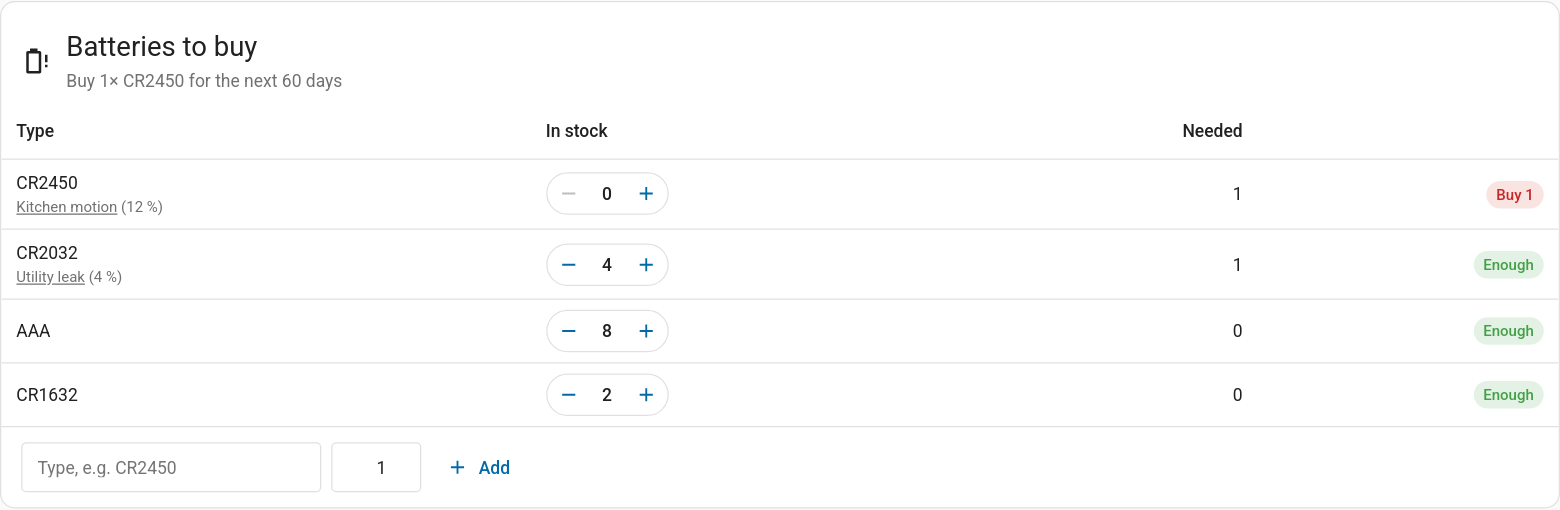
The Batteries to buy card also keeps count of the spare batteries you have. Each battery type has a row with In stock, Needed and what to buy: Buy 3, or Enough when your spares cover it. The card's subtitle sums it up, for example "Buy 2× CR2032, 4× AAA for the next 60 days", or "Your spares cover the next 60 days".
- Use the − and + buttons in In stock to change the count by one.
- To add a type that isn't listed, type it under the table (for example
CR2450), enter how many, and choose Add. Types are matched without regard to case, soaaacounts asAAA. - Types you have in stock but don't need yet stay on the list, with nothing needed.
- Unknown type has no stock count.
When you record a battery change, the batteries come out of stock: as many as the device takes, never below zero. That happens for a change dated in the last 3 days, recorded in any of the ways listed above. If the same change is recorded twice within 3 days, for example by hand and then detected from the level jump, stock is only taken once. If you delete the replacement record, its batteries go back into stock.
The stock is kept in the app's data, so it's in the backup. With the integration, each item on the battery to-do list starts with how many are needed and how many are in stock.