Home
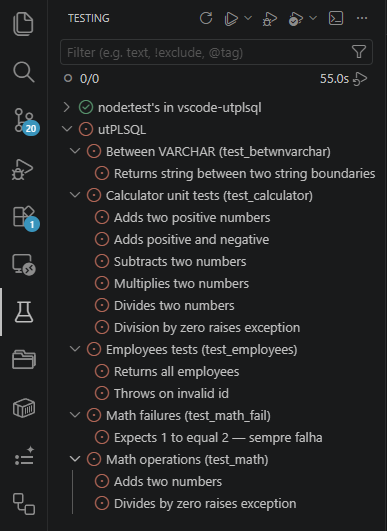
Integrates utPLSQL into VSCode, bringing PL/SQL tests into the native Test Explorer, with context menu and visual coverage.
- Native Test Explorer — suites and tests appear in the test view
-
CodeLens — Run/Run with Coverage buttons over
%suiteand%testin the editor -
Keyboard shortcuts —
Ctrl+Shift+Uprefix + key for main commands (R = Run All, T = Run File, L = Rerun Last, etc.) -
Context menu — right-click on a folder or
.pks/.pkbfile - Visual coverage — colored gutters + percentage per file
- Inline decorations — ✓/✗/⚠ icons in the editor after execution with failure tooltip
- Status Bar — indicator with pass/fail count and duration
- Smart Re-run — Rerun Last, Run at Cursor, Run Failed Only with a shortcut
- Oracle streaming — direct execution via node-oracledb with real-time results
- Schema-aware tree — organize tests by Schema > Package > Suite > Test
- Diagnostics and quick-fix — setup validation with Code Actions
- Jump to failure — navigation to the failed assertion line (native Go to Error)
- Connection profiles — save and switch between environments (DEV/TEST/PROD) with per-profile settings
-
Statement and view coverage —
% of statementsper file, and views tracked viaV$SQL -
Coverage scope — include/exclude objects and schema/object regexes (
utplsql.coverage.*) -
Tag filter and random order — filter tests with
utplsql.tagsand run in random order with a reproducible seed -
Database-first discovery — suites from
ut_runner.get_suites_info(fallback toALL_SOURCE) plus the Rebuild Annotation Cache command -
PL/SQL Debug — breakpoints and step debugging via
DBMS_DEBUG - i18n — 24 languages — follows the VSCode display language
- SQL scripts — run the current script, a file, or a whole folder against the active connection profile
Use the sidebar on the left (or the ≡ menu on mobile) to navigate between sections.
- Getting Started: Installation and Requirements · Connection
- Usage: Quick Start Guide · Test Explorer · Editor Integration · Coverage · SQL Scripts · Reporters
- Advanced: Direct Oracle Execution · PL/SQL Debugger · Connection Profiles · Diagnostics and Quick-fix · Tree Organization
- Reference: Settings · Commands · Internationalization · Database Requirements
- Development: Architecture · Contributing · Tests · PRDs and Roadmap
- Help: Troubleshooting · FAQ