Commands
All extension commands available in the command palette (Ctrl+Shift+P),
prefixed with utPLSQL:.

| Command | Description | UI shortcut |
|---|---|---|
utPLSQL: Run all tests |
Runs all suites in the workspace | ▶ button in Testing view |
utPLSQL: Run tests in this file |
Runs suites from the active .pks/.pkb
|
Right-click → file |
utPLSQL: Run tests in this file (with coverage) |
Same, with coverage profile | Right-click → file |
utPLSQL: Run tests in this folder |
Runs suites from the selected folder | Right-click → folder |
utPLSQL: Run tests in this folder (with coverage) |
Same, with coverage profile | Right-click → folder |
utPLSQL: Refresh tests |
Forces rediscovery of .pks files |
— |
utPLSQL: Cancel run |
Stops the current execution | Escape |
utPLSQL: Show utPLSQL info |
API/DB versions | — |
utPLSQL: Select additional reporter... |
QuickPick with database reporters | — |
utPLSQL: Clear session connection |
Removes connection from cache | — |
utPLSQL: Rerun Last |
Repeats the last run | Ctrl+Shift+U L |
utPLSQL: Run Test at Cursor |
Runs the test under the cursor | Ctrl+Shift+U U |
utPLSQL: Run Failed Tests |
Re-runs only failed tests | Ctrl+Shift+U X |
utPLSQL: Show Test Explorer |
Focuses the Testing view | — |
utPLSQL: Validate setup |
Runs full setup validation (including UT3 installation integrity) | — |
utPLSQL: Configure connection |
Opens settings at utplsql.connection
|
— |
utPLSQL: Switch connection profile... |
QuickPick to switch the active connection profile | Click on status bar |
utPLSQL: New connection profile... |
Creates a new connection profile | — |
utPLSQL: Manage connection profiles |
Opens saved connection profiles | — |
utPLSQL: Import connections from SQL Developer |
Imports SQL Developer connections as profiles | — |
utPLSQL: Debug test (PL/SQL) |
Starts debugging a test via DBMS_DEBUG (utplsql Debug Adapter) |
Editor context menu (.pks/.pkb) |
utPLSQL: Compile for Debug |
Compiles the selected file/folder object with debug information (ALTER … COMPILE DEBUG PLSQL_OPTIMIZE_LEVEL = 1) |
Editor/Explorer context menu |
utPLSQL: Rebuild Annotation Cache |
Rebuilds the utPLSQL annotation cache in the database (ut_runner.rebuild_annotation_cache) and refreshes the tree |
— |
utPLSQL: Run script |
Runs the script open in the editor against a profile (connection QuickPick) | Right-click → .sql/.pks/.pkb/.fnc/.prc/.trg file |
utPLSQL: Run script file |
Runs an Explorer script file (decoded with the profile charset) |
Right-click → file |
utPLSQL: Run script folder |
Runs the folder scripts in alphabetical order (utplsql.scriptRunner.filePattern filter) |
Right-click → folder |
utPLSQL: Copy coverage grants to clipboard |
Copies SQL grants to clipboard | — |
Run test (CodeLens) |
Internal — triggered by CodeLens buttons | ▶ button over %suite/%test
|
Recompile UT3 does not appear in the palette — it is an internal quick-fix of the "utPLSQL Setup" diagnostic (
UTPLSQL_INVALID_OBJECTS).
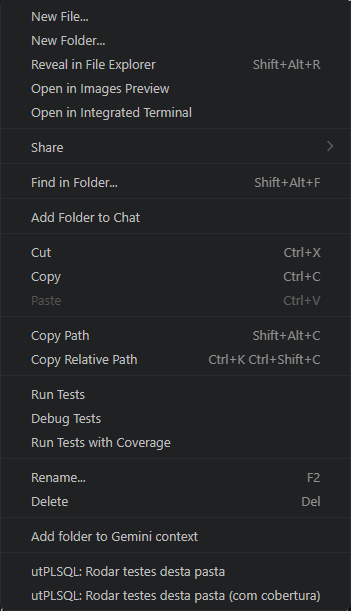
Execution commands also appear in the context menu:
-
Right-click on a file
.pks/.pkb→ runs the suites in that file -
Right-click on a folder → runs the suites in all
.pksfiles inside it -
Right-click on a file
.sql/.pks/.pkb/.fnc/.prc/.trg→ runs the script against a connection profile (output in the "utPLSQL Script" OutputChannel) - Right-click on a folder → runs the folder scripts in alphabetical order
SQL*Plus client directives (
PROMPT,SHOW ERRORS,SET,SPOOL,@file, …) at the start of a statement are ignored (not sent to Oracle).SETis skipped only when it starts a statement, soUPDATE … SET …keeps working.
All shortcuts use the prefix Ctrl+Shift+U (Cmd+Shift+U on Mac):
| Shortcut | Command |
|---|---|
Ctrl+Shift+U R |
Run all tests |
Ctrl+Shift+U T |
Run tests in file |
Ctrl+Shift+U Shift+T |
Run tests in file with coverage |
Ctrl+Shift+U F |
Refresh tests |
Ctrl+Shift+U I |
Show utPLSQL info |
Ctrl+Shift+U C |
Clear session connection |
Ctrl+Shift+U L |
Rerun last |
Ctrl+Shift+U U |
Run at cursor |
Ctrl+Shift+U X |
Run failed only |
Escape |
Cancel run |
To customize, go to File → Preferences → Keyboard Shortcuts and search for utplsql.
