Installation and requirements
The extension can be installed in two ways:
Search for utPLSQL Test Runner in the VSCode Extensions panel
(Ctrl+Shift+X) and click Install.

Download the .vsix file from the releases page
and install:
Command line:
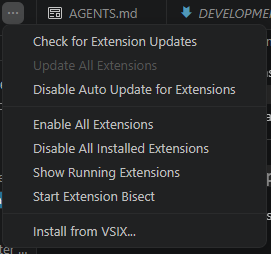
code --install-extension vscode-utplsql-0.13.0.vsixUI: Extensions Panel (Ctrl+Shift+X) → ... (top-right corner)
→ Install from VSIX...
- utPLSQL (UT3) installed on the Oracle database.
To verify whether utPLSQL is installed:
SELECT ut_meta.version() FROM dual;
-- should return something like: v3.2.3- VSCode 1.88+ (required by the Test Coverage API).
- Nothing else — the VSIX already includes the
oracledbthin driver (no Instant Client needed). For databases with NNE, opt into thick mode with a local Oracle Instant Client viautplsql.oracleClientMode/utplsql.oracleClientLibDir.
| Oracle | utPLSQL | VSCode | Extension |
|---|---|---|---|
| 18c+ | v3.1.x / v3.2.0+ | 1.88+ | 0.3.0+ |
| 12.2 | v3.1.x only | 1.88+ | 0.13.0+ |
Oracle 12.2: utPLSQL v3.2.x does not compile on 12.2 (
PLS-00222inUT_ANNOTATION_MANAGER; it requires an 18c+ feature). Use v3.1.x. Also, the 12.2 image ships aWE8DECdatabase character set, which loses characters outside it (e.g.€→¿); preferAL32UTF8.
The extension is just the GUI client — tests are executed by the Oracle database, via node-oracledb (thin driver, or thick when configured).