Repository navigation
FAN Map
Configuration and observability card for FAN setup, included as part of Sensor Control (FAN Configuration).
The FAN Map is an observability and configuration card included as part of Sensor Control (FAN Configuration). It provides a complete visual overview of your FAN system topology and includes a test bench for safely testing zone valves.
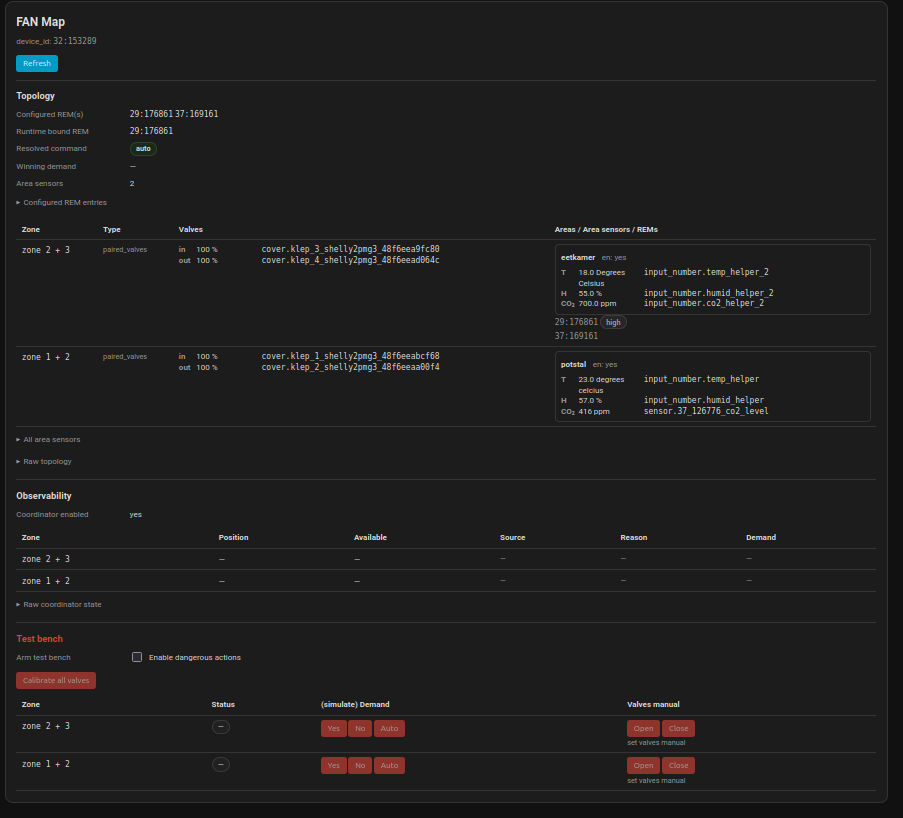
| Section | Content |
|---|---|
| Device Header | FAN ID, label, online/offline status |
| Zones | All configured zones with current state |
| Areas | Area sensors linked to each zone |
| Sensors | Mapped sensor entities and their current values |
| REMs | Configured remote controls and their status |
| Calibration | Zone valve positions and calibration status |
type: custom:ramses-fan-map
entity: fan.ramzes_32_153289
Or add via UI:
- Edit your dashboard
- Click Add Card
- Search for FAN Map or add manually via YAML
Use the FAN Map to verify your setup:
- Check zone mappings – Are areas linked to the right zones?
- Verify sensor values – Do they show current data (not unavailable)?
- Confirm REM configurations ('binding') – Are all your remotes listed?
- Review calibration – Are zone positions accurate?
| Problem | What to Check in FAN Map |
|---|---|
| Zone not responding | Zone status, actuator entity mapping |
| Wrong sensor values | Sensor entity IDs, "unavailable" states |
| REM not working | Binding list, enabled status |
| Automation not triggering | Area sensor values, thresholds |
The FAN Map updates in real-time via WebSocket:
- Sensor values refresh as they change
- Zone positions update when valves move
- REM status shows when buttons are pressed
- Online/offline status reflects transport state
| Aspect | FAN Map | HVAC Fan Card |
|---|---|---|
| Purpose | Observability / Read-only | Control / Interactive |
| Can control | ❌ No | ✅ Yes |
| Shows | Complete topology | Current status + controls |
| Use for | Verification, debugging | Daily operation |
| Part of | FAN Configuration | Separate card |
Best practice: Use both cards together:
- HVAC Fan Card for daily control
- FAN Map for verification and troubleshooting
The FAN Map includes a Test Bench for safely testing zone behavior:
Each zone has independent test controls:
Simulate Demand:
- Yes – Force zone to have active demand
- No – Force zone to have no demand
- Auto – Return to automatic demand detection
Manual Valve Control:
- Open – Manually open zone valve
- Close – Manually close zone valve
- Calibrate all valves – Run calibration routine for all configured zones at once
⚠️ Safety confirmation required – Manual valve controls trigger actual valve movements. Use with caution.
The FAN Map uses these WebSocket commands (automatic):
// Get complete configuration
{
  "type": "ramses_extras/export_config",
  "feature": "sensor_control"
}

// Get zone status
{
  "type": "ramses_extras/get_zone_status",
  "fan_id": "32:153289"
}

// Get current bindings
{
  "type": "ramses_extras/get_bindings",
  "fan_id": "32:153289"
}- FAN Configuration (Sensor Control) – Configuration details
- HVAC Fan Card – Control interface
- Concepts: Zones, Areas, REMs, Sensors – Understanding the components
- Zones – Zone configuration guide
Back to: Home | Prev: Concepts: Zones, Areas, REMs, Sensors | Next: Concepts: Zones, Areas, REMs, Sensors
 Ramses Extras Wiki
- Feature Catalog
- CO2 Control
- Humidity Control (Balance)
- Temp Control (Bypass)
- FAN Configuration (Sensor Control)
- HVAC Fan Card
- Ramses Debugger
-
Device Simulator -
⚠️ Use only on dedicated system/container - Default Feature
- Hello World (Developer Example)