-
Notifications
You must be signed in to change notification settings - Fork 288
Multiple Animations (Actions) ‐ Quick Start
Xavier Loux edited this page Jun 17, 2026
·
1 revision
We will see how to prepare and export Blender Actions as animations in Unreal Engine.
This page of for skeletal animations.
You can found some details here for Alembic animations: Alembic animations
First you need a skeletal mesh in Unreal Engine that can handle the animation.
Follow the steps in Skeletal Meshs ‐ Quick Start to prepare and export the skeletal mesh.
If you use simple animations with one per action you can use the action export.
The addon automatically detect the actions that should be exported with the amature using the bone names.
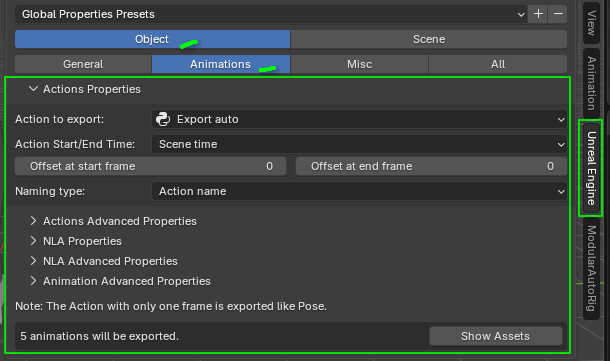
You can found properties ine the Unreal Engine Panel > Object > Animation
- In the export panel click on "Export For Unreal Engine"
- Copy import script with "Copy import script (Assets)"
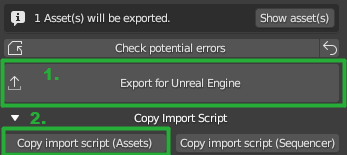
- In Unreal Engine paste with Ctrl+V in console and press enter.

Example_SimpleArmatureWithActions.blend contains a simple armature with several actions.
Read the wiki for more info. Home
- Download And Installation
- Download And Installation (Dev Branch)
- Static Meshs ‐ Quick Start
- Skeletal Meshs ‐ Quick Start
- Multiple-Animations-(Actions)-‐-Quick-Start
- Single-Animation-(NLA)-‐-Quick-Start
- Release-Logs
- Transform And Pivot Point
- Axis Transforms
- Copy Object Transform To Unreal Engine
- Level of details (Lods)
- Collisions
- Sockets
- Cameras
- Camera Depth of Field
- Camera Shift
- Camera Axis
- Curves and Splines
- Animations
- Morph Targets (Shape keys)
- Materials
- Vertex Colors
- UV Maps
- Light Maps
- Generate UV Light Maps
- Alembic animations
- Groom Simulation
- Chaos Flesh
- Custom Properties Animation to Curves UE
- Export Collection like a StaticMesh
- Import Exported Assets to UE
- How Import Blender assets to Unreal Engine -> https://youtu.be/2ehb2Ih3Nbg
- How Import Blender camera to Unreal Sequencer -> https://youtu.be/Xx_9MQu2EkM
- Old Teaser -> https://youtu.be/YLOZZIlhgaM