Single Animation (NLA) ‐ Quick Start
We will see how to prepare and export Blender Non Linear Animation as animation in Unreal Engine.
This page of for skeletal animations.
You can found some details here for Alembic animations: Alembic animations
First you need a skeletal mesh in Unreal Engine that can handle the animation.
Follow the steps in Skeletal Meshs ‐ Quick Start to prepare and export the skeletal mesh.
If you use advanced animation with NLA, you can use the NLA export. (One animation per file)
- Select the Armature that play the animation.
- Open the Sidebar panel in 3D View (N), enlarge it.
- Open Unreal Engine Panel > Object > Animation.
- In Action Properties set "Action to export" to "Not exported" to disable the export from actions.
- In NLA Properties set "Export NLA" to True to enable the export from NLA.
- You can also set the "NLA Export Name". (In general I recomend to use the blender file name.)
- In the export panel click on "Export For Unreal Engine"
- Copy import script with "Copy import script (Assets)"
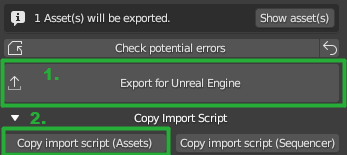
- In Unreal Engine paste with Ctrl+V in console and press enter.

Example_CarScene.blend contains an armature with NLA animation.
Read the wiki for more info. Home