Java and Bedrock Selectors

VelocityNavigator can show a Java inventory, a native Bedrock form, or a clickable chat list. All three use the same lobby availability rules, so an offline, full, or drained server cannot be selected just because it appears in a menu.
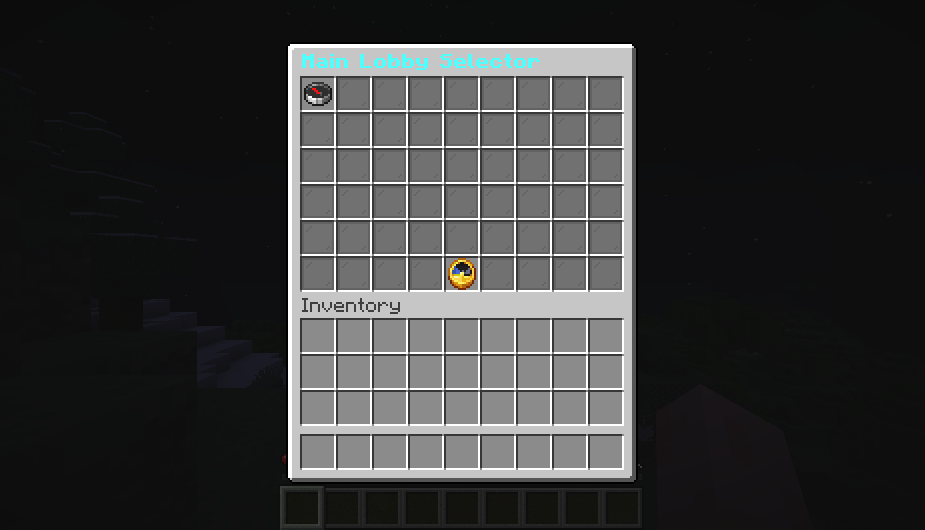
The inventory above is a real Java Edition capture from the Paper backend bridge.
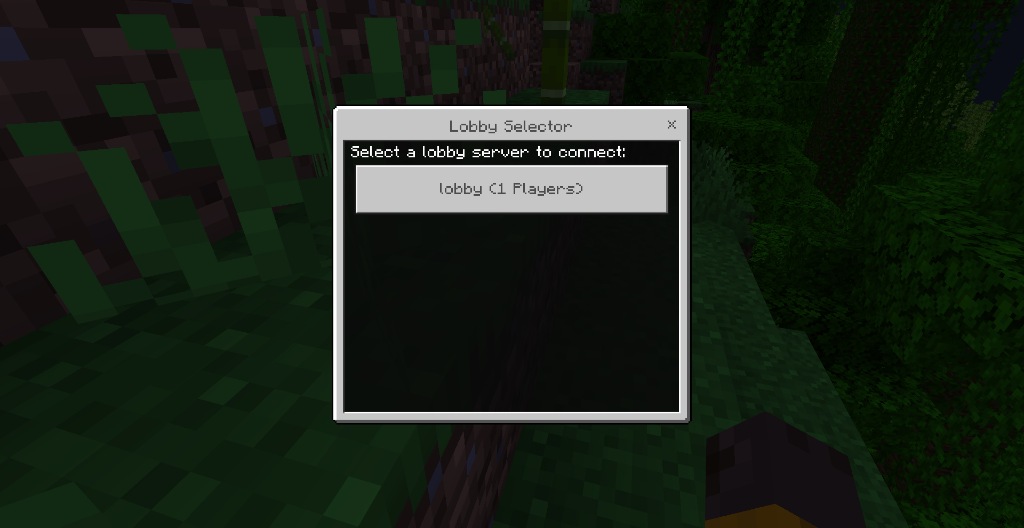
The form above is a real Bedrock capture through Geyser and Floodgate.
In navigator.toml:
[routing]
use_menu_for_lobby = true

[routing.java_menu]
type = "inventory"
fallback_to_chat = true
inventory uses the optional backend bridge. chat always uses clickable text. Players can also use /lobby menu to open the selector directly.
- Put the same VelocityNavigator JAR on the Velocity proxy and the Paper/Spigot backend.
- Start both servers.
- Join the backend through Velocity once.
- Run
/vn bridge statuson the proxy. - Run
/lobby menuwhile connected to that backend.
If the bridge is missing and fallback_to_chat = true, the player receives the chat selector instead.
gui.toml controls the inventory:
[layout]
rows = 6
default_material = "COMPASS"
unavailable_material = "BARRIER"
fill_empty_slots = true
filler_material = "GRAY_STAINED_GLASS_PANE"
refresh_seconds = 5

[controls]
previous_slot = 45
refresh_slot = 49
next_slot = 53
previous_material = "ARROW"
refresh_material = "CLOCK"
next_material = "ARROW"
rows accepts 2 through 6. Minecraft chest inventories always have nine columns, so the available sizes are 18, 27, 36, 45, or 54 slots. VelocityNavigator reserves the bottom row for previous, refresh, and next controls; the other rows hold server entries. For example, rows = 4 creates a 36-slot menu with 27 automatic server slots per page.
Control and fixed server slots use zero-based slot numbers. Keep every configured slot below rows × 9. Invalid or duplicate control slots are moved to safe positions in the bottom row, while invalid server slots fall back to automatic placement.
Per-server overrides can set a fixed slot, material, unavailable material, name, and lore. Leave slot = -1 for automatic placement.
[servers]
"lobby-1" = { slot = 10, material = "NETHER_STAR", unavailable_material = "BARRIER", name = "<gradient:#55FFFF:#FFFFFF><bold>Lobby One</bold></gradient>", lore = ["<gray>Players:</gray> <white>{players}/{max_players}</white>", "7FF88Click to connect"] }Native Bedrock forms require Geyser and Floodgate on the network. In navigator.toml:
[bedrock]
enabled = true
auto_detect = true
strip_advanced_formatting = true
affinity_use_java_uuid = true
use_gui_for_lobby = true
Then adjust the form in gui.toml:
[bedrock]
enabled = true
fallback_to_chat = true
sort_mode = "routing"
max_buttons = 100
show_players = true
show_max_players = true
show_ping = true
show_status = true
title = ""
content = ""
button_format = ""
Blank text values use the active language pack. sort_mode accepts routing, name, or players.
Bedrock forms do not use Java inventory rows. max_buttons limits how many server buttons can be included, while the Bedrock client chooses the form's physical size and layout.
Default chat, inventory, and Bedrock text lives in messages.toml. Java inventory titles, item names, lore, and controls are under [menus.inventory]:
[menus.inventory]
title = "<gradient:#55FFFF:#FFFFFF><bold>Choose a Lobby</bold></gradient>"
item_name = "7FFFF&l{server}"
previous = "<yellow>Previous Page</yellow>"
next = "<yellow>Next Page</yellow>"
refresh = "<aqua>Refresh</aqua>"
item_lore = ["&7Players: &f{players}/{max_players}", "&eClick to connect"]MiniMessage tags, named colors, gradients, & and § codes, &#RRGGBB, and Bungee-style hex codes are supported. Per-server name and lore values in gui.toml use the same formatting.
Bedrock text can also be changed, but native forms do not render every advanced Java style. With strip_advanced_formatting = true, unsupported MiniMessage formatting is removed before the form is sent. See Language Packs for translations, placeholders, and formatting.
-
Inventory falls back to chat: join the backend once and check
/vn bridge status. - Bedrock player sees chat: confirm Geyser/Floodgate detection and both Bedrock enable switches.
- An icon is invalid: use a material available on the backend version; the bridge uses the configured fallback material when needed.
-
Too many servers: the Java menu adds pages automatically; Bedrock uses
max_buttons.
Getting Started
Routing
- Routing Algorithms
- Algorithm Visualizations
- Initial Join Balancing
- Contextual Routing Guide
- Player Affinity
- Health & Circuit Breakers
- Retries & Fallbacks
Player Experience
Configuration
Network & Operations
- Advanced Proxy Systems
- Redis & Multi-Proxy
- Storage & Databases
- Server Management
- Backend Lifecycle States
- HTML Dashboard
- Operations Runbook
- Prometheus & Grafana Setup
- Troubleshooting Guide
- FAQ
VelocityNavigator 4.3.0