Repository navigation
Applying Changes
Every decision is first a change not applied yet, kept by the screen only. The review asks the server what they would do; Apply writes it.
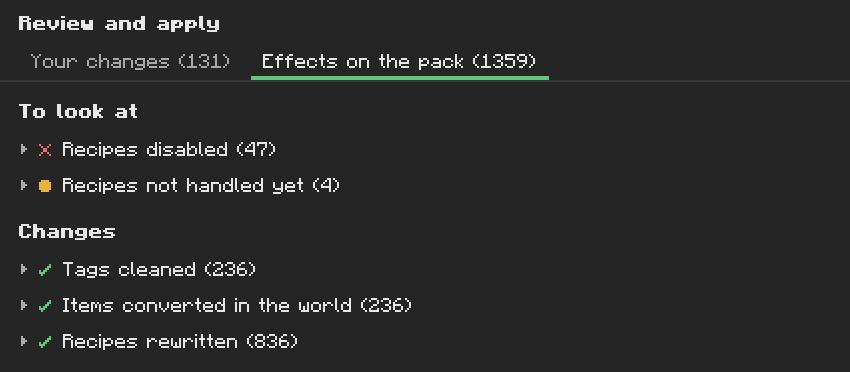
| Group | Meaning |
|---|---|
| Your choices | choices, back-to-defaults, process rules and settings you made |
| Tags cleaned | an alternative removed from the material's convention tag (c:ingots/tin); it keeps its other tags |
| Missing tags added | an item put in a convention tag: by Add missing tags, or by a tag edit from Rule files |
| Items converted in the world | alternatives that become the kept item when the game touches them |
| Conversion recipes | a 1:1 crafting recipe from an alternative to the kept item, for the forms in conversion_recipes
|
| Recipes rewritten | a recipe that made or used an alternative now makes or uses the kept item, at the same id |
| Recipes disabled | a rewrite that became an exact duplicate of another recipe is disabled instead |
| Process recipes generated / disabled | from Process Rules |
| Items to create | from Created Items, after a restart |
| Data edits | files of the edits pack, from Rule files |
| Recipes not handled yet | a recipe type with no recipe format: left untouched (Compatibility) |
| Recipe invalid | a recipe Material Nexus would write but the game refuses: not written |
| Left to Almost Unified | a domain Almost Unified handles (Compatibility) |
| Undone | content of the previous apply that goes away |
Only forms unified by a decision (any level but the default suggestion) generate anything.
- Saves your settings in
config/materialnexus/policies/, keeping a copy of the previous ones. - Writes the generated datapack
config/materialnexus/generated/(tags, recipes, and a manifest of every effect). It is loaded in every world, on top of the others. - Reloads the data, like
/reload, and reopens the screen on the new state. - Records the apply in the history, with a copy of the settings.
After that:
- Recipes give the kept item; recipes using an alternative accept the kept one.
- JEI and EMI hide the alternatives.
- Items in the world are converted when the game touches them: an item dropped or spawned, the inventory of a player logging in, a container when a player opens it. Material Nexus never scans the world.
- Tooltips say what an alternative becomes, and which item is kept.
Created items need a restart; everything else is live.
If another mod fails while the data reloads, the changes are still applied: Material Nexus resends the tags and recipes to players, and the chat names the failure.
| To undo | Do |
|---|---|
| one change not applied yet | View in the bottom bar, then Remove on its line |
| everything waiting for a material or form | × Discard (n) in its header |
| everything waiting | Discard all |
| a saved choice | Back to default at the foot of its inspector (to apply) |
| the saved choices of a material or form | ↺ Back to default (n) in its header (to apply) |
| every saved setting except the mod priority | Reset everything to default on the Overview (to apply) |
| the mod priority | Reset next to Mod priority (to apply) |
| the last apply | Revert last apply on the Overview (at once, after a confirmation) |
| several applies | Restore on a History line of the Overview (at once, after a confirmation) |
The history keeps a copy of the settings after each of the last 20 applies, reverts and restores. A restore is itself undone by Revert last apply. Restores bring back data edits too, but not created items, which are registered at startup.
The files in policies/ are plain JSON (Configuration Files). After editing
them, open the screen: with nothing waiting, Review and apply shows the difference between the
files and the current pack, and Apply regenerates it. An invalid file stops the analysis and the
log names the file.