Repository navigation
Choosing Items
A material is copper, tin, diamond, steel. A form is what it is shaped as: ingot, nugget,
dust, plate, rod, gear, wire, block, ore, raw... Material Nexus reads them from the convention tags:
c:ingots/copper says "these items are copper ingots". Forms mods leave untagged (Modern
Industrialization's double ingots and wires) are found by item name patterns, which are data
(Datapack Guide).
A gem is the ingot of non-metals (diamond, quartz, coal): c:gems/<material>.
A tag means "usable as", not "the same item". So within a form, Material Nexus sorts the candidates:
-
Duplicates: the same thing from different mods (copper ingots from Mekanism and Immersive Engineering). One is kept, the others are replaced by it.
-
Left alone, never unified unless you pick one:
- several items from the same mod (it made them different on purpose);
- an item that belongs to a more specific material (
c:ingots/steelandc:ingots/hot_steel); - an item named as a variant: its id has a word left once the material and the form words are
removed (
remin:yellow_amethysttagged as amethyst,immersiveengineering:plate_duroplasttagged as plastic plates,create:crushed_raw_irontagged as raw iron); - an item named after another material it is also tagged as (
minecraft:quartz, a quartz gem, tagged as milky quartz too); - an item you marked as not the same (the Not the same item button, right click, or Shift + number while sorting);
- a material or form excluded in
global.json.
Words close to the material (golden for gold, aluminium for aluminum) and the words of the material's vanilla items do not count as variant words, and a vanilla item is never a variant. The name rule only applies when some candidate is plainly named.
Select the row: the inspector says, on each item, why it was left alone.
From strongest to weakest; the first that applies wins:
| Level | Set by | Status |
|---|---|---|
| Your choice for that form | clicking an item, Keep this one, sorting, Unify | Unified (chosen) |
| Form priority |
mod_priority of a form in a material file |
Unified (by priority) |
| Material priority |
mod_priority of a material file |
Unified (by priority) |
| Global mod priority | the Mod priority list on the Overview | Unified (by priority) |
| Default suggestion | nothing | To decide |
The default suggestion is the vanilla item when there is one, else the item with the strongest evidence (a tag beats a name pattern), then the alphabetically first id. A suggestion is only a proposal: it unifies nothing until it becomes a choice (accept it, sort it, or Unify).
A choice naming an item that is no longer a member of that form (a mod removed, a tag changed) is ignored, and the row says so; Back to default removes it.
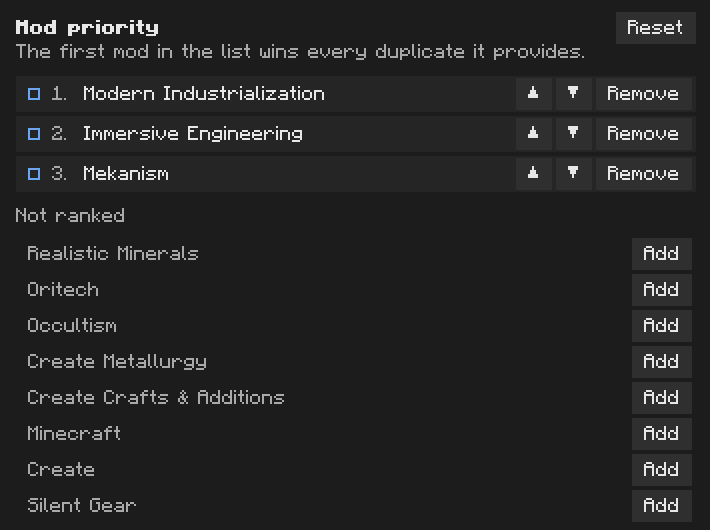
The list on the Overview: the first mod in it wins every duplicate it is part of that you have not decided yourself. + ranks a mod, ▲ ▼ move it, × unranks it, Reset empties the list. Every edit waits for Review and apply.
The same list can be set per material or per form, in a material file (Configuration Files).
Not the same item on its card (or right click, or Shift + its number while sorting) to say it is not interchangeable with the
others in its tag: it is left alone, with "marked as not the same". It is stored in not_same of
global.json. Picking it explicitly still works.
An item is sometimes left alone on a guess: its name reads like a variant or like another material,
its mod has several items in the tag, or it also carries a more specific tag. The reason is written
on its card. When the guess is wrong, press It is the same item on that card: the item becomes a
candidate again, like any other duplicate. It is stored in same of global.json.

A preset is a ready-made set of pack-wide settings: which mod wins duplicates, which forms get conversion recipes. Shipped:
| Preset | Mod priority | Conversion recipes |
|---|---|---|
| Vanilla first | Minecraft | none |
| Create first | Create, Minecraft | ingot, nugget, plate |
| Tech pack | Mekanism, Modern Industrialization, Immersive Engineering, Create, Minecraft | ingot, nugget, dust, plate |
| Maximum unification | Minecraft, Mekanism, Modern Industrialization, Immersive Engineering, Create | ingot, nugget, block, dust, plate, gear, rod, wire, raw, raw block |
| Minimal changes | none | none |
Use this preset only fills those settings as changes to review. Your choices per form are kept and still win. Packs add their own presets as data (Datapack Guide).
"exclude": ["wood", "steel/rod"] in global.json: a whole material, or one form of it, is never
unified. Its items are listed as excluded.