Repository navigation
Getting Started
From a pack with duplicates to a unified pack, in one sitting.
Put Material Nexus in the mods folder of the pack, on the client you build the pack with. JEI or
EMI are optional; with one of them, unified alternatives disappear from the item list.
Open a singleplayer world (or one opened to LAN). Deciding is done there: on a dedicated server the screen is read-only (see Modpacks and Multiplayer).
Run /materials, or right click with the Nexus Terminal (creative Tools & Utilities tab, shown when "Operator Items" is on). You need operator
rights (permission level 2); in singleplayer, cheats must be allowed.

The Overview says where the pack stands and counts what was found:
- Forms to decide: a material form with items from several mods and no decision yet.
- Forms unified: a form where one item is kept, by your choice or by the mod priority.
- Items left alone: items that share a tag with others but are something else (a variant, another material); they are never unified unless you pick them.
Three ways, mix them freely:
-
Start sorting: every open form, one after the other, the candidates as big cards.
Press 1-9 to keep that item and move on; S or → to skip, B or ← to go back,
Shift + number to mark an item as "not the same", Esc to leave.

-
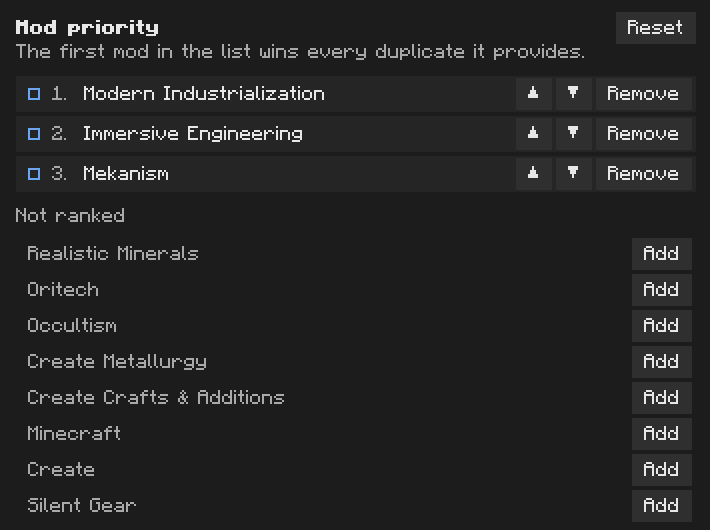
Mod priority (on the Overview): click + on mods in the order you trust them. The first mod
in the list wins every duplicate you have not decided yourself.
- Unify all suggestions: accepts every suggestion at once, as your choices. Fine for a first pass; read the review.
Or open Materials, pick one, select a row and press Keep this one on the item to keep (clicking the item in the table does the same). See Choosing Items.
Every decision is a change not applied yet: the bottom bar counts them, and nothing is written yet.
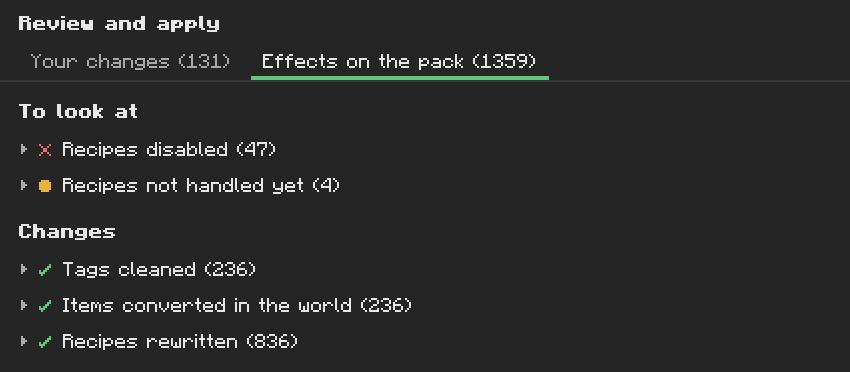
Click Review and apply at the bottom. The right panel lists every change, grouped: your choices, tags cleaned, items converted, recipes rewritten or disabled, recipes not handled yet. Open a group to read its lines.
Click Apply. Material Nexus writes its generated datapack, reloads the data, and reopens the screen on the new state. Recipes now give the kept items, JEI or EMI hide the others, and alternatives in the world turn into the kept item as players pick them up or open containers.
- A change not applied yet: View in the bottom bar, then Remove on the line.
- A saved choice: Back to default in its inspector, or in the header for a whole material.
- The whole apply: Revert last apply on the Overview.
- An older state: Restore on a line of the History on the Overview.
See Applying Changes.
Everything you decided is in config/materialnexus/. Ship that folder with the pack. See
Modpacks and Multiplayer.