Repository navigation
Plugin OpenMM Script Generator
OpenMM Script Generator writes a self-contained OpenMM run script, a PDB with the periodic box, and an OpenMM ForceField XML for your own molecules, with a live preview of every file before you save. OpenMM is never a dependency of the plugin; it is needed only to run the script.
| Repository | moleditpy_openmm_script_generator |
| Author | HiroYokoyama |
| Supported OS | Windows, macOS, Linux, WSL |
| Supported Python | >=3.10, <3.15 |
| Supported MoleditPy | >=5.0.0, <6.0.0 |
| First-party plugin license | LGPL-3.0-or-later |
| Menu location | File ▸ Export ▸ OpenMM Script... |
| Extra dependencies | none; optional openmm and openmmforcefields for the check and for OpenFF/GAFF small molecules |
See Official Plugins for the full catalogue, and MD System Builder for the whole MD workflow.
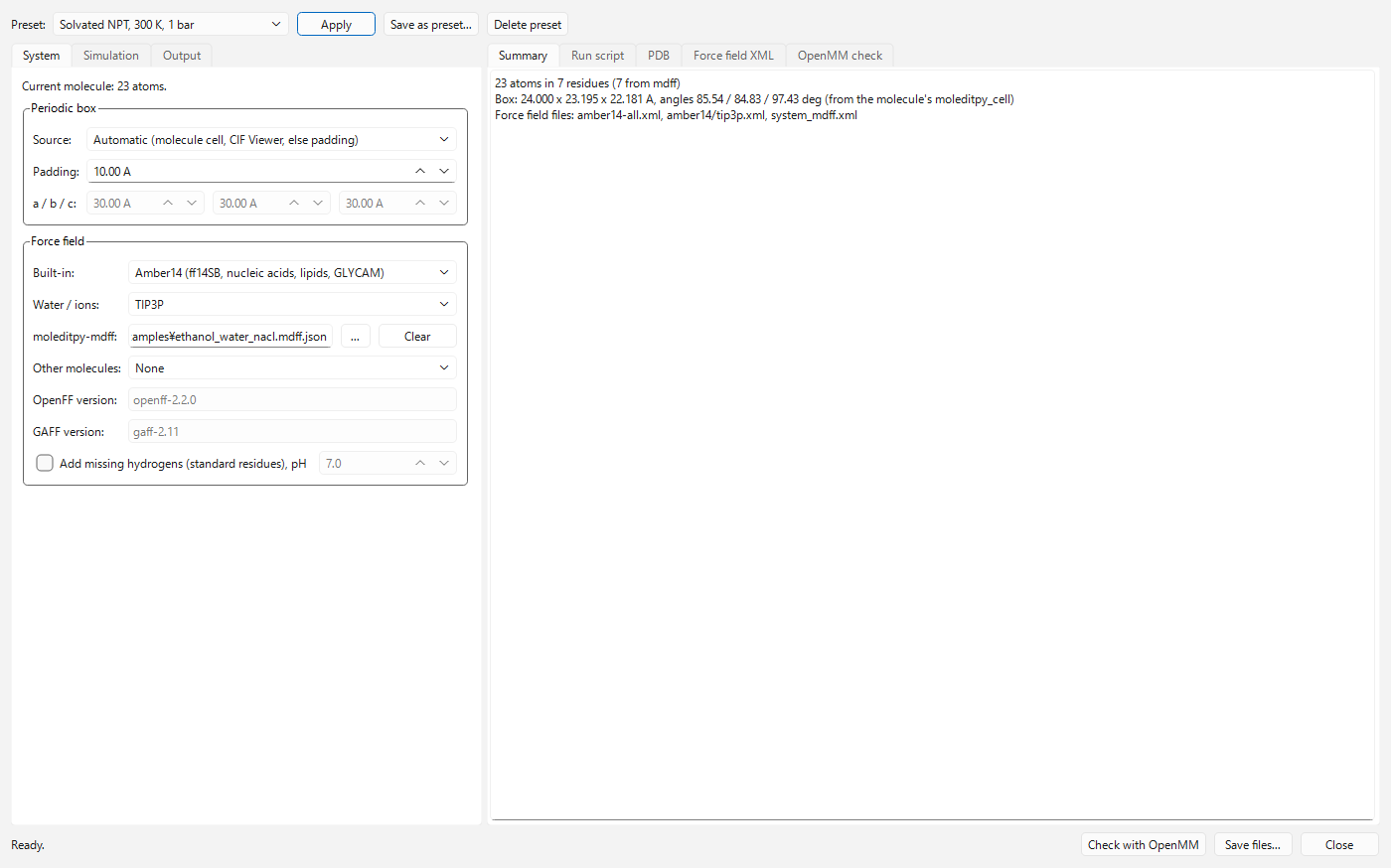
-
run_<name>.py: one Python script with every setting in aCONFIGblock at the top. It needs only OpenMM (plus openmmforcefields when you ask for it). -
<name>.pdb: the system with residue and atom names, aCRYST1record for periodic boxes,TERrecords andCONECTfor non-standard residues. -
<name>_mdff.xml: an OpenMM ForceField XML converted from a moleditpy-mdff file, when one is given. -
<name>_<RES>.sdf: one SDF per small-molecule residue when openmmforcefields parameterises them.
python run_system.py                  # minimise and run
python run_system.py --check          # only build the system and report
python run_system.py --platform CPU --steps 1000 --no-minimize
Before it creates the system, the script names any residue no force field covers and says what to add.
- Built-in Amber14 (ff14SB, nucleic acids, lipids, GLYCAM) or CHARMM36 for proteins, with the matching water and ion files (TIP3P, TIP3P-FB, SPC/E, TIP4P-Ew, TIP4P-FB, OPC, OPC3, TIP4P/2005, TIP5P).
- Small molecules from a moleditpy-mdff file (Force Field Builder), converted to ForceField XML.
- Or from openmmforcefields (OpenFF/SMIRNOFF or GAFF).
mdff conversion. Every molecule type becomes one residue template, pinned by name in createSystem(residueTemplates=...), and every atom gets its own atom type, so charges and Lennard-Jones parameters are the mdff values exactly. OpenMM matches templates on the bond graph alone, so symmetry-equivalent atoms can be matched in any order: terms that are the same under every symmetry go into the XML, and the others (asymmetric charges, angles, torsions, several impropers on one centre, duplicate bonds, constraints) are added by the script after createSystem, by atom name. The 1-4 scaling of the file must agree with the built-in force field (Amber 0.8333/0.5, CHARMM 1.0/1.0); the dialog refuses combinations OpenMM would reject.
Proteins from Force Field Builder (0.1.3) are not converted. Their molecule type is marked Amber ff14SB (proteins), which is the force field in amber14-all.xml, so the protein atoms are written as ordinary PDB residues and OpenMM assigns them from its own residue templates. The other molecule types of the file are converted as above. With CHARMM36 selected, such a file is an error.
-
Box: the molecule's
moleditpy_cellor the CIF Viewer cell, rotated into OpenMM's reduced orientation (triclinic included); a padded box; explicit lengths; or no box. - Simulation: PME, LJ-PME, Ewald or cut-off electrostatics, dispersion correction, constraints, rigid water, hydrogen mass repartitioning, Langevin middle or Verlet integrator, temperature, friction, time step, Monte Carlo barostat, minimisation and number of steps.
-
Output: DCD, extended XYZ (with
Lattice=), PDB trajectory, state-data CSV, checkpoints, and the platform (CUDA, OpenCL, CPU, Reference) with its precision. - Presets: vacuum quick test, solvated NVT, solvated NPT, and NPT with HMR at 4 fs; your own presets can be saved.
- Checks before saving: cut-off against the box, missing water model, a force field that disagrees with the mdff 1-4 scaling, an mdff file that does not match the molecule, and residues with no parameters.
-
Check with OpenMM: with an interpreter that has OpenMM, the dialog runs
run_<name>.py --checkin a separate process, which builds the system and prints its forces and initial energy.
The settings and the cell are stored with the project.
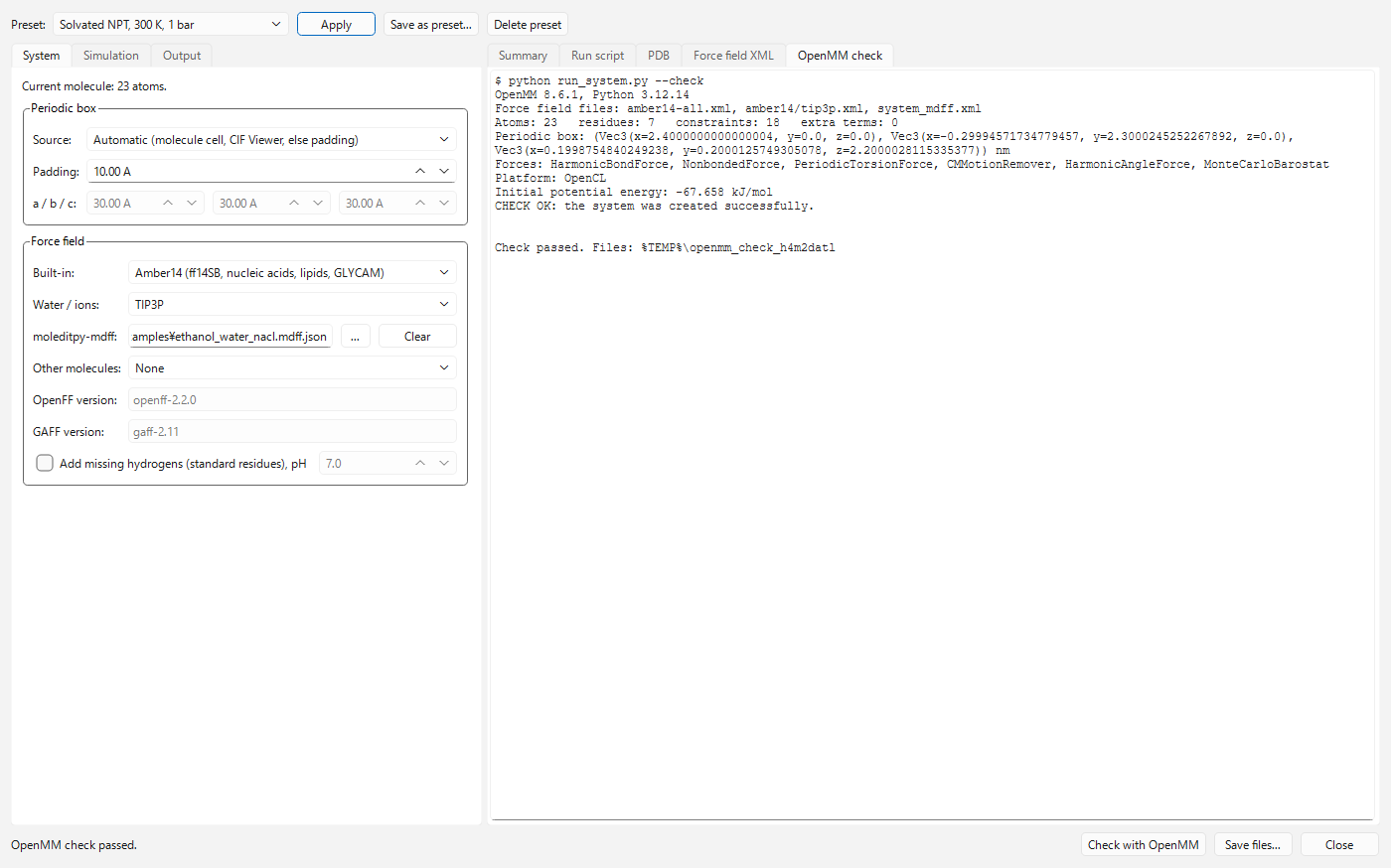
- Build the system with MD System Builder; assign parameters with Force Field Builder if it has non-standard molecules.
- Open
File ▸ Export ▸ OpenMM Script..., choose a preset or set the System, Simulation and Output tabs, and load the.mdff.json. - Check the previews and, optionally, press Check with OpenMM.
-
Save files..., then run
python run_<name>.pywhere OpenMM is installed (conda install -c conda-forge openmmorpip install openmm).
- Official Plugins — the full plugin catalogue
- MD System Builder, Force Field Builder
- GROMACS Input Generator, LAMMPS Input Generator
This page documents OpenMM Script Generator v0.1.3, and was last updated on 2026-11-26. See REGISTRY/plugins.json for the current version.