Repository navigation
HTML Audit Report
The HTML audit report is a single, self-contained web page with the health score, a summary of the crawl and every finding with its explanation, how to fix it and the affected URLs. It needs no internet connection and no other files, so you can email it, attach it to a ticket or print it to PDF for a client. This page shows how to create it and explains every section.

| # | Item | What it does |
|---|---|---|
| 1 | HTML audit report… | Opens the report dialog described below. Greyed out until there is crawl data. |
| 2 | Accessibility (WCAG/EAA) report… | Writes the accessibility report (accessibility.html and accessibility.csv) to a folder you choose. See Accessibility report below. Greyed out until there is crawl data. |
| 3 | CI workflow (GitHub Actions)… | Generates a GitHub Actions workflow that runs the audit automatically. See CI and GitHub Actions. |
-
Crawl a site (or open a saved crawl), then click Reports → HTML audit report….
-
The HTML audit report dialog opens. Fill in the two optional fields:

- Client or site name: shown as the report's first line and in the browser tab title ("SEO Audit · Books to Scrape"). Leave it empty to use the site's host name.
- Prepared by: your name or agency, added to the first line as "Prepared by …". Leave it empty to leave it out.
- Save report…: opens your system's save dialog.
Both fields are remembered for next time, and are also used by Export → Everything to a folder….
-
Choose where to save. The suggested name is
seo-audit-<host>.html, for exampleseo-audit-books-toscrape-com.html. -
ShoutingToad writes the file, shows "Saved …" in the status bar and opens the report in your default browser.
You can create the report while a crawl is still running; it then covers what has been crawled so far. From the command line, every crawl and list run writes the same report as report.html in its output folder (without a client name or "prepared by").
The screenshots below are from the report of the demo crawl of https://books.toscrape.com/ (3,125 URLs). The report is 1080 pixels wide at most and adapts to smaller screens.

- Title and subtitle: "Technical SEO Audit", then the client or site name, the start URL, the date the report was created and "Prepared by …" if you filled it in.
- Health score: from 0 to 100. Green at 85 and above, amber from 60 to 84, red below 60. See How the health score is calculated.
- URLs crawled: every URL in the crawl, including images, CSS, JavaScript and external links.
-
Indexable pages: internal HTML pages that return 200, are not blocked by robots.txt, have no meta refresh redirect, are not
noindexand are not canonicalised to another URL. These are the pages that can appear in search results. - Pages with issues: URLs affected by at least one finding of type Issue (warnings and opportunities do not count here).
- Issues · Warnings · Opps: how many different checks were triggered, by type (red, amber, blue). This counts checks, not URLs: "4" issues means four different problems, each of which may affect many URLs.
- Response codes (internal): internal URLs grouped by status: 2xx Success, 3xx Redirect, 4xx Client error, 5xx Server error and No response / blocked (timeouts, connection errors and URLs blocked by robots.txt).

One row for each of the 30 check categories. Checks is how many checks the category contains; Issues, Warnings and Opportunities are how many of them were triggered. A category full of zeros is clean. Use this table to see at a glance where the problems are: in the demo crawl, Security (2 issues, 5 warnings, 2 opportunities) stands out.
The line above the table says how many checks were run ("474 checks were run across 30 categories"). With rule packs turned on, their rules are counted too.

This section is filled when the AI crawler test ran (the default for a spider crawl; see Spider settings). Otherwise it only says "The AI crawler access test was not run for this crawl", as it does for list mode audits. It lists the pages that were tested, with the status and word count a normal request got, then one row per AI crawler (search and answer bots, user-triggered fetchers and training bots) with what that crawler got on each page: "OK 200 · 297 words", blocked by robots.txt, refused by the server, or "Allowed · robots.txt token only" for tokens such as Google-Extended that only exist in robots.txt. Notes under the table explain the impostor check, inconclusive results and whether the site has an llms.txt file. See AI search readiness for how to read it.
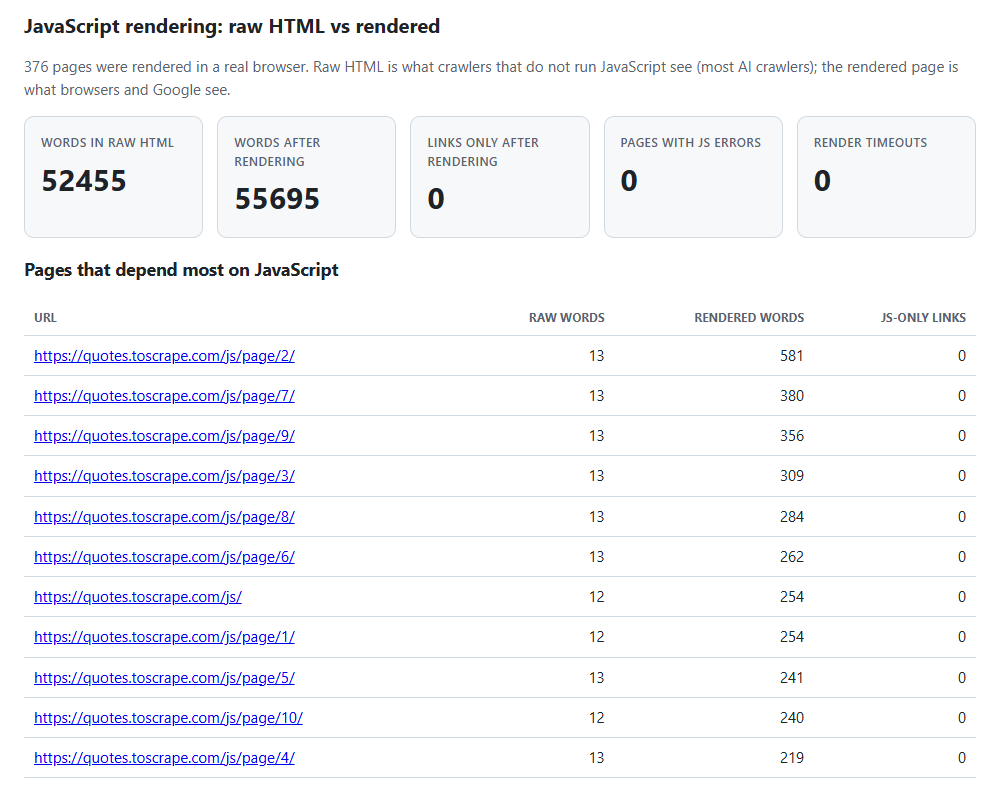
This section appears only when the crawl used JavaScript rendering. The example is from a crawl of https://quotes.toscrape.com/js/, a site whose content is built by JavaScript. The cards compare the words in the raw HTML with the words after rendering (52,455 against 55,695 here), and count links that exist only after rendering, pages with JavaScript errors and pages that timed out. The table lists the pages that depend most on JavaScript (biggest gap between raw and rendered words). Content that only exists after rendering may be missed by crawlers that do not run JavaScript, including most AI crawlers.
When you fetched Chrome UX Report field data (see Core Web Vitals), a section with the origin's LCP, INP, CLS, FCP and TTFB for phones and desktops is added here. Without field data the section is left out.

Every triggered check, sorted by type (Issues, then Warnings, then Opportunities), then by priority (High, Medium, Low), then by number of URLs. Each row shows:
- the type badge (Issue, Warning or Opportunity) and the priority;
- the finding as "Category: Name", for example "Security: Mixed Content" or "Canonicals: Missing";
- the number of URLs and the share of pages affected ("1116 URLs · 100.0%"; the share is of internal HTML pages, or of all internal URLs for checks that also hit images and other files).
Click a row to expand it. The box opens with the description, How to fix and the list of affected URLs (clickable). Up to 50 URLs are listed; for more, the list ends with "…and N more (see the CSV export)", and you get the full list from Export → Every issue with its URLs… (see Saving, opening and exporting). If nothing was found, this section says "No issues were found. Excellent work."
The footer names the ShoutingToad version that made the report.
The score starts at 100. Every triggered check takes points off, depending on its type and priority and on how widespread it is:
| Type | High | Medium | Low |
|---|---|---|---|
| Issue | 6 | 3.5 | 2 |
| Warning | 2.5 | 1.5 | 0.7 |
| Opportunity | 0.3 | 0.3 | 0.3 |
A check that affects a single page costs 35% of its weight; one that affects every internal HTML page costs 100%, with a sliding scale in between. The result is rounded and kept between 0 and 100. If the crawl found internal URLs but not a single HTML page loaded (DNS or TLS failure, every page an error), the score is 0.
So fixing one sitewide high-priority issue gains you up to 6 points, while many small opportunities move the score only a little. The score is a quick indicator for tracking progress between crawls of the same site; the findings list tells you what to fix.
- The report is one HTML file with its styles inside. Send the file itself; it opens in any browser.
- To make a PDF, open the report in a browser and print it to PDF. The print styles keep each finding in one piece. Findings print the way they are shown on screen, so expand the ones whose URL lists you want in the PDF before you print.
- For a full list of URLs per finding, add
issue_urls.csvfrom the Export menu.
Reports → Accessibility (WCAG/EAA) report… asks for a folder and writes two files into it: accessibility.html and accessibility.csv. The status bar confirms "Saved accessibility.html and accessibility.csv to …". The command line writes both files with every crawl.

The report maps ShoutingToad's accessibility checks to the WCAG 2.2 success criteria, shows which criteria have failures and on how many pages, and explains clearly that automated testing covers only part of WCAG. Turn on JavaScript rendering to include the colour contrast, visible focus and keyboard checks. See Accessibility and WCAG report for the full explanation.
Saving, opening and exporting · Issues panel · Checks reference · Accessibility and WCAG report · CI and GitHub Actions