Repository navigation
Site Migration
When a site moves to a new URL structure, a new CMS or a new domain, every old URL that has rankings, backlinks or bookmarks needs a 301 redirect to the best matching new URL. Without them, visitors land on 404 pages and search engines drop the old pages instead of passing their value to the new ones. The Migration redirect mapper takes a crawl of the old site and a crawl of the new site, proposes a target for every old page, lets you correct the proposals, and writes ready-to-use redirect files for Apache, nginx, Netlify and Cloudflare. After launch, shouting-toad validate-redirects checks that the live redirects really do what the map says.
The examples on this page use a crawl of https://books.toscrape.com/ as the old site and a redesigned staging copy at http://127.0.0.1:8765/ as the new site. On the staging copy, book pages moved from /catalogue/<book>_<id>/index.html to /books/<slug>/ and category pages moved to /genre/<name>/, and some books were dropped.
- A saved crawl of the old site (
.shoutingtoad). Crawl it before the launch, while the old URLs still work. - A crawl of the new site, usually on staging. If staging is password-protected or blocked by robots.txt, see Spider settings and Troubleshooting.
One of the two crawls is open in the app; the other is loaded from a file.
Tip: use the same spider settings for both crawls, and make sure both crawls reach every page (raise the URL limit for big sites). Pages missing from the new-site crawl can't be proposed as targets.
-
Open one of the two crawls (File → Open crawl…). In this example, the old site's crawl (books.toscrape.com) is open. The menu item is greyed out until a crawl is open.
-
Click Tools → Migration redirect mapper….

-
A file dialog titled Crawl of the other site (by default: the old site) opens. Pick the other crawl file and click Open. While it loads, the window shows Loading the crawl….
If you already made a map in this session, Tools → Migration redirect mapper… simply reopens it, with your edits; it only asks for a file when there is no map yet. To map against a different crawl, use Load another crawl… in the window.
By default, the mapper assumes the file you just picked is the old site and the crawl open in the app is the new site. The two lines at the top of the window always say which is which:
- Old site: the source of the redirects (the URLs that will stop existing).
- New site: where the redirects point to.
If you opened the old site's crawl in the app (as in this example), the direction is wrong at first: the new site's URLs are listed as "old URLs".

Tick The current crawl is the old site. The mapper swaps the two crawls and proposes the redirects again. Now Old site shows current crawl (https://books.toscrape.com/) and the old book URLs appear in the left column.
Tip: set the direction first, then edit. Ticking or unticking this box proposes every target again. Targets you edited by hand are kept for old URLs that are still in the list, but after a swap the "old" URLs are the other site's, so edits made in the wrong direction don't carry over.
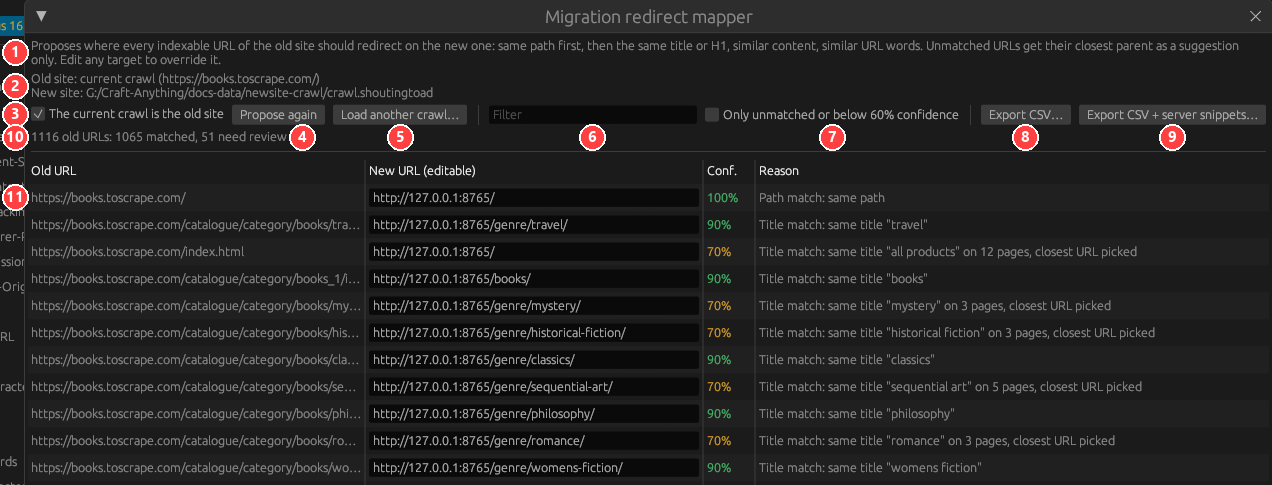
- Description: a short reminder of how targets are found.
- Old site / New site: which crawl is which (see above).
- The current crawl is the old site: swaps old and new (and proposes again).
- Propose again: recalculates every target, keeping the targets you edited by hand (its tooltip says Targets you edited by hand are kept).
- Load another crawl…: opens the file dialog again to replace the other crawl (for example a newer staging crawl). The map is proposed again from scratch, so hand edits are not kept; export first if you need them.
- Filter: shows only rows whose old URL, new URL or reason contains the text (not case-sensitive).
- Only unmatched or below 60% confidence: the review list (see Review the proposals).
-
Export CSV…: saves the map as
redirect_map.csv(you choose the file name and folder). -
Export CSV + server snippets…: asks for a folder and writes
redirect_map.csvplus the four server files. Both export buttons are greyed out while the map is empty. - Summary: "N old URLs: X matched, Y need review". Matched rows will become redirects; need review rows are unmatched (they have no target, or only a parent-page suggestion).
- The map: one row per old URL.
| Column | What it shows |
|---|---|
| Old URL | An indexable page of the old site. Only indexable pages are mapped: internal HTML pages that answered 200, have no meta refresh, are not noindex, are not canonicalised to another URL and are not blocked by robots.txt. Images, CSS, redirects, error pages and non-canonical duplicates are left out, because they don't need their own redirect (or already redirect). Rows are in crawl order. |
| New URL (editable) | The proposed target on the new site. It is a text box: click it and type to change it. Empty when nothing was found. |
| Conf. | Confidence from 0% to 100%: how sure the mapper is that this is the right target. Green at 80% and above, orange from 60% to 79%, red below 60% and for every unmatched row. |
| Reason | How the target was found, as "Method: details", for example Title match: same title "travel". |
The window can be resized from its bottom-right corner, collapsed with the triangle, and closed with ×. Closing it keeps the map and your edits for this session: Tools → Migration redirect mapper… reopens it as you left it. The map is not saved when you quit the app, so export it before you close ShoutingToad.
For each old URL, the mapper tries these methods in this order and stops at the first one that finds a target. Only the new site's indexable pages are considered as targets.
| # | Method (shown in Reason) | How it matches | Confidence |
|---|---|---|---|
| 1 | Same URL | The exact same URL exists on the new site. Reason: the URL still exists. Typical when old and new share a domain and a page did not move. These rows are not written to the server files (a redirect to itself would loop). | 100% |
| 2 | Path match | The same path exists on the new site (compared lower-case, ignoring a trailing slash, query string included), for example on a domain move where /about stays /about. Reason: same path. |
100% |
| 3 | Title match | A new page has the same title. Titles are compared without a trailing brand part (" | Brand", " - Brand", " – Brand", " — Brand", " · Brand", " :: Brand", " » Brand"), lower-case, without punctuation. If exactly one page has that title: same title "…". If 2 to 20 pages share it, the one whose URL words are most similar is picked: same title "…" on N pages, closest URL picked. More than 20 pages with the same title is not distinctive, so the mapper moves on. | 90% for a unique title; 70–80% when picked from several |
| 4 | H1 match | Same as Title, using the main heading (H1). | 85% unique; 65–75% from several |
| 5 | Content match | A new page has very similar text: the same first paragraph (at least 60 characters), or a near-identical content fingerprint (simhash), confirmed by the share of words in common. Pages need at least 20 words. Reason: similar content (simhash distance N, X% word overlap, same first paragraph). Only accepted when the combined similarity is high enough. | 64–80% |
| 6 | Slug match | The last part of the URL shares words with a new URL ("/blog/Green-Tree_Frogs.html" gives frogs, green, tree; extensions like .html and .php are ignored). A partial match needs at least two shared words or the same parent folder, so "/plugins/classic-editor" is not sent to "/docs/block-editor" just because of "editor". Reason: similar URL words (X% in common). |
50–70% |
| 7 | Parent suggestion (shown as Unmatched) | Nothing similar was found, so the closest parent path that exists on the new site is suggested, for example /blog/2020/post → /blog, or the home page. Reason: Unmatched: no similar page; closest parent is /…. |
10% |
| – | Unmatched | Not even a parent exists. The target is empty. Reason: No similar page on the new site. If the new crawl has no indexable pages at all, every row says Unmatched: the new crawl has no indexable pages. | 0% |
| – | Manual | You edited the target by hand. Reason: Manual: edited by hand. | 100% |
What confidence means in practice
- 80–100% (green): almost always right. Spot-check a few.
- 60–79% (orange): probably right, but the mapper had to choose between several candidates. Check them, especially for category and listing pages that share titles.
- Below 60% (red): a guess based on URL words or a parent page. Review every one.
In the example, 1064 old pages were matched by title, the home page by path, and 51 old book pages had no equivalent on the staging site (those books were removed), so they only got the home page as a parent suggestion.
Why parent suggestions are not redirected automatically: sending many unrelated pages to the home page or a category is treated by Google as a "soft 404", so they pass little value and frustrate visitors. Decide for each one: redirect it to a genuinely related page, or let it return 404/410 if the content is gone for good.
-
Tick Only unmatched or below 60% confidence. The table now shows only the rows that need a decision.

-
Use Filter to find a specific URL or a group (for example
/blog/orsapiens).
-
Untick the review box and filter by
closest URL pickedto check the orange title matches that were chosen from several pages.
- Click in the New URL (editable) box of the row.
- Type or paste the correct new URL (a full URL including
https://). - As soon as you change the text, the row becomes Manual at 100% with the reason Manual: edited by hand, and the summary line counts it as matched.

Tips:
- If the review box is ticked, an edited row disappears from the list right after your first keystroke (it is no longer below 60%). Untick the review box, or filter by the URL first, if you want to keep it in view while typing.
- To make an old URL return 404/410 on purpose, leave it unmatched: unmatched rows are never written into the server files. You can also clear the box completely; the row is then Manual with an empty target, which is also skipped in the server files.
- Propose again keeps your edits, and closing and reopening the window keeps them too. Load another crawl… and quitting the app do not, so export the CSV when you are done (and keep it: it is the input for validation later).

-
Export CSV… opens a save dialog (suggested name
redirect_map.csv) and saves just the map; the app confirms with Saved …. - Export CSV + server snippets… asks for a folder and writes five files there, then shows Wrote redirect_map.csv, .htaccess, nginx, Netlify and Cloudflare files to …. Files with the same names in that folder are overwritten.
What goes where:
-
redirect_map.csvcontains every row, including unmatched ones and parent suggestions, so you have the full picture. - The four server files contain only rows that redirect: Same URL rows (old = new), unmatched rows and parent suggestions are left out, as are rows with an empty or invalid target. When two old URLs have the same path and query, only the first is written. Rules for old URLs with a query string come first, so they win over the plain path rule.
Columns old,new,confidence,reason. From the example:
old,new,confidence,reason
https://books.toscrape.com/,http://127.0.0.1:8765/,100,Path match: same path
https://books.toscrape.com/catalogue/category/books_1/index.html,http://127.0.0.1:8765/books/,90,"Title match: same title ""books"""
https://books.toscrape.com/index.html,http://127.0.0.1:8765/,70,"Title match: same title ""all products"" on 12 pages, closest URL picked"
https://books.toscrape.com/catalogue/category/books/travel_2/index.html,http://127.0.0.1:8765/genre/travel/,90,"Title match: same title ""travel"""
https://books.toscrape.com/catalogue/a-light-in-the-attic_1000/index.html,http://127.0.0.1:8765/books/a-light-in-the-attic/,90,"Title match: same title ""a light in the attic"""
https://books.toscrape.com/catalogue/sapiens-a-brief-history-of-humankind_996/index.html,http://127.0.0.1:8765/,10,Unmatched: no similar page; closest parent is /
You can open it in a spreadsheet, have someone review it, and use it later with validate-redirects.
For Apache with mod_rewrite. Paste the rules near the top of the old site's .htaccess (or virtual host config):
# Redirects generated by ShoutingToad. Put these near the top of the old site's .htaccess.
# Old URLs with a query string only match that exact query; other URLs keep their query string.
RewriteEngine On

RewriteRule "^/?$" "http://127.0.0.1:8765/" [R=301,L,NE]
RewriteRule "^catalogue/category/books_1/index\.html/?$" "http://127.0.0.1:8765/books/" [R=301,L,NE]
RewriteRule "^index\.html/?$" "http://127.0.0.1:8765/" [R=301,L,NE]
RewriteRule "^catalogue/category/books/travel_2/index\.html/?$" "http://127.0.0.1:8765/genre/travel/" [R=301,L,NE]
Each rule matches the path with or without a trailing slash, escapes special regex characters, and sends a permanent redirect (R=301) without re-encoding the target (NE). Old URLs with a query string get a RewriteCond %{QUERY_STRING} line and the QSD flag, so that exact query is matched and dropped; other URLs keep the visitor's query string.
Two map blocks for the http {} block, plus two if lines (shown as comments at the end of the file) for the old site's server {} block:
# Redirects generated by ShoutingToad.
# 1. In the http {} block:
map $uri $st_redirect {
    default "";
    "/" "http://127.0.0.1:8765/";
    "/catalogue/category/books_1/index.html" "http://127.0.0.1:8765/books/";
    "/catalogue/category/books_1/index.html/" "http://127.0.0.1:8765/books/";
    ...
}
map $request_uri $st_redirect_query {
    default "";
}

# 2. In the old site's server {} block:
#    if ($st_redirect_query) { return 301 $st_redirect_query; }
#    if ($st_redirect) { return 301 $st_redirect$is_args$args; }
Every path is listed with and without the trailing slash. The second map holds old URLs that include a query string (empty in this example). A map is fast even with tens of thousands of entries.
Put this file in the publish folder of the site on Netlify:
# Redirects generated by ShoutingToad (Netlify _redirects).
/  http://127.0.0.1:8765/  301
/catalogue/category/books_1/index.html  http://127.0.0.1:8765/books/  301
/index.html  http://127.0.0.1:8765/  301
/catalogue/category/books/travel_2/index.html  http://127.0.0.1:8765/genre/travel/  301
Netlify can't match a fixed query string, so such rows are written as a comment (# not expressible (fixed query string): …) for you to handle another way. : and * in old paths are percent-encoded because Netlify reads them as placeholders.
For Cloudflare Bulk Redirects (upload it as a bulk redirect list). No header row; columns are source URL, target URL, status code, and the four list options (preserve query string = TRUE, include subdomains = FALSE, subpath matching = FALSE, preserve path suffix = FALSE):
books.toscrape.com/,http://127.0.0.1:8765/,301,TRUE,FALSE,FALSE,FALSE
books.toscrape.com/catalogue/category/books_1/index.html,http://127.0.0.1:8765/books/,301,TRUE,FALSE,FALSE,FALSE
books.toscrape.com/index.html,http://127.0.0.1:8765/,301,TRUE,FALSE,FALSE,FALSE
The source has no https://, so both http and https requests match. Cloudflare can't match query strings, so rows with a query string are left out of this file.
In real projects the targets point at your new production domain. In this example they point at the local staging address because that is where the "new site" was crawled. If you crawl staging on a temporary domain, replace that domain with the production domain in the exported files (a find-and-replace is enough), or crawl the new site on its final domain before switching DNS.
The same mapping is available without the app:
shouting-toad migrate OLD.shoutingtoad NEW.shoutingtoad [--out DIR]
The first file is the old site, the second the new site. The default output folder is shoutingtoad-migration. It writes the same five files as Export CSV + server snippets…. There is no manual editing on the command line; edit redirect_map.csv in a spreadsheet instead, or use the app.
$ shouting-toad migrate books/crawl.shoutingtoad newsite-crawl/crawl.shoutingtoad --out migrate
Mapped 1116 indexable old URLs to http://127.0.0.1:8765/ in 0.05s (0.3s with loading)
  Path match     1
  Title match    1064
  Unmatched      51
Wrote redirect_map.csv, redirects.htaccess, redirects.nginx.conf, _redirects and cloudflare_bulk_redirects.csv to migrate
Note that if you edit redirect_map.csv by hand, the server files are not regenerated from it; update them too (or redo the edits in the app and export again).
Once the redirects are live, check them against your map:
shouting-toad validate-redirects MAP.csv [--out DIR] [--crawl FILE] [crawl options]
A CSV with the old URL in the first column and the expected new URL in the second. Any other columns are ignored, so the redirect_map.csv exported by the mapper works as-is. Rules:
- A first row without
://in the first column is treated as a header and skipped (old,newis fine). - Empty lines and lines starting with
#are skipped. - Both columns must be full, valid URLs, otherwise the command stops with an error such as
error: bad.csv line 2: expected 'old URL,new URL', got 'not a url,https://x.test/'(exit code 1). - Quoted fields with commas work; a UTF-8 byte-order mark at the start is ignored.
Remove unmatched rows (or rows with a parent suggestion you decided not to redirect) before validating, otherwise they are reported as problems.
- Without
--crawl, it writes the old URLs toold_urls.txtin the output folder and crawls them in list mode, following every redirect. All normal crawl options work (--threads,--delay,--user-agent,--ignore-robots,--rules,--render,--chrome,--render-tabs,--crux-keyand so on; see Command line), before or after the map file. The normal crawl reports andcrawl.shoutingtoadare written to the output folder too. - With
--crawl FILE, it skips the crawl and uses a saved crawl that already contains the old URLs and their redirect targets. - It follows each old URL's redirects through the crawl and writes
redirect_validation.csv(default folder:shoutingtoad-redirects).
For every row, the old URL must answer with one permanent redirect (301 or 308) straight to the mapped URL, which must answer 200. Anything else is reported in the Result column:
| Result | Meaning | What to do |
|---|---|---|
OK |
One 301/308 hop to the mapped URL, which answers 200. Also OK: the old URL equals the mapped URL and answers without redirecting. | Nothing. |
not redirected (200) |
The old URL still serves a page. | The redirect rule is missing or not matching (wrong path, trailing slash, rule order). |
not redirected (404) (or another code) |
The old URL returns an error and does not redirect. | Add the redirect. |
temporary redirect (302) / temporary redirect in the chain
|
A 302, 303 or 307 is used. Temporary redirects don't tell search engines the move is permanent. | Change it to 301. |
redirect chain (N hops) |
More than one redirect before the final page, for example old → http://new → https://new. Each hop wastes crawl budget and slows visitors. | Point the rule straight at the final URL. |
redirects to a different URL than mapped |
The redirect works but lands somewhere else. | Fix the rule's target, or the map if the map is wrong. |
target returns 404 (or another code) |
The redirect ends on a page that doesn't work. | Fix or publish the target page. |
redirect loop |
The redirects go round in a circle. | Fix the rules urgently: the page is unreachable. |
redirect target not crawled |
A redirect points to a URL the crawl doesn't have (or more than 20 hops). | Re-run without --crawl, or check the crawl limits. |
old URL not in the crawl |
Only with --crawl: the saved crawl doesn't contain this URL. |
Re-run without --crawl. |
blocked by robots.txt (validate with --ignore-robots) |
The old site's robots.txt blocks the crawler. | Add --ignore-robots. |
no response (…) |
Timeout, DNS or connection error. | Check the server; try again with a longer --timeout. |
Several problems can appear in one row, separated by ;. URLs are compared after normalisation, so https://Example.com and https://example.com/ count as the same.
A small real map with five rows: books.toscrape.com does not redirect anything, and the local staging server redirects folder URLs without a trailing slash to the version with a slash (301):
old,new
https://books.toscrape.com/,https://books.toscrape.com/
https://books.toscrape.com/catalogue/page-2.html,https://books.toscrape.com/catalogue/page-3.html
https://books.toscrape.com/old-page.html,https://books.toscrape.com/
http://127.0.0.1:8765/genre/travel,http://127.0.0.1:8765/genre/travel/
http://127.0.0.1:8765/genre/mystery,http://127.0.0.1:8765/genre/crime/
$ shouting-toad validate-redirects map.csv --out out
Crawling https://books.toscrape.com/ …
  50 crawled, 0 queued

Crawled 56 URLs in 4.7s (12 URLs/s). Health score: 71/100
...
Reports written to out

Redirect map: 2 OK, 3 with problems (details in out\redirect_validation.csv)
  https://books.toscrape.com/catalogue/page-2.html -> https://books.toscrape.com/catalogue/page-3.html: not redirected (200)
  https://books.toscrape.com/old-page.html -> https://books.toscrape.com/: not redirected (404)
  http://127.0.0.1:8765/genre/mystery -> http://127.0.0.1:8765/genre/crime/: redirects to a different URL than mapped
$ echo $?
2
out/redirect_validation.csv:
Old URL,Mapped Target,Status,Hops,Final URL,Final Status,Result
https://books.toscrape.com/,https://books.toscrape.com/,200,0,https://books.toscrape.com/,200,OK
https://books.toscrape.com/catalogue/page-2.html,https://books.toscrape.com/catalogue/page-3.html,200,0,https://books.toscrape.com/catalogue/page-2.html,200,not redirected (200)
https://books.toscrape.com/old-page.html,https://books.toscrape.com/,404,0,https://books.toscrape.com/old-page.html,404,not redirected (404)
http://127.0.0.1:8765/genre/travel,http://127.0.0.1:8765/genre/travel/,301,1,http://127.0.0.1:8765/genre/travel/,200,OK
http://127.0.0.1:8765/genre/mystery,http://127.0.0.1:8765/genre/crime/,301,1,http://127.0.0.1:8765/genre/mystery/,200,redirects to a different URL than mapped
| Column | Meaning |
|---|---|
| Old URL | From the map. |
| Mapped Target | The expected new URL from the map. |
| Status | What the old URL answered (0 = no response or not in the crawl). |
| Hops | Number of redirects followed. 1 is ideal. |
| Final URL | Where the redirects ended. |
| Final Status | Status of the final URL. |
| Result |
OK or the problems found. |
Re-checking without crawling again (uses the crawl from the first run):
$ shouting-toad validate-redirects map.csv --crawl out/crawl.shoutingtoad --out out2
Redirect map: 2 OK, 3 with problems (details in out2\redirect_validation.csv)
...
The console lists the first 20 problem rows ("…and N more" after that); the CSV has all of them.
| Code | Meaning |
|---|---|
| 0 | Every redirect in the map is OK. |
| 1 | Error: unreadable or invalid map, empty map (… has no redirects), crawl failure. |
| 2 | At least one row has a problem. |
This makes validate-redirects easy to use in a deployment pipeline: fail the deploy if any redirect is wrong.
Before launch
-
Crawl the old (live) site with the URL limit high enough to reach every page, and save it (
old-site.shoutingtoad). Keep this file: after launch the old pages are gone and you can't crawl them again. If you have them, also add URLs from your analytics, Search Console and backlink tools with List mode, so pages that are not linked internally are not forgotten. -
Crawl the staging site (
new-site.shoutingtoad). Fix staging-only problems first (noindex on every page, robots.txt blocking everything, password protection). The mapper only uses indexable pages as targets. - Map: open one crawl, Tools → Migration redirect mapper…, load the other, and make sure Old site and New site are right.
- Review: tick Only unmatched or below 60% confidence and decide for every row: correct target, or no redirect (404/410). Spot-check the orange and green matches.
- Export with Export CSV + server snippets…. Replace the staging domain with the production domain if needed. Give the right file to whoever runs the server.
-
Test on staging if possible: deploy the rules on staging and run
validate-redirectsagainst it.
Launch day
- Deploy the new site and the redirect rules together. Update the XML sitemap to list new URLs only, and update canonical tags and internal links to point at new URLs directly (internal links should not rely on redirects).
-
Validate:
shouting-toad validate-redirects redirect_map.csv --out validation. Fix every row that is notOK(exit code 0 means all good).
After launch
- Crawl the new production site and open the Issues panel: look for internal links to redirects, broken links and new 404s.
- Compare the new crawl with a crawl of staging from before launch using Comparing crawls, to confirm production matches what you tested.
- Keep the redirects for at least a year (ideally permanently), and watch 404 reports in your server logs and Search Console for old URLs you missed; add them to the map, redeploy, and validate again.
Can I map a domain change? Yes. Pages that keep their path are found by Path match at 100%.
Why are some old pages missing from the map? Only indexable old pages are mapped. Pages that already redirect, return errors, are noindex, or are canonicalised to another URL are left out. If one of them matters (for example an old redirect target), add it to the map yourself.
Why did two old pages get the same target? Several old pages can legitimately map to one new page (for example merged articles). If it is wrong, edit one of them.
The new site uses the same titles on many pages. Will Title match fail? When 2 to 20 pages share a title, the one with the most similar URL is picked (confidence 70–80%, check these). With more than 20, the mapper falls through to H1, content and URL-word matching.
Is any data sent anywhere? No. Matching runs locally on the two crawl files.
Next steps: Comparing crawls · List mode · Command line · CI and GitHub Actions