Repository navigation
URL Table
The URL table lists every URL ShoutingToad crawled, one row each, with its status, indexability, title, word count, depth, inlinks, response time, size and number of issues. Quick filters, a search box and sortable columns let you find any group of URLs in seconds, and clicking a row opens it in the URL inspector.
To open it, click the URLs tab above the main area. Clicking a check in the Issues panel or a finding on the Overview also opens it, filtered to that check.

- Quick filters: show one group of URLs at a time.
- Filter box: search by URL or title.
- Count: how many URLs are shown out of the total.
- Column headers: click to sort.
- Rows: one per URL; click to select.
- Inspector: details of the selected URL ("Select a URL above to inspect it." until you click a row).
Click a filter to show only that group of URLs. One filter is active at a time (highlighted). All is the default.
| Filter | Shows | Demo crawl count | Typical use |
|---|---|---|---|
| All | Every crawled URL. | 3,125 | The full list. |
| Internal | URLs on the site you crawled (same host; subdomains too if Treat subdomains as internal is ticked in Spider settings). | 3,124 | Everything you control. |
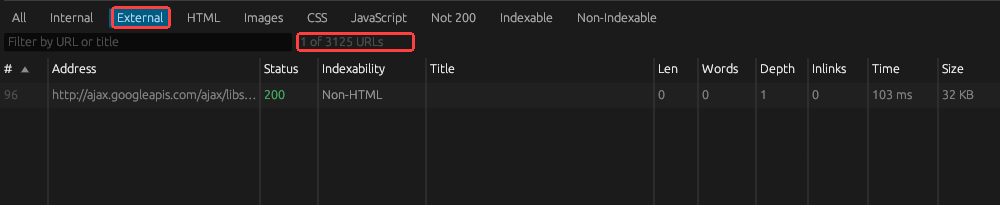
| External | URLs on other hosts that were checked (links, scripts, images hosted elsewhere). | 1 | Find broken or redirecting links to other sites. |
| HTML | URLs whose response is an HTML page (including HTML error pages). | 1,117 | Work on pages only. |
| Images | URLs whose Content-Type is image/…. |
2,000 | Find large or broken images; sort by Size. |
| CSS | Stylesheets. | 3 | Check size and caching of CSS. |
| JavaScript | Script files. | 5 | Check size of scripts; find third-party scripts. |
| Not 200 | Every URL whose status is not exactly 200: redirects (3xx), client errors (4xx), server errors (5xx) and URLs with no response. | 1 | The fastest way to find redirects and broken URLs. |
| Indexable | Internal 200 HTML pages that search engines may index: not noindex, canonical pointing to itself (or none), not blocked by robots.txt, not a meta-refresh redirect. | 1,116 | The pages that can appear in Google. |
| Non-Indexable | Internal HTML URLs that are not indexable: noindex, canonicalised elsewhere, redirects, errors, blocked. | 1 | Check that only pages you meant to hide are hidden. |
Example: the Images filter, with the count showing 2,000 of 3,125 URLs:

The Not 200 filter on the demo crawl shows a single URL: the missing robots.txt (404).

The External filter shows the one external URL the site uses: jQuery, loaded from http://ajax.googleapis.com (over plain HTTP, which is why the pages get the Mixed Content Issue).
Non-Indexable on the demo crawl contains only the robots.txt 404 page, because every real page is indexable:

When a check is selected in the Issues panel, the quick filters are replaced by the check's explanation card and are ignored. Click Show all URLs on the card to get them back. See Combining with an issue filter.
Type in the Filter by URL or title box. The table immediately shows only URLs whose address or page title contains the text. The search ignores upper and lower case and matches anywhere in the text (no wildcards or regular expressions).

The search works together with the active quick filter (or issue). For example, choose HTML and type /catalogue/category/ to see only category pages. Clear the box to show everything again.
Search ideas: a folder (/blog/), a parameter (?page=), a file type (.pdf), a word in titles (sale), or http:// to find non-HTTPS URLs.

| Column | What it shows | Why it matters |
|---|---|---|
| # | The URL's position in crawl order (1 = first URL fetched). Sorting by # restores the original order. | Shows the order the spider discovered URLs; low numbers are usually linked from the start page. |
| Address | The full URL. Long URLs are cut off; widen the window or open the inspector to read them. | |
| Status | The HTTP status code, coloured: green for 2xx, blue for 3xx, red for 4xx and 5xx. A dash (—) means no response (blocked by robots.txt, timeout, DNS or connection error). | Anything other than 200 on a linked URL wastes crawl budget or breaks the user's journey. |
| Indexability | Whether search engines may index the URL. Green Indexable, otherwise one reason in grey: Blocked by robots.txt, No Response, Redirected, Client Error, Server Error, Non-HTML, Noindex, Canonicalised (canonical points to another URL) or External. | Spot pages accidentally hidden from search. |
| Title | The page's <title> (empty for non-HTML URLs). |
The main text of your search result. |
| Len | Title length in characters. | Titles over about 60 characters (or 580 pixels) are usually cut off in Google. |
| Words | Number of words of visible text on the page. | Very low word counts can mean thin content. |
| Depth | Clicks from the start page (0 = start page). | Deep pages are crawled less and found less. |
| Inlinks | Number of internal links pointing at this URL (each link counts, so a page linking twice counts twice). | Pages with few inlinks look unimportant to search engines; 0 can mean an orphan page. |
| Time | Server response time in milliseconds. | Slow responses hurt users and crawling. |
| Size | Size of the response body (uncompressed). | Large pages and images load slowly. |
| Issues | How many checks this URL triggered (amber when above 0). | Sort descending to find the URLs with the most problems. |
The inspector shows more for each URL: meta description, headings, canonical, meta robots, language, readability, hreflang, how it was found, compression and HTTP version. See URL inspector. For every field in a spreadsheet, use Export → All URLs (internal.csv)….
Click a column header to sort by that column in ascending order. Click the same header again to reverse it (descending). A small triangle next to the header shows the sorted column: ▲ ascending, ▼ descending.

Useful sorts:
-
Inlinks ▼: your most linked pages (here
index.html, with 2,230 internal links pointing at it, and the "Books" category page with 1,207). - Inlinks ▲ (with the HTML filter): pages with the fewest internal links, candidates for better linking.
- Issues ▼: the URLs with the most problems.
- Time ▼: the slowest URLs.
- Size ▼ (with Images): the heaviest images.
- Len ▼: the longest titles.
- Status ▼: errors and redirects at the top.
- #: back to crawl order.
Rows with the same value keep their crawl order. Sorting stays in place when you change filters.
Click a row to select it. It is highlighted, and the URL inspector at the bottom shows its details.

- The selection stays when you change the filter or search, even if the selected URL is no longer listed.
- Use Copy URL and Open in browser at the right of the inspector tabs to copy the address or visit the page.
- Drag the top edge of the inspector to change the split between table and inspector.
The table fills in while the crawl runs. The list is refreshed about every 0.6 seconds, so it stays readable. The count next to the filter box shows the progress, and you can sort, filter, search and inspect URLs at any time.

Inlinks and Issues counts are recalculated every few seconds and may change until the crawl is complete (a page found early may get more inlinks later).
When you click a check in the Issues panel (or a finding on the Overview, or an issue in the inspector), the table lists only the URLs that check found:

- The card above the table explains the check and how to fix it.
- The quick filters are hidden and not applied: the check decides the URLs.
- The search box still applies, so you can narrow the list further (here: duplicate titles on category pages only).
- Sorting works as usual.
- Show all URLs removes the issue filter and brings back the quick filters.
Export → Current table view… saves exactly the rows currently shown, in the current order, as a CSV file (view.csv) with all the URL columns. Use it to hand a list of affected URLs to a developer, for example all duplicate titles, or all images over a certain size after sorting by Size. Other exports are described in Saving, opening and exporting.
- To find broken internal links: click Not 200, sort by Status ▼, select a 404 URL and open the inspector's Inlinks tab to see which pages link to it.
- To find orphan-like pages: choose HTML, sort by Inlinks ▲. HTML pages with 0 inlinks were found some other way, for example through the XML sitemap (when Crawl URLs found in XML sitemaps is on), and no crawled page links to them.
- To audit one section: type its folder (for example
/blog/) in the search box, then click checks in the Issues panel: the search stays applied, so each check's URL list shows only that section. (The counts in the Issues panel are always for the whole crawl.)
- URL inspector: everything about one URL.
- Issues panel: filter the table by check.
- Saving, opening and exporting: CSV exports.