Log (Saga)
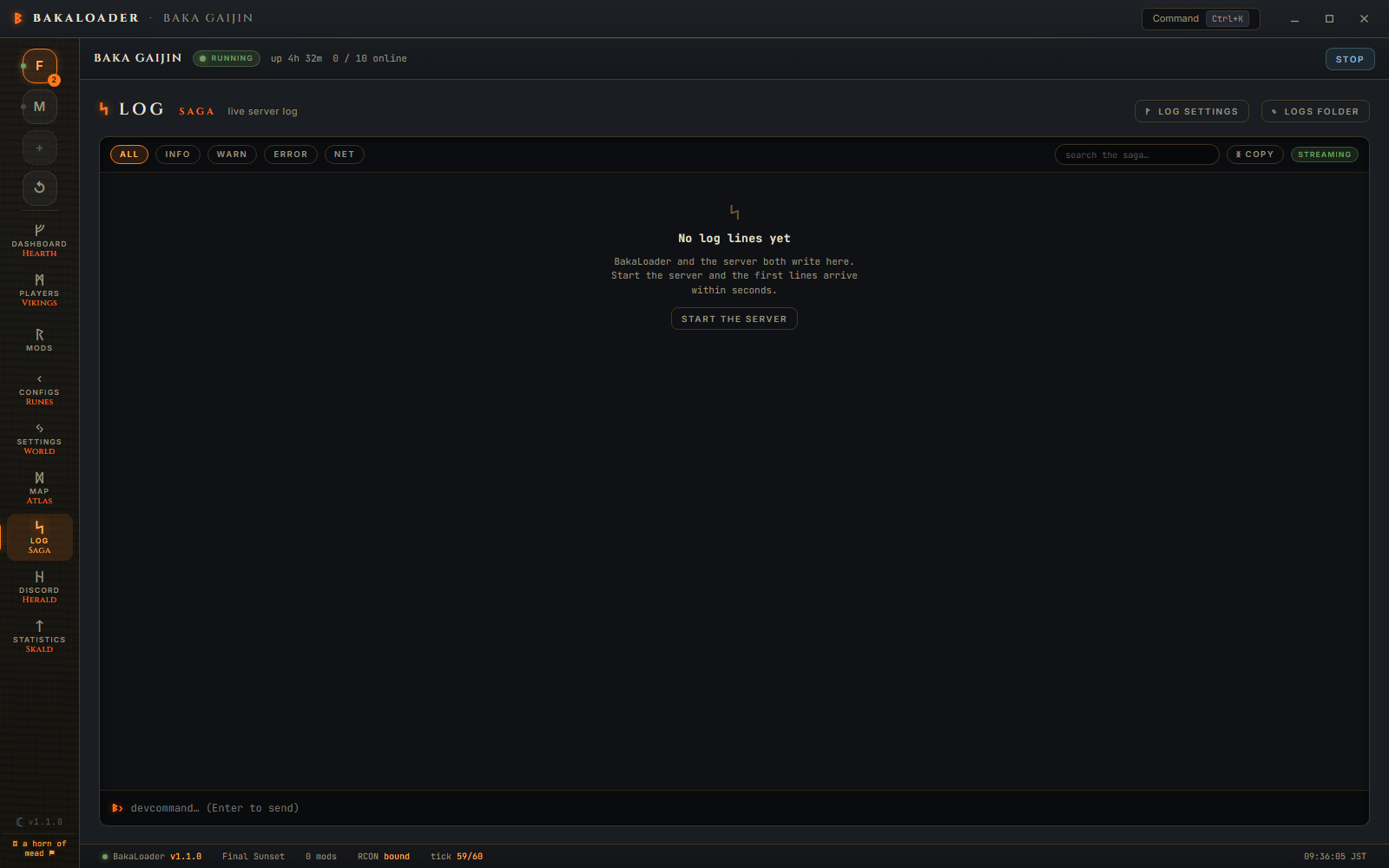
The live server log, with the noise filtered out, a search box and a console line you can type into. When something goes wrong this is the first place to look.

All, Info, Warn, Error, Net. Click one to show only that level. Click All to go back.

Type in the search box to keep only lines containing what you typed. It works with a level filter, so Error plus world shows error lines mentioning the world.
The log follows the newest line by default. Scroll up and it stops, so a line you are reading does not jump away. A ↓ 12 new pill appears in the corner counting what arrived while you were reading. Click it to jump back to the bottom and start following again.
copy puts the visible lines on the clipboard. Visible, so a filter and a search narrow what you copy, which is what you want when you are pasting into an issue.
streaming in the corner is the connection state.
At the bottom, ᛒ› with a text field. Type a command and press Enter to send it to the server over RCON.
This needs the server running with RCON on. Without it the field is disabled and says so.
The command palette has a fuller version of this with a list of the commands worth knowing.
Log settings opens the settings for where logs are written.

Logs folder is a full path, like D:\ValheimLogs. Blank uses the default. The note is exact: new files land in the new folder, and a session that is already writing keeps writing its current file.
Keep BakaLoader's own log writes the app's own log to a file, ApplicationLogs_<date>.txt, one per day, kept for 30 days.
The note under it explains the other half: each server session writes its own file, ServerLogs-<profile>-<start time>.txt, also pruned after 30 days. That one is controlled by Write server logs to file in the profile's Settings, not here.
Saving a folder that cannot be created or written gets you: "could not save: the folder must be a full, writable path (e.g. D:\ValheimLogs)".
Logs folder in the toolbar opens the folder in Explorer.
By default, %USERPROFILE%\AppData\LocalLow\BakaLoader\ValheimBakaLoader\logs\.
ApplicationLogs_20260910.txt is BakaLoader's own log, one per day.
ServerLogs-Final Sunset-20260910-144012.txt is one server session. The timestamp in the name is when the session started, so there is one file per run rather than a rolling file.
Both are kept for 30 days. The server logs are pruned by name and date every time a new session opens a log, because each session's own logger can only see its own file.
The server's raw output is noisy. Three kinds of line are dropped before you see them: Unity source location spam that starts with (Filename:, lines beginning Console: , and blank lines. The game's own date prefix is stripped too, since BakaLoader stamps its own time on every line.
Each line is tagged by severity, and BakaLoader's own lines are prefixed with [BakaLoader] or the subsystem that wrote them, like [Thunderstore] or [Herald].
"No log lines yet. BakaLoader and the server both write here. Start the server and the first lines arrive within seconds." with a Start the server button.
The server's console output is parsed line by line. Some of these are worth knowing because they explain where things on screen come from.
Game server connected means startup finished, and the status goes from Starting to Running.
Valheim version: 0.220.5 (network version 39) gives the version shown on the Server card, and records what build actually launched.
World save (5/5) done. Total time [612ms] is the 1.0 save line, stage 5 being the one where it is actually on disk. There is a pre-1.0 single stage line too. The matching FAILED line raises the failed save notice.
ZNet.LoadOldWorld done means a pre-1.0 world was loaded and the next save converts it. See World file formats.
Session "..." with join code ABC123 is where the crossplay invite code comes from. Nothing looks it up.
Got connection SteamID 76561198… and the PlayFab socket line are connections. Got character ZDOID from Bjorn : 12345:6 is a spawn, and the same line ending in 0:0 is a death, so it is read as one. Departures come from three different lines depending on how the client left.
Game server connected means startup finished.
Valheim version: 0.220.5 (network version 39) is the version banner. Players on a different network version cannot join.
World save (5/5) done. Total time [612ms] is a save landing on disk. The matching FAILED line is a save that did not.
ZNet.LoadOldWorld done means a pre-1.0 world was loaded and the next save converts it. See World file formats.
Got connection SteamID 76561198… is someone connecting.
Got character ZDOID from Bjorn : 12345:6 is a character spawning in. The same line ending in 0:0 is a death.
Closing socket 3 is someone leaving.
A player says they cannot join and get "incompatible version".
Open Log, click Error, then clear it and search for version. The banner line says Valheim version: 0.220.5 (network version 39). Their client is on a different one.
Either Steam has an update your server has not taken, which the condition bar would be telling you about, or their game updated and yours has not. See Server updates and the launch guard.
Where do I find the log file to attach to an issue? Logs folder in the toolbar. The app log is ApplicationLogs_<date>.txt, the server log is the newest ServerLogs-*.txt. Or filter, search and press copy.
Can I change how much is logged? Not from the app. The filtering of Unity noise is fixed.
The console line is greyed out. The server is not running, or RCON is off, or the mod that answers RCON is missing. Check the Network card on the Dashboard.
The log stopped updating. Scroll to the bottom, or click the ↓ N new pill. It stops following when you scroll up on purpose.
Does an adopted server log anything? No. BakaLoader can only read the output of a process it started itself. See Running the server.