Settings (World)
Everything the server is started with, in one form. Name, password, port, world, difficulty dials, restart rules, RCON and folders.
These are per server. Each profile has its own copy. Nothing here reaches a running server: Valheim is handed its whole configuration on the command line when it launches, and it keeps that until it launches again. A restart is what puts a change in force, and since 1.0.8 any restart will do.

Save Config is top right. It writes the file straight away, and the next restart is what reads it.
You do not have to stop the server to change something. Save it, and the next restart comes back up on it.

While the server is up, a line sits directly above Save Config:
The server is running. Saved changes apply the next time it starts.
Press the button and the confirmation says the same thing, instead of a plain "saved" that reads as though the change were already in force:
Saved. The running server keeps its current settings until it restarts.
The change is on disk from that moment. What reads it is the next restart, and that means every kind: the Restart button, the scheduled one, the empty server one, the relaunch after a crash, the restart that carries mod updates in with it, and a held launch that gets retried later.
Before 1.0.8 none of those helped. A relaunch reused the settings the session had been started with, so a change sat on disk doing nothing until somebody pressed Stop and then Start, or closed and reopened BakaLoader. World difficulty was the one that hurt: a new set of dials could be ignored for a whole day of restarts, and nothing on screen said why.
If what you saved differs from what the live server started with, a Restart pending row appears on the condition bar with a Restart button on it. That button runs the same warned restart the Dashboard one does, never a bare stop.
Saving here is manual and always has been. What is new in 1.2.0 is that the form says when there is something to save.
Change anything on this hall and four things happen at once. The field you changed keeps a small ember dot beside its label and a rule down its left edge, and both stay there after you click somewhere else, which is the difference between them and the glow that follows the cursor. A notice slides into the bottom left corner of the hall, diagonally opposite Save Config, saying there are unsaved changes and that Save Config writes them. Save Config itself breathes. And the Settings entry on the rail grows a dot, so you can see it from any other hall.
The notice has no button on it. The only button it could carry is the one already in the other corner.
Nothing stops you leaving. There is no dialog, and walking to another hall and back leaves everything exactly as you typed it; the dot on the rail is there so you know. Everything clears the moment a save lands, and the moment the form is filled again from what is saved, which is what happens when you switch to another server.
If you have asked Windows for less animation, the breathing button is a steady outline instead.
A snapshot of the form is taken whenever it is filled from what is saved, and again after a save writes. Every keystroke, switch and dropdown is compared against that snapshot, and what is marked is the set of fields that differ. That is why typing something and typing it back leaves nothing marked.
What is tracked is what Save Config actually sends: the server fields, the world, the five difficulty dials, max players, the restart and RCON settings, both Directories boxes and the launch arguments. The seed is not, because it is read only, and Process Priority is not, because the save has never sent it anywhere. A marker on a field nothing saves would be a lie.
Two of those are filled by BakaLoader after the form is drawn rather than with it: the max players count and the five dials both have to be fetched. When each one lands it is declared saved on its own, without touching anything else you have changed in the meantime.
The notice stands beside the hall rather than inside it, and the hall gives up a band at its foot for exactly as long as the notice is up. A hall scrolls inside itself, so anything pinned to the bottom of one has the form sliding along underneath, and the first thing to slide under this was the box that had just been typed into. Shortening the hall instead means the form ends above the notice at every scroll position rather than only at the last one.
The note follows the server's status. It is there while the server is Running or Starting and gone the rest of the time, so the header keeps its height either way.
A relaunch asks this profile for its saved settings in the moment before it launches, and builds the command line from those rather than from the ones the old session started with. The profile it reads is the session's own, so a second realm relaunching in the background comes back on its own settings and not on whichever ones are on screen.
It is best effort on purpose. If the saved settings cannot be read at all, the relaunch keeps the ones the server is already running and writes a line to the log rather than refusing to restart:
The saved settings for this profile could not be read, so the relaunch uses the ones the server is already running.
When the refresh does change the command line, the log says so once:
Relaunch uses the settings saved on disk
The Restart pending row sees less than the relaunch does. It works by comparing command lines, so it covers the settings that reach one: server name, port, world, visibility, save folder, save interval, the three backup values, password, crossplay, the world preset or the five difficulty dials, world keys, and additional launch arguments. RCON and its port and password, the three restart rules and their delays, the server log switch and the executable path raise nothing, because none of them appear on the command line. A relaunch still picks those up. It is only the row that cannot see them.
Save Config writes the world dials only when the dials on screen belong to the world being saved, which is right: one world's difficulty must never be stamped onto another. When they do not belong to it, the save used to skip them in silence under a success toast, and a difficulty you had just set looked saved and was not. Now it says so:
World difficulty was not saved for this world. Reopen Settings and save again.
The rest of the save still goes through. Reopen Settings so the dials load for the world named in the World box, check them, and save again. See World-modifiers.
Server Name is what shows in the community browser and in the join info. It can match the world name if you like; the only naming rule Valheim has is about the password, which must be at least 5 characters and cannot appear inside the server name or the world name.
World lists the worlds in this profile's save folder, and from 1.2.0 the last entry in that list is not a world at all. It reads New world…, and picking it opens a box to type a name into. Beside the list there is a COPY AS chip that duplicates the world you have chosen under a name of your own. The chip is there while the list is pointed at a world, and it goes while New world… is chosen, because a name you are still typing is not yet a world there is anything to copy. Both are covered below in A new world, and a copy of one. You can still found a whole new realm in the Forge and name its world there, and that is still the thing to do when you want a separate server with it.
World Seed is read only with a COPY chip. A world's seed is set when it is created and can never change. The one exception is a world that has not been created yet, where the first run wizard can set one.
Password with a SHOW chip, and under it a switch, Require a 5 character password.
The rule is Valheim's, not BakaLoader's. A public server needs a password. It has to be at least 5 characters, and it may not contain the server name or the world name. With the switch on, BakaLoader stops the start and names the rule that was broken: "The password needs at least 5 characters.", "The password may not contain the server name ('Baka Gaijin').", "The password may not contain the world name ('Midgard').", or "Community (public) servers require a password. Set one, or turn off the Community Server option."
With it off, BakaLoader starts the server anyway and leaves the last word to the game, which will turn the password down itself. The switch is app wide: it applies to every realm, not just this one.
Port defaults to 2456. The server also silently uses the port above it, so if you run two servers space their ports at least 2 apart.
Visibility is one switch, "Public, listed in community browser". Off means friends need the address, which is most private servers.
Crossplay adds the crossplay backend, which is what gives you a join code that works from consoles.
Save Interval (s) is how often the world is written, 600 seconds by default. This is your real crash exposure. Ten minutes means up to ten minutes lost if the machine dies.
Backups Kept, Backup Interval: Short (s) and Backup Interval: Long (s) are Valheim's own automatic backups, passed straight through as -backups, -backupshort and -backuplong. A fresh profile uses 4, 7200 and 43200. The save interval has to be less than or equal to both intervals, and short has to be less than or equal to long.
Two things live on the World box: naming a world that does not exist yet, and taking a copy of one that does.
Open the World list and the last entry in it reads New world…. Pick it and a text box appears under the list. Type a name in the box and press Save Config.
Nothing is created at that moment. The name is written into this profile's settings, and the next time the server starts it finds no world by that name and makes one, with a seed picked at random. Until then the World Seed box reads "not created yet · seed set on first launch", which is what it has always said for a world that has been named and never started.
The line under the box says what is wrong with a name while you are still typing it, rather than letting the save go and the start fail later:
A world name has to work as a folder name. Leave out slashes, colons, wildcards and the other characters Windows will not take, and do not end it with a dot or a space.
There is already a world called Midgard in this save folder.
A world name can be at most 64 characters long.
Reopen Settings afterwards and the name you typed is the entry the list has chosen, even though there is still nothing on disk under it.
Press the COPY AS chip beside the World list, or the one on any world's row in the Barrow, or the Copy world as button along the bottom of that world's own page in the Barrow, the page you reach by clicking the row. Type a name, and the world is duplicated beside itself under that name.
The copy is a world in its own right the moment it lands. It is in the World list, any realm can be pointed at it, and deleting one of the two leaves the other alone. The world you copied is not touched, and neither are its backups: those belong to the world that is staying.
This is the thing to reach for before you try something you might regret. Copy the world, point a realm at the copy, and let people loose on that one instead.
BakaLoader turns the copy down rather than making half of one. A world a server is running is turned down before the name box even opens, which is the refusal you are most likely to meet:
'Default' is running this world right now. Stop the server first.
The rest arrive after you have pressed Confirm:
'Default' is running 'Midgard' right now. Stop it before copying the world.
There is already a world called 'Second Midgard' in that save folder, so nothing was copied.
The world file for 'Midgard' could not be read, so nothing was copied.
The running world is refused twice on purpose. The window asks before it opens the box, and the app asks again on the way in, so a server started while the name box was sitting open is still caught.
A name the box itself turns down is said under the box with the name still in it, so you fix the one character rather than open the dialog again and type the whole name a second time. A character a folder cannot hold is caught there wherever you opened the box from. A name a world in that save folder already answers to is caught there when you opened it from the COPY AS chip beside the World list, or from a world's row in the Barrow, because those two know what else is in that folder. The Copy world as button on a world's own page in the Barrow was handed that one world and no listing of its neighbours, so rather than guess it says nothing, and a name already taken comes back there after Confirm as the refusal above. Either way the app looks at the save folder again on the way in, so no copy lands on a name that is already spoken for.
A world's name is written down twice. Once as the file or the folder it sits in, which is what the server is handed on the command line, and once inside the world's own header, which is what the game carries while it runs and what it builds the biome cache file name out of. A plain file copy would leave the second one saying the name of the world you copied from, so you would have two worlds answering to one name and sharing one cache.
So the copy is not a plain file copy. BakaLoader copies the files under the new name and then rewrites the name stored inside the copy's own header, in both save formats: the pre 1.0 .fwl, and the _main.N.fwl2 inside a Valheim 1.0 world folder. Every generation in a 1.0 folder is rewritten and not only the newest one, because the game can be part way through rolling one over. Everything else in the header stays exactly where it was, byte for byte, the seed above all: the seed is what makes the copy the same world.
Nothing takes the new name until the whole copy is finished. Every file lands under a temporary name first, the header is rewritten on that, and only then is the finished copy moved into place. A header that cannot be read stops the copy before the move, and the temporary files go with it, so that refusal leaves the worlds folder exactly as it found it.
A header opens with the size of what follows it, and the rewrite holds that number to the file it is in. A header claiming more than the file has left is one the rewrite will not touch, because rebuilding it would mean copying a tail measured past the last byte there is. Neither is one claiming a size too small to cover the name written inside it, because there the tail is measured short of the name instead. Both are headers whose own size field is contradicted by the file it sits in, and a header rebuilt around a number that was never true is a world that will not open.
The world list never opens a header at all. It names a world by the file or the folder it sits in, so a world with a header like that is listed like any other and is offered a copy like any other. Pressing it comes back with "could not be read", whichever of the two it is, and whether the refusal came before the copy started or from inside it. Nothing is moved, and the world you asked to copy is exactly as it was.
The biome data cache travels too, under the new name. It is the grid the game spends a long first boot building, and because the game names that file after the header rather than after the folder, a copy would otherwise start by building its own.
The copy lands in the same worlds folder the world it came from sits in, so a world in the second worlds folder does not quietly hop into worlds_local.
A typed world name is held to one rule in three places now: the World box, the "Found a new realm" dialog in the Forge, and the name box for a copy. The rule is Windows' own rule for a folder name plus a length of 64, because a world name has to be a folder name before it can be anything else. The World box checks it while you type. The other two check on the press: Forge realm in the dialog, Confirm in the copy box. A space either side of what you typed is trimmed off before the rule looks at it, in the window and in the app alike, so a stray space is not something you are told off for, and the world lands under the name without it.
Only the copy is checked a second time on the way in. worlds.copyAs puts the new name through the same rule again, and looks at the save folder again, before it moves a byte, so a copy cannot land under a name the window would have turned away. The World box and the Forge's world box have the window's check and nothing behind it: the two calls they save through have been taking whatever was typed since long before this rule existed, and making them start refusing it would turn away names hosts already have saved. What those two checks buy you is the refusal arriving with the name still in front of you, as you type in the World box and as you press in the Forge, rather than at the first start, where it used to arrive.
Click the heading to open it.
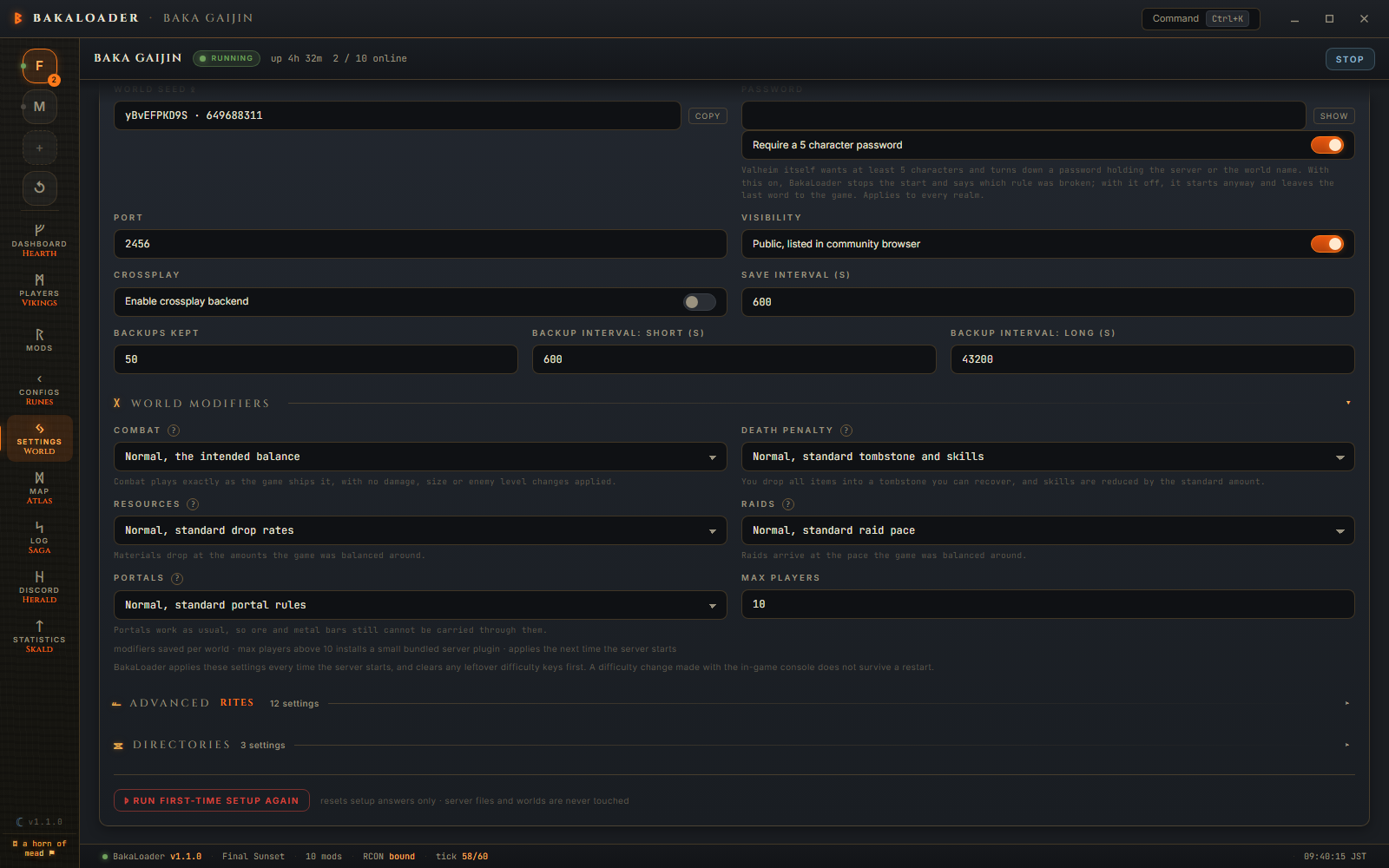
Combat, Death Penalty, Resources, Raids and Portals are Valheim's own world modifier dials, the same ones the game offers when you create a world. They are saved per world, not per server.
Every dial carries a line underneath describing the option you have selected, and a ? beside its name. Put the pointer on the ? and a panel opens with the whole category: every option, what each one does, and the game settings each one applies. The same dials, lines and panels are in the "Found a new realm" dialog, so a world can be created the way you want it from the start.
Two options are worth knowing before you pick them. Death Penalty Hard deletes everything you were not wearing when you died: equipped gear still goes to the tombstone, the rest of the inventory is gone for good. Hardcore deletes every item and resets all of your skills, though your character itself is not deleted. The old permadeath wording is gone, because that is not what the setting does.
Under the dials: "BakaLoader applies these settings every time the server starts, and clears any leftover difficulty keys first. A difficulty change made with the in-game console does not survive a restart." That reset is why lowering a dial now actually takes, instead of leaving the old setting's key behind in the world.
Every option, what it sets, and what BakaLoader does with it at start: World-modifiers.
Max Players defaults to 10, which is the game's own cap. Setting it higher installs a small bundled plugin that raises the cap. The note under the dials says so: "modifiers saved per world · max players above 10 installs a small bundled server plugin · applies the next time the server starts".
A count you saved while an older third party max players mod was still locked by the running server is kept and migrated at the next start rather than lost. That was a real bug in 1.0.0, and so was the order of the swap: the bundled plugin is now installed before the old mod is removed, so a failure leaves you with the working old one rather than neither.
The number in this box is what you asked for, not proof it took. If the game's code is not the shape the plugin's patch expects, it refuses and keeps the vanilla 10 for that session, and says so on the server's output. BakaLoader raises that as a warning on the Log screen rather than leaving it in the chatter:
Max Players could not be raised on this build of the game, so this server keeps the vanilla limit of 10 players. The number saved in the World hall is not in force for this session.
So if the cap looks wrong, filter the log to Warn after a start, or search it for "vanilla limit". See The bundled plugins.
Click ADVANCED to open it. Everything here is about how the server behaves on its own.

Empty-Server Restart with Empty Delay (min). Restart the server when the last player has been gone this long. The label updates as you type, so it reads "Restart when empty for 5 min".
Scheduled Restart with Restart Interval (h). Restart every N hours with an in game countdown. The countdown is timed so the restart lands on the hour rather than starting its warnings then.
Restart on Crash with Crash Delay (s). Relaunch after a crash, after waiting this long.
Server Logs writes the server's own output to a file per session. See Log.
Autostart starts this profile when BakaLoader launches. A brand new profile always has this off, so a server you just created never surprises you by starting.
RCON with RCON Port and RCON Password. RCON is how BakaLoader sends commands to the running server: broadcasts, the restart countdown, player actions and live positions. The port defaults to 25575 and must not clash with the game port. The label reads "Bound on port 25575" or "Not bound".
Process Priority is Above Normal, Normal or High for the server process.

Two paths: where the server program is, and where its worlds are written. Both of them are set for you by the first time setup, and on most installs you never come back here.
Each of the two has a line above it that begins Currently. That line is the path BakaLoader will really use for this server, with any %VARIABLES% already filled in, and it ends with one word saying where the path came from:
- default means it came from the app wide setting, which is what the first time setup wrote and what every server falls back to.
- set for this server means somebody typed a path into the box below it, for this profile only.
Open sits on that line rather than beside the box, because Open opens that folder. Hover it and the tooltip names the folder it is about to open.
The box underneath is an override. Leaving it empty is normal and is what most installs look like: an empty box means "use the path on the line above". A path typed into it applies to this one server and to nothing else. Browse opens Windows' own picker, filtered to valheim_server.exe for the first box and to a folder for the second; what it finds goes into the box and waits for Save Config like anything you typed by hand.
Under the box, while there is something in it, one line says what is actually at that path. It is never a refusal: Save Config saves whatever you typed either way. It is there so a path that will not work is something you find out about now rather than at the next start. What it can say:
| A Valheim dedicated server is here. | the path is a real server install |
| A dedicated server is started from valheim_server.exe, and this path names another file. | usually the game's own valheim.exe rather than the server's |
| There is no file at this path. | nothing is there |
| The file is there, but valheim_server_Data is not in the folder beside it, so the server has nothing to load. | the program was copied out of its install |
| This path names a folder rather than a file. The box wants the program itself, which is the valheim_server.exe inside that folder. | the install folder was given where the program was wanted |
| The folder is there and takes a write. | the save folder is fine |
| The folder is there and will not take a write, so worlds and backups cannot be saved into it. | |
| The folder is not there yet. It is created the first time the server starts. | a note rather than a problem |
| Neither this folder nor the one above it is there, so nothing can be created here. | |
| This path names a file rather than a folder, and the server cannot make a folder where a file of that name already sits. | |
| Windows will not take a path written this way. A name in it uses a mark that is not allowed in a file name, or is one Windows keeps for a device. | |
| This path could not be checked in time. A drive that is asleep or a folder on a machine that is not answering takes longer than the line under the box waits, so nothing here says the path is wrong. | a slow or sleeping drive, not a verdict |
If a box in this section has something unsaved in it, or something to say, the section unfolds itself. A warning folded away is a warning nobody reads. Fold it back and it stays folded.
The two paths live at two levels, and that is worth knowing because of how the section used to read. The first time setup writes its answers to the app wide settings, and the boxes here are the profile's own override, which is empty until somebody fills it. So on a normal install both boxes are empty and correct, and the app is using the setup's answers the whole time. Before 1.2.0 there was nothing on screen saying so, and a fresh install looked like a setting that had been lost. The Currently line is what says it. Nothing about where the values are stored has changed.
When the server starts, the path is worked out the same way: the profile's own value if it has one, otherwise the app wide one, with environment variables expanded. That is the same answer the Currently line shows, so what the line says and what the launcher does cannot drift apart.
The line under the box comes from a check that looks at the disk and nothing else. For the server program it asks whether the file is named valheim_server.exe, whether it is there, and whether valheim_server_Data is in the folder beside it. For the save folder it asks whether the folder is there, whether it takes a write (by writing a file that deletes itself), and if it is not there, whether the folder above it is, so it could be created. The check is asked a moment after you stop typing rather than on every keystroke, and an answer for a path you have since retyped is thrown away rather than shown.
Additional Launch Args are appended to the command line verbatim, last of everything. Four of them never reach the server and it is worth knowing why. -logFile would take away the output stream BakaLoader reads to know what the server is doing, so a start with it in the box is turned down. The other three are taken back out as the command line is built, with the reason written to the log: -demomode turns off all world saving, -joinserverwithcharacter makes the game try to join a server instead of hosting one, and -resetmodifiers is already sent by BakaLoader ahead of your world settings, so a second one down here would land after them and clear what they had just written, leaving the world with no modifiers at all. See World-modifiers.
A red button at the bottom, behind two confirmations. It clears the saved setup answers and runs the guided setup again. The note beside it is accurate: "resets setup answers only · server files and worlds are never touched".
One file: %USERPROFILE%\AppData\LocalLow\BakaLoader\ValheimBakaLoader\userprefs.json. Plain JSON, holding the app wide settings, every server profile and every world's modifier choices.
Passwords are stored in plain text in that file. Both the server password and the RCON password. There is no encryption. If that matters to you, that file is the one to think about. The only place a password is masked is in the log, where the launch command line is written with the password replaced by asterisks.
Every read, change and write of that file goes through one lock, because the whole document is loaded, changed and written back, and two threads doing that at once would lose one of the changes.
For the pref key behind every field and exactly what each one does to the command line, see Settings reference.
You want a private server for six friends, restarting nightly, with a password.
Set Server Name to something that is not the world name. Set Password. Leave Port at 2456. Turn Visibility off so it is not listed. Turn Crossplay on if anyone is on a console.
Leave Save Interval at 600, or drop it to 300 if the machine is not reliable.
Open Advanced. Turn on Scheduled Restart, set Restart Interval to 24. Turn on Restart on Crash. Leave RCON on so the countdown actually reaches people in game.
Press Save Config, then Restart on the Dashboard.
I changed a setting and nothing happened. The server reads its settings when it starts. Save, then restart, and any restart will do, including the automatic ones. While the server is up, the line above Save Config says so, and the condition bar raises Restart pending once what is saved differs from what the server started with.
I saved a difficulty and it was not saved. If the toast said the world difficulty was not saved for this world, the dials on screen belonged to another world, or to no world yet. Reopen Settings, check the dials, and save again. The rest of that save went through.
Can I change the seed of an existing world? No. That is Valheim's rule, not BakaLoader's. Create a new world if you want a different seed.
Why can two servers not share a port? Valheim uses the port you give it and the one above it. Space them by at least 2. BakaLoader picks free ports for you when you create a profile and warns about overlaps while you edit.
Do I need RCON? Only for anything that talks to the running server: broadcasts, restart countdowns, player actions and live positions. Everything else works without it.
Is my password safe in userprefs.json? It is plain text. Treat that file the way you would treat any file with a password in it.