World modifiers
The five difficulty dials Valheim offers when you create a world: combat, death penalty, resources, raids and portals. BakaLoader puts them in the app, explains every option in plain words before you pick it, and writes your choices onto the world at every start.
They are saved per world, not per server. Two profiles pointed at the same world share the same modifiers. A change applies the next time that server starts, not while it is running.
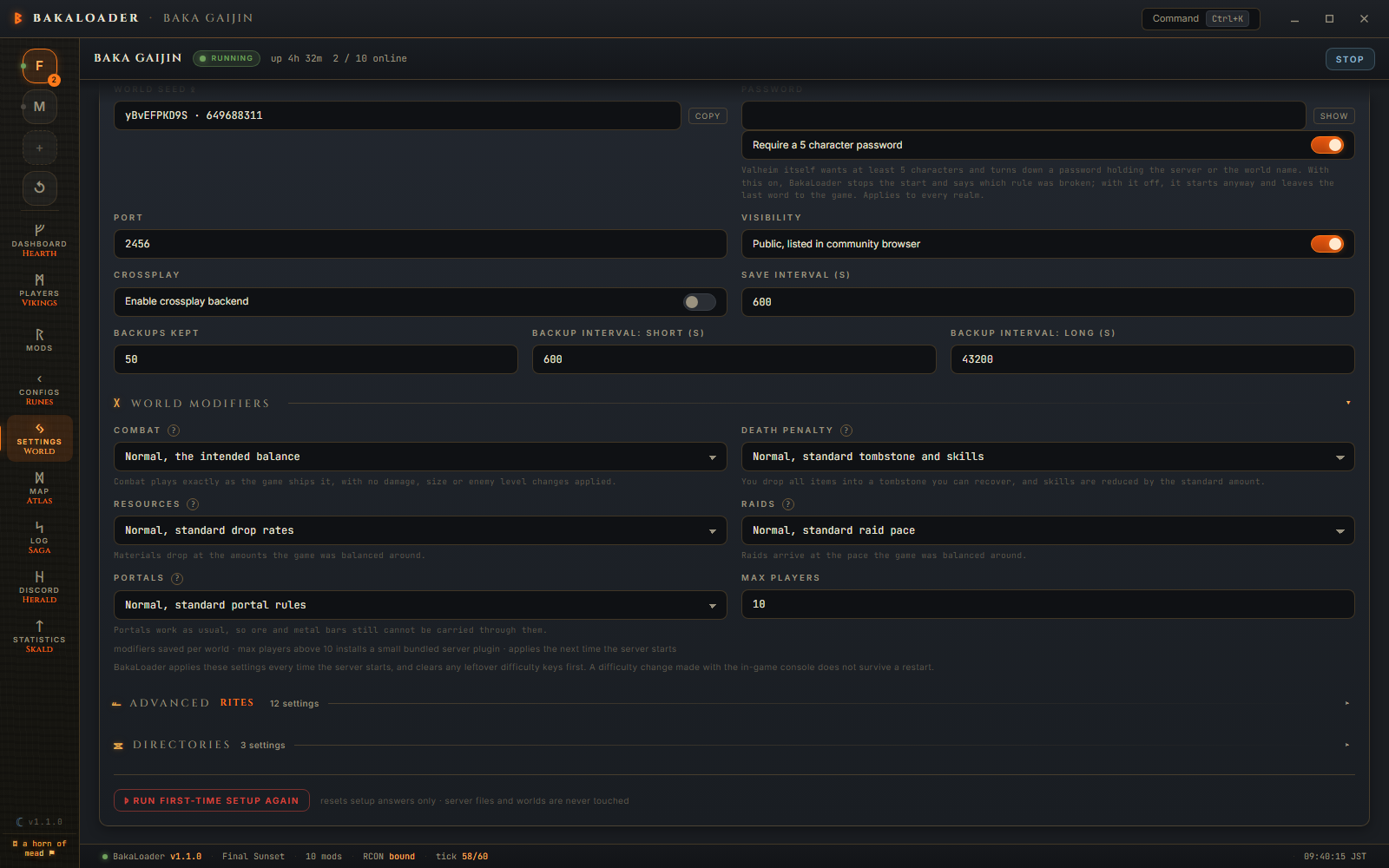
On the Settings screen, click the World Modifiers heading to open the block. Five dropdowns, plus a Max Players box that is not a modifier (see below).
Three things are on screen for every dial.
The label says what the option does. Not "Hard" on its own, but "Hard, enemies hit harder". You can read the row and know what you picked.
The line under the dial describes the option you have selected right now. It changes as you change the dial, so you never have to guess whether the setting you just chose is the one you meant.
The ? beside the dial's name opens the full list. Put the pointer on it and a panel opens with the whole category: what the dial controls, every option it offers, what each option does, and the game settings each one applies in small type underneath. That last line is the honest version, the actual keys and numbers handed to the game.

The panel marks the option you currently have selected, so you can see where you sit in the range without closing it.
Pick your options, press Save Config, then restart the server. Saving while the server runs writes the file and leaves the live world alone, because the server was handed its modifiers on the command line when it launched. The next restart is what reads the file, and since 1.0.8 that is a restart of any kind: the Restart button, the scheduled one, the empty server one and the relaunch after a crash all read the profile again before they launch. A difficulty saved in the evening is in force after the nightly restart, with nobody having to stop and start anything.
Save Config writes the dials only when they belong to the world being saved, which is what stops one world's difficulty being stamped onto another. When they do not, the save says so:
World difficulty was not saved for this world. Reopen Settings and save again.
The rest of the save still goes through, so the server settings are written and the difficulty is not. Reopen Settings, let the dials load for the world named in the World box, check them, and save again. Before 1.0.8 this was skipped in silence under a success toast, so a difficulty you had just set looked saved and was not.
The "Found a new realm" dialog, the one that adds a server, carries the same five dials, the same lines and the same ? panels, so a realm can be born on the settings you want rather than set to Normal and changed afterwards.
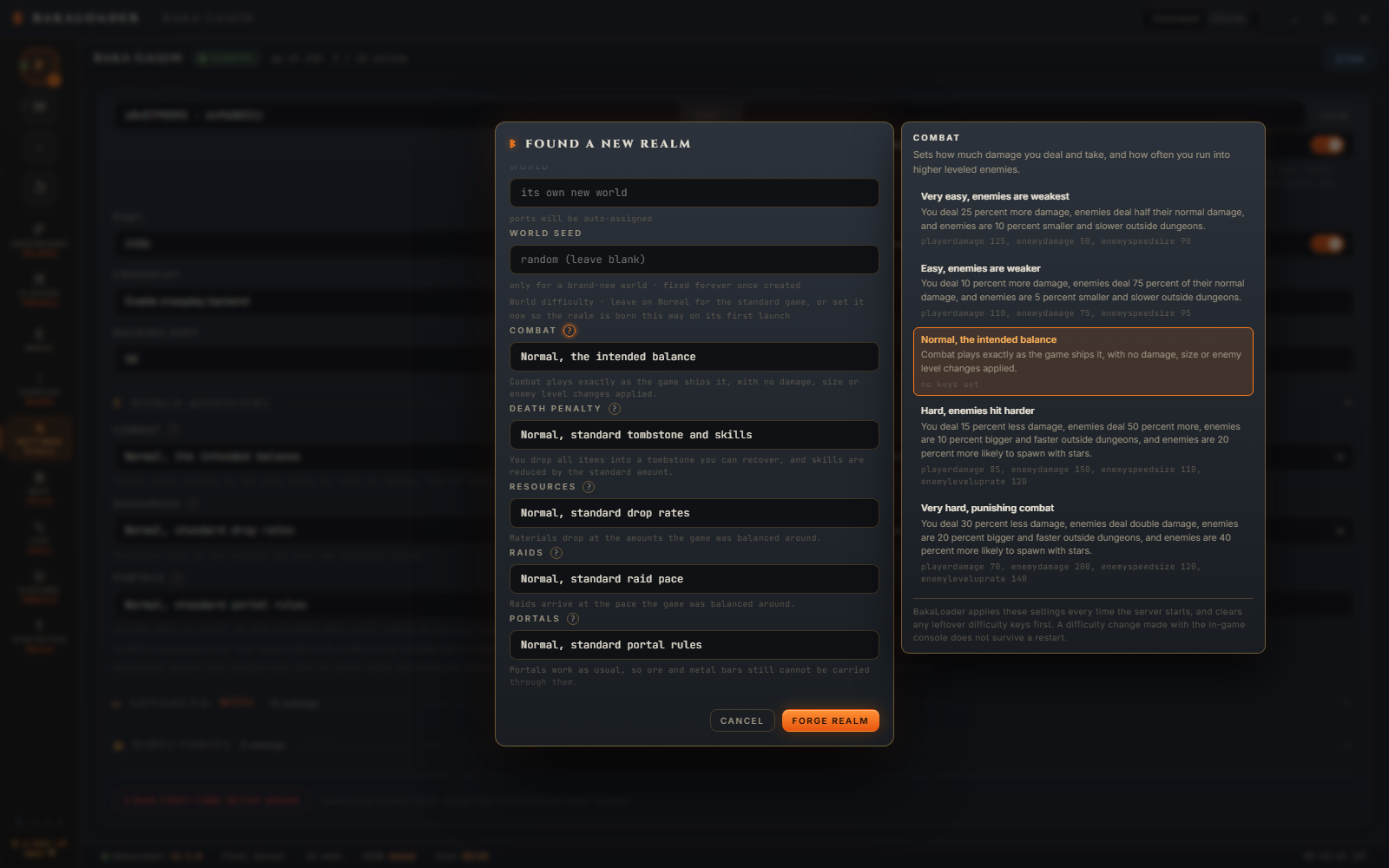
Sets how much damage you deal and take, and how often you run into higher leveled enemies.
| Option | What it does | What the game is set to |
|---|---|---|
| Very easy, enemies are weakest | You deal 25 percent more damage, enemies deal half their normal damage, and enemies are 10 percent smaller and slower outside dungeons. | playerdamage 125, enemydamage 50, enemyspeedsize 90 |
| Easy, enemies are weaker | You deal 10 percent more damage, enemies deal 75 percent of their normal damage, and enemies are 5 percent smaller and slower outside dungeons. | playerdamage 110, enemydamage 75, enemyspeedsize 95 |
| Normal, the intended balance | Combat plays exactly as the game ships it, with no damage, size or enemy level changes applied. | no keys set |
| Hard, enemies hit harder | You deal 15 percent less damage, enemies deal 50 percent more, enemies are 10 percent bigger and faster outside dungeons, and enemies are 20 percent more likely to spawn with stars. | playerdamage 85, enemydamage 150, enemyspeedsize 110, enemyleveluprate 120 |
| Very hard, punishing combat | You deal 30 percent less damage, enemies deal double damage, enemies are 20 percent bigger and faster outside dungeons, and enemies are 40 percent more likely to spawn with stars. | playerdamage 70, enemydamage 200, enemyspeedsize 120, enemyleveluprate 140 |
The size and speed change is outside dungeons only. That is the game's own rule, not a BakaLoader one.
Sets what happens to your items and your skills when you die.
This is the dial worth reading twice, because two of its options destroy items and the old labels did not say so.
Hard deletes everything you were not wearing. Equipped gear still drops into a tombstone you can recover. The rest of your inventory is deleted for good and never reaches the tombstone. Skill loss is 1.5 times the normal amount.
Hardcore deletes every item you were carrying, equipped or not, and resets all of your skills to zero. Your character itself is not deleted. The label used to read permadeath, which is not what the setting does, and that wording is gone.
| Option | What it does | What the game is set to |
|---|---|---|
| Casual, keep your equipped gear | You do not drop equipped gear, so only the items you were not wearing go into a tombstone you can recover, and skill loss is cut to 15 percent of the normal amount. | deathkeepequip, skillreductionrate 15 |
| Very easy, smallest skill loss | You drop all items, equipped gear included, into a tombstone you can recover, and skill loss is cut to 15 percent of the normal amount. | skillreductionrate 15 |
| Easy, half the skill loss | You drop all items into a tombstone you can recover, and skill loss is half the normal amount. | skillreductionrate 50 |
| Normal, standard tombstone and skills | You drop all items into a tombstone you can recover, and skills are reduced by the standard amount. | no keys set |
| Hard, unequipped items are deleted | Equipped items are dropped into a tombstone you can recover, everything else in your inventory is deleted for good and never reaches the tombstone, and skill loss is 1.5 times the normal amount. | deathdeleteunequipped, skillreductionrate 150 |
| Hardcore, items and skills lost | Every item you were carrying, equipped or not, is deleted permanently and all of your skills reset to zero, but your character itself is not deleted. | deathdeleteitems, deathskillsreset |
Sets how much material you get from gathering and from enemy drops, shown in the game as a multiplier.
| Option | What it does | What the game is set to |
|---|---|---|
| Much less, x 0.5 drops | Gathering and enemy drops give half the usual amount of materials. | resourcerate 50 |
| Less, x 0.75 drops | Gathering and enemy drops give three quarters of the usual amount of materials. | resourcerate 75 |
| Normal, standard drop rates | Materials drop at the amounts the game was balanced around. | no keys set |
| More, x 1.5 drops | Gathering and enemy drops give 1.5 times the usual amount of materials. | resourcerate 150 |
| Much more, x 2 drops | Gathering and enemy drops give double the usual amount of materials. | resourcerate 200 |
| Most, x 3 drops | Gathering and enemy drops give three times the usual amount of materials, the highest setting the game offers. | resourcerate 300 |
Sets how often enemies come to raid your base, called Raid Rate in the game.
| Option | What it does | What the game is set to |
|---|---|---|
| None, timed raids turned off | The timed raid check never runs, so the usual random raids on your base stop happening. | eventrate 0 |
| Much less, raids are rare | Raids have to wait twice as long before they can trigger and are half as likely on each check. | eventrate 200 |
| Less, fewer raids | Raids have to wait 50 percent longer before they can trigger and are about a third less likely on each check. | eventrate 150 |
| Normal, standard raid pace | Raids arrive at the pace the game was balanced around. | no keys set |
| More, frequent raids | Raids can trigger after 60 percent of the usual wait and are about 1.7 times as likely on each check. | eventrate 60 |
| Much more, constant raids | Raids can trigger after 30 percent of the usual wait and are more than three times as likely on each check. | eventrate 30 |
The number runs the other way from what you might expect. eventrate is a percentage of the usual wait between raids, so a smaller number means they come round sooner. eventrate 0 is the exception: it is not the fastest setting, it stops the timed raid check running at all.
Changes how portals work, from carrying anything through them to having none at all.
| Option | What it does | What the game is set to |
|---|---|---|
| Portal items, carry anything through | Allows you to bring all items with you through portals, ore and metal bars included, which skips much of the hauling the world is built around. | teleportall |
| Normal, standard portal rules | Portals work as usual, so ore and metal bars still cannot be carried through them. | no keys set |
| No boss portals, blocked during bosses | You will not be able to use portals or exit boss dungeons while a boss is active. | nobossportals |
| No portals, walk everywhere | You will not be able to use portals to teleport yourself across the world, so every trip is made on foot or by boat. | noportals |
Max Players sits with the dials because that is where people look for it. It is not one of Valheim's world modifiers. It defaults to 10, the game's own cap, and setting it higher installs a small bundled plugin that raises the cap. It belongs to the server, not to the world. See Settings and The bundled plugins.
The note under the whole block covers both: "modifiers saved per world · max players above 10 installs a small bundled server plugin · applies the next time the server starts".
None of this is a live setting the server holds in memory. Valheim keeps a list of starting global keys inside the world itself, and a world modifier is one of those keys. deathdeleteunequipped is a key. resourcerate 150 is a key with a value. The launch flags on the command line are what write that list.
That is why the dials belong to the world rather than to the server profile, and why nothing you change reaches a server that is already running.
At every start, in this order:
-
-resetmodifiers, always, whether or not you have set anything. - Either
-preset <name>, or one-modifier <key> <value>per dial you have moved off Normal. A preset wins and the two are never combined. - One
-setkey <key>per extra key saved on the world. - Your Additional Launch Args, verbatim, last of all.
The order is not cosmetic. The game reads -resetmodifiers, -preset, -modifier and -setkey in one pass over the command line, in the order they appear on it. A reset sitting after the other flags would wipe exactly what they had just set, and the world would come up vanilla.
The reset goes out even when every dial reads Normal, and that is the case that needs it most. An all Normal profile is a request for a world with no modifiers on it, and only the reset can deliver that.
Before this, BakaLoader wrote the settings you had switched on and nothing else. Turning a dial back down wrote nothing for that dial, so the key the old setting had put in the world stayed in the world.
The clearest case was Death penalty. Set it to Hard, and deathdeleteunequipped went into the world. Set it back to Normal afterwards, and nothing removed that key. The dial on screen read Normal, the game still deleted everyone's unequipped inventory when they died, and there was nothing on screen to explain it.
Sending -resetmodifiers first empties the world's starting key list, and the flags after it write the whole intended set back. The world now matches what the app shows at every start, in both directions.
-resetmodifiers reaches the world's server option starting keys only. World progression, the defeated boss keys, is out of its range. Resetting the modifiers at every start never rolls back a boss you have already killed.
The note under the dials is the one to remember:
BakaLoader applies these settings every time the server starts, and clears any leftover difficulty keys first. A difficulty change made with the in-game console does not survive a restart.
If you set a modifier live with a console command, it holds for that session and is gone at the next start, because the start writes the app's settings over it. Change the dial and restart if you want it to stick. The same note is on the Settings screen, at the foot of every ? panel, and in the "Found a new realm" dialog.
Put -resetmodifiers in Additional Launch Args and BakaLoader takes it back out, with the reason written to the log:
BakaLoader already resets and writes back the world modifiers at every start, so a second reset would wipe the settings it had just applied
Additional launch arguments are appended last, after the modifier flags. A second reset down there would land after the flags that had just written your settings and clear them, and the world would come up with no modifiers on it at all. It is refused for the same reason the app's own reset has to come first.
I changed a dial and nothing changed in game. The server reads its settings when it starts. Press Save Config, then restart. Any restart does it, the scheduled and empty server ones included, so you can also just let the next one come round.
It said the world difficulty was not saved for this world. The dials on screen belonged to another world, or to no world yet, so writing them would have stamped the wrong difficulty onto the world you were saving. Reopen Settings, check the dials, and save again. Everything else in that save went through.
I set a modifier with the in game console and it went away. It did, at the next start. BakaLoader clears the leftover keys and writes your dials every time the server comes up. Set the dial instead.
Does the reset wipe my boss progress? No. It reaches the server option keys only. Bosses you have defeated are a different kind of key and are left alone.
Two of my servers use the same world. Do they share the dials? Yes. The choices belong to the world, so whichever server starts last is the one that wrote them.
Where are the choices saved? In userprefs.json, in the worlds array, one entry per world. See Settings reference.
Can I still use a preset? Yes. If a preset is set it wins, and BakaLoader sends either the preset or the individual dials, never both at once.
Why show the keys at all? Because the labels are a summary and the keys are what actually happens. If you want to check a claim against the game's own wiki, or against a mod that touches the same keys, the panel gives you the exact names and numbers to search for.