Mods
Keeping mods current is the worst part of running a modded server. The Mods screen reads the server's own BepInEx plugins folder, and from 1.0.6 the patchers folder beside it, checks each mod against Thunderstore, and tells you which ones have a newer version. You can update one, update all, or paste a Thunderstore link to install something new.
Nothing here loads while the server is running. BepInEx reads the plugins folder once, at launch, so every change on this page takes effect at the next server start.

Add from Thunderstore opens a box for a link. See Installing from a link.
Scan Thunderstore reads the plugins folder and checks every mod against the community index. The subtitle under the title shows the count and the time of the last scan, like 63 loaded · Thunderstore index · last scan 21:38.
Update all (2) updates every mod with a newer version. The number in the button is how many.
New in 1.1.0, there is a box in the page header, straight after the 63 loaded · Thunderstore index · last scan 21:38 line. It narrows the rows on screen.

Type and the table narrows as you go. Beside the box it says showing 2 of 10, and that count is only there while something is typed. Escape empties the box. Pressing / anywhere on the Mods screen puts the cursor in it and selects whatever is already there, so a second search is one key and then typing.
What you type is cut at the spaces, and a row is kept only when every piece is somewhere in that row's own text, capitals ignored. So jere world finds JereKuusela's WorldEditCommands whichever order you type the two words in, and a single word behaves the way anyone would expect.
A row is searched on everything it shows. The mod name, the author, the full Author-ModName, the folder it sits in under plugins or patchers, the installed version, the Thunderstore version, the Hexium version where there is one, and every tag and pill the row can carry: patcher, Hexium, Bundled, held, Update, Current, and the Yes in the Possibly outdated column. So typing update leaves you the mods with one waiting, and typing patcher leaves you the patchers.
When nothing matches, the table says so rather than going blank:
No mod matches that search
Nothing in this server's mod list carries every word that was typed. Clear the box to see all 10 again.
with a Clear the search button under it. The old "No mods installed" state is untouched and still shows when the folder really is empty.
The filter is applied in exactly one place, the drawing of the table body. Everything else reads the whole list: the 63 loaded count in the header, the number in Update all, the mods badge in the sidebar, the waiting updates pill, the condition bar row, and every unattended path.
Update all is the one place a search could mislead you, so the app says so out loud. Update all (2) still updates every mod with an update, not only the rows you can see, and while a search is on the button carries a hover line saying exactly that: "updates every mod with an update, not only the ones shown". To update one mod and no others, use its row menu.
What you typed is held in the app rather than in the box, so a scan, an update or anything else that redraws the table leaves the search where it was. It is emptied when you switch to another server profile, since the last realm's search is not this one's.
Five columns. The first four sort by clicking the header.
Name is the mod name in bold with the author under it, both read from the folder name in BepInEx\plugins, or in BepInEx\patchers for a patcher mod. See Patcher mods.
Installed is the version from that mod's manifest.json, or unknown if it has no manifest.
Latest is the newest version on Thunderstore, or - if the mod could not be matched to a package. From 1.1.0 it can also carry a small mark, which is the second mod site saying it holds something else. See Mods from the second site.
Status is Update in amber when a newer version exists, Current in green, or, new in 1.1.0, held in amber on a copy installed from the second mod site that something has since moved past. While an update is running this cell shows that mod's own progress instead: Queued, then Updating, then a green ✓ 1.9.5 → 1.9.7 when it lands or Failed: with the reason. The fresh scan that follows the run puts the plain pill back.
Possibly outdated reads Yes when this mod's newest Thunderstore version came out before Valheim was last updated, and is blank the rest of the time. It is a hint, not proof, and Possibly outdated below explains exactly what it means and does not mean. The column folds away when the window is narrower than 1100 pixels, since it is the least important one.
Right click a row for the row menu. Three entries are always in it: Update mod, Open Thunderstore page and Remove mod…. With the second mod site turned on, a row can carry up to three more. See Mods from the second site.

Update mod is new in 1.0.3. It updates just that one mod, the same way Update all does, with the one row moving through Queued, Updating and then done or failed in place. It is greyed with "This mod is already up to date." when the row has nothing newer to fetch, so it only offers the action when there is one to take. It is greyed on a mod installed from the second site as well, with "This copy came from Hexium, so Thunderstore updates are not applied to it."

Open Thunderstore page is new in 1.0.1. It opens that mod's own page in your browser. The scan is what pairs a plugin folder with a page, so a hand dropped plugin or one that is not on Thunderstore has none, and the entry is greyed with the hint "Not on Thunderstore" rather than opening nothing.

Most mods are plugins. The DLL sits in BepInEx\plugins and BepInEx loads it once the game's own code is already in memory. A patcher mod is the other kind. Its DLL sits in BepInEx\patchers and loads earlier, before the game code does, which is the only way some mods can do what they do.
New in 1.0.6, the scan reads that folder as well, so patcher mods show up in the table instead of being invisible.
A mod that ships both halves, a plugin and a patcher, is still one row. The two folders are paired by name and the single row carries both, rather than the mod appearing twice.
A mod that is only a patcher gets its own row, with a small patcher tag after the author, so you can tell the two kinds apart at a glance.

Installed and Latest still fill in for a patcher row when the folder name matches a Thunderstore package, so you can see when a newer version exists. What the row menu does not offer is the update itself. Update mod is always greyed on a patcher-only row, with the tip "Patcher mods are not updated here.", because the update path replaces a folder in plugins and a patcher-only mod has nothing there. Open Thunderstore page and Remove mod… both work exactly as they do on any other row. The Possibly outdated column stays blank on these rows for the same reason.
Two folders in patchers are never listed and cannot be removed here: denikson-BepInExPack_Valheim, which is BepInEx itself, and ValheimModding-HookGenPatcher, which regenerates the MMHOOK assemblies at every launch. Removing either would break the framework, and it would break it for every server at once, because patchers is shared between your servers. See Multiple servers.
The Possibly outdated column is a nudge to look, never a verdict. It reads Yes for a mod when the newest version on its Thunderstore page was published before the last time Valheim itself updated. The reasoning is plain: a mod that has not had a release since the game changed may not account for the current game version yet.
It is a hint and only a hint, for two honest reasons. Right after a Valheim update almost every mod reads Yes, because no author has had time to publish since the patch, and most of those mods are completely fine. And a mod can keep working across a game update with no new release at all, so Yes does not mean broken, and blank does not mean safe.
The column stays blank, never Yes, whenever it cannot tell. A mod that is not on Thunderstore has no release date to read. And if BakaLoader cannot read when this server's Valheim was last updated, which happens with a hand copied install that has no Steam manifest, the whole column is blank and the header says so when you hover it.
So treat a Yes as a shortlist of mods worth a look after a game update, then go and check them on their pages. The column updates nothing on its own and never stands between you and starting the server.
New in 1.1.0, BakaLoader can also check Hexium, a second mod site, if you turn on Also check Hexium in the Upkeep card on the Dashboard. It is off on a fresh install and off after an upgrade, and while it is off nothing on this screen changes and no request is made. Hexium is the whole story: what the switch says, what installing from there involves, and what BakaLoader can and cannot tell you about who published a file. This section is only what the table looks like once it is on.
With the switch on, a scan checks Hexium after Thunderstore, never instead of it, and a row can pick up one mark beside the number in the Latest column. One at most, never two.
newer on Hexium 1.67.0 in blue means Hexium holds a version higher than both what is installed and what Thunderstore has, so the mark only ever appears when the other site really is ahead. newer on Thunderstore in amber means Thunderstore has moved past a copy you took from Hexium.
Both marks are pressable, and pressing one opens the same offer the row menu carries. Both offers ask before a byte is fetched.
A mod BakaLoader installed from Hexium carries a small Hexium chip after the author. Its Status pill reads held in amber, rather than Current, once either site has moved past it. Held is the honest word: something newer exists out there and BakaLoader is deliberately not taking it. A Hexium copy nothing has moved past is genuinely current and reads that way.
The chip is on the row because that row sits out everything automatic. A copy installed from Hexium is not in Update all, not in the waiting updates count, and not touched by the scheduled restart or the empty server restart. Nothing replaces it on its own. Going back to the Thunderstore build is offered from the row menu as its own deliberate action, and it asks first.
The table shows "Mods have not been scanned", with the reason "A scan reads this server's BepInEx folder and checks Thunderstore for newer versions" and a Scan Thunderstore button. Scanning shows "Scanning Thunderstore". A scan that finds nothing shows "No mods installed" with "Nothing was found in this server's BepInEx plugins folder. Check the server path in Settings, or add a mod from Thunderstore."

Update all (2) asks first. The dialog is titled Update 2 mods and lists each one as Therzie-Warfare 1.9.5 → 1.9.7. If the server is running it adds:
The server is RUNNING. Updating does NOT stop or restart it. New versions only load after a restart, and locked files may fail to update. Stopping the server first is recommended.
That warning is honest. BakaLoader will not stop your server behind your back, and a DLL the running server has open cannot be replaced.
While the run goes, a bar appears above the table with the mod it is on and the count, like Updating Therzie-Warfare (1 of 2), and each row moves through Queued, then Updating, then a green ✓ 1.9.5 → 1.9.7 when it lands. When the run ends the bar clears and a fresh scan redraws the resting table.
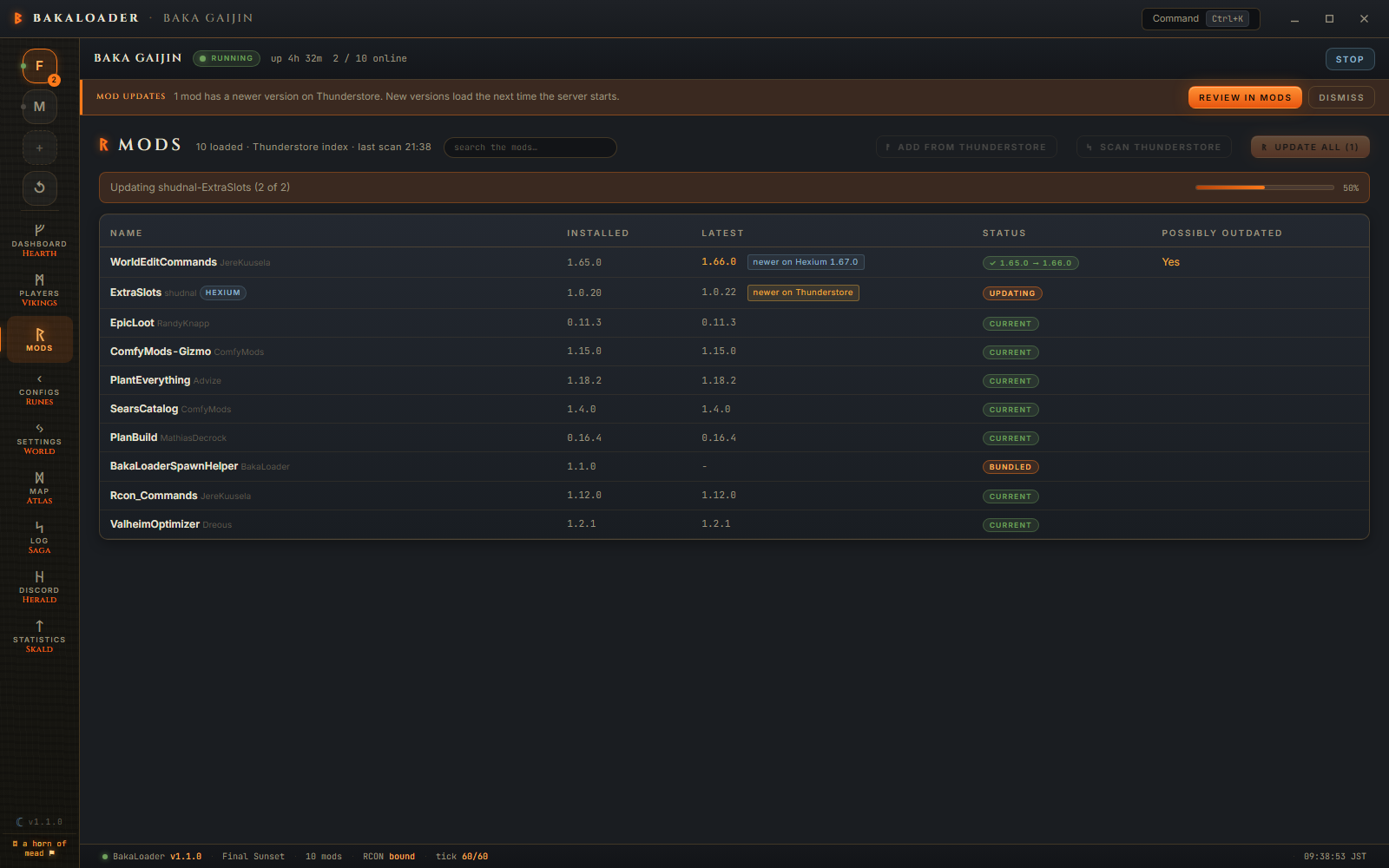
A mod that fails says so in its own row, with the reason, and the others carry on. Nothing about one mod failing stops the rest.

To update a single mod, right click it and pick Update mod. It runs the same way, with that one row moving through the same states, and it is greyed when the mod is already current.
Per mod, an update downloads the package to a temp folder, copies the current mod folder to BepInEx\.bakaloader-mod-backups\{Author-ModName}\{stamp}\, empties the live folder and copies the new files in. If anything throws part way through it puts the backup back and logs "Restored previous version of {mod}." If even that fails, the error names the folder your old files are still sitting in.
Config files are not touched. They live in BepInEx\config, and nothing in the update path goes near that folder.
Add from Thunderstore opens a single field. The body says: "Paste any Thunderstore link. The mod's page, its versions page, a direct download link, or a ror2mm:// mod-manager link. If the link has no version, the latest release is installed."
All of these work:
https://thunderstore.io/c/valheim/p/denikson/BepInExPack_Valheim/
https://thunderstore.io/c/valheim/p/denikson/BepInExPack_Valheim/v/5.4.2333/
https://old.thunderstore.io/package/bbepis/BepInExPack/
https://thunderstore.io/package/download/denikson/BepInExPack_Valheim/5.4.2333/
ror2mm://v1/install/thunderstore.io/denikson/BepInExPack_Valheim/5.4.2333/
A link without a version installs the latest. A link with one installs exactly that version.
New in 1.1.0, with Also check Hexium turned on, a hexium.gg mod page address works in this same box, and the dialog body says so. It never installs straight from the paste. BakaLoader looks the package up, shows you what the download would be, and asks. With the switch off the paste is turned down, and the toast tells you where the switch is. See Hexium.
Bad links get a specific message rather than a generic failure. "Paste a Thunderstore link first." for an empty box, "That doesn't look like a link (missing https:// or ror2mm://).", "Not a thunderstore.io link.", "Download links need owner, mod name, and version, for example /package/download/denikson/BepInExPack_Valheim/5.4.2333/." and a few more in the same shape.
Dependencies are not installed for you. If a mod needs another mod, paste that one's link too. There is no dependency resolver.
Right click the row, Remove mod….

The dialog says "The plugin folder is backed up to BepInEx.bakaloader-removed, then removed." If it found config files whose names look like this mod's, it offers a checkbox, ticked, listing them: "Also delete 2 config files:" with the names underneath. Untick it to keep them. If it found none it says so.
New in 1.0.6, a removal takes both halves of the mod. If BepInEx\patchers holds a folder with the same name as the one being removed, it is backed up next to the plugin folder and deleted with it. The dialog line only names the plugin folder, so this is worth knowing on its own: before 1.0.6, removing a mod that had a patcher part left that part behind, and it kept loading at every start. Only the named folder inside patchers is ever touched, never patchers itself. See How mods are matched and updated for the exact backup path.
Config matching is a heuristic. Both the file name and the mod name are reduced to lowercase letters and digits, and it matches if the file name contains the mod name. That catches Therzie.Warfare.cfg, com.therzie.warfare.cfg and plain warfare.cfg. It will not catch a config named after something else entirely.
New in 1.0.3: if other installed mods list this one as a dependency, the dialog names them under "These installed mods depend on {mod} and may stop working:" with a checkbox, "Also remove these N mods", off by default. Leave it unticked and only this mod goes. Tick it and BakaLoader removes the dependents first, in an order that never leaves one of them orphaned midway, then the mod itself, each with its own backup kept.

That list is read from the mods you already have installed, from the dependencies each one records in its own manifest.json, and it follows the chain, so a mod two steps down the line is caught too. It is never a Thunderstore lookup, so it only ever names mods that are actually on this server. A mod nothing depends on shows no such list.
BakaLoader will not remove its own bundled plugins, or the two protected patchers, here: "This plugin is managed by BakaLoader and cannot be removed here."
Some player actions need a mod on the server. If BakaLoader's own Commander plugin is installed, everything works and you never see this. If it is not, and the third party mods that do the same job are also missing, a banner appears on the Players screen:
Some actions are unavailable because the server is missing required mods
with a line per mod and an Install missing mods button. That button downloads and installs them, and the note beside it says "fetched from Thunderstore · loads on the next server start". Installing a brand new plugin folder is safe while the server runs, because nothing has that folder open yet.
When a scan finds updates, a notice sits above the page:
Mod updates. 2 mods have newer versions on Thunderstore. New versions load the next time the server starts.
with a Review in Mods button. It stays until you deal with it or dismiss it.
New in 1.1.0, a dismissal sticks. It is remembered against the number of waiting updates, so the notice no longer comes back on the next redraw of the screen, which it used to do on every letter typed into the mod search. A mod that picks up an update afterwards changes the count and raises the notice again, and taking the updates forgets the dismissal altogether.

Turn on Update mods at scheduled restarts, in the Upkeep card on the Dashboard, and BakaLoader will do it without you. Waiting updates are installed during a scheduled restart. Separately, it waits until the server has been running with nobody on it for 10 minutes, re-checks every 10 minutes after that, and if there are any it restarts the server with the reason "empty" and applies them.
That path is the safe one by construction. The mod files are replaced after the server process has exited and before it is started again, so nothing is ever swapped under a running server.
A mod installed from the second site is never in that path. It is not counted as having an update at all, so the scheduled restart and the empty server restart both walk straight past it. See Mods from the second site.
Someone links you a mod on Discord: https://thunderstore.io/c/valheim/p/Azumatt/AzuExtendedPlayerInventory/.
Stop the server. Open Mods, press Add from Thunderstore, paste the link, press Install. The toast reads "Installed Azumatt-AzuExtendedPlayerInventory 1.4.6" and the log records it.
Press Scan Thunderstore. The new mod appears in the table with Current in the Status column.
Start the server. Open Configs and the mod's .cfg file is now in the list, because it wrote one on first load. Edit it, save, restart.
Do I have to stop the server to update mods? Not to press the button, but yes for it to work reliably. A DLL the running server has open cannot be replaced, and nothing loads until the next start anyway.
Why do so many mods say "possibly outdated"? Usually because Valheim updated recently and their authors have not published a new release yet. The column reads Yes for any mod whose newest Thunderstore version predates the last game update, so right after a patch it can flag most of your list even though most of those mods are fine. It is a hint to go and check, not a sign anything is broken. See Possibly outdated.
Can I update one mod instead of all of them? Yes. Right click the mod and pick Update mod. It is greyed when that mod is already current.
A mod is installed but the list does not show it. Almost always the folder shape. BakaLoader reads one level of folders inside BepInEx\plugins, so a loose .dll sitting directly in plugins is invisible to it. Put it in a folder.
I removed a mod and it kept loading. It had a patcher part. Before 1.0.6, removing a mod only took its folder in BepInEx\plugins, so a mod that also had a folder in BepInEx\patchers, like Smoothbrain-StartupAccelerator, left that half sitting there and it loaded at every start. From 1.0.6 both halves go together, and patcher mods are listed in the table so you can see they are there in the first place. See Patcher mods.
Why does a mod show - in the Latest column? The scanner could not match it to a Thunderstore package. Usually a renamed folder, sometimes a mod that is not on Thunderstore at all. See How mods are matched and updated.
Will it update the mods my players run? No. This is the server's plugins folder only. Your players update their own game.
Where do the backups of replaced mods go? BepInEx\.bakaloader-mod-backups for updates, BepInEx\.bakaloader-removed for removals. Both are siblings of plugins, so they are never scanned as plugins. Nothing prunes them, so clear them out yourself when the folder gets big.
How mods are matched and updated covers the folder naming rules, the Thunderstore index and its cache, and what to do when a mod will not match.
For mod authors covers what a mod needs so BakaLoader can see it, update it and list its items.