Repository navigation
Calibration
Guided calibration is available in 0.3.0. Manual dial readings are the recommended route. No utility account or automation is needed.
Important
The transmitter sends a pulse counter, not the reading on your dial. Both its starting offset and litres per pulse are unknown. Read just after a transmission, use 20–50 L (reuse it), then read after the next transmission, normally about one hour later, to establish both; more readings may be needed to resolve uncertainty. Until calibrated, usage is in pulses. Check the calibrated estimate against the dial; this is experimental, not billing-grade measurement.
Use the dashboard card’s Read your dial panel: its mechanical register picture and expandable Other meters help explain which digits and unit to enter. The panel stays visible until calibrated, reopens for warnings, and otherwise collapses to Add a check reading. Fictional transmitter ID 123456 is used throughout; substitute your own ID and check actual entity IDs, since existing renames are preserved.
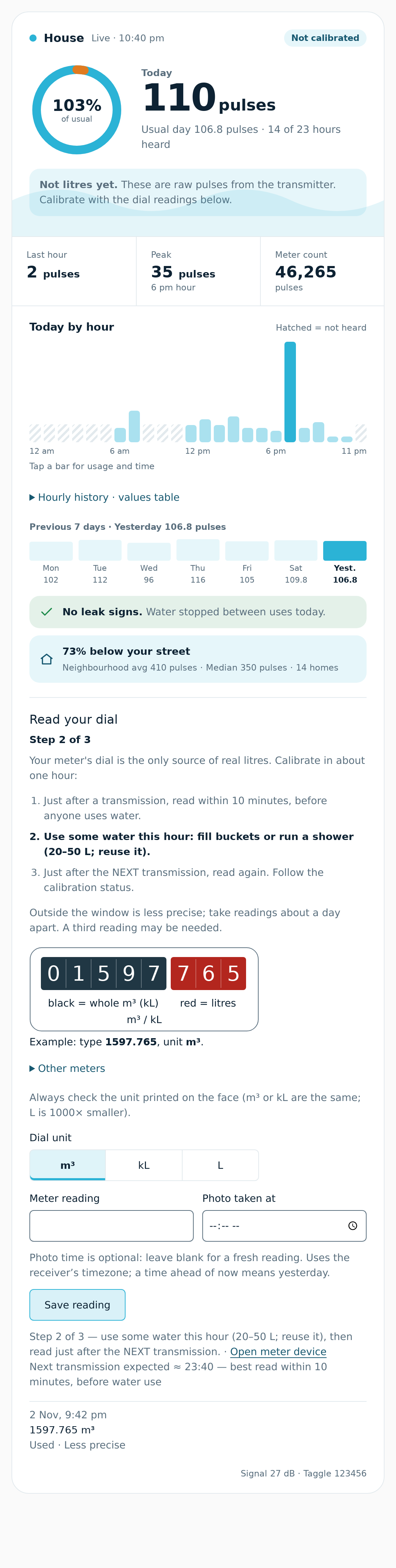
- Just after a transmission, read the dial within 10 minutes, before anyone uses water. The card shows Read now with minutes remaining; Good time to read the dial turns on. Choose m³, kL or L to match the face (1 m³ = 1 kL = 1,000 L), type the full reading, and save promptly.
- Use some water during the hour, for example fill buckets or run a shower, about 20–50 L. Reuse the water. This is practical guidance, not a minimum-usage gate.
- Just after the NEXT transmission (normally about one hour later), read within 10 minutes again, before further water use. Save the second reading and follow Calibration status. When exactly one standard pulse size fits, calibration supplies litres automatically. If multiple sizes fit, status names them and asks for another reading.
The card’s friendly form combines Meter reading and optional Photo taken at into one text command, preserving the decimals you type. Leave the photo time blank for a fresh reading. A clock time uses the receiver’s timezone: today, or yesterday if ahead of now. The last ten readings show time, value/unit, exactness and whether they are used, excluded or pending. Reading sent means the command was sent; check receiver status for acceptance.
Without the card: open Settings → Devices & services → MQTT → devices → Taggle [your ID]. Choose Dial unit (m³ = kL, or L) and type 1597.765 or 1597.765 18:00 into Dial reading (e.g. 1597.765 or 1597.765 18:00). Submit once with Enter. The reading and time travel together; there is no pending time for the next reading.
Outside the read-now window, readings remain accepted but are less precise; a third reading may be needed. For the next reading, return to the one-hour routine: read just after a transmission, use 20–50 L (reuse it), then read after the next transmission. The Read your dial now sensor (binary_sensor.taggle_123456_read_dial_now, displayed as Good time to read the dial) is on for ten minutes after every configured-meter frame, off otherwise; its attributes give since, until and next_transmission.
| Calibration status says | Next action |
|---|---|
| Step 1 / Read your dial now | Read within 10 minutes of a transmission, before water use. |
| Step 2 / Step 3 | Use 20–50 L this hour (reuse it), then read just after the next transmission. |
| Waiting for next transmission to line up your reading | Keep receiving; the next frame supplies the later counter boundary. |
| No counter history before this reading | Take a fresh reading while reception is running. An old photo without usable history cannot be aligned. |
| No water was used between your readings | Use some water before the next transmission, then read again. |
| Named pulse sizes both/all fit / Several wrap counts fit / Readings are too uncertain | Follow the message; more normal use and a reading just after a transmission can narrow the bounds. |
| Readings disagree / Check your reading | Check digits, unit, timestamp and transmitter ID, then delete the mistake and submit a correction. |
| Calibrated | Check the estimated Meter reading against the physical dial, and submit later readings to validate it. |
| Counter gap may hide wraps / resolve the absolute reading | Follow the request for a fresh reading; usage litres may be known while the absolute reading is withheld. |
| Counter sequence changed | Back up state, reset calibration and take fresh readings as requested. |
Read your dial now (binary_sensor.taggle_123456_read_dial_now, displayed as Good time to read the dial) can trigger a phone reminder. Replace the fictional ID with your actual entity ID and replace the notification action with your phone’s action:
alias: Taggle dial-reading reminder
triggers:
  - trigger: state
    entity_id: binary_sensor.taggle_123456_read_dial_now
    to: "on"
actions:
  - action: notify.mobile_app_your_phone
    data:
      message: "Read your dial now, before anyone uses water."
The sensor opens a ten-minute window after each configured-meter frame. Its since, until and next_transmission attributes describe the window and expected next transmission; this is guidance, not guaranteed delivery timing.
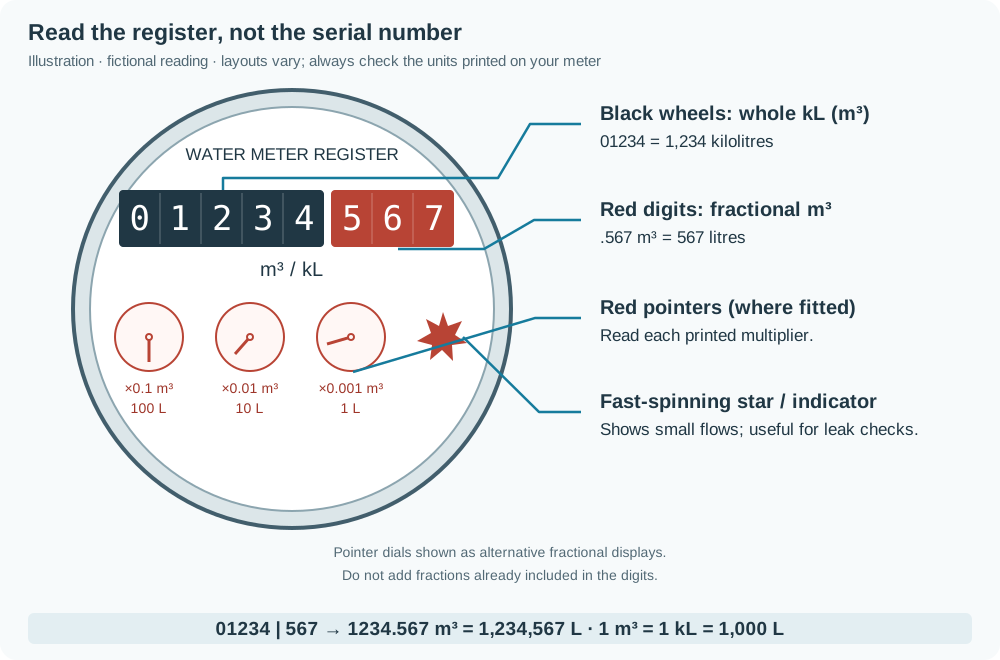
Illustration, not a photo. Layouts vary; follow the units and multipliers printed on your meter.
Black wheels commonly show whole m³ or kL; red digits or pointer dials show fractions. 1 m³ = 1 kL = 1,000 L. For m³/kL dials, ×0.1 = 100 L, ×0.01 = 10 L and ×0.001 = 1 L. Do not add pointer fractions a second time if red digits already show them. The spinning star shows flow, not cumulative volume. A serial number is not a reading or transmitter ID.
For illustrated black 01234 and red 567, enter 1234.567 with m³ or kL selected, or 1234567 with L selected. These are the same volume. Photograph the full face with units and decimal positions visible; do not assume your own dial uses this layout.
The card’s compact illustration uses a different fictional reading: black 01597 and red 765 mean 1597.765 m³ (or kL), equal to 1597765 L. For black digits with separate pointer dials, add their values: 1597 + 0.7 + 0.06 + 0.005 = 1597.765 m³. All-one-colour digits marked L/litres need every digit with L selected. For digital/LCD displays, enter the displayed reading and choose the unit printed beside it. Ignore the small star/triangle flow spinner. Always check the unit printed on the face: m³ and kL are the same; L is 1000× smaller.
Use one reading box (default text.taggle_123456_dial_reading) or publish to taggle/123456/reading/set, with retain off:
1597.765
1597,765
1597.765 18:00
1597.765 6:00
1597.765 1800
1597.765 at 18:00
1597.765@18:00
1597.765 2026-11-02T18:00:00+10:00
A bare number uses submission time and the selected dial unit. Append the photo’s original time in the same submission: HH:MM, H:MM, HHMM, or offset-aware ISO-8601. Clock times mean today in the receiver’s timezone, or yesterday if later than now. Nonexistent or repeated DST clock times require ISO with an explicit UTC offset. A future ISO timestamp is rejected. Use a decimal point or comma, without grouping separators or unit letters. These formats also work with at or @ before the time.
JSON remains supported on the same MQTT topic:
{"m3":1234.567,"time":"2026-11-02T08:15:00+10:00","source":"photo"}Use exactly one of m3, kl or litres; JSON units override the selector. Optional time is the measurement time, and optional source describes it. No time means submission time. Use actual measurement time for automation and older photos. A photo outside stored counter history cannot be aligned; take a fresh reading. Topics here use the default taggle prefix.
| Quantity | Meaning |
|---|---|
Raw radio counter (raw_count) |
Wrapping 16-bit pulse counter with an arbitrary start; wraps at 65,536. Multiplying it by litres per pulse does not reconstruct the dial. |
meter_count |
ha-taggle's running sum of recovered hourly pulse differences; it is not the raw counter or dial total. |
Meter reading (meter_reading) |
Estimated absolute dial reading, derived from your readings, offset and unwrapped radio counter. Withheld if the absolute counter is ambiguous. |
meter_reading_litres = offset + litres_per_pulse × unwrapped_counter
For guided calibration, select Meter reading (sensor.taggle_123456_meter_reading, using your actual entity ID) under Settings → Dashboards → Energy → Water. It has unit L, device class water and state class total_increasing, with whole-litre display precision. Home Assistant records changes from a statistics baseline; a large initial reading is not imported lifetime consumption or historical hourly data. Allow an hour or two for statistics. Check the estimate against the dial periodically.
Total litres (total_litres) is separate: each newly recovered interval adds usage using the litres per pulse active when that interval is first processed. Previously stored intervals are not recalculated or backfilled. A frame after calibration may recover a recent earlier interval; that is different from importing history. Hourly/daily litre displays use the current factor. Missing unrecovered intervals are omitted; the next frame can recover a single missed transmission.
The manual-factor-only route can use sensor.taggle_123456_total_litres for Energy before an absolute reading exists. Choose one source per supply. If migrating from Total litres, replace the existing water source rather than adding both. Existing statistics are not automatically rewritten into the new entity's history. Calibration corrections/reset can change or temporarily remove the absolute estimate; review Energy statistics rather than assuming continuity across those changes.
| Control/sensor | Default entity ID for fictional 123456 | MQTT command topic |
|---|---|---|
| Dial unit (m³ = kL, or L) | select.taggle_123456_dial_unit |
taggle/123456/dial_unit/set (m³, kL, L) |
| Dial reading (optional photo time in the same box) | text.taggle_123456_dial_reading |
taggle/123456/reading/set (formats above) |
| Good time to read the dial | binary_sensor.taggle_123456_read_dial_now |
No command; state and attributes on taggle/123456/read_dial_now. |
| Delete all dial readings (Configuration) | button.taggle_123456_reset_calibration |
taggle/123456/reset/set (RESET) |
| Calibration status | sensor.taggle_123456_calibration_status |
No command; attributes on taggle/123456/calibration. |
| Meter reading | sensor.taggle_123456_meter_reading |
No command; value on taggle/123456/state. |
Controls and Calibration status require receiver availability, so you can enter readings before usable counts arrive. Usage and Meter reading additionally require recent decoded counts; no valid frame for three hours makes them unavailable. Meter reading discovery appears only when the absolute estimate exists and is removed when it is withheld. A calibrated factor can expose usage litres before an absolute reading is possible.
The card resolves these controls through the same device/entity registry as Calibration status, including renamed entities and existing pulse mappings. If lookup is unavailable, add explicit keys to the meter’s existing entities: mapping (use actual entity IDs):
entities:
  calibration_status: sensor.taggle_123456_calibration_status
  dial_unit: select.taggle_123456_dial_unit
  dial_reading: text.taggle_123456_dial_reading
  read_dial_now: binary_sensor.taggle_123456_read_dial_now
Each meter has its own form. The card preserves unsent entries and keyboard focus through Home Assistant state updates. If controls are missing or unavailable, it shows an explanation and disables saving.
Up to 200 readings are stored; MQTT attributes expose only the last ten. To inspect them, open Developer tools → States, select your actual Calibration status entity and inspect its readings attribute. Each row includes an id, time, original value/unit, litres, source, resolution_litres, exact flag, counter interval, used flag, reason and residual when available. Attributes also report bounds, chosen factor, method, offset, uncertainty and next expected transmission. Delete an older reading before adding another at the limit.
Negative use, implausible pulse sizes, and dial/prediction differences larger than the counter interval plus dial-reading resolution and 0.5% of measured use flag a suspect reading. Suspect readings remain stored, excluded and visible. A reading about 1000× off suggests switching Dial unit; it is never silently converted. Check all digits, decimal places, units, photo time, timezone and your transmitter ID.
Back up receiver state first: include the add-on's data in an HA OS backup, or stop the Docker receiver and copy its private data directory together with config.json. Backup guidance.
To delete one mistake, inspect readings in Calibration status attributes. For example, a row with id: 3, used: false and a disagreement reason identifies reading 3, not your transmitter number. In Developer tools → Actions → MQTT: Publish, send {"delete":3} to taggle/123456/reading/set (substitute your transmitter ID and the actual reading ID), with retain off. The remaining readings are solved again; check status, then submit the corrected reading with its actual time. Deleting may remove the solution if insufficient usable readings remain.
Delete all dial readings, under the device’s Configuration (delete-sweep icon), clears all entered readings and the automatic solution/offset. The Calibration status attributes describe this action too. It preserves the selected Dial unit, observed usage totals and configuration pins. Ordinary reset retains counter checkpoints; after a blocked counter-sequence change it discards the invalid calibration checkpoint history. A pinned factor/offset can immediately restore a configured solution. Otherwise absolute Meter reading is withdrawn until solved again, and automatic litre discovery can be removed. HA's previously recorded statistics are not erased or repaired by a receiver reset. Review these consequences before pressing the button; it sends the reset immediately without an extra receiver confirmation dialog. Counter sequence changes require a reset and fresh readings as requested by status.
Never retain command messages: replaying an entry would duplicate it. The receiver ignores retained commands. MQTT discovery and subscriptions return after broker reconnect or Home Assistant birth; readings, selected unit and solution persist privately in versioned state.json (0600). Normal INFO logs list configured-meter IDs only; heartbeat summaries count other meters without listing their IDs. Scans and explicitly enabled broad JSONL logging have separate privacy exceptions.
| Option | Default | Accepted values |
|---|---|---|
dial_unit |
m3 |
Add-on default: m3, kl or L; device selector shows m³, kL or L. |
calibration_max_uncertainty |
0.02 |
Positive, at most 1; full relative bounds-width limit for a nonstandard fit. Add-on schema minimum is 0.000001. |
Old unknown add-on option keys are ignored with a startup warning, so retired options do not prevent startup. Upgrades remove the old reading-number and separate photo-time discovery entities and drop pending photo time from saved state.
The selector’s saved choice takes precedence over the default. litres_per_count pins a factor; guided readings then validate/report and find the absolute offset, never replace that factor. Optional meter_reading_offset pins the offset in litres too (a mapping in JSON, a list of meter_id / value in add-on options, like litres_per_count). It requires a pinned factor. With a pin but no dial reading/offset, usage litres are available but an absolute meter reading is not yet possible. To let automatic calibration replace a previous manual pin, remove any meter_reading_offset pin and clear litres_per_count: use [] for both in add-on options, or {} for both inside the copied standalone JSON. Save and restart Taggle water meter, or run docker compose restart taggle from the receiver repository. Existing readings are solved again; a full reset is not required solely to remove a pin. Do not copy the example factor below as a default.
The neighbourhood uses the first configured meter's calibrated litres per pulse unless separately configured; that assumption does not calibrate neighbours.
The V100 PSM-T specification lists 5 L/pulse for the 5 black + 3 red register and 0.5 L/pulse for the 4×4 register. The owner-confirmed Gladstone V100 readings match 5 L. Two utility meter readings 24 hours apart (3 November 2026) spanned 585 L over 116 radio pulses = 5.04 L/pulse, i.e. 5 L within one pulse of rounding, and two dial photos taken in between agreed within a pulse. As a second source for 5 L/pulse, davidjb’s configuration uses official Taggle cloud MQTT and pulses × 5 = litres. It does not establish a model or pulse size for every installation, or an absolute dial offset. Still calibrate your own meter; compare meter types and pulse sizes.
The receiver retains 90 days of counter checkpoints using the same sequence and slot identities as usage accounting. Each frame includes the current and two earlier counter slots, so a later frame can fill missed transmissions. A dial reading at time t is bracketed by the last checkpoint before it and first after it. The exact flag is true only within ten minutes of a received frame and when both unwrapped bracket counters agree (no pulses since that frame); otherwise it remains false. A reading at the frame timestamp has a zero-width bracket. A later frame can confirm a static bracket for a photo taken minutes after the earlier frame. A recovered slot without an observed frame does not open a window. Otherwise the true count remains an interval. An explicit photo time brackets against stored history. If there is no older checkpoint, take a new reading; the receiver does not invent one.
There is no minimum-usage gate. Each typed reading R carries a litres interval [R−resolution, R+resolution]. Resolution follows the number of decimals typed: 1597.765 m³/kL is ±1 L, 1597.76 is ±10 L, and 1597 is ±1000 L; whole L readings are ±1 L. Additional decimal places narrow the resolution (for example four m³ decimals give ±0.1 L). JSON decimal precision is preserved too. Old stored readings default to ±1 L.
For two readings, combine both resolution intervals with counter intervals [a,b], [c,d]: the lower factor bound is (ΔR−res1−res2)/(d−a), and when c>b the upper is (ΔR+res1+res2)/(c−b). Bounds intersect across all usable readings. Plausible factors are 0.05–1000 L/pulse. Standard sizes are 0.1, 0.5, 1, 2.5, 5, 10, 25, 50, 100, 1000 L. Exactly one standard inside the bounds applies automatically. If several fit, status names the candidates and suggests the next transmission. With none inside, a nonstandard fit applies only when full relative bounds width is at most 2% (calibration_max_uncertainty). For example, one pulse and a dial change of 4 L with ±1 L per reading allows both 2.5 L and 5 L; another reading is needed. Offset fitting also uses reading-resolution intervals; residual checks include resolution rather than a fixed rounding allowance.
Missing-slot gaps may conceal extra 65,536-count wraps. The solver checks wrap counts against the register changes and plausible factor bounds. A uniquely supported standard factor applies even when the exact wrap placement is unresolved; the absolute reading is withheld if its counter/offset is still ambiguous. Ambiguous factors ask for more evidence. Each wrap search is limited to 4,096 combinations; standard factors are also checked separately to narrow that search. Searches that remain too large stay ambiguous rather than guessing. If a new gap after calibration could conceal wraps, the receiver withholds the absolute reading and asks for a fresh dial reading to resolve it. Observed meter_count and historical total_litres keep their original accounting.
The fictionalised 2 November 2026 hardware example uses ID 123456: 1,597,361 L at 02:43 +10:00, counter static at 46,218; then 1,597,765 L at 18:00 +10:00, bracketed by 17:41 / 46,283 and 18:41 / 46,318. The bounds are 4.02–6.25 L/pulse (including ±1 L per reading). Only 5 L fits, and the exact first reading fixes the offset to 1,366,271 L. The counter did not match the dial modulo 65,536 at any common pulse size: its start is arbitrary.
Advanced: manual litres-per-pulse override. Most people should use guided entry above. This route calculates a factor from precisely aligned observed usage; it does not by itself find the radio counter's offset or produce an absolute dial reading. The litres_per_count setting means litres per pulse and pins the factor for guided checks.
The CLI is part of the Python package (Python 3.11–3.13). See Python installation if taggle-calibrate is not installed; this command runs on the receiver host, not in HA's YAML editor.
- Confirm the transmitter ID from your own label and record reliable reception.
- Wait for a fresh transmission (
last_seenjust updated). Note that timestamp and the receiver's cumulativemeter_count. Go straight to the meter box and photograph the register; retain the phone photo timestamp as the actual physical reading time. Avoid all water use between the radio endpoint and the photo so they represent the same reading. If the frame was delayed/old or water was used in between, take another aligned pair. - Use 20–50 L during the hour (reuse it), then repeat the aligned reading just after the next transmission, normally about one hour later. With coarse register digits or a large pulse size, collect more aligned readings during normal use until the scale is clear; do not run extra water to force a result. Guided calibration above accounts for reading uncertainty automatically.
- Check there are no missing recovered usage intervals or counter resets across the whole period. A utility export can supply equivalent register readings if its timestamps and units are known. Radio intervals need not end on a clock hour; do not align an export by rounding its time to a nearby radio endpoint.
Keep both original timestamps. Only assign the register reading to the radio endpoint in the calibration CSV when no intervening use means the readings really align; the helper cannot correct a delay or estimate water used between them.
For two aligned readings, first convert the physical register values to litres:
litres_per_count = (reading2_L - reading1_L) / (meter_count2 - meter_count1)
Fictional worked example: 1234.567 → 1234.587 m³ gives 20 L. Receiver meter_count 10,000 → 10,008 gives 8 pulses. The factor is 20 / 8 = 2.5 L/pulse. This is an example, not a default for your meter.
For three or more aligned readings, prepare a CSV with offset-aware ISO timestamps and decimal register units:
time,register_reading,meter_count
2026-01-01T12:15:00Z,1234.567,10000
2026-01-01T13:15:00Z,1234.587,10008
2026-01-01T14:15:00Z,1234.617,10020
taggle-calibrate readings.csv --register-unit m3This fictional example gives 2.5 L/pulse. With only two readings, the calculation is (register_end - register_start) / (counts_end - counts_start), converting m³ to litres first. For more readings the helper fits changes from the first reading using least squares through zero, and reports RMSE in litres. Duplicate/naive timestamps, nonfinite values, nonincreasing usable ranges and backwards readings are rejected.
A register-only CSV can have time,register_reading columns; supply a second time,meter_count file with --counts counts.csv. Only exactly matching timestamps participate. The CLI never scrapes a portal, uses credentials or writes a scale to your configuration.
A small residual alone does not prove the scale. Validate it over several independent days, including low and high usage, and compare totals. An exact fit from two observations has no independent validation. For exports of interval litres rather than cumulative register readings, first form aligned cumulative values over complete intervals; the helper does not infer sub-hour use.
Coarse water-tap sanity check: use a household tap, never knock or touch utility equipment. Just after a transmission with other water use stopped, measure 2 × 10 L, noting the time. After you have independently verified litres per pulse, look for approximately that volume across the corresponding interval(s). Pulse resolution may make the change small or absent; check the following interval if needed. Reuse the water. This neither proves ownership nor replaces calibration; do not keep running water to force a result. Repeat uncertain identification during normal use or ask the utility.
Pitfalls: unrecovered intervals make observed pulses incomplete; a counter reset invalidates the comparison; a serial number is not a volume; m³ and litres differ by 1,000. The CLI cannot infer unobserved multiple wraps; guided calibration uses register readings to resolve missing-slot wraps when only one solution fits. Its cumulative meter_count is an observed total, not the physical register. Reject suspect intervals rather than fitting across these problems.
Replace the existing litres_per_count property inside the complete copied config.json example. This is a property fragment, not a complete JSON file: keep the surrounding braces and other settings. Fictional example only; use your verified value:
"litres_per_count": {"123456": 2.5}Or edit that setting in Taggle water meter → Configuration, keeping other options. This YAML belongs in add-on options, not HA's configuration.yaml:
litres_per_count:
  - meter_id: 123456
    value: 2.5
Save and restart Taggle water meter, or run docker compose restart taggle for an existing Docker JSON edit. With a manual factor alone, select sensor.taggle_123456_total_litres (your actual ID) for Energy water. To obtain an absolute Meter reading too, enter guided dial readings; they check the pinned factor and find the offset. See Energy and the three counters for accumulation and migration semantics.
This is optional. A utility reading must be a cumulative register value, with known units and its actual measurement time, not the portal update time or an interval-use total. Keep credentials in the portal integration. This receiver never logs in to your utility.
Publish plain numbers to taggle/<id>/reading/set in the selector’s unit, or JSON with exactly one of litres, m3, kl, plus optional ISO time and source. For example:
{"litres":1597765,"time":"2026-11-02T18:00:00+10:00","source":"utility portal"}Example Home Assistant automation; replace the fictional sensor, attribute names, unit and transmitter ID with your integration’s actual values. The source must supply an offset-aware read_at. Send each physical observation once; do not replay old observations whenever an unrelated attribute changes.
alias: Taggle calibration from utility register
triggers:
  - trigger: state
    entity_id: sensor.utility_register_litres
conditions:
  - condition: template
    value_template: >-
      {{ trigger.to_state is not none and trigger.from_state is not none
         and is_number(trigger.to_state.state)
         and trigger.to_state.attributes.get('read_at') is not none
         and trigger.to_state.attributes.get('read_at') != trigger.from_state.attributes.get('read_at') }}
actions:
  - action: mqtt.publish
    data:
      topic: taggle/123456/reading/set
      retain: false
      qos: 1
      payload: >-
        {{ {'litres': trigger.to_state.state | float,
            'time': trigger.to_state.attributes.read_at,
            'source': 'utility portal'} | to_json }}
Backfilled observations use stored checkpoints, just like phone photos. A portal reading outside retained history cannot be aligned. More manual photos can still calibrate and validate the meter without any utility automation.