Repository navigation
Entities Reference
The sensors and controls ha-taggle 0.3.0 creates in Home Assistant. They arrive through MQTT discovery, so you don't write any YAML for them.
All IDs below use the fictional meter 123456. Yours will use your ID. Home Assistant may rename entities, so check the device page if an ID doesn't match.
- Open Settings → Devices & services → MQTT, then its Devices list.
- Open Taggle 123456, using your transmitter ID. Scroll to Diagnostics for Last seen, SNR and signal level.
- Select a sensor, open its settings (gear icon), and copy Entity ID into the matching card YAML entry.
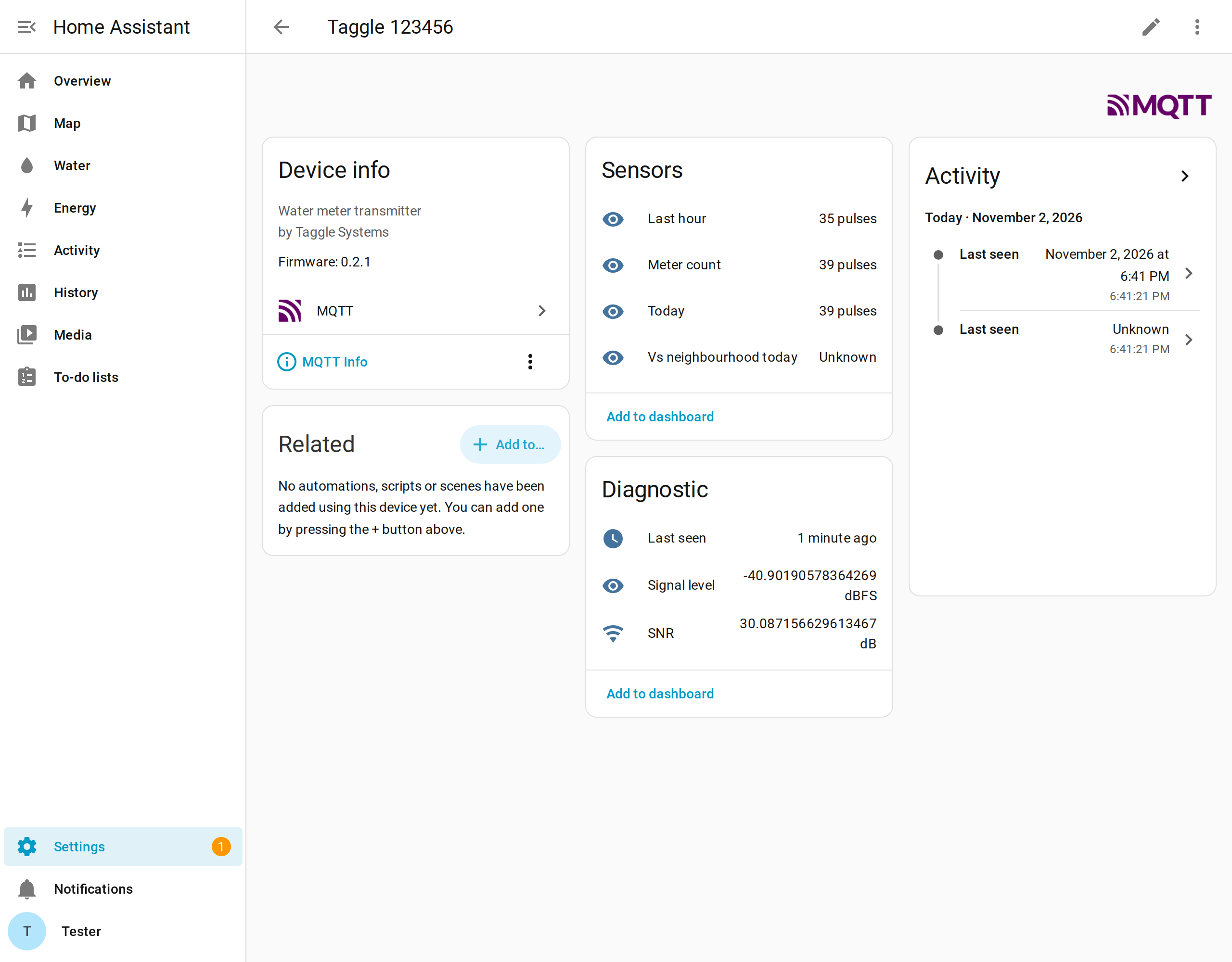
Real 0.2.1 device page with fictional transmitter ID 123456. Select a sensor under Sensors or Diagnostic, then its settings to copy Entity ID. “Firmware: 0.2.1” here is the receiver software version reported through MQTT, not the utility transmitter's firmware.
These are different identifiers:
| Identifier | Example or location | Used for |
|---|---|---|
| Transmitter ID | Fictional 123456 on the radio label |
Receiver meter_ids
|
| Device name | Friendly label such as Taggle 123456 | Finding the device in Home Assistant |
| Home Assistant device ID | Long identifier at the end of /config/devices/device/<device-id> on your HA instance |
Card device:
|
| Entity ID | sensor.taggle_123456_last_hour |
Card entities: map and Energy source |
Discovery announces one device per configured meter when normal mode connects to MQTT, before any radio reading. The enabled neighbourhood device appears then too. Values can remain unknown or unavailable while waiting. A missing device calls for MQTT/configuration checks, not an hour of waiting. Entity unique IDs are stable. Default IDs are requested on first registration; existing registry IDs and user renames are preserved, and collisions may add a suffix.
| Entity ID | Unit | State class | What it is |
|---|---|---|---|
sensor.taggle_123456_last_hour |
pulses | measurement | Pulses in the most recent hourly interval |
sensor.taggle_123456_today |
pulses | — | Total of recovered intervals that ended today (local time). Partial if intervals remain unrecovered. |
sensor.taggle_123456_meter_count |
pulses | total_increasing | ha-taggle's running total of recovered hourly pulse differences. Not the raw radio counter or dial reading. |
sensor.taggle_123456_snr |
dB | measurement | Median despread correlation SNR estimate (diagnostic) |
sensor.taggle_123456_signal_level |
dBFS | measurement | Noise-subtracted signal level in the sampled band (diagnostic) |
sensor.taggle_123456_last_seen |
timestamp | — | When the last valid message arrived (diagnostic) |
sensor.taggle_123456_last_hour_litres |
L | — |
last_hour × your litres per pulse. Only after calibration.
|
sensor.taggle_123456_today_litres |
L | — |
today × your litres per pulse. Only after calibration.
|
sensor.taggle_123456_total_litres |
L | total_increasing | Sum of newly recovered intervals at the litres per pulse active when first processed; past additions are not revalued. Usable for the Energy dashboard with a manual factor before an absolute Meter reading exists; choose one source per supply. |
sensor.taggle_123456_meter_reading |
L | total_increasing | Estimated absolute dial reading after guided calibration resolves factor and offset. Discovery is withdrawn if the absolute estimate is ambiguous. Recommended for Energy once available. |
sensor.taggle_123456_calibration_status |
— | — | Reading guidance, acceptance, ambiguity and calibration result; attributes include the last ten readings. |
sensor.taggle_123456_vs_neighbourhood_today |
% | measurement | Your today ÷ neighbourhood average × 100. Only when neighbourhood is on; see its unit limitation. |
The litre entities have device class water. SNR, signal level and last seen are in the device's Diagnostic section.
| Default entity ID | Display name / purpose |
|---|---|
text.taggle_123456_dial_reading |
Dial reading (e.g. 1597.765 or 1597.765 18:00). A reading and optional photo time submitted together. Press Enter once. |
select.taggle_123456_dial_unit |
Dial unit (m³ = kL, or L). Select m³, kL or L to match the meter face. Saved selection overrides the configuration default. |
binary_sensor.taggle_123456_read_dial_now |
Good time to read the dial (Read your dial now). ON for ten minutes after each configured-meter frame; since, until, next_transmission attributes. This is guidance, not evidence of usable clear counts. |
button.taggle_123456_reset_calibration |
Delete all dial readings, under Configuration. Clears entered readings and automatic calibration/offset immediately; keeps the unit, observed usage totals and configuration pins. Review reset consequences. |
binary_sensor.taggle_123456_possible_leak |
Possible leak, device class problem. Enabled by default for configured meters; no calibration needed. Hourly continuous/night-flow hint, not an instant alarm. Rules and recovery. |
The old number control enter_reading and separate text control reading_time are removed on upgrade, along with saved pending photo time. Use the single Dial reading box. Guided entry needs no receiver restart.
Calibration status attributes include readings (last ten; up to 200 stored), reading_count, k_bounds, chosen_k, method, offset, uncertainty, dial_unit, next_transmission and read_dial_now. Each reading has an ID, time, unit, resolution, exact, used, reason and counter interval when available. Calibration explains pending/excluded readings, deletion and phone reminders.
Possible leak attributes are reason, hours_with_flow_last_24h, longest_zero_run_hours, night_pulses, observed_hours and last_evaluated. OFF means no qualifying hint, not proof of no leak.
last_hour (and last_hour_litres) carry extra attributes, used by the card:
| Attribute | Meaning |
|---|---|
history |
Recent hourly intervals, used for the 48-hour chart |
hours_observed |
How many hourly intervals were recovered today |
litres_per_count |
The litres per pulse in use (if calibrated) |
encrypted |
Whether the transmitter is the encrypted type |
raw_count |
The newest raw 16-bit counter value from the radio |
See Neighbourhood comparison for the rules. Each is unknown until at least 3 meters qualify for its own group.
| Entity ID | Unit | State class | What it is |
|---|---|---|---|
sensor.taggle_neighbourhood_meters_heard |
meters | measurement | Other meters heard in the last 24 h (including encrypted) |
sensor.taggle_neighbourhood_meters_counted |
meters | measurement | Clear neighbours qualifying for today |
sensor.taggle_neighbourhood_average_today |
L or pulses | measurement | Average of qualifying neighbours' today totals |
sensor.taggle_neighbourhood_median_today |
L or pulses | measurement | Median of the same |
sensor.taggle_neighbourhood_average_last_hour |
L or pulses | measurement | Average of each neighbour's latest interval within 2 h |
- No valid frame for 3 hours → diagnostics and usage for that meter become unavailable. Possible leak follows usage availability.
- Encrypted meter → usage and leak entities stay unavailable. SNR, signal level and last seen still work.
- Inconsistent counter/sequence → usage can temporarily become unavailable while a new baseline is established. Calibration status may request a reset and fresh readings.
- Controls, Calibration status and Good time to read the dial require only receiver availability, so dial entries can be submitted before usable counts arrive.
- Meter reading requires recent decoded counts and a resolved absolute estimate; its discovery is removed when that estimate is withheld, even if usage litres remain available.
- Receiver stopped → everything goes unavailable. The MQTT last will marks it offline.
A state class tells Home Assistant how to keep long-term statistics:
-
measurement: a value at a point in time (like temperature). HA keeps min, max and mean. -
total_increasing: a counter that only goes up, except for resets. HA tracks how much it grew. The Energy dashboard needs this.
Read more in the sensor developer docs.
With the default topic_prefix: taggle:
| Topic | Contents |
|---|---|
taggle/status |
online / offline for the receiver |
taggle/123456/state |
JSON with the sensor values |
taggle/123456/attributes |
JSON attributes (history and so on) |
taggle/123456/available |
Diagnostics availability |
taggle/123456/counts_available |
Usage availability |
taggle/123456/calibration |
Calibration attributes |
taggle/123456/read_dial_now |
Read-now state and timing attributes |
taggle/123456/leak |
Possible-leak state and attributes |
taggle/123456/reading/set |
Non-retained command: reading plus optional time, JSON reading, or {"delete":3} using a reading ID |
taggle/123456/dial_unit/set |
Non-retained command: m³, kL or L
|
taggle/123456/reset/set |
Non-retained command: RESET
|
taggle/neighbourhood/state |
JSON aggregate values |
homeassistant/<domain>/…/config |
Retained discovery messages for sensors, binary sensors, text, select and button |
Discovery and cached state are republished on broker reconnect and Home Assistant's MQTT birth message. Running two receivers? Give each a different topic_prefix. If you remove a meter or change prefixes, manually remove its old MQTT device/discovery topics.
Remove the ID from receiver meter_ids first and apply the change. If changing topic prefixes, stop the old receiver configuration first. Release 0.3.0 does not automatically clear discovery for removed IDs or old prefixes.
For retained MQTT cleanup, use Developer tools → Actions, choose mqtt.publish, and switch to YAML mode. This example removes one sensor's discovery using default prefixes; replace fictional 123456 with the old ID you intend to remove:
action: mqtt.publish
data:
  topic: homeassistant/sensor/taggle_123456/last_hour/config
  payload: ""
  qos: 1
  retain: true
Run the action, then repeat for each sensor key, replacing last_hour in the topic: today, meter_count, snr, signal_level, last_seen, last_hour_litres, today_litres, total_litres, meter_reading, calibration_status and vs_neighbourhood_today. Empty retained discovery removes the associated entity; it does not delete the whole MQTT integration. See MQTT discovery.
Also clear discovery for homeassistant/text/taggle_123456/dial_reading/config, homeassistant/select/taggle_123456/dial_unit/config, homeassistant/button/taggle_123456/reset_calibration/config, and homeassistant/binary_sensor/taggle_123456/read_dial_now/config and homeassistant/binary_sensor/taggle_123456/possible_leak/config. For an older installation, clear homeassistant/number/taggle_123456/enter_reading/config and homeassistant/text/taggle_123456/reading_time/config if still present. Use empty payloads with retain enabled only for this cleanup. Never retain reading, unit or reset commands.
Clear the old retained data the same way, using the exact topics taggle/123456/state, taggle/123456/attributes, taggle/123456/available, taggle/123456/counts_available, taggle/123456/calibration, taggle/123456/read_dial_now, taggle/123456/leak and the retired taggle/123456/reading_time. Keep the payload empty and retain enabled. Use your old configured prefixes if they differed; never clear shared taggle/status or neighbourhood topics for this one-meter cleanup. Remove any leftover empty device from Home Assistant's MQTT Devices list. Correct your card mappings afterwards.
last_hour is the difference between the newest two 16-bit raw slots. Usage requires clear frames; encrypted meters expose diagnostics while count entities remain unavailable. meter_count starts at the sum of the two recoverable intervals, deduplicates overlapping intervals across restarts, handles 16-bit count and 8-bit sequence wraps, and skips unknown gaps. It is an observed cumulative total, not the physical meter register. The newest raw slot is available as raw_count in attributes. Its starting value relative to the dial and its litres per pulse are unknown. Multiplying it by litres per pulse does not recover the absolute dial reading. Guided calibration in 0.3.0 finds the factor and offset from dial readings and unwrapped counter intervals to provide meter_reading. Gaps can conceal wraps; it withholds an ambiguous absolute estimate and asks for another reading instead of guessing.
Each newly recovered interval is added to total_litres at the litres per pulse active when first processed, even if the interval ended earlier. Previously stored intervals and past Energy consumption are not revalued or backfilled. Hourly and daily litre displays use the current factor. Deleting state.json loses the cumulative baseline, dial readings and automatic solution. Back up receiver data before updates or calibration resets.
The receiver recomputes today's observed total once a minute, including local midnight, without changing last_seen. Three raw slots yield two hourly differences. Their timestamps approximate transmitter interval endpoints, not utility clock-hour buckets. A later frame can recover one missed transmission; only unrecovered intervals remain gaps.
The last will marks the receiver offline, and a meter becomes unavailable after three hours without a valid frame. See Configuration reference for topic prefixes and Protocol for counter limits.