Repository navigation
Manual Index
This is the user manual for Portable TTS Server V2, a linux distro for windows users. The complete release runs from a local Windows folder and uses its own WSL2 disk. Kokoro and all app runtimes are included; other engines install into that disk when selected.
A GitHub source checkout has no runtime image. Download the complete release or follow the build instructions.
You can also read the online GitHub wiki, with the same illustrated guides and a navigation sidebar.
Read this manual when you want to install engines, speak text, clone a voice, generate SRT, edit audio, or drive the same surfaces from tts.cmd or the authenticated HTTP API.
Start here: the illustrated quickstart follows a real Kokoro narration from installation to a saved edit.
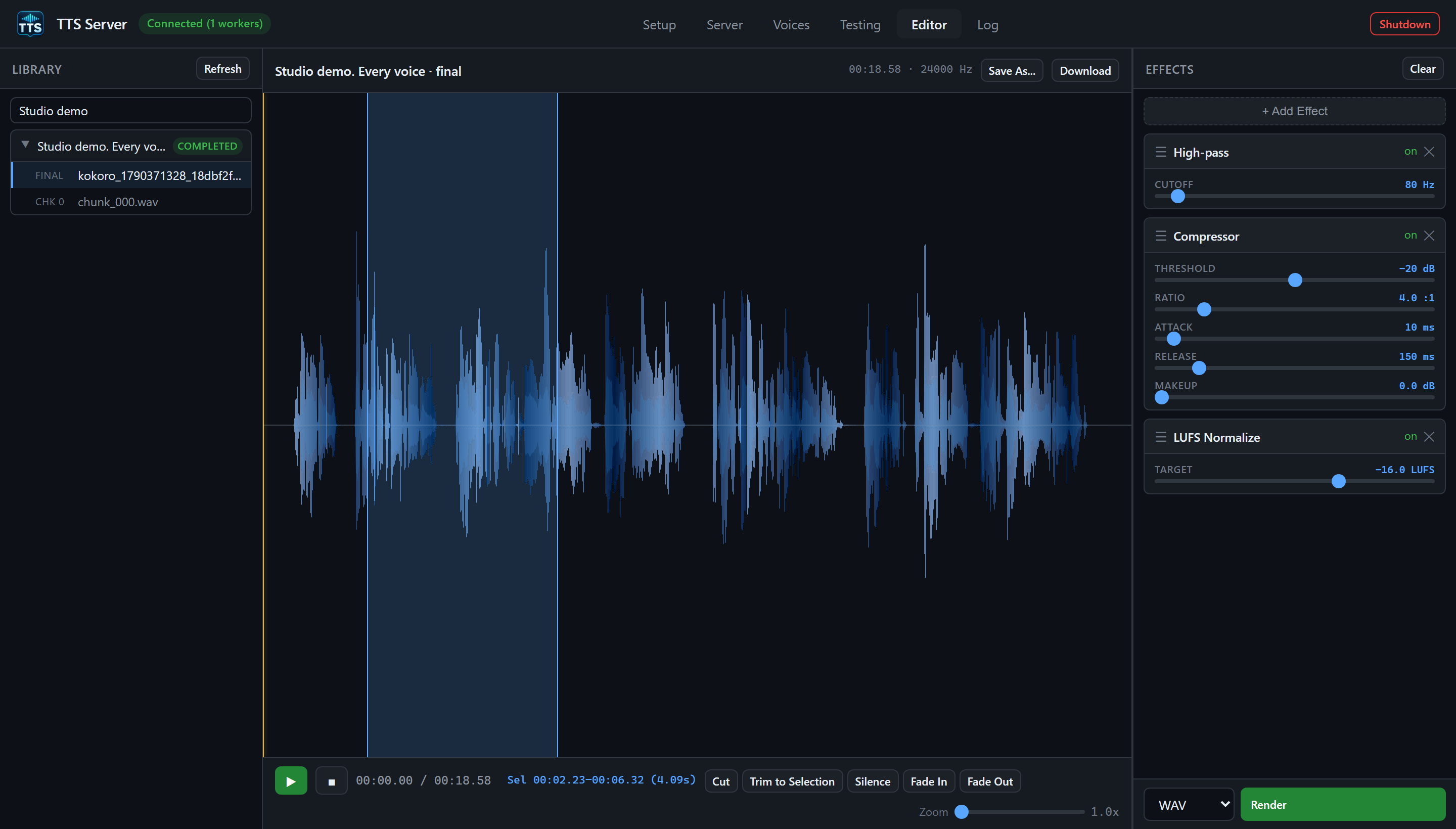
Start with identity and requirements if you have never launched the app. Then follow the start/stop page, then the GUI tab that matches what you want to click. The CLI and HTTP API pages cover the same product from the command line and from another local app. The engine catalog is the A-to-Z of every registered model id in MODEL_SETUP. The dedicated A to Z knowledge page indexes every usage topic alphabetically.
Developer-oriented files such as CLI.md, API_REFERENCE.md, PORTABILITY.md, app_intents.md, and skills/use-tts-server/ remain in the app root for agents and maintainers. This manual/ directory is the user book.
| Page | What it covers |
|---|---|
| Illustrated quickstart | A first narration: install, load, generate, edit, save, and download, with real app screenshots |
| Identity and requirements | What this product is, the linux distro for windows users, and every requirement needed to use it |
| Start, stop, and portability |
Start-TTSServer.cmd, -VerifyOnly, first registration of ext4.vhdx, Shutdown, copying the tree |
| Storage, layout, and ports |
E:\tts_server vs /opt/tts_server, jobs, voices, secrets, registry, ports 8300/9300 |
| GUI overview | Window chrome, six tabs, gateway badge, toasts, how the WebView GUI authenticates |
| Setup tab | Hugging Face token, Install / Install All / Remove, install statuses |
| Server tab | Gateway panel, spawn workers, device, precision, Kill / Kill All |
| Voices tab | Upload, play, transcribe, rename, delete reference audio in voices/
|
| Testing tab | Worker, Voice, reference audio, parameters, Generate, history |
| Editor tab | Library, waveform, transport, range ops, effects rack, Render |
| Log tab and Shutdown | Live log filters, Clear, the Shutdown button |
Windows CLI (tts.cmd) |
Every verb, discovery, exit codes, generation, jobs, audio editor |
| Authenticated HTTP API | Token, discovery registry, generate / jobs / voices / setup / workers / SRT / editor / maintenance |
| Engines overview | How install, load, speak, clone, and unload work across engines |
| Engines catalog | Every MODEL_SETUP id: bark, chatterbox, dia, f5, fish, higgs, kokoro, qwen, vibevoice, whisper, xtts, speecht5, parler, outetts, vits, edge, voxtral, voxcpm2, csm, orpheus |
| Jobs and projects | Job folders, recovery, chunk edit/rerun, save_path, deliver_to, projects |
| SRT and Whisper | Word-timed captions, source-guided vs ASR-only, Whisper sizes |
| Audio editor usage | Effect names, parameters, CLI tts.cmd audio, API /api/audio/*
|
| Diagnostics and maintenance |
diagnose, disk, env, gc-jobs, clear-cache, stale workers |
| Troubleshooting | Distro/path failures, 401 token, GPU reserve, missing Python, Edge offline |
| A to Z knowledge page | Alphabetical full-usage index of every topic in this manual |
Confirm Windows + WSL2, extract the complete release to a local folder, and double-click TTSServer.exe. When the GUI appears, open the Setup tab, paste a Hugging Face token if you will install gated models, check that bundled Kokoro is ready, switch to the Server tab, spawn a worker, switch to Testing, type text, click Generate. Finished audio lands under E:\tts_server\output\jobs\ unless you asked for a named project under E:\tts_server\projects_output\.
- GUI labels are written as they appear on the button or tab: Setup, Server, Voices, Testing, Editor, Log, Shutdown, Install, Spawn Worker, Generate, Render.
-
Engine ids are the lowercase keys the API, CLI, and
MODEL_SETUPshare:kokoro,xtts,edge, and so on. Display names such as "Kokoro 82M" are what the Setup cards show. -
Example paths use
E:\tts_serverand the legacy namelinbox-TTS_Server; substitute your actual folder and the distro returned byStart-TTSServer.ps1 -VerifyOnly. New copies use a name derived from their path. -
Windows paths use backslashes (
E:\tts_server\voices). Linux paths inside the distro use forward slashes (/opt/tts_server,/mnt/e/tts_server). - Ports: the FastAPI gateway listens on 8300; the Windows WebView talks through the bridge on 9300. The CLI defaults to the bridge. The registry file lists both.
- Commands shown as
tts.cmd ...are meant to be run fromE:\tts_serverin cmd.exe or PowerShell.tts.pyis the same program if you invoke Python directly.
It does not teach general Linux administration, covers moving the stopped folder in the portability page, and does not dump OpenAPI as a substitute for usage. Live OpenAPI remains at http://127.0.0.1:9300/docs and http://127.0.0.1:9300/openapi.json while the server is running.