Repository navigation
Testing and Generation
The Testing tab is the interactive speak-this-text surface. It sends POST /api/tts/{model} (JSON) or POST /api/tts/{model}/upload (multipart when you attach a fresh reference file). It does not submit async jobs via /submit; it blocks until the pipeline returns, then shows a Response History row you can Play / Stop / Save.
You must have a ready or busy worker already spawned on the Server tab. If the Worker dropdown says -- No workers loaded --, Generate toasts Select a worker first.
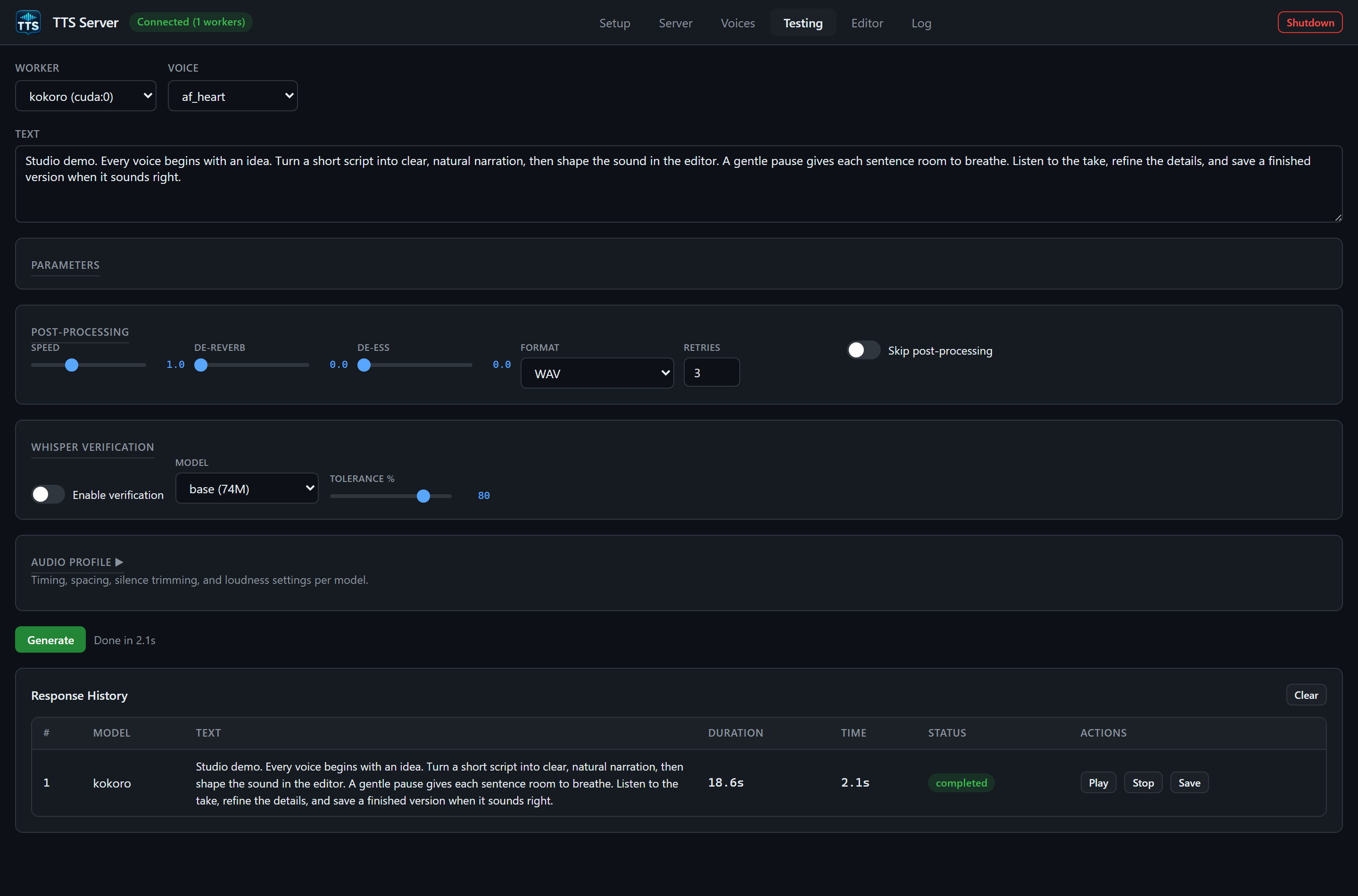
An actual 18.6-second demo take. Generation time varies with the engine, hardware, and whether it is the first request.
- Worker and Voice dropdowns
-
Saved Voice / Or Upload / Reference Text row (hidden unless the engine declares
ref_audio) -
Text textarea (default sample:
Hello, this is a test of the text to speech system.) -
Insert style tag... row (hidden unless the engine declares
style_tags) - Parameters panel (engine-native sliders and extra fields)
- Post-Processing panel
- Whisper Verification panel
- Collapsible Audio Profile panel
-
Generate button and
gen-statusline - Response History table
Filled from workers with status ready or busy. Labels look like kokoro (cuda:0) or xtts (cuda:0, busy). Changing Worker rebuilds Voice, Parameters, style tags, and the reference row for that engine. A transient disconnect does not wipe your sliders.
The selected worker's device is sent on the request so the gateway pins that GPU.
Populated from GET /api/tts/{model}/voices. Built-in catalogs (Kokoro .pt stems, XTTS named speakers, Bark v2/en_speaker_6, Edge live names, Orpheus tara, …) appear here. -- None -- means the engine has no built-in list (you clone from Saved Voice instead).
For XTTS, picking a named speaker such as Daisy Studious uses that built-in; cloning uses Saved Voice / Upload (API mode defaults to cloned when a reference path is supplied). See the engines catalog.
Visible when MODEL_SETUP[model].ref_audio is true.
| Control | Behavior |
|---|---|
| Saved Voice | Files from GET /api/voices. First option -- None (upload or manage in Voices tab) --. Choosing one clears the file picker. The filename is sent as voice. |
| Or Upload |
<input type="file" accept="audio/*">. Choosing a file clears Saved Voice. Generate then uses multipart /upload with field reference_audio. |
| Reference Text | Shown only when ref_text is true (f5, fish, higgs, outetts, voxcpm2, csm). Sent as reference_text. Use the exact transcript of the clip. |
VibeVoice and F5 require reference audio: Generate shows an error if the required reference is missing. For F5, select a Saved Voice or upload a reference file; also supply its exact transcript.
For VibeVoice, choose Saved Voice for Speaker 1 and the optional saved voices for Speakers 2–4 in order, without gaps. A fresh upload supplies a single speaker reference. The JSON API also accepts reference_audios; see Authenticated HTTP API.
Required. Empty Generate toasts Enter text to synthesize. Long text is chunked server-side using per-engine TEXT_LIMITS (for example bark 200 characters, edge 3000). You do not pick chunk size in the GUI.
Visible when style_tags is true. Dropdown Insert style tag... plus Insert. Hint: Add emotion/style cues — model interprets these from the text.
Engines with a model-specific dialect (do not use the generic list or the engine may speak the cue literally):
| Engine | Inserted tokens |
|---|---|
| bark |
[laughs] , [sighs] , [gasps] , [clears throat] , [music]
|
| dia |
(laughs) , (sighs) , (clears throat) , (coughs) , (gasps)
|
| fish |
(excited) , (sad) , (angry) , (whispering) , (shouting) , (laughing) , (sighing)
|
| voxcpm2 | Leading voice-design, e.g. (young woman, warm and calm) . Insert replaces an existing leading (...) rather than injecting mid-sentence. |
| orpheus |
<laugh> , <sigh> , <chuckle> , <cough> , <sniffle> , <groan> , <yawn> , <gasp>
|
Other style-tag engines fall back to the generic list: (happily) , (sadly) , (angrily) , (with surprise) , (sarcastically) , (nervously) , (whispering) , (shouting) , (laughing) , (sighs) , ... , (cheerfully) , (calmly) , (in a serious tone) , (speaking slowly) , (speaking quickly) .
Dia dialogue additionally uses [S1] / [S2] in the text itself (example: [S1] Hello there! (laughs) [S2] Hey, how are you?). VibeVoice uses Speaker 1: / Speaker 2: lines. Those are typed in Text, not in this dropdown.
Sliders come from GET /api/config → defaults for that model plus params (label, min, max, step, format). Per-model param_overrides narrow ranges (Fish Speech temperature max 1.0). Extra fields:
| Engine | Field | UI |
|---|---|---|
| xtts | Language | Select: English, Spanish, French, German, Italian, Portuguese, Polish, Turkish, Russian, Dutch, Czech, Arabic, Chinese, Japanese, Korean, Hungarian, Hindi (en … hi) |
| parler | Voice Description | Text, hint Describe speaker, recording quality, pace, tone...
|
| higgs | Scene / Speaker Description | Text, hint e.g. SPEAKER0: warm mature voice; moderate pace; quiet studio
|
Default slider values (from MODEL_DEFAULTS):
| Engine | Defaults shown |
|---|---|
| xtts | temperature 0.65, repetition_penalty 2.0, top_k 50, top_p 0.85 |
| fish | temperature 0.8, repetition_penalty 1.1, top_p 0.8, seed 0 |
| kokoro | (none) |
| bark | temperature 0.7, waveform_temperature 0.7 |
| chatterbox | temperature 0.8, repetition_penalty 1.2, exaggeration 0.5, cfg_weight 0.5 |
| f5 | nfe_step 32, cfg_scale 2.0, seed 0 |
| dia | temperature 1.8, cfg_scale 3.0, top_p 0.90, top_k 50 |
| qwen | temperature 0.9, top_p 0.8, top_k 40, seed 0 |
| vibevoice | cfg_scale 1.3, seed 0 |
| higgs | temperature 0.3, top_p 0.95, top_k 50, seed 0 |
| speecht5 | (none) |
| parler | temperature 1.0 |
| outetts | temperature 0.4, repetition_penalty 1.1, top_p 0.9, top_k 40, seed 0 |
| vits | (none) |
| edge | pitch 0, volume 0 |
| voxtral | cfg_alpha 1.2, seed 42 |
| voxcpm2 | cfg_scale 2.0, nfe_step 10 |
| csm | temperature 0.9, top_p 0.95, top_k 50, seed 42 |
| orpheus | temperature 0.6, top_p 0.95, repetition_penalty 1.1, seed 42 |
Hover tooltips match TOOLTIPS in config (temperature = randomness, exaggeration = Chatterbox emotion, nfe_step = diffusion steps, pitch/volume = Edge Hz / percent, cfg_alpha = Voxtral guidance, …).
Global slider bounds (before per-model overrides):
| Param | Label | Min | Max | Step |
|---|---|---|---|---|
| temperature | Temperature | 0.0 | 3.0 | 0.05 |
| speed | Speed | 0.5 | 2.0 | 0.1 |
| repetition_penalty | Repetition Penalty | 0.5 | 5.0 | 0.1 |
| top_p | Top P | 0.0 | 1.0 | 0.05 |
| top_k | Top K | 1 | 200 | 1 |
| cfg_scale | CFG Scale | 0.0 | 10.0 | 0.5 |
| exaggeration | Exaggeration | 0.0 | 1.0 | 0.05 |
| cfg_weight | CFG Weight | 0.0 | 1.0 | 0.05 |
| waveform_temperature | Waveform Temperature | 0.0 | 3.0 | 0.05 |
| seed | Seed | 0 | 99999 | 1 |
| nfe_step | NFE Steps | 4 | 64 | 4 |
| pitch | Pitch Hz | -50 | 50 | 5 |
| volume | Volume % | -50 | 50 | 5 |
| cfg_alpha | CFG Alpha | 0.5 | 3.0 | 0.1 |
| de_reverb | De-reverb | 0.0 | 1.0 | 0.1 |
| de_ess | De-ess | 0.0 | 1.0 | 0.1 |
| tolerance | Tolerance | 0 | 100 | 5 |
Note: the HTTP API allows exaggeration 0–2 and nfe_step 4–128; the Testing sliders use the table above. Chatterbox's documented API range for exaggeration is 0–2 with default 0.5.
These are app-level, applied after the engine returns audio:
| Control | Default | Meaning |
|---|---|---|
| Speed | 1.0 (0.5–2.0) | Pitch-preserving time-stretch via pyrubberband |
| De-reverb | 0.0 | Leave at 0 for clean speech; raise only if the take is actually reverberant |
| De-ess | 0.0 | Harsh-sibilance reduction |
| Format | WAV | WAV, MP3, OGG, FLAC (Testing does not offer m4a; the API does) |
| Retries | 3 (0–10) | auto_retry |
| Skip post-processing | off | skip_post_process |
| Control | Default |
|---|---|
| Enable verification | off (verify_whisper) |
| Model | base (74M); also tiny (39M), small (244M), medium (769M), large (1.5B) |
| Tolerance % | 80 |
When enabled, the pipeline transcribes the take and compares to the source text. Failures can trigger retries. This loads Whisper (VRAM). Unload it when you are done (tts.cmd model unload whisper).
Collapsed by default (title Audio Profile ▶). Click to expand. Hint: Timing, spacing, silence trimming, and loudness settings per model. Sliders start at that engine's PROFILES values; only values you change are sent.
| Slider | Range | Typical default |
|---|---|---|
| Inter-chunk Pause (s) | 0–2.0 | 0.15–0.3 depending on engine |
| Front Pad (s) | 0–1.0 | 0 (kokoro 0.15) |
| Start/End Pad (s) | 0–2.0 | 0.5 |
| Silence Threshold (dB) | -60 to -10 | -35 or -40 |
| Min Silence (ms) | 100–2000 | 300–500 |
| Front Protect (ms) | 0–500 | 80–250 |
| End Protect (ms) | 0–2000 | 600–1100 |
| Peak Limit | 0.5–1.0 | 0.95 (clipping) |
| Target LUFS | -40 to -10 | -23 |
Native sample rates (not sliders, but what you hear): most engines 24000 Hz; SpeechT5 16000; VITS 22050; Dia / Parler / OuteTTS 44100; VoxCPM2 48000.
- Validates worker + text (+ VibeVoice reference).
- Disables the button; status shows a spinner Generating....
- Builds the JSON body (text, voice, params, fields, post-process, optional profile diffs, optional Whisper, device, and the selected worker ID).
- If a file is attached: multipart
/api/tts/{model}/upload. Else JSON/api/tts/{model}. - On success: history row with blob playback, toast
Generated Ns of audio, statusDone in Ts. - On failure: history row with the error under the text, toast
Generation failed: ..., statusFailed. - Button always re-enables.
Audio is also stored as a job under output/jobs/ (and shows up in the Editor library). Sync responses may omit audio_base64 if the file is larger than 25 MB; you can still fetch GET /api/jobs/{job_id}/output.
Columns: #, Model, Text (full, wrapping; errors underneath in red), Duration, Time (wall seconds), Status, Actions (Play, Stop, Save when a blob exists).
Clear on the panel header wipes the in-memory list (it does not delete jobs on disk). Blob URLs are revoked on pagehide.