Repository navigation
Server
The Server tab is the process manager: is the gateway up, which workers are alive, spawn a new one, kill one, or kill all. Whisper is omitted from the spawn Model dropdown; load Whisper from CLI//api/whisper/{size}/load or by enabling verification/SRT which auto-spawns it.
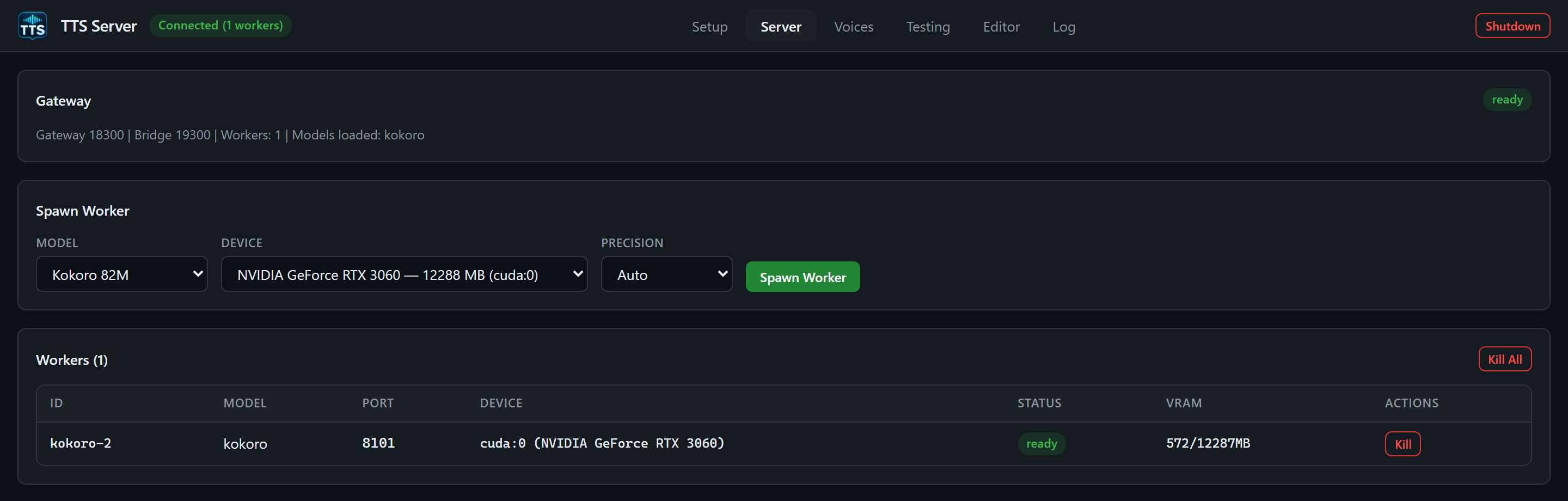
The demo used an RTX 3060 and custom ports 19300/18300. Select a device available on your own machine and wait for the worker's ready status.
Three panels, top to bottom:
-
Gateway (
#srv-gateway) — rebuilt on each poll. - Spawn Worker — built once (your Model/Device/Precision choices are not wiped every 3 seconds).
-
Workers (N) table (
#srv-workers) — rebuilt on each poll.
Polling is GET /api/workers every 3 seconds from app.js.
Header: title Gateway and a status badge (ready when connected, dead when not).
Muted line:
Gateway 8300 | Bridge 9300 | Workers: N | Models loaded: kokoro, edge
If bridge and gateway ports are the same (you opened the UI directly on 8300), the port label collapses to Gateway 8300. Models loaded lists unique model values among workers whose status is ready, or none.
This panel is read-only. It does not start the server; Start-TTSServer.cmd already did that.
Title: Spawn Worker.
| Field | Control | Values |
|---|---|---|
| Model | <select id="spawn-model"> |
Every MODEL_SETUP id except whisper, shown as display names (Kokoro 82M, XTTS v2, …) |
| Device | <select id="spawn-device"> |
From GET /api/devices. GPU rows look like NVIDIA GeForce RTX 3060 — 12288 MB (cuda:0). CPU is cpu. If the device list is still empty, fallback options are cuda:0 and CPU. |
| Precision | <select id="spawn-precision"> |
Auto (empty string, server chooses), FP16 (half) (fp16), BF16 (bf16), FP32 (full) (fp32) |
| Spawn Worker | Primary button |
POST /api/workers/spawn with {model, device, precision}
|
Click flow:
- Button disables.
- Toast
Spawning kokoro on cuda:0 (fp16)...(precision suffix omitted for Auto). - On success: toast
kokoro worker spawned!and an immediate extra poll. - On failure: toast
Spawn failed: ...(the body is the HTTP error, often a VRAM reserve rejection). - Button re-enables.
Spawn does not wait until the worker is ready. Status starts as loading. Cold loads can take from seconds (kokoro) to several minutes (qwen ~412s, higgs ~252s, voxtral ~250s in the guarded probes). Watch the table and the Log tab.
If the engine is not ready on Setup, spawn will fail. Install first.
The gateway refreshes nvidia-smi immediately before a load, serializes loads per GPU, and rejects a spawn that would eat the safety reserve (TTS_SERVER_GPU_RESERVE_GB, default 1.5 GiB). Free VRAM is dynamic because other Linbox apps may be using the same GPU. Re-read devices (tts.cmd devices) if spawn fails with a memory error.
Header: Workers (N) and a red Kill All button.
Empty state: No workers running. Spawn one above.
Columns:
| Column | Source |
|---|---|
| ID |
worker_id (monospace) |
| Model | Engine id (kokoro, xtts, …) |
| Port | Worker HTTP port in 8101–8200 |
| Device |
cuda:0 (NVIDIA ...) when the name is known, else the raw id |
| Status | Badge: ready, busy, loading, … |
| VRAM |
used/total MB or - on CPU |
| Actions | Kill |
Kill sends DELETE /api/workers/{worker_id}. The gateway tries graceful HTTP /unload, then SIGTERM, then SIGKILL. Toast Worker killed. This drops that engine from VRAM and ends the process group.
Kill All confirms Kill all workers? This unloads all models from GPU. then deletes every current worker in parallel. If some fail, the toast reports Killed M/N workers (K failed).
There is no GUI button for Unload (drop weights, keep process) or Restart. Those exist on the API:
POST /api/workers/{worker_id}/unloadPOST /api/workers/{worker_id}/restart-
POST /api/models/{model}/unload— kill all workers for one engine -
POST /api/models/{model}/scale—{count: 0-16, device?} GET /api/workers/{worker_id}/logs?lines=200
CLI:
tts.cmd workers list
tts.cmd workers spawn kokoro --device cuda:0 --precision fp16
tts.cmd workers kill <worker_id>
tts.cmd workers scale kokoro 2 --device cuda:0
tts.cmd model load xtts --device cuda:0
tts.cmd model unload xtts
tts.cmd maintenance kill-stale
tts.cmd maintenance restart-workers --model kokoro- Spawn → row appears, Status loading, VRAM climbing.
- Status ready → Testing tab Worker dropdown includes
kokoro (cuda:0). - Generate → Status busy until that request finishes, then ready again.
- Kill / Shutdown /
model unload→ row disappears; VRAM should fall after a few seconds.
WORKER_AUTO_SPAWN is enabled in config: some API generate paths will spawn a worker if none exists. The Testing tab will not; it requires you to pick a ready/busy worker. SRT and verify_whisper will try to auto-spawn Whisper.
Leave Auto unless you know the engine. FP16/BF16 save VRAM on NVIDIA. FP32 is the compatibility hammer. Not every engine honors the flag the same way (Qwen uses an isolated 4-bit path; Voxtral uses vLLM). If a spawn crashes in Log during load, try Auto or FP16, and confirm Setup status is still ready.