Repository navigation
Setup
The Setup tab is where you give the app a Hugging Face token and install or remove engines. It does not load models into VRAM. Loading is the Server tab (or tts.cmd model load).
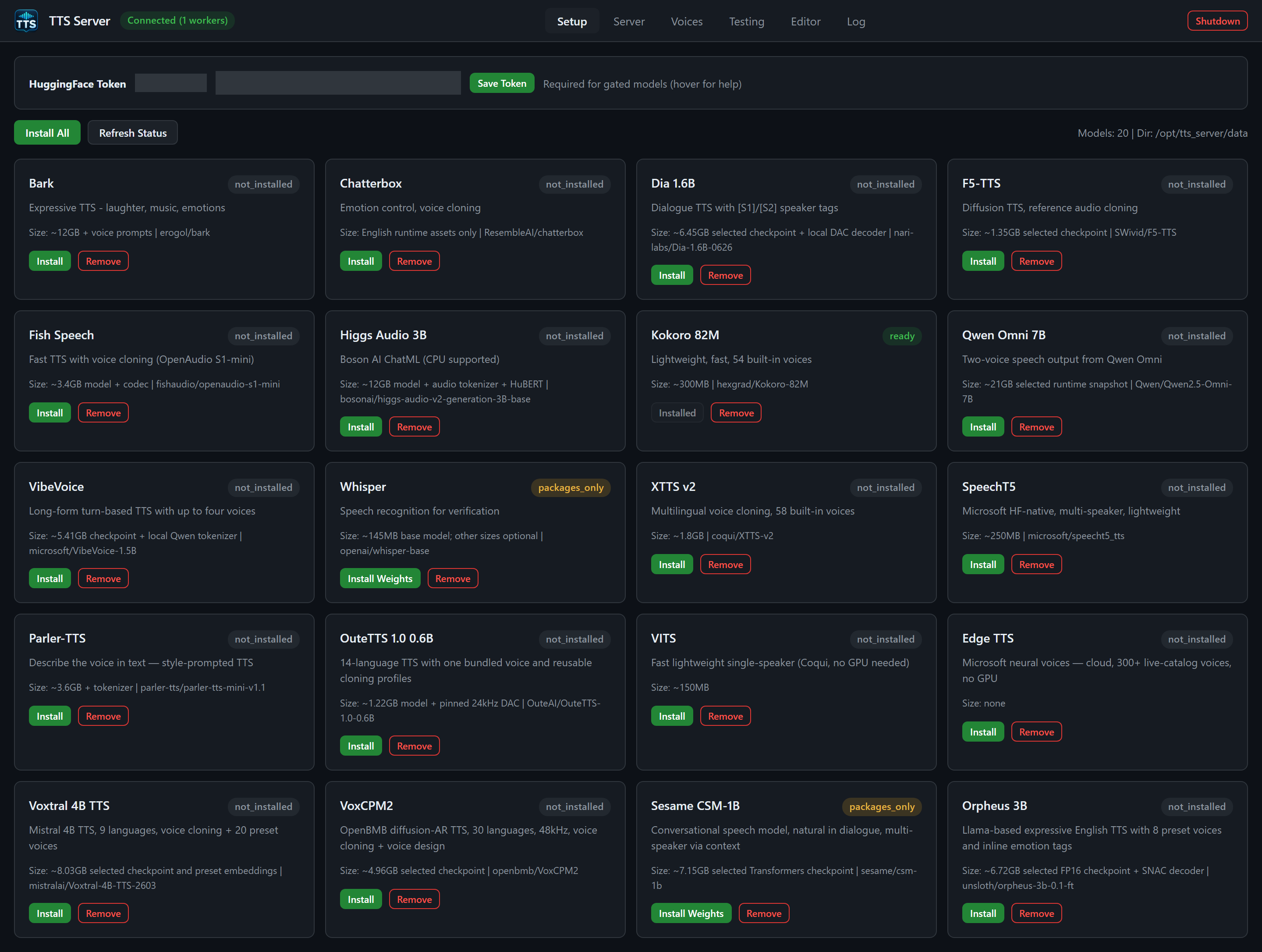
Actual installation state from the demo session. The saved token badge and input are concealed in this image.
From top to bottom:
- HuggingFace Token panel
- Toolbar: Install All, Refresh Status, and a muted
Models: N | Dir: ...summary - Optional accent-bordered panel when an install is running
- A card grid, one card per
MODEL_SETUPid
Labels and controls, left to right:
| Control | What it does |
|---|---|
| Text HuggingFace Token | Section label |
| Badge Token: hf_...masked (green) or No token set (gray) | Current save state from GET /api/setup/hf-token (saved, masked) |
Password input, hint text hf_..., id hf-token-input
|
Paste a token. Survives re-renders so typing is not wiped by status polls. |
| Button Save Token |
POST /api/setup/hf-token with {token}. Empty string removes the token. |
| Muted hint Required for gated models (hover for help) | Tooltip: create a token at huggingface.co/settings/tokens; fine-grained tokens need "Read access to contents of all public gated repos you can access"; classic Read tokens work; accept the model license on the Hub page before downloading. |
On success the toast is HuggingFace token saved or Token removed, the input is cleared, and the badge updates. Failures toast Failed: ....
The file on disk is E:\tts_server\secrets\hf_token. CLI: tts.cmd hf-token get / tts.cmd hf-token set.
You do not need this token for Edge TTS (cloud Microsoft voices) or for engines whose weights are already on the VHDX. You do need it the first time you Install a Hub-gated or authenticated repo.
Install All — confirm dialog: Install all models? This may take a long time. Then POST /api/setup/install/all. The GUI switches you to the Log tab. Models that are not ready install sequentially in the background. If something is already installing, the API returns already_installing and the toast lists those ids.
Refresh Status — re-fetches GET /api/setup/status.
The right-hand muted text reports how many model cards exist and the actual configured model directory, for example /opt/tts_server/data.
If active_installs.all is true, the banner title is Install-all is running. Otherwise Install running. The muted suffix is Current: <id, id> or preparing next model.
Each card shows:
-
Display name from
MODEL_SETUP(Bark, Chatterbox, Dia 1.6B, F5-TTS, Fish Speech, Higgs Audio 3B, Kokoro 82M, Qwen Omni 7B, VibeVoice, Whisper, XTTS v2, SpeechT5, Parler-TTS, OuteTTS 1.0 0.6B, VITS, Edge TTS, Voxtral 4B TTS, VoxCPM2, Sesame CSM-1B, Orpheus 3B). - A status badge.
- One-line desc.
-
Size:
weights_sizeand the Hubweights_repowhen present. - Buttons Install (or a disabled label) and Remove.
| Status | Button text | Enabled? |
|---|---|---|
ready |
Installed | No |
installing |
Installing... | No |
packages_only (most engines) |
Install Weights | Yes — finish installation before spawning a worker |
packages_only (VITS) |
Packages Only (weights on first use) | Yes — VITS can also fetch its weights when first loaded |
anything else (not_installed, partial, …) |
Install | Yes |
Clicking Install immediately disables that button, sets the label to Installing..., toasts Installing <id> — check Log tab for progress, and switches to Log. The request is POST /api/setup/install/{model}. The installer is server/install_model.sh <model_id> inside the distro. It returns immediately; progress is the log stream.
If the API says already_installing, the toast is <id> is already being installed. On HTTP error the button is re-enabled as Install.
Whisper is a first-class Setup card. Installing it pulls at least base.pt (~145MB). Other Whisper sizes download when you load them.
Edge's card reports Size none. Install still registers packages; there is no weight tarball.
VITS may show packages-only: Coqui can auto-download LJSpeech weights on first use.
Confirm: Remove <id>? This deletes weights and override packages. Then DELETE /api/setup/{model}. Toast: <id> removed (N items). This does not pip-uninstall the base venv. A shared override such as coqui (bark / xtts / vits) stays on disk while another registered engine still needs it. Remove is disabled while status is installing.
There is no GUI button for POST /api/setup/cancel/{model}. From CLI you would need the HTTP API (POST /api/setup/cancel/{model} or .../cancel/all) if you must abort an installer.
| Status | Meaning |
|---|---|
not_installed |
No packages, no weights |
partial |
Some files present, not enough to mark ready |
packages_only |
Packages exist but weights are absent/incomplete; VITS intentionally fetches weights on first use |
ready |
Package completion markers and required nonempty weights or a completed download inventory have been checked |
installing |
An installer subprocess owns this id |
GET /api/setup/status also returns active_installs with whether install-all is active and which concrete ids are in flight.
The card badge turns ready / Installed. Nothing is in VRAM yet. Go to the Server tab and Spawn Worker, or:
tts.cmd model load kokoro
tts.cmd wait-ready --model kokoro --timeout 120- Save the Hugging Face token if you will touch gated Hub repos.
- Install edge if you only need cloud speech (fastest first voice).
- Install kokoro for a small local narrator (~300MB, ~1 GB VRAM estimate).
- Install whisper if you want SRT or Testing-tab verification.
- Install cloning engines (xtts, f5, chatterbox, …) only when you have disk and a GPU that satisfies
MODEL_VRAM_ESTIMATE_GBplus the 1.5 GiB reserve. - Avoid Install All on a small VHDX; Qwen alone is ~21GB of snapshot plus a heavy load.
Setup installs are capped at two low-priority CPU cores on the agent-facing contract; they are still slow. Watch Log. Do not spawn the same engine until status is ready.
Setup and model installers share a lock. Each installer uses its own temporary directory. Install All includes Whisper and retains per-model failures in active_installs.recent.all.failed_models; an aggregate failure is not reported as completed. Cancelling a model remains effective between retries.
The shared Python environment is pinned in server/requirements-base.txt and server/requirements-base.lock. Setup checks required imports and pinned versions even on the fast path. Model downloads use immutable revisions, including server/model_revisions.json; Fish runtime reuse includes its source commit. Existing weight directories without a completion inventory may require one install pass to verify/rebuild that inventory.
Model removal is refused during active work, and filesystem failures are reported.