Speech to Text

Use this page to configure Groq Speech-to-Text services for Home Assistant voice pipelines and direct audio transcription.
Speech-to-Text services create Home Assistant STT entities for voice pipelines.
- Open the Groq integration page.
- Choose Add Speech-to-Text.
- Enter a friendly service name.
- Select a Groq Whisper model.
- Select a language hint.
- Enable free-tier protection if you want this service paused locally after Groq reports a limit reset time.
| View | Screenshot |
|---|---|
| Speech-to-Text setup | 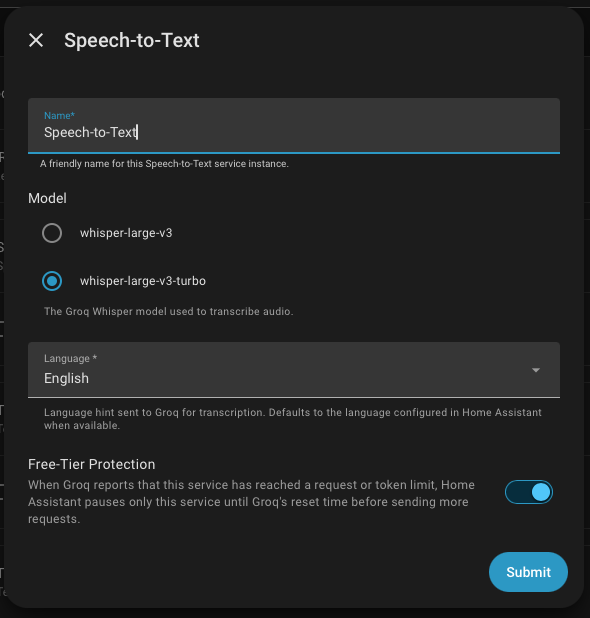 |
| Generated STT entity |  |
After creating a Speech-to-Text service, select the generated Groq STT entity in a Home Assistant voice pipeline.

Use groq.transcribe_audio from Developer Tools -> Actions, scripts, or automations when you want to transcribe an audio file outside the normal voice pipeline. The action requires the Speech-to-Text service_id.
action: groq.transcribe_audio
data:
  service_id: Voice Pipeline STT
  audio_file: media-source://media_source/local/recording.wav
  language: en-US
  prompt: Home automation command.
response_variable: groq_transcript
You can also use audio_path for an allowlisted local path.

The service can send a language hint to Groq for transcription. The default follows the Home Assistant language when available.
Built-in language options include:
- English:
en-US,en-GB,en - German:
de-DE - Spanish:
es-ES - French:
fr-FR - Italian:
it-IT - Portuguese:
pt-PT - Dutch:
nl-NL - Indonesian:
id-ID - Japanese:
ja-JP - Korean:
ko-KR - Chinese:
zh-CN
The setup flow prefers live Groq model discovery. If discovery is unavailable, the integration has built-in fallback model IDs:
whisper-large-v3-turbowhisper-large-v3