Text to Speech

Use this page to configure Groq Text-to-Speech entities backed by Orpheus models and call them through Home Assistant tts.speak.
- Setup
- Speak action
- Voices
- Vocal directions
- Playback format and audio processing
- Long TTS
- Free-tier protection
- Built-in fallback models
- Related pages
Text-to-Speech services create Home Assistant TTS entities.
- Open the Groq integration page.
- Choose Add Text-to-Speech.
- Enter a friendly service name.
- Select a Groq speech model.
- Select a voice for that model.
- Optionally choose a default vocal direction.
- Choose a playback format.
- Optionally set a sample rate and playback speed.
- Optionally enable audio normalization or Long TTS if
ffmpegis available.
| View | Screenshot |
|---|---|
| Text-to-Speech setup | 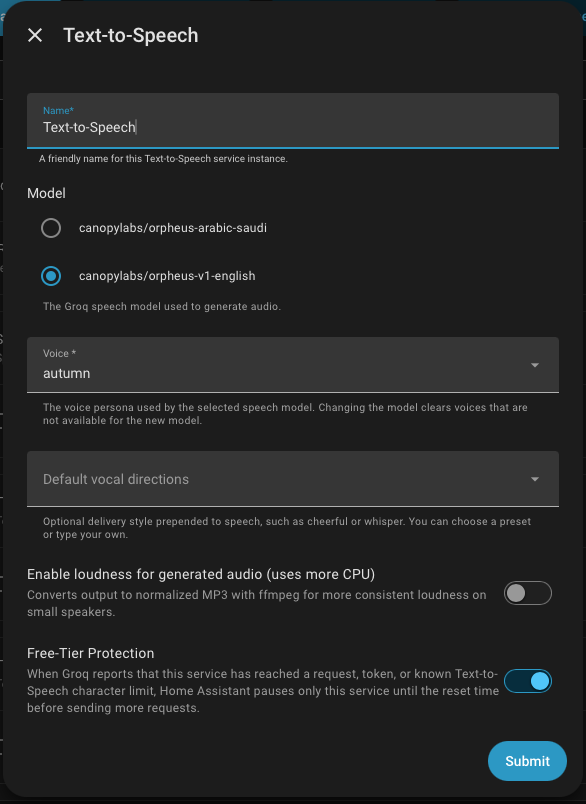 |
| Generated TTS entity |  |
Replace the entity ID with the Groq TTS entity created by your named Text-to-Speech service.
action: tts.speak
target:
  entity_id: tts.groq_text_to_speech
data:
  cache: true
  media_player_entity_id: media_player.living_room_speaker
  message: The front door has been open for five minutes.
  options:
    voice: hannah
    vocal_directions: calm
    response_format: mp3
    sample_rate: 44100
    speed: 1.0
English Orpheus voices:
autumndianahannahaustindanieltroy
Arabic Saudi Orpheus voices:
abdullahfahadsultanlulwanouraaisha
Changing the model clears voices that are not available for the new model.
Vocal directions control delivery style. Built-in presets include:
cheerfulfriendlywarmprofessionalcalmexcitedwhisperdramatic
You can also type a custom vocal direction in supported flows. Vocal directions must be a single word. Choose None or clear the field to remove a default direction.
Groq Orpheus can generate these output formats:
-
wav: default and widest compatibility inside Home Assistant. -
mp3: safest choice for most speakers, including HomePod and Apple TV targets. -
flac: lossless playback for supported speakers. -
ogg: compressed Ogg playback for supported speakers. -
mulaw: telephony-style mu-law output.
For a single-part announcement without audio normalization, the integration asks Groq for the selected format directly. Audio normalization and Long TTS use ffmpeg; when either is enabled, the integration asks Groq for WAV audio, then uses ffmpeg to normalize, stitch, or convert the final playback output.
Sample rate is optional. Leave it unset to use Groq's model default or the integration playback profile. Supported sample rates are:
8000160002205024000320004410048000
Speed is optional. Use 1.0 for normal playback. Supported values are 0.5 through 5.
If processed TTS fails, use a direct single-part output without audio normalization, disable Long TTS, then check the host ffmpeg installation.
Long TTS splits announcements that exceed the Groq Orpheus single-request limit into multiple chunks, sends them sequentially, and stitches the audio with ffmpeg.
Enable Long TTS only when you need longer announcements. It uses more CPU and more Groq request quota than a normal tts.speak call. Without Long TTS, overly long TTS messages are blocked locally before they are sent to Groq.
The integration includes a local free-tier protection option for built-in Orpheus request, token, and character limits. This is a conservative local guard and does not replace Groq account-side rate limits.
The setup flow prefers live Groq model discovery. If discovery is unavailable, the integration has built-in fallback model IDs:
canopylabs/orpheus-v1-englishcanopylabs/orpheus-arabic-saudi