Troubleshooting

Use this page to diagnose authentication failures, missing services or models, cloud connectivity, rate limits, TTS audio issues, and safe issue reporting.
- Authentication issues
- Cannot connect
- Model is missing
- Service or entity is missing
- Action target is missing
- Unsupported option
- Text-to-Speech audio processing fails
- Rate limits
- Diagnostics
- Support and issue reporting
- Privacy
- Related pages
If setup fails with an authentication error:
- Confirm the API key in the Groq Console.
- Create a fresh key if needed.
- Run the Groq reauthentication flow in Home Assistant.
API keys are redacted from diagnostics, but they should still never be posted in public issues.

Check:
- Home Assistant can reach
https://api.groq.com - DNS works from the Home Assistant host
- no firewall or proxy is blocking outbound HTTPS
- Groq is not reporting an outage on the Groq status page
The setup flow discovers active models for the selected API key and filters them by service type.
If a model is missing:
- confirm the model is available to your Groq account
- confirm the model supports the service type you are adding
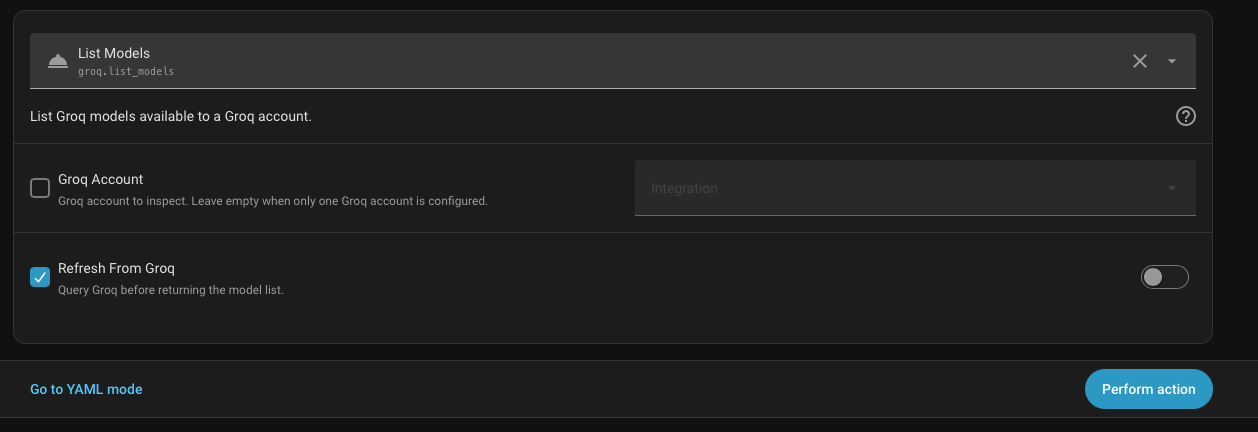
- use
groq.list_modelswithconfig_entry_idselected andrefreshenabled to inspect the account model list - retry setup later if Groq model discovery is temporarily unavailable
The initial Groq setup flow creates only an account entry. Service-specific behavior appears after you add service entries from the integration page.
If the expected entity or service target is missing:
- open the Groq integration entry and confirm the service subentry exists
- reload the Groq integration entry
- confirm the service type matches the surface you expect
- check Home Assistant logs for setup errors
| Expected surface | Required service entry |
|---|---|
| Conversation entity or AI Task entity | Text Generation |
| STT entity for voice pipelines | Speech-to-Text |
TTS entity for tts.speak
|
Text-to-Speech |
groq.analyze_image or groq.extract_text_from_image defaults |
Image Recognition |
Groq response actions require explicit targets. If an automation that used to work starts failing after updating:
- add
service_idto service-level actions:groq.generate_text,groq.generate_structured,groq.analyze_image,groq.extract_text_from_image, andgroq.transcribe_audio - add
config_entry_idto account-level actions:groq.clear_cacheandgroq.list_models - use Developer Tools -> Actions to pick the configured Groq service or account when you are unsure of the exact target value
Reasoning, prompt caching, and structured-output controls are gated by model capability. If an option is unavailable or rejected, choose a model that supports that capability.
For image, speech, and TTS services, the setup flow filters model choices by service type. If a manually entered model fails, verify it supports the selected Groq endpoint.
Direct single-part TTS output can use Groq-generated WAV, MP3, FLAC, OGG, or MULAW audio without ffmpeg. Audio normalization, Long TTS stitching, and processed playback conversion require ffmpeg on the Home Assistant host.
If processed TTS fails:
- Disable audio normalization and Long TTS.
- Try a short
tts.speakmessage with a direct Groq output format. - Confirm
ffmpegis installed and available to Home Assistant. - Check Home Assistant logs for process errors.
Groq account limits and model limits are enforced by Groq. The integration also includes local per-service free-tier protection, but that protection is not a complete account quota system.
If requests fail with rate-limit errors:
- reduce automation frequency
- use prompt caching where appropriate
- split heavy automations across separate named services only when that matches your account/project design
- check Groq account limits and the Groq status page
Download diagnostics from the Groq integration page when reporting issues.
Diagnostics include setup options, enabled service types, selected models, and runtime configuration. API keys are redacted.

Report issues at https://github.com/barneyonline/ha-groq/issues.
Before opening an issue:
- confirm Home Assistant version and integration version
- include which service type is affected
- include the selected model ID
- attach downloaded diagnostics if relevant
- include Home Assistant log excerpts around the failure
Do not include private prompts, camera images, generated audio, household data, local file paths containing sensitive names, or API keys in public issues.