Repository navigation
Tag and Rename
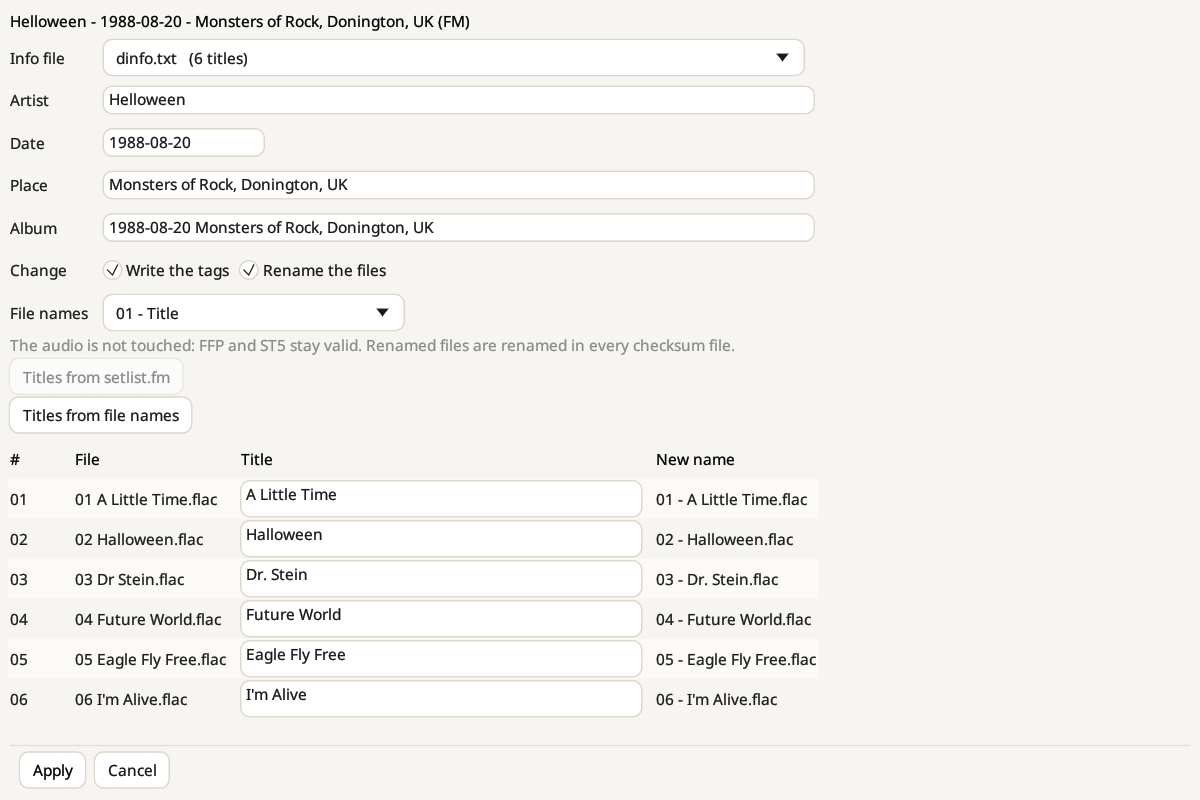
Bootleg Toolbox reads the show's info file (the .txt that comes with it) and finds the artist, date, venue and tracklist. If the folder has several text files, pick the right one in Info file. The window shows what it found, so you can check and correct everything before anything is written:
- Artist, Date, Place and Album are filled in from the info file. Album defaults to the date and the place.
- Title for each track, read from the tracklist. Here "Dr Stein" from the file name becomes "Dr. Stein" from the info file.
- If the info file has no usable tracklist, Titles from setlist.fm fetches the setlist (with your own free API key), and Titles from file names uses the current names.
You decide what changes: Write the tags, Rename the files, or both. The New name column previews each file's new name, using the pattern you choose in File names (for example Artist YYYY-MM-DD d1t01).
The audio is never touched. FFP and ST5 checksums are computed on the audio only, so they stay valid. Renamed files are also renamed inside every checksum file of the show. MD5 and SFV checksums cover the whole file, tags included, so tick Update the .md5 and .sfv files to have them recomputed.
You can tag several shows at once: the clear ones are ticked, and the doubtful ones are checked one by one. If you change your mind, Tools → Undo tagging gives the files back byte for byte, for 30 days.