Accounts and app passwords
An account mount maps a Nextcloud account to a drive letter, and NcDavTray never asks for the password you log in with. What it stores is an app password: a token the server issues for one device, which opens that account and nothing else, and which can be withdrawn again at any time without touching the account.
There are two ways to get one, and the account window offers both.
Tip
TL;DR — Enter the server, then press Log in with browser. The login happens on your server's own page, in a real browser, with whatever that page asks for — second factor, single sign-on, passkey — and the app password arrives here by itself. It is the same kind of app password you would create by hand, so everything about looking after them applies to it too: they are listed under Settings → Security → Devices & sessions, and every one you no longer use should be deleted there.
- The browser login is an app password too
- Adding an account
- Log in with browser
- One account, one spelling
- Log in with user ID and app password
- Where the password ends up
- Looking after your app passwords
- When it does not work
This is the point to understand before anything else on this page.
Log in with browser does not create a different kind of access. It creates an app password — the same object, in the same list, with the same rights, revoked the same way. Only the way it is produced differs:
| Created by hand | Created by the browser login | |
|---|---|---|
| What it is | app password | app password |
| Where it is listed | Settings → Security → Devices & sessions | Settings → Security → Devices & sessions |
| What it can do | everything the account can | everything the account can |
| How it is withdrawn | delete it in that list | delete it in that list |
| How it reaches NcDavTray | shown once, copied, pasted | handed over directly, never displayed |
| What you type into NcDavTray | your user ID and the password | nothing |
So the browser login is the convenient way and the safer way to make an app password. It is not a way around making one.
Add ▾ → Add account… opens the window with one field filled in: the server. Enter the host name, without https://, and append the installation path if the Nextcloud does not sit at the root of the domain — cloud.example.com/nextcloud. That is the same form every server field in NcDavTray takes, see Mounts.
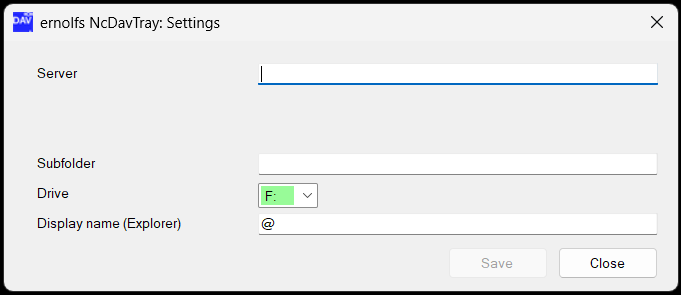
As soon as the address leads to a Nextcloud, the server's icon appears next to the field and the window offers the two ways:
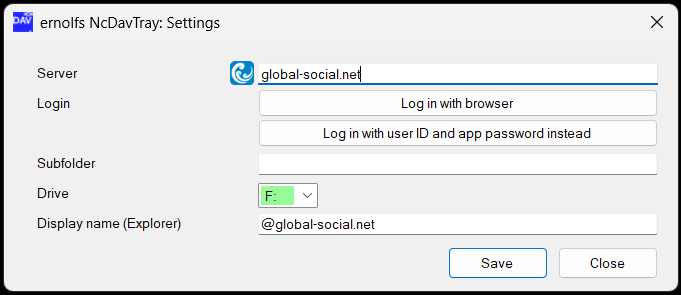
Nothing else is asked for yet. The login name is part of what is being decided: the browser brings it back from the server, and typing it is what the other way consists of.
Note
If no icon appears, the address is wrong, the server is not reachable from this machine, or it is not a Nextcloud. Until it appears, neither button is offered — there would be nothing to log in to.
This uses Login Flow v2, the procedure the official Nextcloud clients use. NcDavTray asks the server to open a login session and shows a small window while it waits:
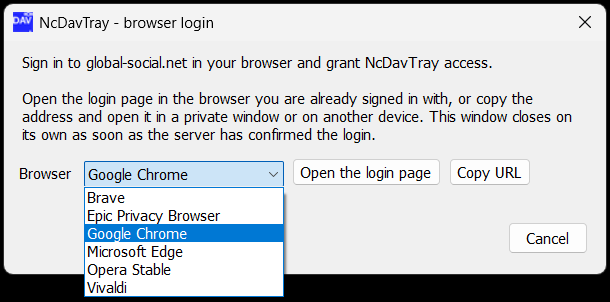
| Control | What it does |
|---|---|
| Browser | every browser registered on this machine, with your default one preselected. The list only appears when there is more than one |
| Open the login page | opens the page, in the browser selected beside it. Nothing opens before this is clicked |
| Copy URL | puts the address on the clipboard instead |
| Cancel | closes the window. Nothing is stored, and the session the server opened is left to expire |
Internet Explorer is left out of the list: it hands the address to Edge, and a page that opens somewhere other than where it was sent is the one thing this list exists to prevent.
The address is an ordinary link. Where it is opened does not matter, and NcDavTray has no way of knowing where it was:
- In the browser you are already signed in with. Then the whole login is one click on Grant access — no password at all.
- In a private window, so the session leaves nothing behind: no cookie, no history entry, no saved password on that machine.
- In another browser than the one Windows would have used.
- On another device entirely — a phone, a tablet, the machine you are actually signed in on. The Windows box does not have to be the one that logs in.
Whoever opens it signs in to Nextcloud and clicks Grant access:
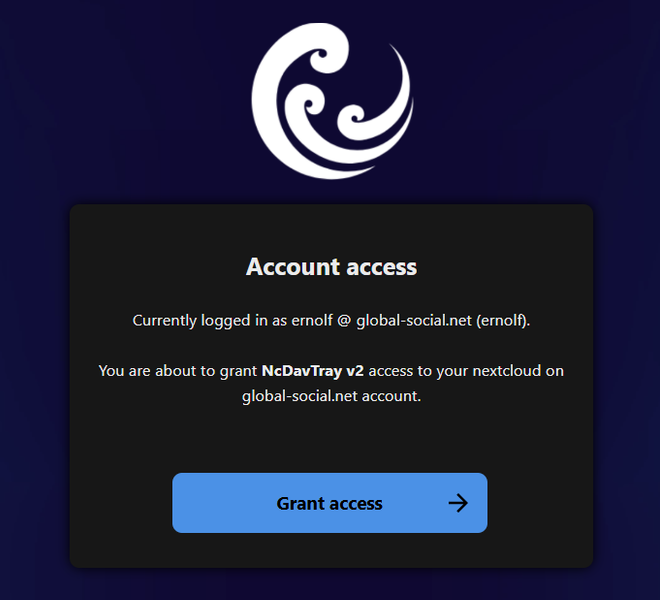
That page names the account it would grant access to and the device it would grant it to — NcDavTray v2, the name the password is filed under afterwards. Read both before clicking; this is the one moment where an address that is not your server would show.
The window polls the server every two seconds and closes by itself as soon as the confirmation arrives, wherever it came from. The session is good for 20 minutes; after that the window says so and the login has to be started again.
The login itself happens on the server's own page, in a real browser. Whatever that page asks for happens there and only there — a second factor, a single sign-on provider, a passkey. NcDavTray sees none of it. Your login password is never typed into NcDavTray, never held by it, and never anywhere near it.
What comes back is the login name and a fresh app password. It is never displayed, never on the clipboard and never pasted, so there is no moment at which it can be read over a shoulder or left in a paste buffer. It lands in the account window and is stored right away; there is nothing left to click. In portable mode this is the moment the passphrase for the secret store is asked for — see Security and privacy.
The server's answer contains two addresses: the page to open, and the endpoint to poll. Neither is used unless it is https on the host that was asked, so nothing in that answer can send the login page or the token somewhere else.
If the confirmation comes back naming a different address than the one you typed — a server that knows itself by another host name — you are asked whether to use the returned one. It is offered, not taken: the name the server prefers is not necessarily one this machine can reach.
Nextcloud accepts more than one name for the same account. The user ID always works, and so does a mail address that is verified on the account — that is how Nextcloud logs people in, without anything having to be switched on for it. Guest accounts often have a mail address as their user ID, and some servers are set up so that this is the only name their users ever type.
Whichever one is typed, the login is the same account and reaches the same files. What the browser hands back afterwards is the name that was typed, not the ID behind it. In a browser that difference is invisible. Here it is not, because the login name is not a label:
| What the login name decides | What a second spelling of the same account means |
|---|---|
| which stored password is used | one app password per server and login name, so one account occupies two of them |
| what the WebDAV path says |
/remote.php/dav/files/<login name> — two addresses for one folder |
| which Windows login the drive runs under | two identities instead of one, out of the two a host has |
The last one is the one you notice. Windows offers two logins per server and no more, so an account that is mounted twice under two spellings fills the server up by itself, and the next mount of that server — another folder, a share link — waits with Waiting for a free connection slot. See Server identities for what that limit is and how it is counted.
Nothing about this is broken: both spellings have full access, and a mount set up under a mail address works. It is complexity that buys nothing, and it is avoidable — so NcDavTray avoids it.
After a browser login, NcDavTray asks the server which account just logged in (GET /ocs/v2.php/cloud/user, which answers with the user ID) and settles the account on that ID. What happens then depends on what is already here:
| Situation | What happens |
|---|---|
| Signed in as the user ID, account is new here | it is stored under the ID. Nothing to decide |
| Signed in as a mail address, and the account is already here under its ID | the existing account is used, and the app password that was just created is withdrawn again — the one already stored works, and a second one would only be another entry under Devices & sessions |
| Signed in as the user ID, and the account is already here under a mail address | the stored account moves to the ID, with the fresh app password, and the old one is withdrawn |
The user field shows the result, so you can see which name the account ended up on. The third case is the only one that can be felt: the mounts of that account are mapped under the old name and have to be disconnected and connected again to come up under the new one. If a drive of that account is connected at that moment, NcDavTray asks first, because a program that has a file open on that drive loses it. With nothing connected the question would be noise and is not asked.
Note
If the server does not answer with a user ID — an older release, the provisioning API switched off — the login name is kept as it came back. Nothing fails; the account is simply stored under the name that was used.
The manual way below is unchanged by any of this: an app password is bound to the login name it was created with, so the name you enter there has to be the one you created it under. Use the user ID and it is the same name NcDavTray would have settled on anyway.
The manual way: the user field and the password field appear, and you bring both.
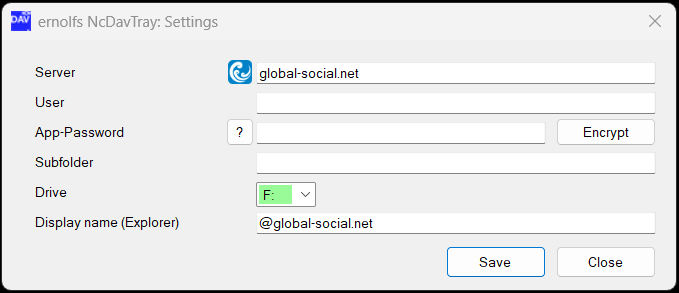
The ? next to the password field explains where an app password is created — Nextcloud, Settings → Security → Devices & sessions, Create new app password — and offers the browser way as the way out of that explanation.
Important
Your ordinary login password works too, but it is the wrong thing to store: it cannot be withdrawn separately, it opens everything rather than one device, and on an account with two-factor authentication it will not work at all.
Once a password is stored, the field says so instead of showing it — DPAPI encrypted password, or Encrypted portable secret in portable mode — and the ? disappears with it. So do the two buttons: an account that has a password is not asked to log in again.
The button beside the field is the way back. It reads Encrypt while there is something to store and Clear — Delete secrets in portable mode — once there is. Clearing asks once, drops the stored password from this machine, and the two ways are offered again. What it does not do is withdraw anything on the server: the app password it forgets is still valid there, and still yours to delete under Devices & sessions.
On the server, under Settings → Security → Devices & sessions, with the device name NcDavTray v2. The major version is part of the name and the patch level is not, so a 2.x line stays one entry and an update does not leave another one behind.
On this machine, never in plain text — DPAPI in installed mode, AES-256-CBC with a passphrase-derived key in portable mode. Security and privacy has the details of both.
One password per server and login name. An app password belongs to that pair, not to a mount. Two mounts of the same account — another subfolder, another drive letter — share one password: enter the two names and the window finds the password that is already there. That is also why the login is only ever asked for once per account, and why the login name is settled on the user ID first — see One account, one spelling.
Every app password is a standing key to your account. It does not expire, it does not notice that the program it was made for is gone, and it keeps working until somebody deletes it. The list under Devices & sessions is worth reading now and then, and everything in it that no longer corresponds to something you use should go.
Warning
A new browser login makes a new app password. Running the browser login again for an account that already had one does not reuse or replace the token on the server — the old one stays valid and stays in the list, under the same name. Repeated logins therefore leave several NcDavTray v2 entries behind, and only the newest of them is in use. Delete the others.
When the last mount of an account is removed, NcDavTray drops the password it kept and offers to withdraw it on the server as well:
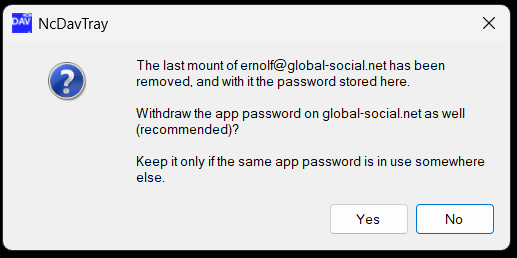
Yes is the recommendation. It calls DELETE /ocs/v2.php/core/apppassword and authenticates with the very password it withdraws, so the server invalidates exactly that token — there is nothing to name and nothing else that can be hit. Answer No only if the same app password is genuinely in use elsewhere.
If the call fails, NcDavTray says so, and the password is still valid on the server. Remove it by hand under Devices & sessions.
Forgetting a password here does not withdraw it there. That is the whole reason this question is asked.
| What you see | What it means |
|---|---|
| … did not start a browser login | the server did not answer POST /index.php/login/v2 with a usable session. Check the address; if it is right, something between you and Nextcloud is refusing the request — a proxy or a web application firewall in front of the server is the usual candidate. The manual way still works |
| The login was not confirmed in time | more than 20 minutes passed. The session is gone; start the browser login again |
| The app password … could not be withdrawn | the server refused or was not reachable. The password remains valid and is listed under Devices & sessions, where it can be removed by hand. A password that was never an app password — an ordinary login password stored here — cannot be withdrawn this way at all; the server answers that no app password is in use |
| The drive is refused with 5, 1326 or 1244 | the credentials themselves. See Troubleshooting |
Note
A window that opens another one minimizes itself for as long as that one is up, and comes back when it closes. These windows are fixed dialogs: while one of them has a child window open, the one behind it is blocked and cannot even be dragged out of the way — which is exactly where it would hurt, with the login page coming up in the browser underneath it. Nothing is lost; it is the same window with the same content.
