Share links
Somebody sends you a Nextcloud link ending in /s/…. NcDavTray can turn that into a drive letter — no account on that server, no app password, nothing to register.
Tip
TL;DR — Copy the link, then tray icon → Add share link…, paste, pick a drive letter. If the link is password-protected you are asked for the password when it connects. Only https on the standard port works.
Right-click the application icon → Add share link…, or use Add ▾ in the Shares tab of the settings window. Paste the link as you received it — the scheme may be missing, that is handled — and press the check button. NcDavTray asks the server what is behind the link: whether it exists, whether it needs a password, and what it is called.
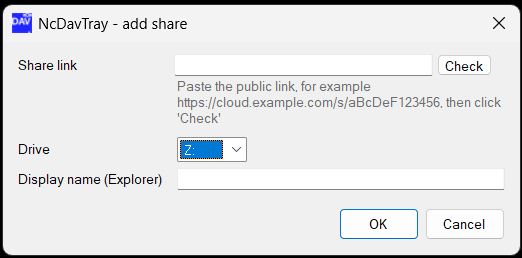
If the server does not answer at all you are told so and can add the share anyway; whether it connects then shows on the first attempt.
The rest is the same as any other mount: a drive letter, optionally a subfolder inside the share, and a label for Explorer. See Mounts for those fields.
https://cloud.example.com/nextcloud/index.php/s/aBcDeF123456
        └──────┬───────┘ └───┬────┘         └──────┬──────┘
              host        installation path        token
Two things are read: the server and the token, which is the segment after /s/. Everything between them is the path the Nextcloud is installed under and stays with the host in the server field — all but a trailing index.php, which only appears on servers without pretty URLs and is no part of the installation path.
Note
Only https on the standard port 443 is accepted. A mount's server field holds a host and an installation path — no scheme, no port — so a link naming a different port cannot be expressed as a mount.
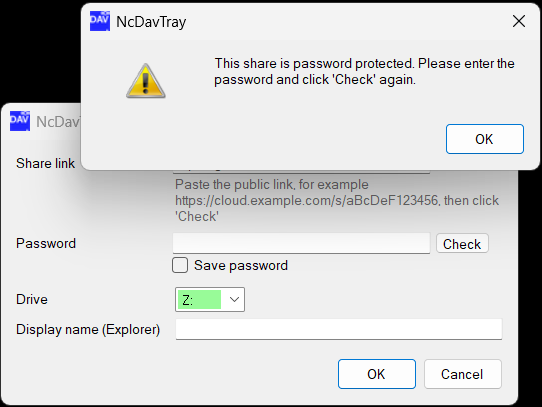
A protected share asks for its password when the mount connects, and keeps it for that mount alone. This is different from an account mount, whose password belongs to the server/user pair and is shared by every mount of that pair — a share token is handed out once and used once, so there is no pair to share anything with.
| Message | What it means |
|---|---|
| This does not look like a share link | no /s/<token> segment, or not https on the standard port |
| The server does not know this share | the link expired, or the share was removed |
| The share link and/or the password are wrong, or the share has expired | what it says — check both |
| WebDAV access to public shares is switched off | see below |
| Waiting for a free connection slot | both server identities of that host are taken. See Server identities |
This one is worth knowing about, because the share works perfectly in a browser and still cannot be mounted. Whether a server hands out public shares over WebDAV is an administrator setting on that server — no client can work around it.
The option is on the server's Administration → Sharing page, in the Federated Cloud Sharing section, and reads:
Allow people on this server to send shares to other servers (this option also allows WebDAV access to public shares)

While that is off, no share on that server can be connected as a drive. NcDavTray says so when it runs into this, and its More information link leads here, so you can forward this page to whoever sent you the share.
Important
A share-link mount defaults to the explicit-port server identity, because it is usually added next to an account mapping of the same server. That is what lets an account and a share of the same Nextcloud be mounted at the same time — but it also means the two of them use up both identities that host has. Further links without a password are free: they sign in the same way as the first one and join its connection, however many there are. A link with a password is a login of its own and needs a place of its own. See Server identities.
