Differences between 1 and 2
NcDavTray 1.x was one drive per running instance. NcDavTray 2.x is one instance that holds as many drives as you like — and it can mount public share links, which 1.x could not do at all.
Tip
TL;DR — In 1.x, "several drives" meant several copies of the program running side by side. In 2.x there is one program with a mount list. Public share links are new, the browser login that fetches the app password is new, the program can check for a new release and install it itself, and the whole project is now built and tested by CI. Your existing configuration is taken over automatically on first start — including the password.
- The one big change
- Feature by feature
- Upgrading from 1.x
- What happens to your configuration
- What changed under the hood
- Staying on 1.x
flowchart TB
    subgraph one["NcDavTray 1.x"]
    A1["instance 1<br>(installed)"] --> D1["Z:"]
    A2["instance 2<br>(portable)"] --> D2["Y:"]
    A3["instance 3<br>(portable)"] --> D3["X:"]
    end
    subgraph two["NcDavTray 2.x"]
    B["one instance<br>manager icon"] --> E1["Z: account"]
    B --> E2["Y: account"]
    B --> E3["X: share link"]
    end
In 1.x each instance had exactly one server, one user, one drive letter — the settings dialog had those fields at the top and that was the account. To get a second drive you started a second, portable copy of the whole program.
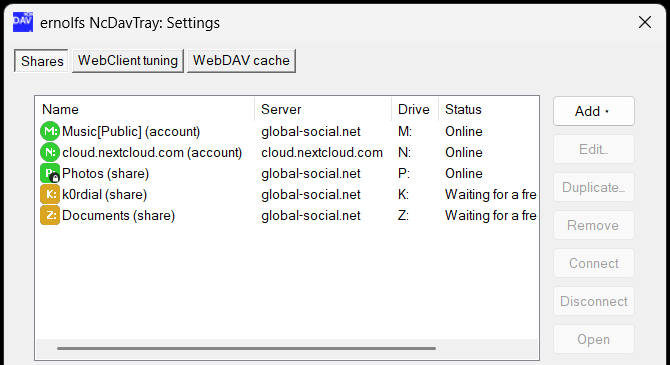
In 2.x the settings dialog opens on a Shares tab holding a list of mounts. Each entry has its own server, kind, drive letter and label, and each can be enabled or disabled without deleting it. One tray icon manages them all, with an optional icon per mount.
| 1.x | 2.x | |
|---|---|---|
| Drives per instance | 1 | as many as you have letters |
| Public share links | ❌ | ✅ — see Share links |
| Password-protected share links | ❌ | ✅ |
| App password fetched by the browser | ❌ — typed in by hand | ✅ — Login Flow v2, see Accounts and app passwords |
| Per-mount tray icons | ❌ | ✅, switchable off |
| Enable / disable a mount without deleting it | ❌ | ✅ |
| Warning about the Windows two-identity limit | ❌ | ✅ — see Server identities |
| Update check | ❌ | ✅, off by default — see Updates |
| Installing that update from inside the program | ❌ — download and run the installer | ✅ — Update now in the About box |
| A balloon naming the running version at every start | ❌ | ✅ |
| Auto-reconnect and watchdog | ✅ | ✅ |
| Subfolder mapping | ✅ | ✅ |
| Explorer label and favicon icon | ✅ | ✅ |
| WebClient tuning tab | ✅ | ✅ |
| WebDAV cache tab | ✅ | ✅ |
| Automatic Office file locking | ✅ | ✅ |
| DPAPI / AES-256 + PBKDF2 credential storage | ✅ | ✅ |
| Languages | 6 packs + English built in | 7 packs, English is a pack too |
| Installer file | installNcDavTray.cmd |
Installer.cmd |
| Built from | one script, src\NDT.ps1
|
a module tree, assembled by make
|
| CI, REUSE compliance, automated release archive | ❌ | ✅ |
Note
Nothing was removed. Everything 1.2.2 did, 2.x still does — the list above is what was added around it.
Exactly like any other update, because the migration is automatic:
| Mode | Do this |
|---|---|
| Installed | download the new archive, unpack it, run Installer.cmd → 1. Your running instance is stopped and restarted |
| Portable | run Installer.cmd → 2 and point it at your existing portable folder |
The installer is the only thing whose name changed: 1.x shipped installNcDavTray.cmd, 2.x ships Installer.cmd.
Tip
This is the last upgrade you have to do by hand. From 2.0.0 on, the About box installs a newer release itself — see Updates. A 1.x copy has no update check that could offer anything, which is why this one is a download.
Important
If you ran several portable copies in 1.x to get several drives, upgrade one of them first, then add the other mounts to it from the Shares tab and retire the extra copies. Running three 2.x instances would work, but it is no longer what the program is for — and it makes the two-identity limit harder to keep track of.
On the first start of 2.x:
flowchart LR
    A["1.x account<br>(flat)"] --> B{{"first start<br>of 2.x"}}
    B --> C["first entry of<br>the mount list"]
    B --> D["password moved into<br>the account store"]
    C --> E["old values removed"]
-
Installed: the single account under
HKCU\Software\NcDavTraybecomes the first entry of the new mount list, and its stored password moves into the per-account store. The old values are then removed — their absence is what records that the migration already ran, so it cannot happen twice. -
Portable:
NcDavTray_portable.jsonis read once, when the copy has no 2.x configuration of its own yet, and becomes the first entry. The password comes across fromNDT_secret.datbehind the same passphrase you already use. - Your check interval and language keep their names and are simply read where they are.
Note
The portable JSON file is deliberately left in place. If you start an old 1.x copy from the same folder again, it still finds its configuration.
Not visible in use, but it is why the version number moved to 2:
- The program is no longer maintained as one 4 000-line script. It is over 200 small source files, one function each, assembled into the single deliverable at build time — see Build from source.
- Every push runs a build and a set of static checks: syntax, undefined variables, unknown commands, unreachable form members, translation keys and placeholders, and code style.
- The whole tree is REUSE-compliant.
- A published release rebuilds from its own tag, refuses to proceed if the tag disagrees with the version in the source, and attaches the archive itself.
- English moved out of the code and into
NDTi18n.en.jsonlike every other language; only a small fallback set is still compiled in.
The result you download is still exactly what it was: one PowerShell script, one .cmd, some assets. Nothing to install, nothing to compile, no dependencies.
NcDavTray 1.x describes what is still available and where to get it. 1.2.2 works and is not going anywhere — but new features land in 2.x only.
