Languages
NcDavTray ships in seven languages and switches between them without a restart.
Tip
TL;DR — Settings → Shares tab, at the bottom. Pick a language and the whole interface changes immediately, menus and tooltips included. Language packs are plain JSON files in i18n/; adding one is copying a file and translating it.
| File | Language |
|---|---|
NDTi18n.en.json |
English |
NDTi18n.de.json |
German |
NDTi18n.es.json |
Spanish |
NDTi18n.fr.json |
French |
NDTi18n.it.json |
Italian |
NDTi18n.nl.json |
Dutch |
NDTi18n.pt.json |
Portuguese (Brazil) |
English is special in one respect: a minimal English set is compiled into the script itself as a safety net, so the application still speaks even if the i18n folder is missing entirely. The full English pack is a file like all the others.
flowchart TD
    A[Start] --> B{"A language stored<br>in the settings?"}
    B -- yes --> C[use it]
    B -- no --> D{"Windows UI culture<br>has a pack?"}
    D -- yes --> E[use it]
    D -- no --> F[English]
So a fresh installation follows Windows, and the moment you pick a language yourself that choice is remembered and wins from then on.
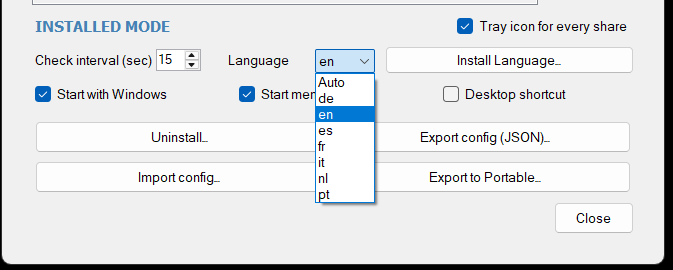
The language belongs to the installation, not to a mount. It sits below the mount list in the settings window for exactly that reason.
Changing the language takes effect at once, with no restart and no reopening. Menus rebuild themselves when they open, and tooltips that are already on screen are relabelled — otherwise one of them would sit there in the old language until the next poll happened to overwrite it, which would read as if the switch had not taken.
A pack is a flat JSON file: one key, one string. To add a language:
- Copy an existing pack, e.g.
NDTi18n.en.json→NDTi18n.pl.json. - Translate the values. Leave the keys alone.
- Keep the placeholders —
{app},{server},{drive},{version}— exactly as they are, including the braces. They are filled in at runtime. - Drop the file into
i18n/, or use Install language pack in the settings window.
The new language appears in the picker as soon as the file is there.
Note
A pack that is missing a key does not break anything: the missing string falls back to English rather than showing an empty label. So a partial translation is usable from the first key onwards.
Tip
Translations are very welcome as pull requests. If you send one, only the pack file is needed — nothing in the code has to change to support a new language.
