Server identities
This page explains the one hard limit you will meet when you set up more than two logins against the same Nextcloud, and why it is not something NcDavTray can simply fix.
Tip
TL;DR — Windows keeps one login per server identity, and a host offers exactly two: host@ssl and host@ssl@443. So per Nextcloud server you get two different logins at a time. Mounts that use the same login can share one identity and there is no limit on those — and every share link without a password uses the same login, so any number of them fit into one place. A mount that needs a third different login reports Waiting for a free connection slot (Windows error 1219) and connects by itself as soon as a slot frees up.
- What Windows actually counts
- The two identities per host
- When mounts can share one
- Error 1219 and what NcDavTray does with it
- Working within the limit
The Windows WebDAV redirector treats a WebDAV server like an SMB server, and there it enforces a rule that predates all of this: one set of credentials per server, at a time. Connecting to the same server under a second, different account is refused with
System error 1219 has occurred.
Multiple connections to a server or shared resource by the same user,
using more than one user name, are not allowed.
The limit is on logins, not on drives. Ten drive letters pointing at one server under one login are fine. Two letters under two different logins already need two identities.
A WebDAV UNC path can name the same host in two ways, and Windows counts them as two separate servers:
| UNC form | NcDavTray calls it |
|---|---|
\\cloud.example.com@ssl\... |
the plain identity |
\\cloud.example.com@ssl@443\... |
the explicit-port identity |
Both reach the same machine over the same port — 443 is what @ssl means anyway. But because the strings differ, the redirector keeps a separate login for each. That gives you two concurrent logins per host instead of one.
Every mount carries a switch for which form it uses. Share-link mounts default to the explicit-port form, because a public link is usually added next to an existing account mapping of the same server and needs the second identity to exist alongside it.
Note
This is a workaround, not a feature Microsoft documents as one. It works reliably, but it is what caps the count at two: there is no third spelling of the same host that the redirector would accept as another server.
Two mounts ride on the same identity when all four of these match:
- the same host,
- the same identity form (plain or explicit-port),
- the same kind (account or share),
- the same login name — which is not the same thing as the same target.
The first one is the host, not the Nextcloud. Two installations under one domain — cloud.example.com/work and cloud.example.com/private — are two servers as far as Nextcloud is concerned and one server as far as Windows is concerned: they share the two places, and an account in each fills the host up.
The fourth one is where it gets interesting, because the login name is not what you would guess from the mount:
| Mount | Signs in as | With |
|---|---|---|
| Account | your user ID | the app password |
| Share link without a password | anonymous |
nothing |
| Share link with a password | the share token | the share password |
A share link without a password carries its token in the path, not in the login. Every one of them on a host therefore presents exactly the same credentials, and all of them together take one place — however many there are. A password-protected link takes a different route: it goes over the legacy endpoint, where the token is the login name, and that makes it a login of its own, exactly like an account.
So the two places per host are taken by logins that carry a password — an account or a protected link — plus, as one single place, all the password-free links together.
flowchart TD
    A[New mount wants to connect] --> B{"Is a connection up<br>with the same host, form,<br>kind and login name?"}
    B -- yes --> C["Join it<br>no new identity needed"]
    B -- no --> D{"Is one of the two<br>identities still free?"}
    D -- yes --> E[Take it and connect]
    D -- no --> F["Status: Waiting for<br>a free connection slot"]
    F -.-> |"a slot frees up"| E
So the same account under three drive letters is no problem at all — one login, three drives. Neither is one account plus five password-free share links — that is two logins. Three different accounts on one server, or an account plus two protected links, is a problem, and no arrangement of settings solves it.
Important
What counts is what Windows has on record, not what NcDavTray has configured. A drive mapped by another program, by net use, or by a portable copy of NcDavTray running beside the installed one takes an identity just the same. So does a connection made without a drive letter — it holds the login and simply has no letter to show for it.
A mapping refused with 1219 is deliberately not reported as a failure. The mount is sound, its settings are correct, and nothing needs fixing — both slots are simply taken at this moment. It therefore gets its own status:
Waiting for a free connection slot
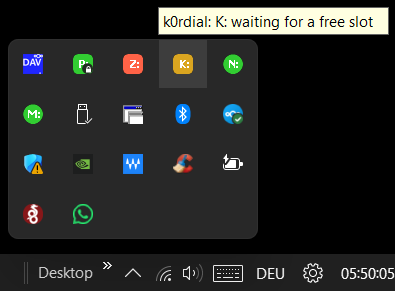
NcDavTray keeps it in the list, keeps polling, and connects it the moment one of the two identities is given up — by a disconnect, an exit, or another mount going offline. You do not have to come back and press anything.
| Situation | What works |
|---|---|
| One account, many folders | one identity, any number of drive letters — use Duplicate… and change the subfolder |
| One account plus any number of share links without a password | fits: the account takes one place, all the links together take the other |
| One password-protected share link plus any number without a password | fits, for the same reason — the protected one is a login of its own |
| One account plus one password-protected share link | fits exactly — both places taken, nothing else on that host connects, password-free links included |
| Two different accounts on one server | fits exactly — same situation |
| One account in each of two installations on the same host | fits exactly — the two places are the host's, not the installation's |
| Three or more logins that each carry a password | does not fit. Disable the ones you do not need right now, or reach the extra folders as subfolders of an account you already have |
The most common way out is the last one: much of what looks like it needs a second account is reachable as a subfolder — including anything shared with you, which appears inside your own account rather than needing its own login.
