File locking
This is the one thing NcDavTray does that the official Nextcloud Desktop Client cannot, and it is the reason a lot of people use both side by side.
Tip
TL;DR — Because NcDavTray exposes Nextcloud as a real network drive, Office applications send a WebDAV LOCK before editing a file, automatically and with no configuration. Another user then sees the familiar file is locked warning. The Desktop Client does not do this, because it edits a local copy. With the server app files_lock installed, non-Office files are locked too.
NcDavTray does not synchronise anything. The drive is the server, reached over WebDAV as you use it. So when Word, Excel, LibreOffice or Collabora opens a document from Z:, it opens it over WebDAV — and these applications issue a LOCK request before editing, exactly as they would on a SharePoint or a company file server.
flowchart LR
    subgraph NcDavTray
    A[Office opens Z:\doc.odt] --> B["WebDAV LOCK<br>to the server"]
    B --> C[Other users see it as locked]
    end
    subgraph Desktop Client
    D[Office opens the synced copy] --> E["a local file<br>no LOCK is sent"]
    E --> F[Other users notice nothing]
    end
- Locking is automatic and per application — nothing to configure.
- Another user opening the same file gets the standard locked by another user warning.
- Closing the file releases the lock.
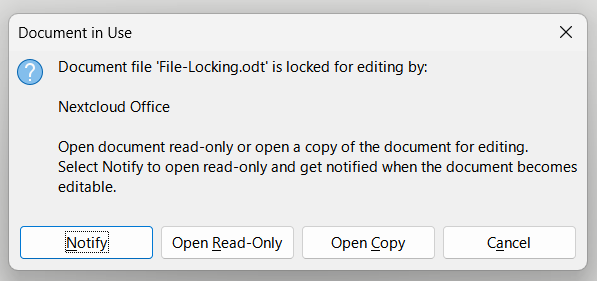
Important
This does not work through the Nextcloud Desktop Client, including virtual files. The client synchronises to a local file, and opening a local file sends no WebDAV request at all — there is nothing for the server to lock.
With files_lock installed on the server, locking goes further:
- Non-Office files get locked too — any application opening a file over the drive triggers a server-side lock.
- The Desktop Client gains a manual lock / unlock entry in the file context menu.
- The server enforces locks towards other users with HTTP
423.
Warning
The user who created a lock can bypass it: they can still edit, rename, move or delete the file (files_lock#228). Locking is therefore effective between users but does not protect a file from the person who locked it — including from a second device of that same person.
The two are complementary, not competitors:
| NcDavTray (WebDAV drive) | Nextcloud Desktop Client | |
|---|---|---|
| Automatic Office file locking | ✅ | ❌ |
Non-Office locking (with files_lock) |
✅ | ❌ |
Manual lock from the context menu (with files_lock) |
❌ | ✅ |
| Works offline / keeps a local copy | ❌ | ✅ |
| Behaves like a standard network drive | ✅ | — |
Running both is the usual arrangement: the Desktop Client for what you want available offline, NcDavTray for shared documents that several people edit.
