Updates
NcDavTray can tell you when a newer release exists, and install it for you when you say so. It never does either behind your back.
Tip
TL;DR — A balloon names the running version a moment after every start. Open About from the application icon and press Check for updates. If a newer release is there, the button turns into Update now: confirm, and the program replaces itself and comes back. To have it checked once at every start, tick the box in the same window — it is off by default, and the start balloon then carries the answer.
Note
The screenshots on this page were taken during a test round and show a project link ending in NcDavTray-test. That is a throwaway repository the updater is exercised against before a release goes out — see Build from source for what it is for. Your copy shows the real project link.
It asks the project page which release is the newest, and compares that release's version with the one running.
flowchart LR
    A["About → Check for updates"] --> B["GitHub API:<br>latest release of the project"]
    B --> C{"Newer than<br>this copy?"}
    C -- yes --> D["Version X.Y.Z is available"]
    C -- no --> E[This is the latest version]
    B -. "no answer" .-> F[Could not reach the project page]


The address is derived from the project link the About box already shows, so what is checked is the release behind that link and not a second address that could drift away from it.
The comparison is on version numbers, component by component — so 2.10.0 is correctly newer than 2.9.10, which a text comparison would get wrong. And it only ever reports a release that is strictly ahead: if you are running something newer than the latest release, you are told nothing, because telling you to install what you are already past would be worse than saying nothing.
A balloon comes up a moment after NcDavTray has started and names the version that is running. The program starts hidden, and usually from the autostart entry, so without it nothing on screen would say that it is there at all — or which version of it.
The About box has a checkbox: Check for updates at startup. It is off unless you switch it on, and it is remembered with the rest of your settings. With it on, that same balloon carries a second line whenever a newer release exists.
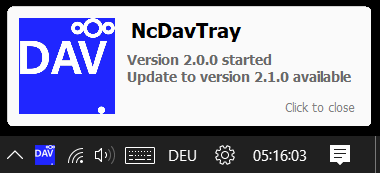
The check runs deliberately behind the mounts, never in front of them, because the answer is not something anyone is waiting for and the request takes as long as the server needs. It is one balloon and not two: a new balloon replaces the one before it, so a separate update message would take the version line off screen before it could be read.
That answer is kept. Open the About box after the balloon and it is already showing Update now — you do not have to ask the same question a second time.
Note
A balloon with nothing but the version line means either "up to date" or "could not ask" — both are answers nobody asked to be told about. Press the button in the About box if you want to know which.
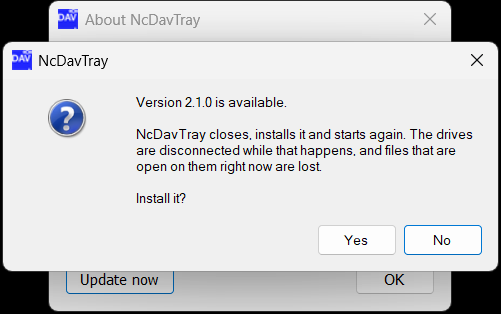
When the newest release carries its archive, the Check for updates button is replaced by Update now. It is a replacement rather than a second button because the check has nothing left to say once its answer is on screen.
Pressing it asks first:
Warning
The drives go down while the update runs. Anything still open on them at that moment is lost — save your work before you confirm.
Say yes and this happens:
flowchart LR
    A["Update now"] --> B["Download the release archive<br>to a temporary folder"]
    B --> C{"Complete, and a<br>newer version?"}
    C -- no --> D["Could not download the update"]
    C -- yes --> E["Drives down,<br>this copy exits"]
    E --> F["The downloaded copy writes<br>over the installed one"]
    F --> G["Restart<br>+ 'Version X.Y.Z started'"]
A running script cannot be replaced underneath the process running it, so the two copies swap roles: the downloaded one does the writing and the one you started is what gets written over. That is the same division of labour Installer.cmd has always used, not a second one beside it.
What is checked before anything is replaced:
- the download is complete — the release says how long the archive is, and a transfer that broke off early is a perfectly valid file of the wrong length
- the archive really contains the program, in the layout a release archive has
- the script's own version is newer than the running one, not just the release's tag: the tag says what a release is called, the script says what it is
- the package is 2.0.0 or newer, because the handover is an agreement between the two copies and an older one would not know its half of it
If any of those fails, nothing is touched and the About box says so.
What survives: your mounts, your saved passwords, your settings, your shortcuts and your autostart setting. An update is not an installation — a setting you switched off does not come back because a new version arrived. Language packs are merged rather than replaced, so one you put there by hand stays.
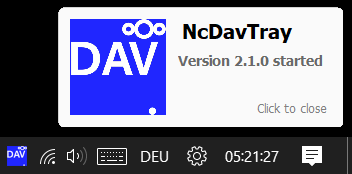
When the new copy is up, its start balloon names the version now running — and no longer offers an update, because there is none left to offer. That is the whole confirmation, and it is the one you would have got anyway:
Note
Installed and portable both work this way. An installed copy replaces itself in %LOCALAPPDATA%\NcDavTray; a portable copy replaces itself in the folder it runs from and rewrites its launchers. Neither touches NDT_config.json or NDT_secret.dat.
You never have to use the in-app updater, and sometimes you cannot:
- coming from 1.x, where it did not exist yet
- when the release carries no archive, or the download cannot be verified
- when you would rather unpack and look at the script before running it
Then it is the installation you already know:
| Mode | What to do |
|---|---|
| Installed | Download the new ZIP, run Installer.cmd → 1. The running copy is stopped, replaced and restarted; mounts, passwords and settings survive |
| Portable | Run Installer.cmd → 2 and point it at your existing portable folder. Your NDT_config.json and NDT_secret.dat are not touched |
See Installation for the details of both.
Important
Updating from 1.x is a manual step. A 1.x copy has no update check that can offer anything, so download the 2.x archive and run Installer.cmd. What changes on the way over is described in Differences between 1 and 2.
- It does not check unless you press the button or switched on the startup check.
- It does not download or install anything on its own. The download starts when you press Update now, and only after you confirm.
- It does not take whatever file happens to hang on a release. It looks for the archive under the name the release workflow builds it as, and ignores anything else — something added there by hand is not what it offers to install.
- It sends no identifying information — it is a plain request for the project's latest release, the same one a browser makes when you open the releases page.
Important
NcDavTray 1.x advertised no background update checks at all. Version 2 keeps that promise for anyone who does not change the setting: the check exists, and it stays off until you turn it on.
