Token Compression
OBEY API Gateway includes a multi-engine token compression system that transparently reduces request payload sizes before forwarding to providers. This cuts token consumption and costs, especially for applications with large conversation histories, repetitive content, or verbose tool definitions.
Token compression is opt-in and defaults to disabled. When enabled, it runs as Tower middleware on the request path, after guardrails and before provider dispatch.
Request ──▶ Protection Rules (preserve code, URLs, JSON, etc.)
                │
                ▼
         Engine Pipeline (ordered by compression level)
                │
                ▼
         Time Budget Check (abort if over budget)
                │
                ▼
         Cache-Aware Downgrade (preserve prompt-cache prefixes)
                │
                ▼
         Compressed Request ──▶ Provider
- Protection rules identify content that must never be compressed (code blocks, URLs, JSON structures, identifiers, etc.) and mark those regions as exempt.
- Engine pipeline runs one or more compression engines in sequence based on the resolved compression level.
- Time budget ensures compression never exceeds a configurable per-level millisecond budget; if time runs out, partial results are used.
-
Cache-aware downgrade detects
cache_controlmarkers (Anthropic Claude) and preserves the cached prefix byte-for-byte, only compressing the suffix.
The system ships with 8 named engines that can be composed into levels or custom pipelines:
| Engine | Strategy | Best For |
|---|---|---|
lite |
Light whitespace normalization and redundancy removal | Single-turn, short requests |
standard |
Balanced semantic compression preserving meaning | Multi-turn conversations |
aggressive |
Structure removal, whitespace stripping, abbreviation | Long contexts where some formatting loss is acceptable |
ultra |
Maximum compression, removes all non-essential tokens | Cost-sensitive batch processing |
rtk |
Round-trip-knowledge: semantic grouping with balanced/aggressive/conservative strategies | Preserving meaning while maximizing savings |
perplexity |
ONNX perplexity-scored redundancy removal | Long-context models, research workloads |
tool_def |
Schema minification for tool/function definitions | Requests with many tool definitions |
language_pack |
Language-aware compression using external language pack files | Non-English or multilingual content |
Named levels resolve to ordered engine chains:
| Level | Engine Chain | Typical Savings |
|---|---|---|
none |
No compression | 0% |
lite |
lite | 5-15% |
standard |
standard | 15-30% |
aggressive |
aggressive | 30-50% |
ultra |
ultra | 50-70% |
rtk |
rtk | 40-60% |
stacked |
rtk + standard | 50-70% (highest, slowest) |
Configure compression from the admin panel's Compression tab. The page opens with compression disabled and every field at its default value.
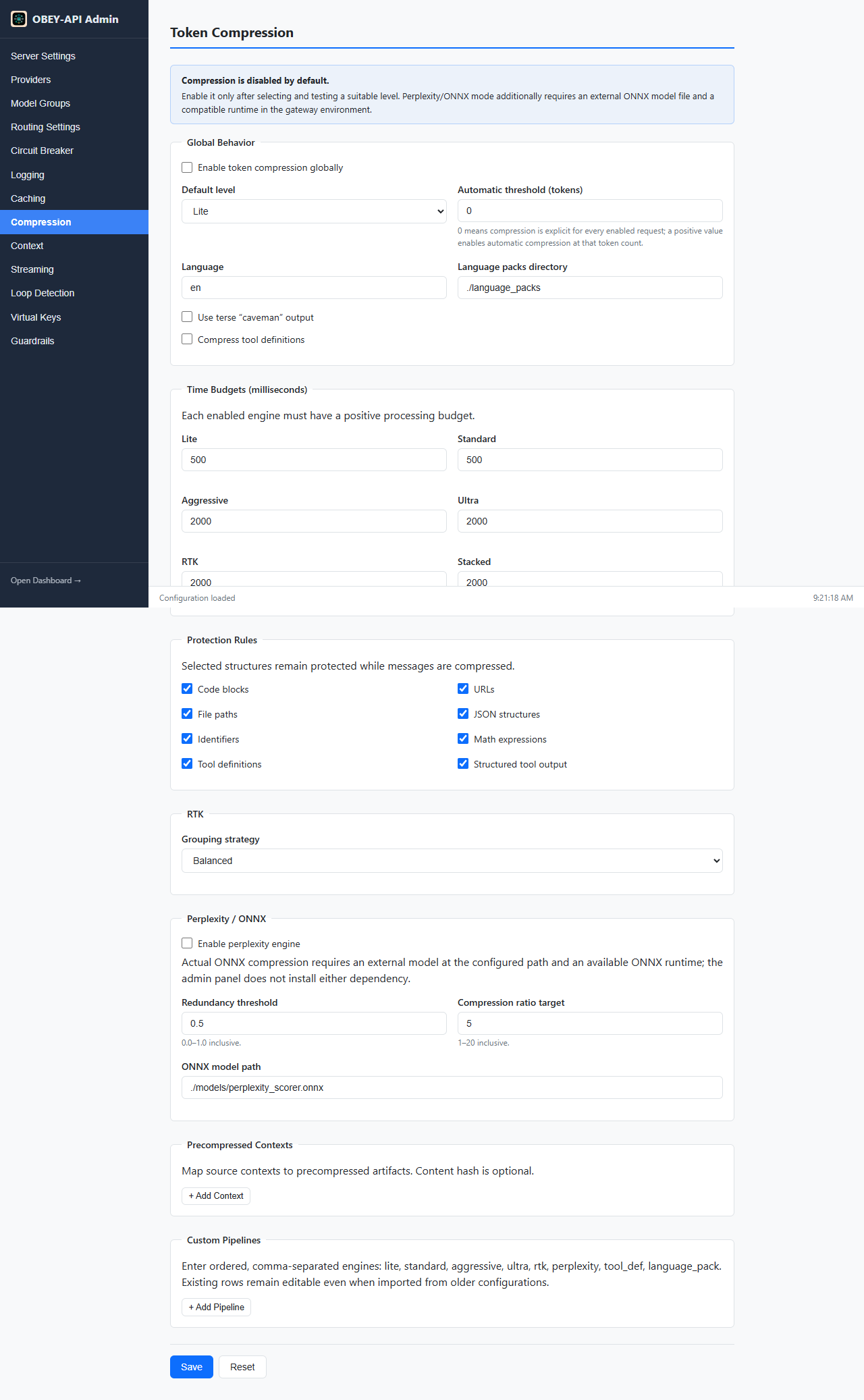
The page is grouped into sections — Global Behavior, Time Budgets, Protection Rules, RTK, Perplexity / ONNX, Precompressed Contexts, and Custom Pipelines — each mapping directly to the YAML keys documented below.
- Enable globally — tick Enable token compression globally under Global Behavior.
-
Pick a default level —
None,Lite,Standard,Aggressive,Ultra,RTK, orStacked.Standardis a balanced starting point for multi-turn conversations. -
Set an automatic threshold (optional) — leave
0to compress only when a request explicitly opts in, or enter a positive token count to auto-compress larger requests. -
Adjust time budgets (optional) — each enabled engine needs a positive millisecond budget; heavier levels default to
2000ms and the light levels to500ms. - Review protection rules — keep structured content (code blocks, URLs, file paths, JSON, identifiers, math, tool definitions) checked so it is preserved verbatim.
-
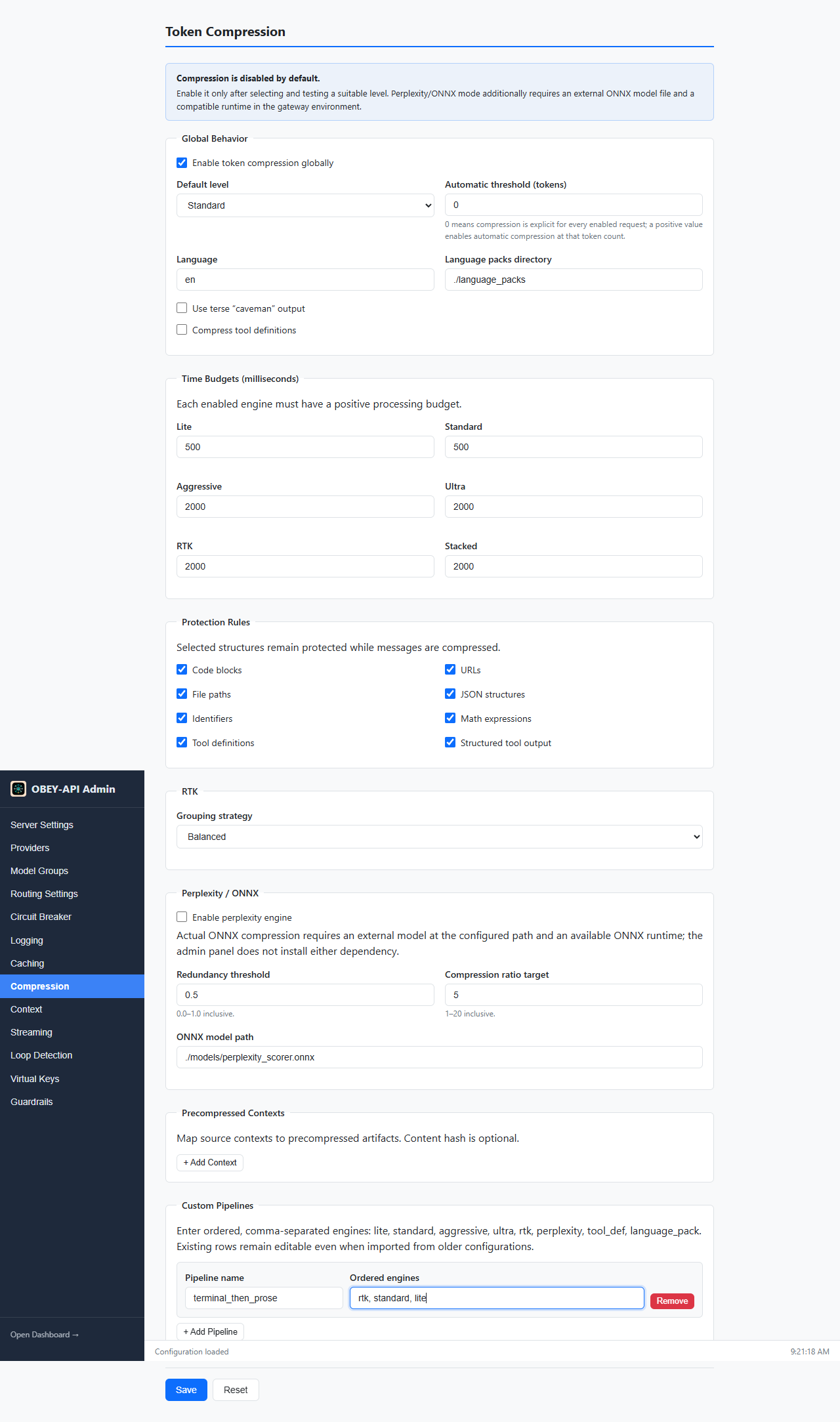
Add a custom pipeline (optional) — click + Add Pipeline, give it a name, and enter ordered, comma-separated engines (for example
rtk, standard, lite). - Save — click Save. Changes apply via hot reload; no restart is required.
The screenshot below shows compression enabled with the Standard default level and a custom terminal_then_prose pipeline defined:
Perplexity / ONNX: Enter the desired model path, then use Download missing in the Compression panel. The gateway downloads and verifies the pinned Apache-2.0 Kompress-Small model, tokenizer, and matching ONNX Runtime on the server/container—not in your browser. Save the configuration after the panel reports both model and runtime ready. Docker users should mount a writable persistent volume at
/app/models.
compression:
  enabled: false                         # Enable compression globally (default: false)
  default_level: lite                    # Default compression level
  auto_threshold_tokens: 0              # Auto-trigger above this token count; 0 = disabled
  caveman_output: false                  # Collapse output to extreme brevity
  compress_tool_definitions: false       # Also compress tool/function definitions
  language: en                           # Language for language_pack engine
  language_packs_dir: ./language_packs   # Directory for language pack files
  time_budget_ms:                        # Per-level time budgets (milliseconds)
    lite: 500
    standard: 500
    aggressive: 2000
    ultra: 2000
    rtk: 2000
    stacked: 2000
  protection_rules:                      # Content patterns never compressed
    - code_blocks
    - urls
    - file_paths
    - json_structures
    - identifiers
    - math_expressions
    - tool_definitions
    - structured_tool_output
  precompressed_contexts: []            # Pre-compressed file mappings
  rtk:
    grouping_strategy: balanced         # aggressive | balanced | conservative
  perplexity:
    enabled: false                       # Requires ONNX perplexity scorer model
    redundancy_threshold: 0.5           # 0.0-1.0; higher = less aggressive
    compression_ratio_target: 5         # 1-20
    model_path: ./models/perplexity_scorer.onnx
custom_pipelines: {} # Named custom engine chainsproviders:
- name: "openai"
type: "openai"
base_url: "https://api.openai.com/v1"
api_key_env: "OPENAI_API_KEY"
compression:
enabled: true # Override: enable for this provider
level: standard # Override: use standard level
auto_threshold_tokens: 2000 # Override: auto-trigger at 2000 tokens
caveman_output: falseSetting level: none on a provider explicitly disables compression for that provider regardless of the global setting.
model_groups:
  - name: "gpt-4-group"
    models:
      - provider: "openai"
        model: "gpt-4"
        priority: 1
    compression:
      level: aggressive                 # Override: aggressive for expensive models
      auto_threshold_tokens: 1000       # Override: lower threshold
caveman_output: trueConfiguration resolves per-field (not all-or-nothing):
Global defaults
  └── Provider override (if set)
        └── Model-group override (if set) ← wins
Each field resolves independently. A model-group can override level while inheriting auto_threshold_tokens from the provider.
Define named pipelines that chain engines in any order:
compression:
  custom_pipelines:
    terminal_then_prose:
      engines: [rtk, standard, lite]
    tools_focused:
      engines: [tool_def, lite]
Callers select a custom pipeline via the x-compression-pipeline request header:
curl http://localhost:8080/v1/chat/completions \
  -H "x-compression-pipeline: terminal_then_prose" \
  -H "Content-Type: application/json" \
  -d '{"model":"gpt-4-group","messages":[...]}'
Engine names must be from the known set: lite, standard, aggressive, ultra, rtk, perplexity, tool_def, language_pack.
Protection rules prevent compression from damaging structured or sensitive content. The following rules are enabled by default:
| Rule | Protects |
|---|---|
code_blocks |
Fenced code blocks (``` markers) |
urls |
HTTP/HTTPS URLs |
file_paths |
File system paths |
json_structures |
JSON objects and arrays |
identifiers |
Variable names, function names, class names |
math_expressions |
Mathematical notation and formulas |
tool_definitions |
Tool/function definition schemas |
structured_tool_output |
Structured output from tool calls |
Protected regions are passed through verbatim regardless of compression level.
When a provider supports prompt caching (e.g., Anthropic Claude with cache_control markers), the gateway automatically detects cached prefixes and:
- Preserves the cached prefix byte-for-byte (no compression applied)
- Compresses only the suffix (new content after the cache boundary)
- Downgrades aggressive/ultra/rtk/stacked levels to
nonefor the protected prefix
This ensures prompt cache hits are never invalidated by compression.
For large, static context documents (system prompts, documentation, etc.), you can pre-compress them offline and map the original to the compressed version:
compression:
  precompressed_contexts:
    - source_path: ./docs/system-prompt.md
      compressed_path: ./docs/system-prompt.compressed.md
      content_hash: "sha256:abc123..."    # Optional: verify freshness
When the gateway detects a message matching the source content, it substitutes the pre-compressed version directly, skipping runtime compression entirely.
The RTK (Round-Trip-Knowledge) engine uses semantic grouping to compress content while preserving meaning. It supports three grouping strategies:
| Strategy | Behavior |
|---|---|
aggressive |
Maximum grouping, highest compression, may lose nuance |
balanced (default) |
Good compression with reliable meaning preservation |
conservative |
Minimal grouping, lowest compression, highest fidelity |
compression:
  rtk:
grouping_strategy: balancedThe perplexity engine uses the pinned Kompress-Small ONNX token-classification model to score token redundancy and remove low-information content. The admin panel installs the graph, external weights, tokenizer, and platform ONNX Runtime into the directory containing model_path. The full bundle is approximately 350 MB.
compression:
  perplexity:
    enabled: false
    redundancy_threshold: 0.5           # Tokens below this perplexity are candidates for removal
    compression_ratio_target: 5         # Target ratio (1-20); higher = more aggressive
    model_path: ./models/perplexity_scorer.onnx
Note: The perplexity engine remains disabled by default. Install the approved assets from Admin → Compression, wait for both readiness indicators, then enable and save the setting. If assets or model initialization are unavailable, the gateway safely leaves the request unchanged instead of representing heuristic scoring as ONNX inference.
Compression metrics are exported via the /metrics Prometheus endpoint:
| Metric | Type | Labels | Description |
|---|---|---|---|
obey_compression_tokens_saved_total |
counter |
level, provider
|
Cumulative tokens saved |
obey_compression_ratio |
histogram |
level, provider
|
Compression ratio (compressed / original) |
obey_compression_duration_seconds |
histogram |
level, provider
|
Compression operation duration |
Each compression operation produces a content-free stats record (never logs request/response content):
{
  "request_id": "req_abc123",
  "level": "standard",
  "engines_applied": ["standard"],
  "original_tokens": 4200,
  "compressed_tokens": 2900,
  "savings_percent": 31.0,
  "compression_time_ms": 45,
  "auto_triggered": true,
  "cache_downgrade_applied": false,
  "tool_definitions_tokens_saved": 0,
  "caveman_applied": false,
  "timed_out": false,
  "error": false,
  "provider": "openai",
  "model": "gpt-4"
}Each compression level has a configurable time budget. If compression exceeds the budget:
- The pipeline aborts remaining engines
- Partial results (from completed engines) are used
- The
timed_outfield is set totruein stats - No error is returned to the caller; the request proceeds with whatever compression was achieved
Default budgets:
| Level | Budget |
|---|---|
| lite | 500ms |
| standard | 500ms |
| aggressive | 2000ms |
| ultra | 2000ms |
| rtk | 2000ms |
| stacked | 2000ms |
When auto_threshold_tokens is set to a non-zero value, compression activates automatically for requests exceeding that token count, even if the caller didn't explicitly request compression:
compression:
  enabled: true
  auto_threshold_tokens: 4000    # Compress requests > 4000 tokens automatically
  default_level: standard
This is useful for catching unexpectedly large requests without requiring client-side changes.
When caveman_output: true is set, the gateway appends an instruction to the system prompt requesting extremely brief, compressed output from the model. This reduces response token consumption at the cost of prose quality.
This can be set globally, per-provider, or per-model-group.
Compression configuration participates in hot reload via /admin/config/reload. Changes to:
- Enabled state
- Default level
- Time budgets
- Protection rules
- Custom pipelines
- RTK/perplexity settings
...all take effect immediately without restart. Invalid configurations are rejected atomically (the previous config remains active).
- Configuration — full config reference
- Caching — how caching interacts with compression
- Virtual Keys — per-key compression overrides (coming soon)
- Streaming — compression applies before streaming begins