Virtual Keys
Virtual keys (vk_…) authenticate individual callers to the gateway without sharing real provider credentials. Each key carries its own budgets, rate limits, model-access rules, and expiry — all enforced at the proxy layer before requests reach upstream providers.
- Multi-tenant usage tracking — see who's spending what
- Cost control — per-caller USD and token budgets with automatic enforcement
- Access governance — restrict which model groups a caller can use
- Credential isolation — callers never see your real provider keys
- Revocation — instantly disable a compromised key without rotating provider secrets
Enforcement is opt-in and defaults to disabled:
virtual_keys:
  enforcement: disabled       # disabled | optional | required
database_path: "./keys.db" # Dedicated key/usage store (SQLite)| Mode | Behavior |
|---|---|
disabled (default) |
Virtual keys are ignored; requests route with provider keys directly |
optional |
Requests with a vk_ bearer token are validated and tracked; requests without one pass through |
required |
Every proxied request must present a valid virtual key (else 401) |
The pipeline runs in order for each request:
Authenticate → Model Access → Budget Check → Rate Limit → Forward → Record Usage
-
Authenticate — validate the
vk_token exists and isn't expired/revoked - Model Access — check the requested model against the key's whitelist
- Budget Check — verify USD/token spend hasn't exceeded limits
- Rate Limit — enforce RPM/TPM token buckets
- Forward — route to provider
- Record Usage — capture spend and tokens from the provider response
| Constraint | Description | Enforcement |
|---|---|---|
budget_limit_usd |
Cumulative USD spend cap (0.01–999,999,999.99) |
429 when reached |
token_budget |
Cumulative token cap (input + output) |
429 when reached |
budget_window |
daily / weekly / monthly reset window (omit for lifetime) |
Auto-resets |
requests_per_minute |
Per-key RPM token-bucket |
429 + Retry-After
|
tokens_per_minute |
Per-key TPM rolling 60s window |
429 + Retry-After
|
model_access |
Whitelist of model group names (omit = allow all) |
403 on denial |
expires_in |
never, 1_year, 6_months, 3_months, 1_month, 2_weeks, 1_week, 3_days, 1_day
|
401 after expiry |
Virtual keys are managed through the admin API (protected by admin auth):
# Create a key (returns the full vk_ value exactly once)
curl -X POST http://localhost:8080/admin/keys \
  -H 'Content-Type: application/json' \
  -d '{"name":"team-a","budget_limit_usd":50,"budget_window":"monthly","requests_per_minute":60}'

# List all keys
curl http://localhost:8080/admin/keys

# Inspect a specific key
curl http://localhost:8080/admin/keys/{id}

# Update constraints
curl -X PATCH http://localhost:8080/admin/keys/{id} \
  -H 'Content-Type: application/json' \
  -d '{"budget_limit_usd":100}'

# Revoke (key becomes unusable immediately)
curl -X POST http://localhost:8080/admin/keys/{id}/revoke

# Delete permanently
curl -X DELETE http://localhost:8080/admin/keys/{id}

# Per-key usage over a time range
curl "http://localhost:8080/admin/keys/{id}/usage?start=2024-01-01T00:00:00Z&end=2024-01-31T23:59:59Z"The Virtual Keys tab provides a complete management interface:
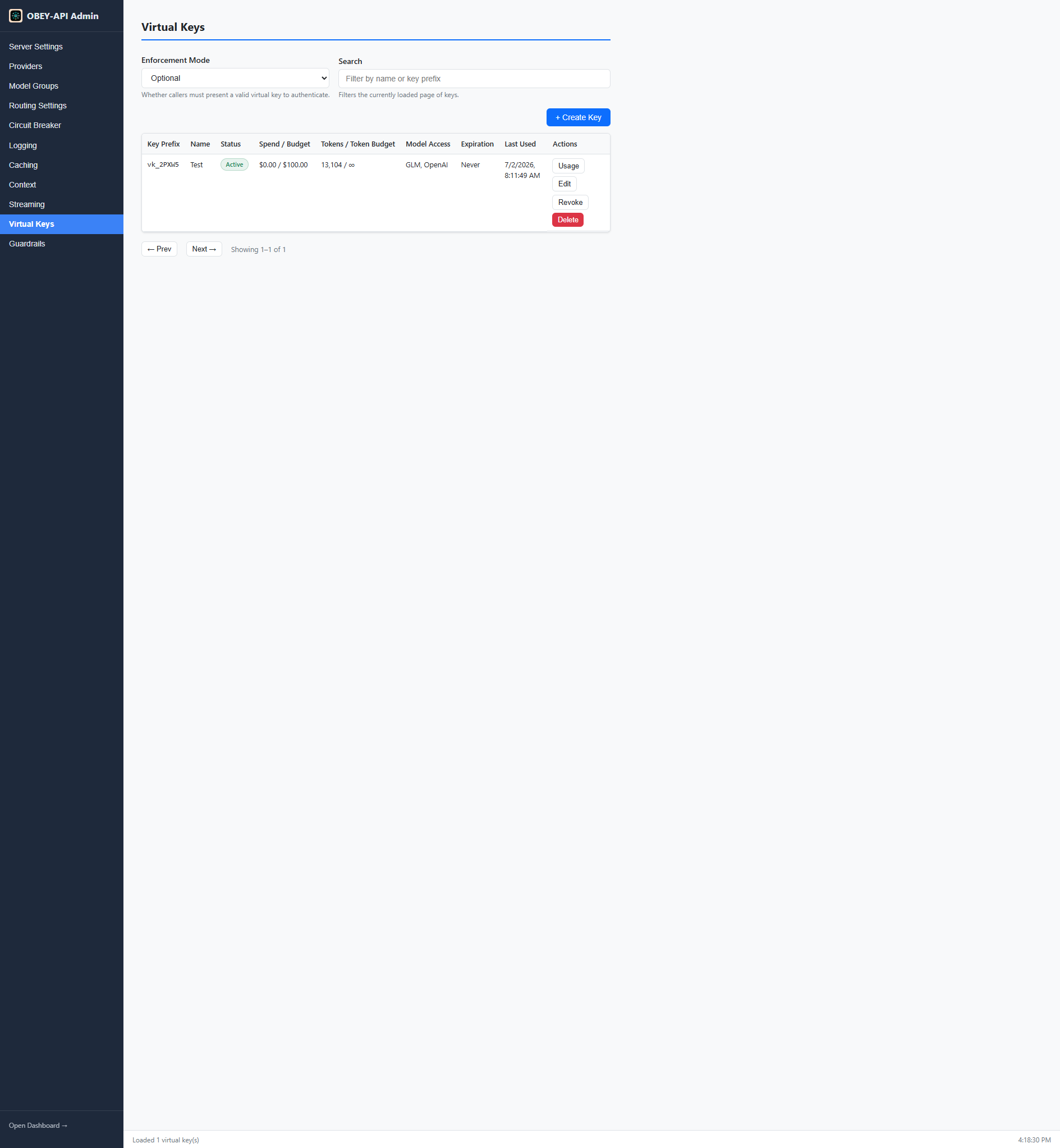
Features:
- Searchable/sortable key table with budget and expiry warnings
- Create/edit forms with all constraint options
- One-time key reveal on creation
- Revoke/delete confirmations
- 30-day per-key usage chart
Callers authenticate with the issued key as a Bearer token:
curl http://localhost:8080/v1/chat/completions \
  -H "Authorization: Bearer vk_your_key_here" \
  -H "Content-Type: application/json" \
  -d '{"model":"gpt-4-group","messages":[{"role":"user","content":"Hello!"}]}'
from openai import OpenAI
client = OpenAI(
base_url="http://localhost:8080/v1",
api_key="vk_your_key_here" # Virtual key as API key
)Virtual keys are stored encrypted in a dedicated SQLite database (keys.db), separate from request logs. The full vk_ token value is shown exactly once at creation time and cannot be recovered afterward.
When both virtual keys and guardrail pipelines are active, pipelines can be bound to specific virtual keys:
guardrails:
  bindings:
    virtual_keys:
      vk_team_a: standard
      vk_external: strict-pii
This allows different policy enforcement per caller.
- Guardrail Pipelines — policy enforcement per key
- Security — key encryption details
- Admin Panel & Dashboard — usage monitoring