Repository navigation
How Mac.apk Works
Mac.apk is a compatibility layer. It's the same idea as Wine, Proton or WSL: software written for one operating system runs on another. It doesn't emulate a phone, and it doesn't run Android in a virtual machine. It provides the Android app environment on macOS itself, so an app's code runs on your Mac's processor and draws with your Mac's GPU.
An Android app is roughly three things: code written in Java or Kotlin, sometimes native code written in C or C++, and its images, sounds and other files. Here's what Mac.apk does with each.
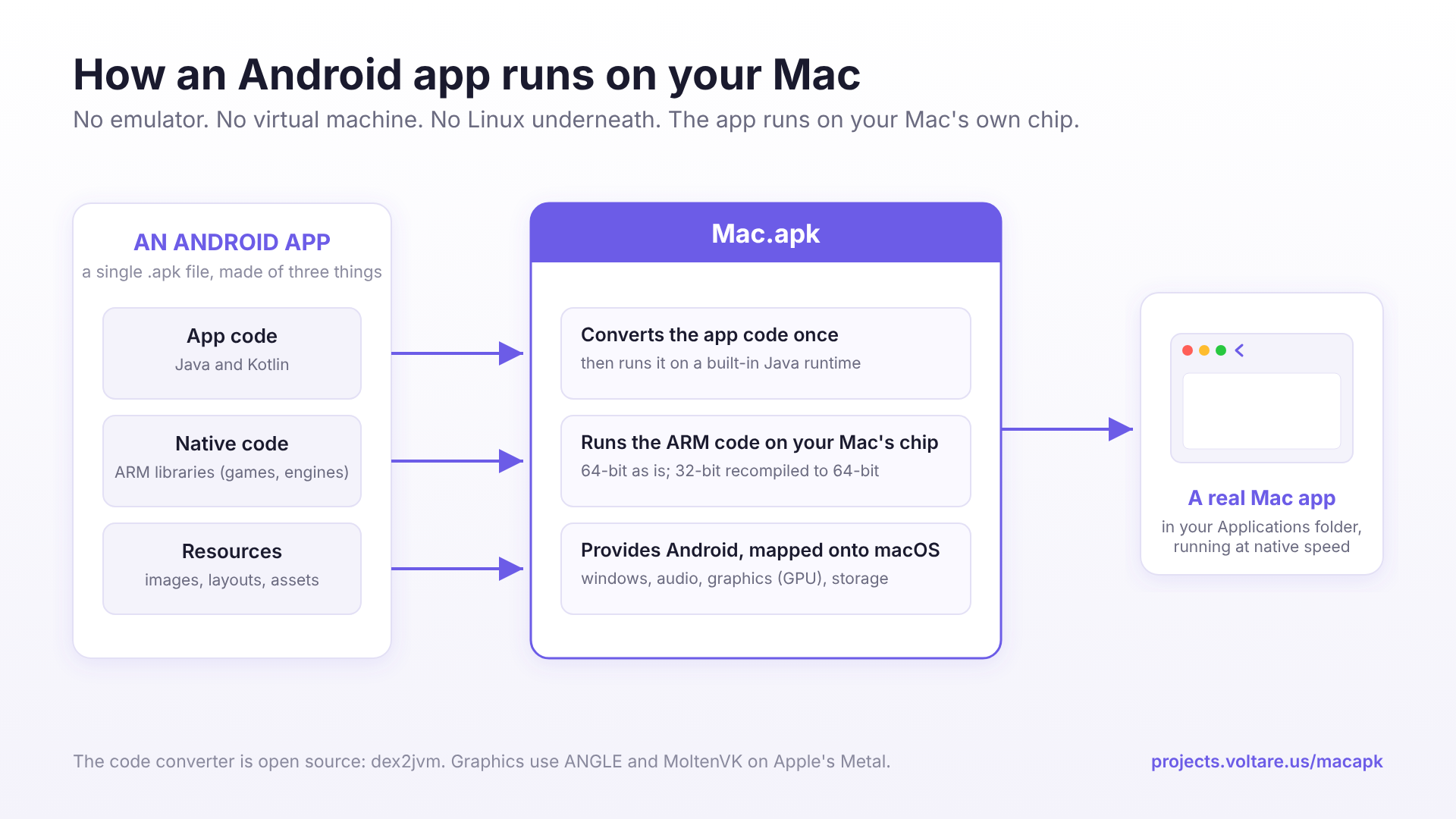
Android apps ship this code as DEX, Android's own bytecode format. The first time an app runs, Mac.apk converts its DEX to standard Java bytecode and keeps the result, so later launches skip the work. That conversion is most of why the first launch is slow. The converter is open source: dex2jvm.
The converted code runs on a Java runtime built from OpenJDK, which ships inside Mac.apk.
Apps don't only run their own code. They lean on Android for activities, views, layouts, resources, input, notifications, storage and much more. Mac.apk has its own implementation of all that, written to behave the way Android's open-source code (AOSP) behaves. Android's platform resources, the built-in themes, strings and so on, are built from AOSP source.
Wherever Android would talk to a phone's hardware or system services, Mac.apk talks to macOS instead. Windows are Mac windows, the clipboard is the Mac clipboard, location comes from Location Services, sound plays through macOS, and controllers come through macOS's game controller support.
Many apps, and nearly every game, include native libraries built for ARM processors.
- 64-bit ARM code runs as it is. Apple Silicon is a 64-bit ARM processor, so there's nothing to translate. Mac.apk loads the app's library and runs its original instructions.
- 32-bit ARM code is recompiled. Apple Silicon can't run 32-bit ARM code, so Mac.apk translates it to 64-bit ARM once, before it runs, and keeps the result. If an app has both, Mac.apk uses the 64-bit code.
- Android's system libraries come from Mac.apk. Native code expects Android's C library and other system libraries to be there. Mac.apk provides them, built on macOS's own. This happens at the library level. Nothing translates Linux system calls, and there's no Linux kernel anywhere.
Android apps draw with OpenGL ES or Vulkan. Mac.apk runs OpenGL ES through ANGLE and Vulkan through MoltenVK. Both end up on Apple's Metal, so the GPU does the drawing directly.
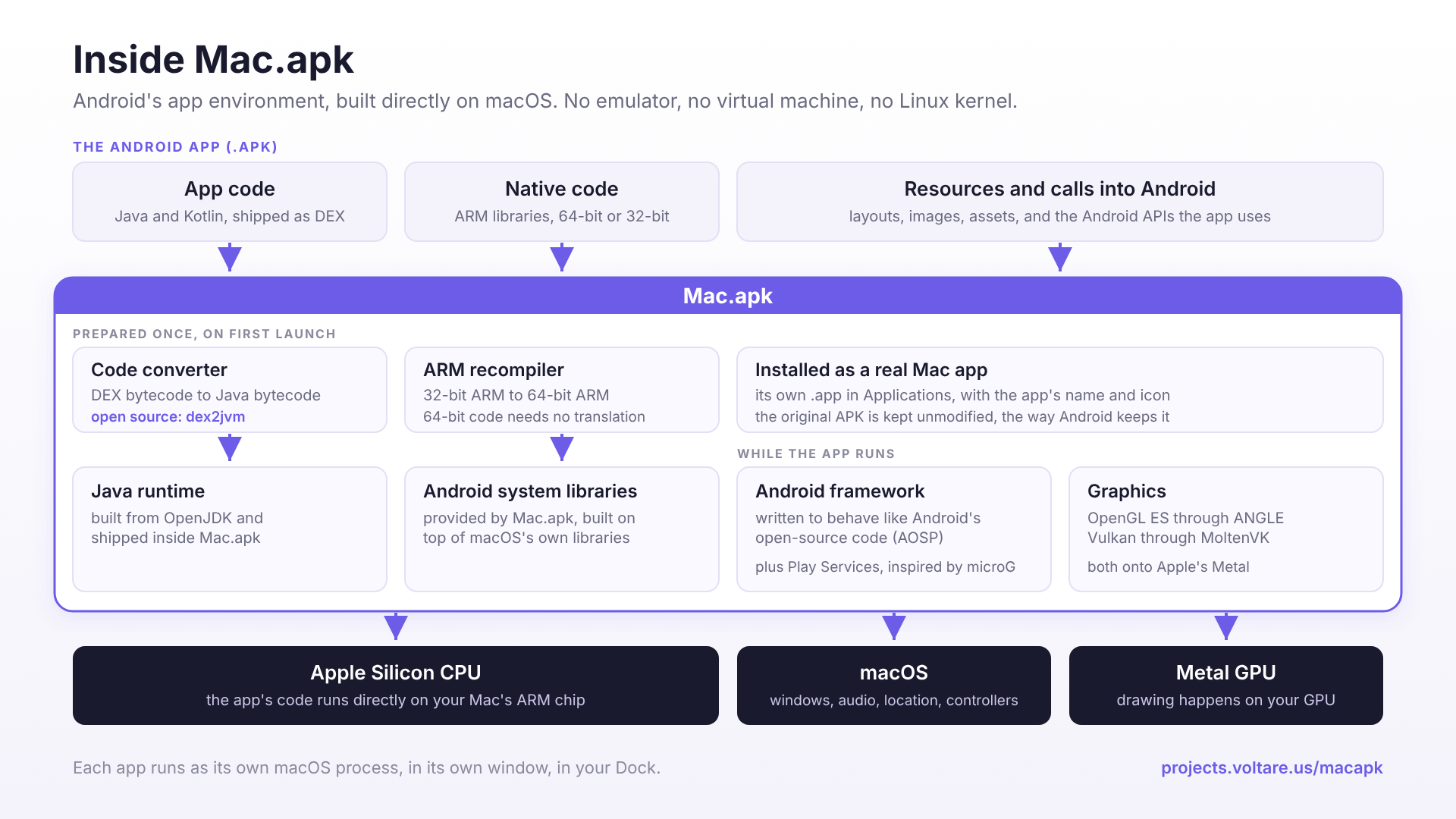
Each installed app becomes its own Mac app, with the APK, its libraries, its converted code and its saves inside. See How Apps Are Installed.
Lots of apps depend on Google Play Services. Mac.apk has its own implementation of the parts most apps use, and it identifies itself as a Mac.apk device. See Google Accounts and Play Services.
- dex2jvm, the DEX-to-Java converter, is Apache 2.0.
- Mac.apk includes open-source components such as ANGLE, MoltenVK and the Vulkan loader, Capstone, libpng, libvpx, stb_vorbis, Bouncy Castle, a JRE built from OpenJDK, and Android platform resources built from AOSP. Their licences are in THIRD_PARTY_NOTICES.txt.
The rest of Mac.apk is closed source. For licensing, partnerships or acquisition, email Kaleb@voltare.us.