Repository navigation
5. Adding Locations
Location transponders are a pre-programmed Seeed Studio XIAO SAMD21 that operate the same way as an infrared remote control while holding a button down so it transmits the same thing over and over. In the LCC ecosystem, up to 1000 of these are allowed.
Transponders themselves don't have any dedicated function, they only let the LCC Slave know where they're at and the slave either performs an action that it's told to do or simply reports its location to Mission Control. Location detection commands should be sent to the LCC Slave before sending motor control commands, but that's not a hard rule.
In the case of a model railroad, you can use two transponders where the locomotive requests a command to slow down the motor when the first transponder is encountered and then completely stops the motor when the second one is encountered. This is how you'd overcome the inertia of a fast moving train when you need it to stop precisely at a specific location.
PRO TIP: Model railroaders can remove the IR LED from transponders and put them in decorative things like yard lights, chimneys, building windows, etc and just run wires back to the transponder PCB hidden anywhere out of view. I'm not sure what the maximum wire length can be, but I'm pretty sure it would take a lot to affect the LED.
In the case of a motorized gate, two transponders can be used as long-distance limit switches to tell when the gate is fully open or closed and stop the drive motor. The same type of setup would apply to motorized features of a holiday decoration display to keep an animated feature within travel limits.
Just like the LCC Slave command buffer/queue, LCC Slaves can also store 16 transponder ID numbers and actions to perform whenever they encounter a location ID. Those are then removed from the buffer just like commands are removed the command buffer after they run. You can also have more than one action per location as well.
Something to keep in mind about location detection is that the LCC slave will not repeatedly notify Mission Control of the same transponder detected if the slave is parked in front of it. It has to detect another transponder before that one will be reported again. You should have at least two transponders in any setup or the slave will need to be rebooted before it will detect the same one again.
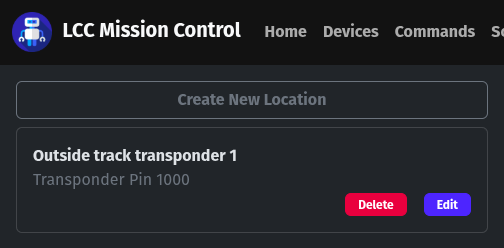
- Click on Locations in the menu bar and then click the Create New Location button.
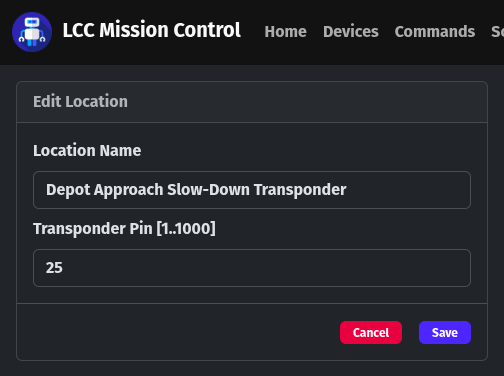
- Fill in the parameters for the new location and then click the Save button.
NOTE: If you order location transponders from me, you need to tell me what number (1 to 1000) that you want them to transmit. Otherwise, you will need to reflash them yourself if you end up with a duplicate to one that you already own.
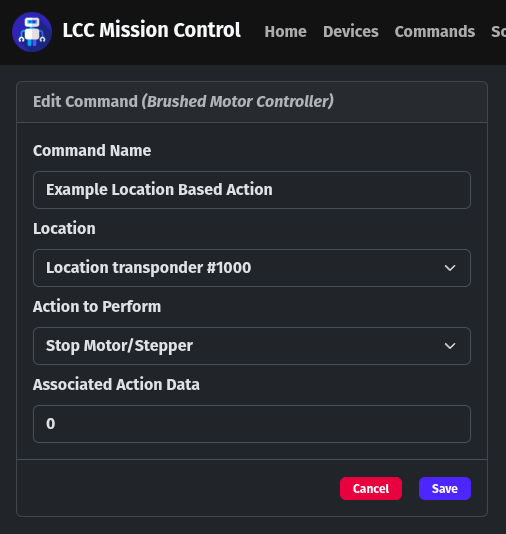
There are 7 types of actions that an LCC Slave can perform when it encounters a specific location transponder.
- Stop Motor/Stepper
- Play Sound Effect
- Request Command
- Request Script
- Request Scene
- Toggle GPIO Pin
- Toggle RGB LED
All but the first action type require a numeric value for the action to perform in the Associated Action Data field. If you look at the list of Commands, Scripts, and Scenes, you will see that all of them have an ID number. All MP3s on a DFRobot DFPlayer SD card are named by number, GPIO pins are addressed by number, and so are RGB LEDs. Those numbers are what you use in this field.
As mentioned in the above, you can have more than one action associated with a location transponder. The same as with commands sent to an LCC Slave, these actions are executed in a first-in/first-out fashion. For example, in the case of a model railroad, you could set up one transponder to stop the locomotive, play a braking sound effect, and turn the cab light red in that specific order just by sending the commands in that order.