Repository navigation
Editor Rules
Rules make an item react to more than its own state. They exist on every kind of item: lights, LED strips, appliances, the robot vacuum dock, furniture, text items and rooms.

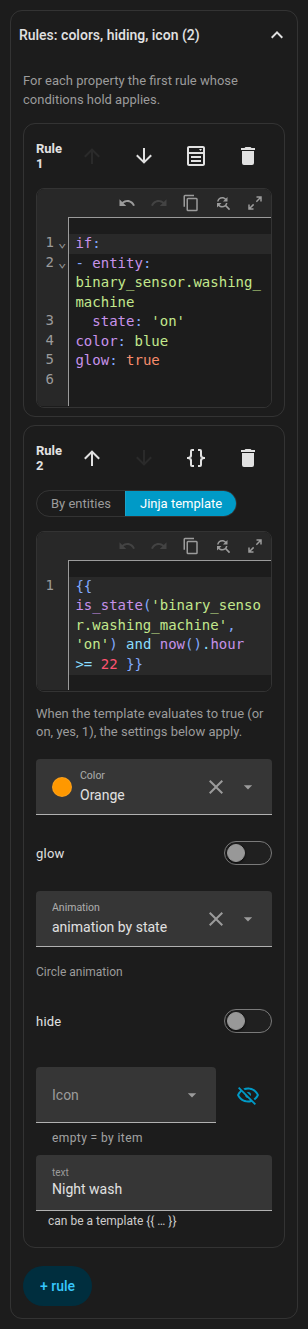
rules is an ordered list. Each rule has conditions (if) and outputs. For each output field, the first rule whose conditions all hold and which sets that field wins. A rule without if is the default.
rules:
  - if: [ ... ]        # all conditions must hold (AND)
    color: red
- color: blue # no "if": applies when no earlier rule set a colourYou can write conditions in two modes. Every rule has a switch By entities / Jinja template; switching from entities to Jinja converts the existing conditions.
A condition is {entity, attribute?, state | state_not | above | below}. state and state_not may be a list. {any: [conditions]} is an OR group.
if:
  - entity: climate.living_room
    attribute: hvac_action
    state: heating
  - entity: sensor.outdoor_temperature
    below: 5
  - any:
      - entity: binary_sensor.window
        state: "on"
      - entity: binary_sensor.door
        state: "on"
In the form, each condition has an entity (with a this entity shortcut), an optional attribute, and the operator is / is not / above / below / template. New conditions are prefilled with the entity of the item (a room uses its temperature sensor).
A single condition {template: "{{ ... }}"}. Home Assistant renders it live, and it is true for true, on, yes, 1 or a non-zero number.
if:
  - template: "{{ is_state('binary_sensor.front_door', 'on') and states('sensor.outdoor_temperature') | float(0) < 0 }}"
A text output that contains {{ }} is a template as well.
| Output | Effect |
|---|---|
color |
Tints the icon and the badge border; on furniture the outline and fill; on a light it overrides the bulb colour (badge, glow, strip); on the robot it replaces the theme colour, also in the dock |
glow |
Adds a glow around the item |
animate |
Overrides active of an appliance: true / false. animate: false also stops the icon animation |
wave |
Colour of the radiator's heat waves |
text |
Replaces the text under the icon (plain or a template) |
tint (or color) |
On a room: shades the floor; opacity sets its strength (default 0.14) |
hide |
Hides the item (on a room: its label) |
icon |
Swaps the icon (appliances, lights, furniture, the dock). none removes it; pick it with the icon picker |
background |
Background of a text item |
fx |
Ring animation: ring, radar, comet, countdown, spin, orbit, breath, blink, heartbeat, shake, none
|
progress |
An entity that drives a countdown (see below) |
progress_total |
A length in minutes for a countdown
|
Colours: red, orange, yellow, green, blue, purple, pink, white, black, any theme colour name picked in the form (stored by name, for example teal), or any CSS colour (hex, rgb(...), var(...)).
Lights, LED strips, the dock and furniture have no ring animation of their own, so the ring appears only when a rule sets fx. The ring of a LED strip is in the middle of the strip, on furniture in the middle of the rectangle.
For an output of a ring the priority is: rule, then the appliance's own setting, then the alarm default by state.
fx: countdown draws a shrinking arc. Where it gets its progress:
-
progress: timer.kitchen: atimer(active or paused), -
progress: sensor.dryer_remainingwithdevice_class: duration(seconds, minutes or hours; the total isprogress_total, otherwise the highest value seen so far), -
progress: sensor.dryer_endwithdevice_class: timestamp(the end time; the start is thelast_changedof the running device, otherwiseprogress_total), -
progress: sensor.dryer_progressin%: the ring fills like a battery (0 % empty, 100 % full), -
progress_total: 45without an entity: a countdown of that length in minutes, measured from the change of the rule's condition entity (for an appliance from the moment it starts running).
Without any of these the countdown is a decorative 4 second cycle.
Every rule has a { } button in its header that opens just that rule as YAML in the Home Assistant code editor (syntax colours, line numbers, suggestions for entities and icons). The change is committed when you leave the editor. The same YAML is what you see in the plan format.
If your Home Assistant has an ai_task.* entity that supports data generation, the Rules section shows Suggest with AI. Describe in a sentence what you want. The editor sends the description to ai_task.generate_data together with the rules format, the outputs allowed for this item, its entity (state and attributes), the current rules and a list of your entities (up to 1500, without update, event, scene and script entities). The answer arrives as YAML and opens as a draft; only Use draft replaces the rules. If the request cannot be fulfilled, the assistant answers with one sentence that you see as a message.
devices:
  - id: washer
    kind: generic
    name: Washer
    entity: sensor.washer_state
    icon: mdi:washing-machine
    x: 1.2
    z: 3.4
    rules:
      - if:
          - entity: sensor.washer_state
            state: running
        color: blue
        animate: true
        fx: countdown
        progress: sensor.washer_finish_time   # device_class: timestamp
      - if:
          - entity: sensor.washer_state
            state: finished
        color: green
        fx: blink
text: DoneA template with now() is re-rendered every minute, so the rule turns on five minutes after the door opened.
rooms:
  - id: hall
    name: Hall
    points: [[0, 0], [3, 0], [3, 2.5], [0, 2.5]]
    rules:
      - if:
          - template: >-
              {{ is_state('binary_sensor.front_door', 'on')
                 and (now() - states.binary_sensor.front_door.last_changed).total_seconds() > 300 }}
        tint: orange
opacity: 0.3devices:
- id: leak
kind: generic
name: Leak
entity: binary_sensor.kitchen_leak
x: 2.0
z: 1.0
rules:
- if:
- entity: binary_sensor.kitchen_leak
state: "on"
color: red
glow: true
fx: blink
text: Leak!
- hide: trueThe last rule has no condition, so the item is hidden whenever there is no leak.
devices:
  - id: phone_battery
    kind: generic
    name: Phone
    entity: sensor.phone_battery_level
    x: 4.0
    z: 2.0
    rules:
      - if:
          - entity: sensor.phone_battery_level
            below: 20
        color: red
        fx: countdown
        progress: sensor.phone_battery_level
      - fx: countdown
        progress: sensor.phone_battery_level
color: greenAn oven that counts down 45 minutes from the moment it is switched on:
devices:
  - id: oven
    kind: generic
    name: Oven
    entity: switch.oven
    x: 3.1
    z: 0.4
    rules:
      - if:
          - entity: switch.oven
            state: "on"
        fx: countdown
        progress_total: 45
        color: orange
And a kitchen timer helper that drives the ring:
    rules:
      - if:
          - entity: timer.kitchen
            state: active
        fx: countdown
        progress: timer.kitchen
color: yellowdevices:
- id: radiator_living
kind: radiator
entity: climate.living_room
x: 4.3
z: 1.1
rules:
- if:
- entity: switch.boost_living_room
state: "on"
color: yellow
- if:
- any:
- entity: binary_sensor.living_room_window
state: "on"
- entity: binary_sensor.balcony_door
state: "on"
color: blue
- if:
- entity: switch.valve_living_room
state: "on"
color: orange
animate: true
wave: red
- animate: falseBack to Items, or see the Plan format.