Draw List
The ImGui DrawList has number of methods to draw anti-aliased vector shapes.
The shapes can be divided into two categories:
-
Primitives:
AddLineH(),AddLineV(),AddRect(),AddQuad(),AddNGon(),AddTriangle(),AddCircle(),AddEllipse().
These are generally used for composing UI shapes, their default for 1px lines were to draw the line inside the shape. -
Paths:
AddLine(),AddBezierCubic(),AddBezierQuadratic(),AddPolyline(),AddConvexPolyFilled(),PathStroke(),PathFillConvex(),PathFillConcave().
They are generally used to draw data visualizations, and other more freeform content, and many had center behavior before.
The PathStroke(), PathFillConvex(), and PathFillConcave() are used along with the stateful path API, which allows to build the path to be filled or storked one feature at a time.
Some draw functions take draw flags as the last parameter. The flags define optional features, some of which are shape speicfic.
Applies for AddRect(), AddRectFilled(), and PathRect().
- ImDrawFlags_RoundCornersTopLeft: round top-left corner
- ImDrawFlags_RoundCornersTopRight: round top-right corner
- ImDrawFlags_RoundCornersBottomLeft: round bottom-left corner
- ImDrawFlags_RoundCornersBottomRight: round bottom-right corner
- ImDrawFlags_RoundCornersNone: disable rounding
- ImDrawFlags_RoundCornersAll: round all corners
When not specified and rounding > 0, the default is ImDrawFlags_RoundCornersAll. Use ImDrawFlags_RoundCornersNone to disable roudning even if rounding is specified. The rounding flags cam be combined to round any combination of corners. The following common combinations are defined for cenvenience:
- ImDrawFlags_RoundCornersTop: round top left and right corners
- ImDrawFlags_RoundCornersBottom: round bottom left and right corners
- ImDrawFlags_RoundCornersLeft: round left top and bottom corners
- ImDrawFlags_RoundCornersRight: round right top and bottom corners
These flags are used to position the stroke relative to the path of the shape. This makes it easier to create crisp pixel perfect renderings which scale well. These apply to all stroked shapes.
Inside is right of the path direction. That is, if you draw clock wise closed shape, the inside will be visually inside the shape.
- ImDrawFlags_StrokeInside: stroke is expanded right of the path.
- ImDrawFlags_StrokeCenter: stroke is expanded equally to both sides of the path.
- ImDrawFlags_StrokeCenterBiased: stroke is expanded to both sides, so that one side always has integer offset, odd sizes grow inside. This allows center like strokes which are pixel aligned.
- ImDrawFlags_StrokeOutside: stroke is expanded left of the path
- ImDrawFlags_StrokeLegacy: stroke position mimicks the old API behavior (may differ per function)
In order to keep the common use intuitive to use (and to help with the migration from pre 1.93 API), the default stroke position is different for the two groups of shapes.
-
Primitives:
AddLineH(),AddLineV(),AddRect(),AddQuad(),AddNGon(),AddTriangle(),AddCircle(),AddEllipse().
The default stroke position is StrokeInside. -
Paths:
AddLine(),AddBezierCubic(),AddBezierQuadratic(),AddPolyline(),PathStroke().
The default stroke position is StrokeCenter.
The Default Stroke Position may be overidden by passing one of the dedicated ImDrawFlags value to any function.
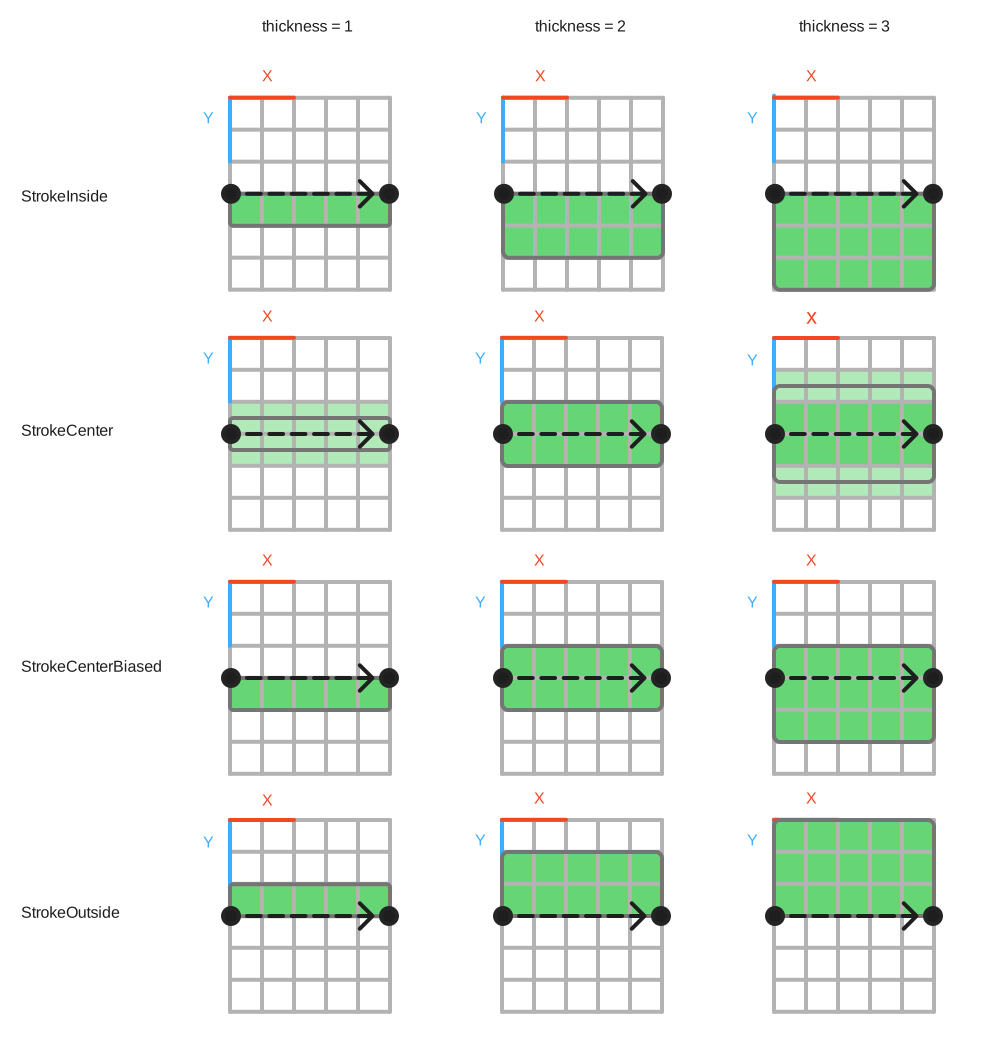
-
ImDrawFlags_Closed: This option closes the path by drawing a line from first to last point. Applies to
AddPolyline()andPathStroke() - ImDrawFlags_MiterOnly: This option chooses a fast path in the rendering and skips logic that tried to handle very sharp corners. Can be used for well behaved shapes to speed up rendering. Applies to all stroked shapes.
-
ImDrawFlags_SquareCap: Expands the ends of an open path so that they extend hand line thickess beyond the end points. Applies to
AddPolyline()andPathStroke(). -
ImDrawFlags_NoAAEnds: Does not render anti-aliased ends for lines. This can speed up single line rendering, at the expense of aliasing and potentially missed pixels. Applies to
AddPolyline()andPathStroke().
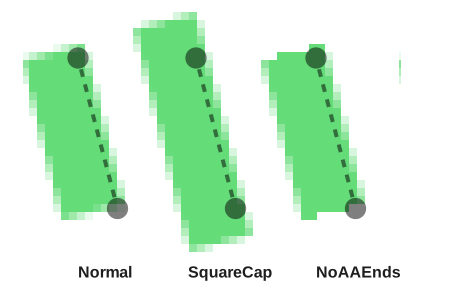
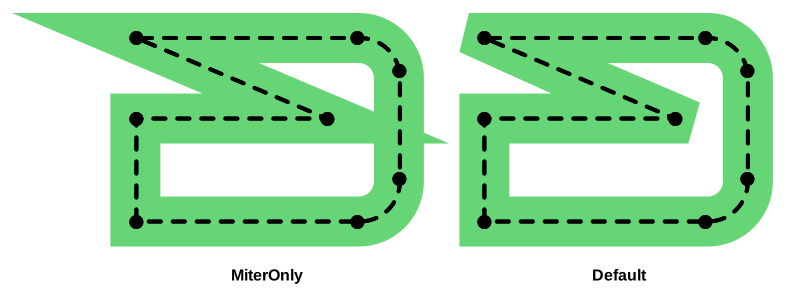
- ImDrawListFlags_RoundCornersUseTex: toggles whether to use texture to render small rounded rectangles (stroked and filled) using textured corners.
-
ImDrawListFlags_AntiAliasedLines: is now unsupported, lines are always anti-aliased, except when calling
AddPolylineLegacy()directly. - ImDrawListFlags_AntiAliasedLinesUseTex: is now unsupported, lines always use texture for anti-alias.
-
ImDrawListFlags_AntiAliasedFill: is now unsupported, fills are always anti-aliased, except when calling
AddConvexPolyFilledLegacy()directly.
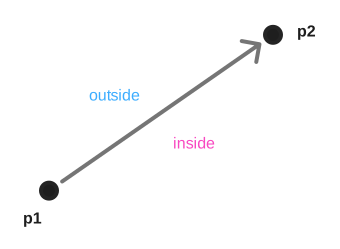
Draws line from p1 to p2 with specified color and thickness. Default thickness is 1.0. Default storke positon Center. Stroke Position and Stroke Options flags can be used.
If you need to draw a continuous line, prefer to use AddPolyline() or PathStroke() instead as they will join the lines together. For strictly horizontal or vertical lines, prefer to use AddLineH() and AddLineV(). They have additional optimizations for the cases when you are drawing pixel perfect lines.
🚧 Changes from versions < 1.93
🚨 Version 1.93.0
Before: AddLine() used to have 0.5px offset applied to the end points. Together with no-AA line ends, the line would render as if the points were pixel center coordinates. Sometime it worked, and sometimes it did not and it was hard to reason why.
After: the default stroke position is Center. The 0.5px offset is now removed, so AddLine() works the same way as a path with 2 points. Uses of AddLine() should be audited and any compensation for the 0.5px offset can be removed.
There are two new functions AddLineV() and AddLineH() which should be used for drawing horizontal and vertical lines. Their default stroke position is Inside, which matched many uses of 1px lines draw using AddLine(). They have additional optimizations for the cases when you are drawing pixel perfect lines.
When switching from legacy AddLine() values to AddLineV()/AddLineH() you can keep mostly same inputs coordinates add AddLineV()/AddLineH() default stroke position is Inside:
- Before:
AddLine({x, y1}, {x, y2}, col)--> useAddLineV(x, y1, y2, col)// Vertical line. - Before:
AddLine({x1, y}, {x2, y}, col)--> useAddLineH(x1, x2, y, col)// Horizontal line.
If you have lines that form a continuous shape use the Path functions or AddPolyline() instead. They will handle the joins between the lines. They both support ImDrawFlags_Closed which will closes the shape by creating a segment automatically between first and last point.
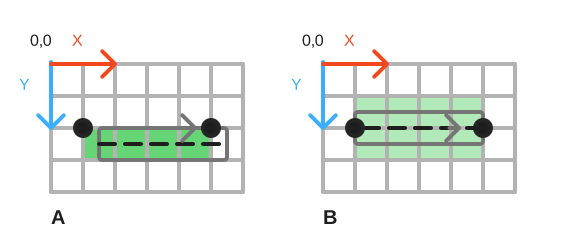
A, B) AddLine({ 1,2 }, { 5,2 })
Before: 0.5px offset, no AA line ends. The start pixel is covered due to the rasterization filling rules, and the end pixel is not for same reason.
After: Offset is removed so the line is centered around the input coordinates. Existing uses will appear blurred since the only half of the pixels are covered.
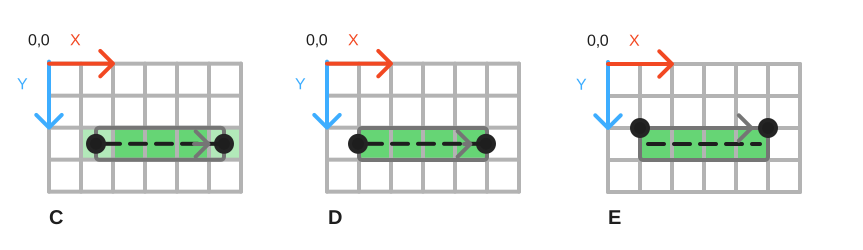
C) AddLine({ 1.5,2.5 }, { 5.5,2.5 })
After: If we were to add the 0.5px offset back, then then the line would look crisp as before, but the line ends were blurred, since the line covers only half a pixel on each end.
D) AddLine({ 1,2.5 }, { 5,2.5 })
Migration: The line should cover the pixel we want to fill fully. One way to do that is to draw horizontal lines offset by half the thickness. In this case the thickness is 1, so we offset by 0.5px.
E) AddLineH( {1,5}, 2)
Migration: Offsetting the lines can be tedious and a simpler way is to use the stroke offset. You can draw the line using “stroke position = inside”. Then the stroke is expanded to just one side of the line, which allows you to use nice round numbers for defining the geometry, and any integer thickness will look crisp.
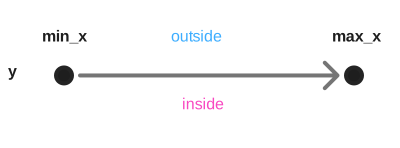
Draws horizontal line at y from min_x to max_x with specified color and thickness. Default thickness is 1.0. Default stroke positon Inside. Stroke Position and Stroke Options flags can be used. Prefer to use this method over the generic AddLine() to draw horizontal lines.
The "inside" of the shape below the line. You can think the horizontal line as the top edge of a rectangle.
Optimized rendering is used, if the horizontal line is drawn on integer coordinates, integer thickness, and the stroke offset is Inside or Outside.
🚧 Changes from versions < 1.93
🚨 Version 1.93.0
AddLineH() used to be implemented similarly as AddLine() and had the same 0.5px offset and missing anti-aliased end caps.
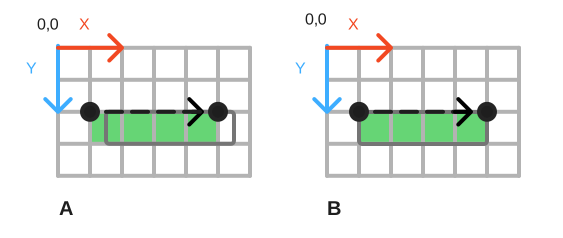
A, B) AddLineH( {1,5}, 2)
Before: 0.5px offset, no AA line ends. The start pixel is covered due to the rasterization filling rules, and the end pixel is not for same reason.
After:
The default stroke position for AddLineH() is Inside, which means that 1px lines will look the same as before, and thicker lines will grow below the specified line.
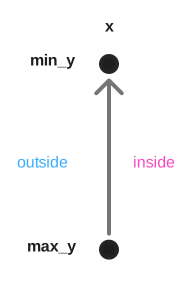
Draws vertical line at x from max_y to min_x with specified color and thickness. Default thickness is 1.0. Default stroke positon Inside. Stroke Position and Stroke Options flags can be used. Prefer to use this method over the generic AddLine() to draw vertical lines.
The "inside" of the shape right of the line. You can think the vertical line as the left edge of a rectangle.
Optimized rendering is used, if the vertical line is drawn on integer coordinates, integer thickness, and the stroke offset is Inside or Outside.
🚧 Changes from versions < 1.93
🚨 Version 1.93.0
AddLineV() used to have the same 0.5px offset as AddLine(). The offset was removed,.
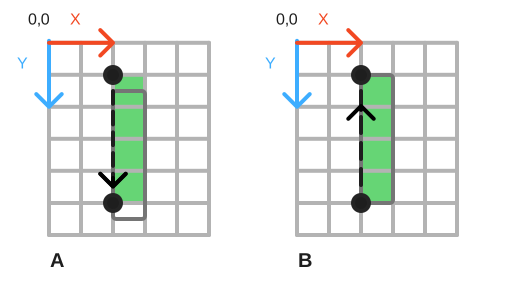
A, B) AddLineV(2, {1,5})
Before: 0.5px offset, no AA line ends The start pixel is covered due to the rasterization filling rules, and the end pixel is not for same reason.
After:
The default stroke position for AddLineV() is Inside, which means that 1px lines will look the same as before, and thicker lines will grow below the specified line.
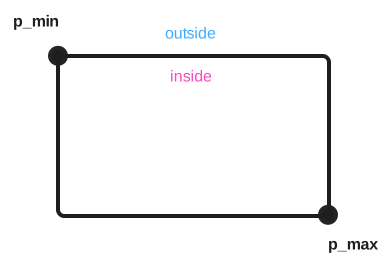
Draws stroked rectangle from p_min (top-left) to p_max ( bottom-right), with specified color, rounding and thickness. The default rounding is 0.0, default thickness is 1.0, and default stroke position is Inside. Corner Rounding and Stroke Position flags can be used.
The rendering code now handles corners cases robustly, like stroke thickness that would completely cover the inside of the shape will fallback to rendering to filled rectangle instead.
Corner rounding is clamped to fit inside the rectangle bounds.
Optimized rendering is used if the coordinates and thickness are integer, and rounding is small integer and stroke position is Inside or Outside.
🚧 Changes from versions < 1.93
🚨 Version 1.92.8 (2026-05)
Swapped the trailing parameters flags and thickness:
Before 1.92.8:
void AddRect(ImVec2 p_min, ImVec2 p_max, ImU32 col, float rounding = 0.0f, ImDrawFlags flags = 0, float thickness = 1.0f);
After 1.92.8:
void AddRect(ImVec2 p_min, ImVec2 p_max, ImU32 col, float rounding = 0.0f, float thickness = 1.0f, ImDrawFlags flags = 0);
Added inline redirection functions when IMGUI_DISABLE_OBSOLETE_FUNCTIONS is off. Marked the old functions are =delete when IMGUI_DISABLE_OBSOLETE_FUNCTIONS is on, to allow for better type-checking. Effectively the typical call site is changing from:
draw_list->AddRect(p_min, p_max, color, rounding, ImDrawFlags_None, border_size);- to
draw_list->AddRect(p_min, p_max, color, rounding, border_size);
Users of C++ and other languages with type-checking will be notified at compile-time of any mistakes. Users of high-level bindings or languages with no type-checking will be notified at runtime via an assert for invalid flags value. Refer to Changelog for more details.
🚨 Version 1.93.0
AddRect() used to have fixed 0.5px inset. This meant that a 1px line draw was drawn inside the shape, which works well when rendering widgets.
As the offset was fixed, thicker lines would still render with that half pixel offset, but would not stay inside the shape unless parameters were fudged.
The 0.5px offset is now removed, and the user can use the stroke position to place the stroke inside, center, outside of the shape, inside being the default.
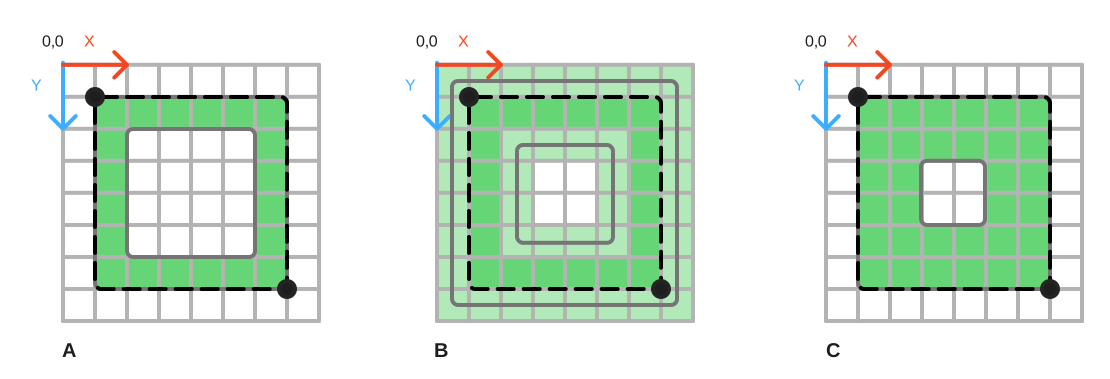
A) AddRect({ 1,1 }, { 7,7 }, 1)
B) AddRect({ 2,2 }, { 6,6 }, 2)
Before: Fixed 0.5px offset on all thickness. This resulted blurred lines on even thicknesses.
C) AddRect({ 2,2 }, { 6,6 }, 2)
Migration:
By default, the stroke is placed inside the shape.
The uses of AddRect() that use 1px thickness will work as before.
Other uses of AddRect() should be reviewed to see if the intended use was to draw the stroke at center or inside of the shape.
Draws filled rectangle from p_min (top-left) to p_max ( bottom-right), with specified color, rounding. The default rounding is 0.0. Corner Rounding flags can be used.
Optimized rendering is used when the coordinates are integer, and rounding is small integer.
🚧 Changes from versions < 1.93
🚨 Version 1.93.0
AddRectFilled() used to always draw non-rounded rectangle without anti-aliasing. Now it renders with anti-aliasing. The optimized rendering case for integer coords matches the previous non-AA rendering.
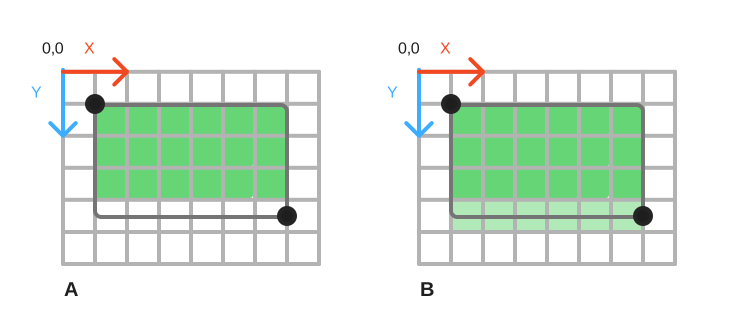
A,B) AddRectFilled({ 1,1 }, {7,4.5} )
Before: Non-rounded rectangles did not have anti-aliasing.
After: Rectangles which are draw on non-integer coordinates are anti-aliased.
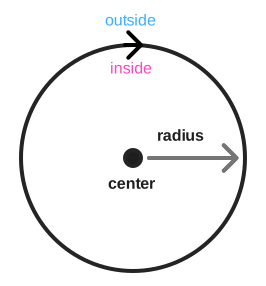
Draws stroked circle at center using radius, with specified color, segment count, and thickness.
The default segment count is 0 (calculate count automatically based on radius), thickness is 1.0, and default stroke position is Inside. Stroke Position flags can be used.
The rendering code handles corners cases robustly, like stroke thickness that would completely cover the inside of the shape will fallback to rendering to filled circle instead.
🚧 Changes from versions < 1.93
🚨 Version 1.93.0
AddCircle() used to have fixed 0.5px inset. This meant that a 1px line draw was drawn inside the shape.
As the offset was fixed, thicker lines would still render with that half pixel offset, but would not stay inside the shape unless parameters were fudged.
The 0.5px offset is now removed, and the user can use the stroke position to place the stroke inside, center, outside of the shape, inside being default.
Draws filled circle at center using radius, with specified color.
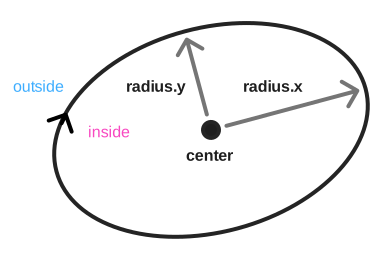
Draws stroked ellipse at center using radius (separate for x, y), with specified rotation, color, segment count and thickness.
The default rotation is 0, segment count is 0 (calculate count automatically based on radius), default thickness is 1.0, and default stroke position is Inside. Stroke Position flags can be used.
Stroked ellipse drawing is more complicated than other shapes and it does not handle all degenerate inputs, like thick thickness compared to ellipse size, as well as other shapes.
🚧 Changes from versions < 1.93
🚨 Version 1.93.0
The ellipse used to have center stroke position, it is not changed inside to be consistent with other primitive shapes.
The code did not have the 0.5px offset as other primitive drawing functions, so even 1px thick ellipses may appear smaller than before.
To get the old behavior set stroke position to center.
Draws filled ellipse at center using radius (separate for x, y), with specified rotation, color, and segment count.
The default rotation is 0, segment count is 0 (calculate count automatically based on radius).
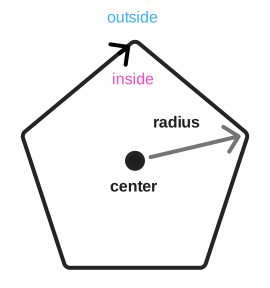
Draws stroked regular polygon centered at center with circumcircle radius, with specified color, segment count, and thickness.
The default thickness is 1.0, and default stroke position is Inside. Stroke Position flags can be used.
The rendering code handles corners cases robustly, like stroke thickness that would completely cover the inside of the shape will fallback to rendering to filled ngon instead.
🚧 Changes from versions < 1.93
🚨 Version 1.93.0
AddNGon() used to have fixed 0.5px inset. This meant that a 1px line draw was drawn inside the shape.
As the offset was fixed, thicker lines would still render with that half pixel offset, but would not stay inside the shape unless parameters were fudged.
The 0.5px offset is now removed, and the user can use the stroke position to place the stroke inside, center, outside of the shape, inside being default.
Draws filled regular polygon at center using circumcircle radius, with specified color, and segment count.
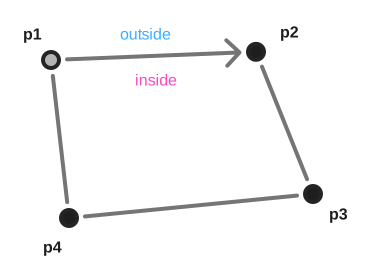
Draws arbitrary stroked quad (4 cornered closed polyline) described by p1, p2, p3, p4, with specified color, and thickness.
The default thickness is 1.0, and default stroke position is Inside. Stroke Position flags can be used.
The points should be wound counter clockwise and should not self-intersect. Internally calls AddPolyline(), see the method for more information.
Draws arbitrary filled quad (4 cornered polygon) described by p1, p2, p3, p4, with specified color.
The points should be wound counter clockwise and should not self-intersect. Internally calls AddConvexPolyFilled(), see the method for more information.
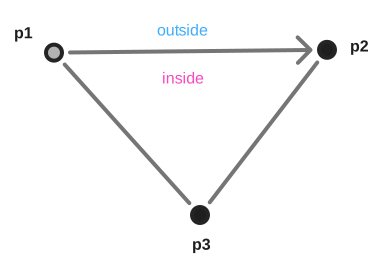
Draws arbitrary stroked triangle (3 cornered closed polyline) described by p1, p2, p3, with specified color, and thickness.
The default thickness is 1.0, and default stroke position is Inside. Stroke Position flags can be used.
The points should be wound counter clockwise. Internally calls AddPolyline(), see the method for more information.
Draws arbitrary filled triangle (3 cornered polygon) described by p1, p2, p3, with specified color.
The points should be wound counter clockwise. Internally calls AddPolyline(), see the method for more information.
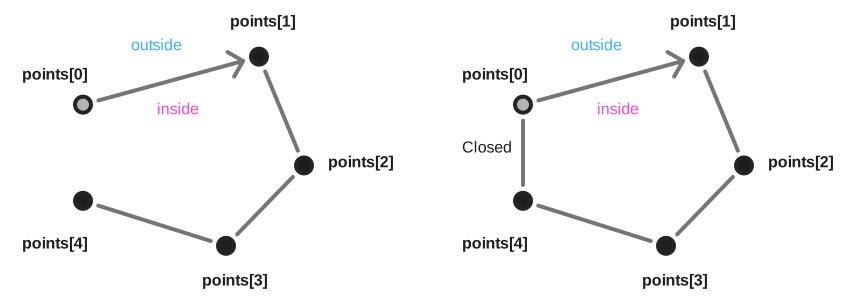
Draws stroked polyline described by points and num_points, with specified color, and thickness.
The default thickness is 1.0, and default stroke position is Center. Stroke Position and Stroke Options flags can be used.
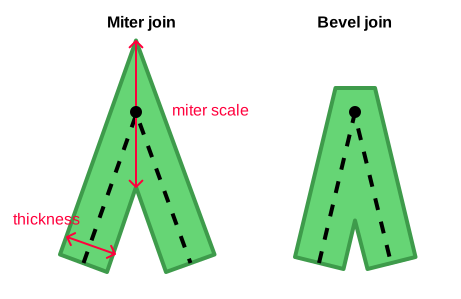
The stroke expansion uses corner miter calculation, which keeps thickness along the line segments consistent. If the corner becomes too sharp, it will be bevelled to avoid long spikes at corners.
There are some robustness measures for the case where the line thickness is larger than the features being drawn to avoid long spikes in inner corners. Due to the chose algorithm, some rendering artifacts are possible when the path features are smaller than line thickness, but the artifacts should be localized. The implementation attempts to favor simple implementation and robustness over the corner case accuracy.
The rendering uses textures for ant ialiasing for all line thicknesses. This allows to use just one rendering function, and rendering is as fast on all sizes. There’s max line thickness, 32 (IM_DRAWLIST_TEX_LINES_WIDTH_MAX), after which the lines will start to become blurry.
If drawing a closed shape, you can omit the last segment and use flag ImDrawFlags_Closed. This will also create correct line joins between the first and last segment.
By default, the line ends are anti-aliased. This can be turned off with flag ImDrawFlags_NoAAEnds for slight performance increase.
The line ends can have square caps using flag ImDrawFlags_SquareCap, which will extend the line by half thickness. This can help to render widgets at various sizes.
Shapes that do not have very sharp corners, can use ImDrawFlags_MiterOnly draw flag for faster rendering. When this flag is set, some safety measures are skipeed, like beveling sharp corners. A good rule of thumb is that if your shape has 90 degree or rounded corners, you should be able to use this flag.
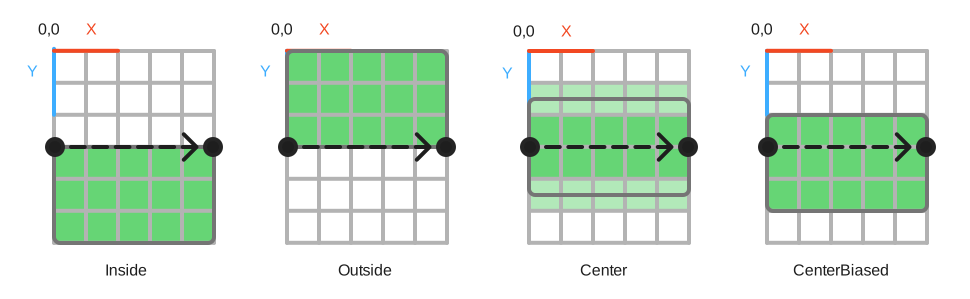
To make it easier to define and reuse the geometry for shapes, and to render shapes pixel perfect, the stroke position can be set to be inside, center, center aligned, or outside of the polyline.
For example, then the stroke position is inside, the stroke will be crips as long as the input coordinates and line thickness are integer.
Inside is right of the path direction. The pictures of the shapes in this document shows the inside/ outside and an arrow indicating the line direction.
🚧 Changes from versions < 1.93
🚨 Version 1.92.8 (2026-05)
Swapped the trailing parameters flags and thickness. See AddRect() section for details.
🚨 Version 1.93.0
The algorithm to render lines got overhauled.
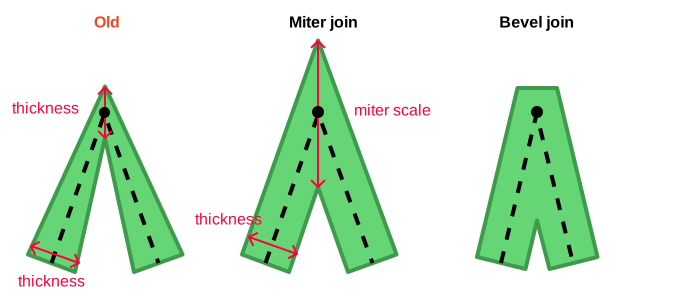
Previous the polyline rendering would expand the stroke along the normal at each polyline vertex. This caused inconsistent line width, which very noticeable when the polyline has sharper corners.
The line ends are now anti-aliased. This solves missing pixels at line ends and results in cleaner rendering, especially under motion.
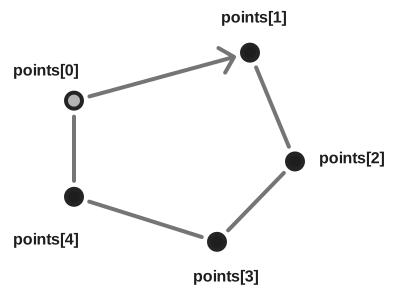
Draws convex filled polygon described by points and num_points, with specified color.
The polygon must be wound in clock wise order, the shape must be convex and does not have self-intersections.
The rendering expands small faded fringe around the polygon for anti-aliasing. To keep the expansion robust, the polygon rendering bevels really sharp corners, and clamps long miters in inner corners. As the fringe is 1px wide, it can cause issues when trying to render long thin polygons whose smallest extent is less than 1px.
Shapes that do not have very sharp corners, can use ImDrawFlags_MiterOnly draw flag for faster rendering. When this flag is set, some safety measures are skipped, like beveling sharp corners. A good rule of thumb is that if your shape has 90 degree or rounded corners, you should be able to use this flag.
🚧 Changes from versions < 1.93
🚨 Version 1.93.0
PathFillConvex() was improved to handle input geometry more robustly.
The rendering of sharp corners was improved. Earlier there were issues with sharp corners either creating long spikes, or messing up the adjacent edge’s anti-aliasing. Now the anti-aliasing fringe calculation is more consistent, and sharp corners get bevelled to avoid spikes.
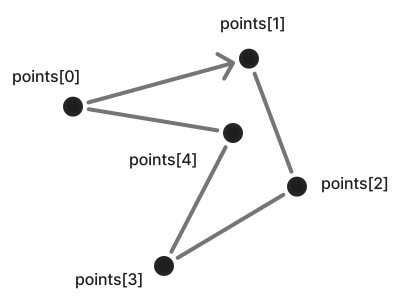
Draws filled polygon described by points and num_points, with specified color. Stroke Options flags can be used.
The polygon must be wound in clock wise order and does not have self-intersections.
The concave polygon fill is more expensive than convex one: it has O(N^2) complexity. Provided as a convenience for the user but not used by the main library.
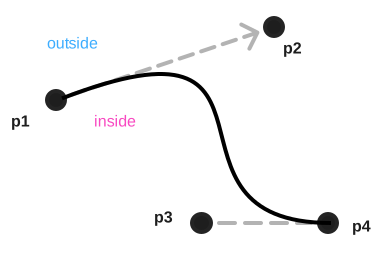
Draws stroked cubic bezier curve described by p1, p2, p3, and p4, with specified color, thickness, and segment count.
The default thickness is 1.0, default segment count is 0 (automatic based on error tolerance), and default stroke position is Center. Stroke Position and Stroke Options flags can be used.
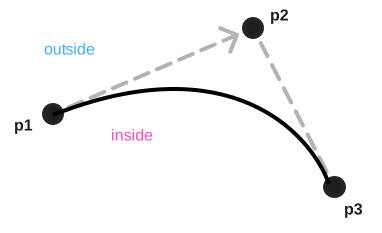
Draws stroked quadratic bezier curve described by p1, p2, and p3, with specified color, thickness, and segment count.
The default thickness is 1.0, default segment count is 0 (automatic based on error tolerance), and default stroke position is Center. Stroke Position and Stroke Options flags can be used.
Draws rectangle filled with image ref_ref from p_min (top-left) to p_max ( bottom-right), with specified input image UV-coordinates, color, and rounding.
Draws rectangle filled with image ref_ref from p_min (top-left) to p_max ( bottom-right), with specified input image UV-coordinates, and color.
The default UV-coordinates are (0,0) - (1,1) (the whole input image).
Note: The method renders the image without anti-aliasing.
Draws quad (4 cornered polygon) filled with image ref_ref described by p1, p2, p3, p4, with specified input image UV-coordinates, and color.
The points should be wound counter clockwise and should not self-intersect.
Note: The method renders the image without anti-aliasing.
Draws filled multi-colored rectangle p_min (top-left) to p_max ( bottom-right), with specified specified colors.
Note: The method renders the image without anti-aliasing.
The path rendering has stateful API which allows to stage a path one part at a time, and methods that strokes or fills the currently staged path.
Important: filled shapes must always use clockwise winding order! The anti-aliasing depends on it. Counter-clockwise shapes will have "inward" anti-aliasing.
So e.g. PathArcTo(center, radius, PI * -0.5f, PI) is ok, whereas PathArcTo(center, radius, PI, PI * -0.5f) won't have correct anti-aliasing when followed by PathFillConvex().
Clears the currently staged path.
Adds point pos to the currently staged path. If called on empty path, defines the start of the path.
Adds point pos to the currently staged path, if the point is different than the previous one or path is empty.
Adds arc segment to the path, centered at center, using radius, sweeping from a_min to a_max, with specified number of segments.
The angle is clockwise, 0 degrees at 3 o'clock.
The default segment count is 0 (calculate count automatically based on radius).
Adds arc segment to the path, centered at center, using radius, sweeping from a_min_of_12 to a_max_of_12.
The angle is clockwise, one of the 12 angles (0-360), 0 degrees at 3 o'clock.
The function uses pre calculated angles, and does not call expensive sin/cos. The number of segments is calculated automatically based on radius.
Adds elliptic arc segment at center using radius (separate for x, y), with rotation, sweeping from a_min to a_max, with specified number of segments..
The angle is clockwise, 0 degrees at 3 o'clock.
The default segment count is 0 (calculate count automatically based on radius).
Adds cubic bezier curve described by last path point, p2, p3, and p4, with specified number of segments..
The default segment count is 0 (calculate count automatically based on curvature).
Adds quadratic bezier curve described by last path point, p2, and p3, with specified number of segments..
The default segment count is 0 (calculate count automatically based on curvature).
Adds rectangle from p_min (top-left) to p_max ( bottom-right), rounding.
The default rounding is 0.0. Corner Rounding flags can be used.
Corner rounding is clamped to fit inside the rectangle bounds.
Strokes the staged path using AddPolyline() and clears the path. See AddPolyline() for more information.
Fills the staged path using AddConvexPolyFilled() and clears the path. See AddConvexPolyFilled() for more information.
Fills the staged path using AddConcavePolyFilled() and clears the path. See AddConcavePolyFilled() for more information.