Image Loading and Displaying Examples
Examples: OpenGL - DirectX9 - DirectX11
Loading an image file into a GPU texture is outside of the scope of Dear ImGui and has more to do with your Graphics API. Because this is such a recurring issue for Dear ImGui users, we are providing a guide here.
We will load this image: (Right-click to save as MyImage01.jpg, 20,123 bytes)

This is generally done in two steps:
- Load image from the disk into a decompressed RGBA stored in RAM. You may use helper librairies such as stb_image.h to do this.
- Load the decompressed RGBA image storage in RAM into a GPU texture. You'll want to use dedicated functions of your graphics API (e.g. OpenGL, DirectX11) to do this.
Once you have an image in GPU texture memory, you can use functions such as ImGui::Image() to request Dear ImGui to create a draw command that your Dear ImGui rendering back-end will turn into a draw call.
Please note that many new C/C++ users have issues their files because the filename they provide is wrong.
Two things to watch for:
- Make sure your IDE/debugger settings starts your executable from the right working directory. In Visual Studio you can change your working directory in project
Properties > General > Debugging > Working Directory. People assume that their execution will start from the root folder of the project, where by default it oftens start from the folder where object or executable files are stored. - In C/C++ and most programming languages if you want to use a backslash
\within a string literal, you need to write it double backslash\\. So if you try to use"C:\MyFiles\MyImage01.jpg"when performing a quick test this will be incorrect. Use"C:\\MyFiles\\MyImage01.jpg"instead.
We will here use stb_image.h to load image from disk. Grab stb_image.h and add at the top of one of your source file:
// Use stb_image.h to load a PNG from disk and turn it into raw RGBA pixel data:
#define STB_IMAGE_IMPLEMENTATION
#include <stb_image.h>
You may then include <stb_image.h> from multiple sources, but only #define STB_IMAGE_IMPLEMENTATION in one of them.
Then, let's load a file from disk:
int my_image_width = 0;
int my_image_height = 0;
unsigned char* my_image_data = stbi_load("MyImage01.jpg", &my_image_width, &my_image_height, NULL, 4);
IM_ASSERT(my_image_data != NULL);
In the snippet of code above, we added an assert (IM_ASSERT(my_image_data != NULL)) to check if the image file was loaded correctly. You may also use your Debugger and confirm that my_image_data is not null, and that my_image_width my_image_width are correct.
Now, we'll be upload our pixels into an OpenGL texture:
// Create a OpenGL texture identifier
GLuint my_image_texture;
glGenTextures(1, &my_image_texture);
glBindTexture(GL_TEXTURE_2D, my_image_texture);

// Setup filtering parameters for display
glTexParameteri(GL_TEXTURE_2D, GL_TEXTURE_MIN_FILTER, GL_LINEAR);
glTexParameteri(GL_TEXTURE_2D, GL_TEXTURE_MAG_FILTER, GL_LINEAR);

// Setup CPU->GPU upload parameters
glPixelStorei(GL_UNPACK_ROW_LENGTH, 0);

// Upload pixels into texture
glTexImage2D(GL_TEXTURE_2D, 0, GL_RGBA, my_image_width, my_image_height, 0, GL_RGBA, GL_UNSIGNED_BYTE, image_data);
Now that we have an OpenGL texture and its dimension, we can add in our main loop:
ImGui::Begin("Test");
ImGui::Text("pointer = %p", my_image_texture);
ImGui::Text("size = %d x %d", my_image_width, my_image_height);
ImGui::Image((void*)(intptr_t)my_image_texture, ImVec2(my_image_width, my_image_height));
ImGui::End();
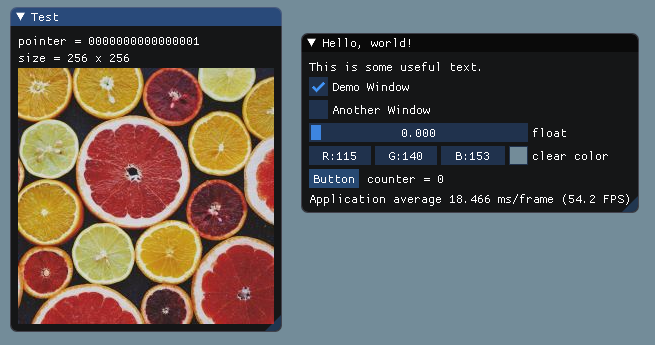
Unlike the majority of modern graphics API, DirectX9 include helper functions to load image files from disk. We are going to use them here, instead of using stb_image.h.
Add at the top of one of your source file:
#include <D3dx9tex.h>
#pragma comment(lib, "D3dx9")
Then, let's load a file from disk directly into a DirectX9 texture:
// Load texture
PDIRECT3DTEXTURE9 my_image_texture;
HRESULT hr = D3DXCreateTextureFromFileA(g_pd3dDevice, "../../MyImage01.jpg", &my_image_texture);
IM_ASSERT(hr == S_OK);

// Retrieve description of the texture surface so we can access its size
D3DSURFACE_DESC my_image_desc;
my_image_texture->GetLevelDesc(0, &my_image_desc);
int my_image_width = my_image_desc.Width;
int my_image_height = my_image_desc.Height;
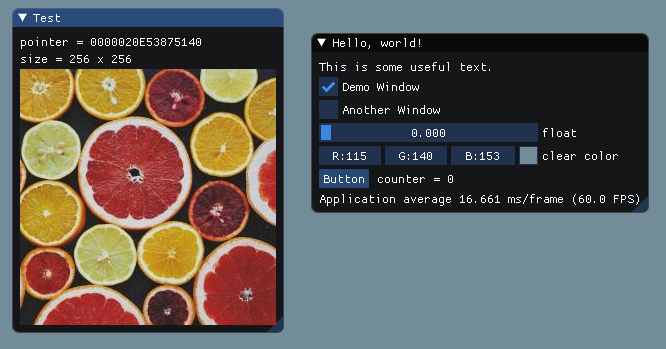
Now that we have an DirectX9 texture and its dimensions, we can add in our main loop:
ImGui::Begin("Test");
ImGui::Text("pointer = %p", my_image_texture);
ImGui::Text("size = %d x %d", my_image_width, my_image_height);
ImGui::Image((void*)my_image_texture, ImVec2(my_image_width, my_image_height));
ImGui::End();
From the FAQ: "How can I display an image? What is ImTextureID, how does it works?"
Short explanation:
- You may use functions such as
ImGui::Image(),ImGui::ImageButton()or lower-levelImDrawList::AddImage()to emit draw calls that will use your own textures. - Actual textures are identified in a way that is up to the user/engine. Those identifiers are stored and passed as a
ImTextureIDvalue (which is no other than avoid*). - Loading image files from the disk and turning them into a texture is not within the scope of Dear ImGui (for a good reason). You can read documentations or tutorials on your graphics API to understand how to upload textures. Onward in this document you'll find examples.
Long explanation:
- Dear ImGui's job is to create "meshes", defined in a renderer-agnostic format made of draw commands and vertices. At the end of the frame those meshes (ImDrawList) will be displayed by your rendering function. They are made up of textured polygons and the code to render them is generally fairly short (a few dozen lines). In the examples/ folder we provide functions for popular graphics API (OpenGL, DirectX, etc.).
- Each rendering function decides on a data type to represent "textures". The concept of what is a "texture" is entirely tied to your underlying engine/graphics API. We carry the information to identify a "texture" in the ImTextureID type. ImTextureID is nothing more that a void*, aka 4/8 bytes worth of data: just enough to store 1 pointer or 1 integer of your choice. Dear ImGui doesn't know or understand what you are storing in ImTextureID, it merely pass ImTextureID values until they reach your rendering function.
- In the examples/ bindings, for each graphics API binding we decided on a type that is likely to be a good representation for specifying an image from the end-user perspective. This is what the examples rendering functions are using:
OpenGL:     ImTextureID = GLuint                       (see ImGui_ImplOpenGL3_RenderDrawData() function in imgui_impl_opengl3.cpp)
DirectX9:   ImTextureID = LPDIRECT3DTEXTURE9           (see ImGui_ImplDX9_RenderDrawData()     function in imgui_impl_dx9.cpp)
DirectX11:  ImTextureID = ID3D11ShaderResourceView*    (see ImGui_ImplDX11_RenderDrawData()    function in imgui_impl_dx11.cpp)
DirectX12:  ImTextureID = D3D12_GPU_DESCRIPTOR_HANDLE  (see ImGui_ImplDX12_RenderDrawData()    function in imgui_impl_dx12.cpp)
For example, in the OpenGL example binding we store raw OpenGL texture identifier (GLuint) inside ImTextureID. Whereas in the DirectX11 example binding we store a pointer to ID3D11ShaderResourceView inside ImTextureID, which is a higher-level structure tying together both the texture and information about its format and how to read it.
- If you have a custom engine built over e.g. OpenGL, instead of passing GLuint around you may decide to use a high-level data type to carry information about the texture as well as how to display it (shaders, etc.). The decision of what to use as ImTextureID can always be made better knowing how your codebase is designed. If your engine has high-level data types for "textures" and "material" then you may want to use them. If you are starting with OpenGL or DirectX or Vulkan and haven't built much of a rendering engine over them, keeping the default ImTextureID representation suggested by the example bindings is probably the best choice. (Advanced users may also decide to keep a low-level type in ImTextureID, and use ImDrawList callback and pass information to their renderer) User code may do:
// Cast our texture type to ImTextureID / void*
MyTexture* texture = g_CoffeeTableTexture;
ImGui::Image((void*)texture, ImVec2(texture->Width, texture->Height));
The renderer function called after ImGui::Render() will receive that same value that the user code passed:
// Cast ImTextureID / void* stored in the draw command as our texture type
MyTexture* texture = (MyTexture*)pcmd->TextureId;
MyEngineBindTexture2D(texture);
Once you understand this design you will understand that loading image files and turning them into displayable textures is not within the scope of Dear ImGui. This is by design and is actually a good thing, because it means your code has full control over your data types and how you display them. If you want to display an image file (e.g. PNG file) into the screen, please refer to documentation and tutorials for the graphics API you are using.
Finally, you may call ImGui::ShowMetricsWindow() to explore/visualize/understand how the ImDrawList are generated.