Repository navigation
Control alarm_control_panel
Control catalogue · Documentation home
Minimal field JSON:
{
  "id": "alarm_control_panel",
  "type": "alarm_control_panel",
  "name": "Alarm control panel"
}
Full field JSON:
{
  "id": "alarm_control_panel",
  "type": "alarm_control_panel",
  "name": "Alarm control panel",
  "default": "disarmed",
  "controls": [
    {
      "key": "",
      "type": "action",
      "label": "ui_124",
      "command": "",
      "payload": "ARM_HOME"
    },
    {
      "key": "",
      "type": "action",
      "label": "ui_125",
      "command": "",
      "payload": "ARM_AWAY"
    },
    {
      "key": "",
      "type": "action",
      "label": "ui_126",
      "command": "",
      "payload": "ARM_NIGHT"
    },
    {
      "key": "",
      "type": "action",
      "label": "ui_127",
      "command": "",
      "payload": "DISARM"
    },
    {
      "key": "",
      "type": "action",
      "label": "ui_128",
      "command": "",
      "payload": "TRIGGER"
    }
  ],
  "ha": {
    "command_topic": "$command",
    "state_topic": "$state",
    "code_arm_required": false,
    "code_disarm_required": false,
    "code_trigger_required": false
  }
}
Properties in the full example:
| Property | Required? | Meaning / default |
|---|---|---|
id |
Required | Stable application key; unique across registered pages. |
type |
Required | Enabled field type. |
name |
Required title¹ | Display title; may be replaced by a nonempty names object. |
default |
Optional | Omit to use the built-in initial value. |
controls |
Optional | Omit to use the preset controls; supplying an array replaces them. |
ha |
Optional | Omit to use automatic HA discovery; supplied properties override defaults. |
¹ name can be replaced by names. Other shared optional properties are listed in the catalogue.
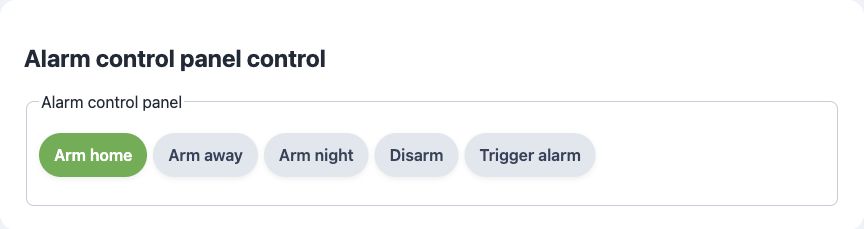
The control provides Arm home, Arm away, Arm night, Disarm and Trigger
buttons. Its default state is "disarmed"; commands are ARM_HOME, ARM_AWAY,
ARM_NIGHT, DISARM and TRIGGER on the base topic. Matching reported states
are armed_home, armed_away, armed_night, disarmed and triggered.
The preset does not require a code and does not offer a PIN-entry field.
Changing HA code-related properties alone does not implement code handling in
the portal or firmware. The raw state string is hidden; selected buttons reflect
reported state.
MQTT component: alarm_control_panel. Requires the control’s feature flag, dynamic pages, MQTT and HA support to be enabled. ArdPortal registers MQTT Discovery and routes state/commands; the sketch implements device behavior. Action callbacks acknowledge acceptance, not physical completion.
Supported by ArdPortal: ARM_HOME, ARM_AWAY, ARM_NIGHT, DISARM and TRIGGER actions; the application reports the actual alarm state string. The preset declares that arm/disarm/trigger do not require a code.
Not provided by the built-in integration / limits: No built-in PIN validation, entry/exit delay engine, zone processing, bypass handling or alarm hardware. Vacation/custom-bypass arming commands are not in the built-in action list.
Explicit ha properties can override Discovery metadata. They do not create additional hardware behavior, application value properties or command handlers by themselves. See HA integration for the shared setup.
Implemented as a composite mapping. The functions below are separate standard endpoints on the same physical Zigbee device. The optional generated Zigbee2MQTT converter and ZHA quirk add names and option/state semantics; a composite mapping does not guarantee one combined gateway entity. Requires ESP32-C5/C6/H2, Zigbee and dynamic pages enabled, and the field’s control flag enabled. MQTT/HA is not required.
Standard mapping: Five momentary On/Off actions + Multistate Input.
Supported by ArdPortal: ON activates ARM_HOME, ARM_AWAY, ARM_NIGHT, DISARM or TRIGGER on its dedicated endpoint. Reported panel state: 1=disarmed, 2=armed_home, 3=armed_away, 4=armed_night, 5=pending, 6=arming, 7=triggered.
Not provided / limits: This is a set of standard generic endpoints, not an IAS ACE server or a native alarm-panel UI. There is no PIN handling, zone enrollment or alarm logic. State values outside this list report the standard fault flag.
Endpoint IDs follow registration order, then the preset’s controls order; read-only measurement/status endpoints follow the editable/action endpoints. Composite fields consume multiple slots in the shared 239-endpoint budget. Startup stages one endpoint per loop and reports one endpoint per loop. Values and action callbacks use the existing AppConfig routes and persist; accepting an action is not hardware completion.
Standard Basic ProductLabel contains field name / property or action, truncated to 63 UTF-8 bytes; Analog/Multistate endpoints also carry their Description. A gateway is not required to use these labels or expose all these clusters. Option/state names are documented here but are not currently sent as StateText. Unknown discrete readings set the standard status fault flag and leave the last representable ordinal unchanged.
visibleWhen does not remove endpoints or create a dynamic Zigbee form. Dependency rules do not affect Zigbee control visibility or command acceptance. Native endpoint definitions freeze at startup; changes need restart. Physical coordinator interoperability is still unverified.
See Zigbee integration and page/order limitations.
These examples use the field ID from the JSON above and an existing ArdPortal portal. Run them after page registration has finished and portal.portalAndAppConfigReady() is true. Call portal.loop() frequently. Register callbacks once in setup(); do not repeat setters on every loop iteration.
Set "persist": true on this field in its page JSON. It is optional for editable fields whose preset already persists settings, but required to override a RAM-only preset such as a sensor. Calling setAppConfigValue() sets the control value and ArdPortal automatically saves AppConfig through its integrated ArdFS storage. Do not create an ArdFS object or call a separate write/flush method. The automatic save is coalesced and advanced by subsequent portal.loop() calls.
// Use this path when the value is a setting that should survive restart.
ArdJSON::JSONVar next = "disarmed";
if (!next.isValid() || !portal.setAppConfigValue("alarm_control_panel", next)) {
  Serial.println("Setting rejected or storage temporarily unavailable");
}
true from the setter means acceptance, not a completed flash write. Configure this callback once to observe the result:
portal.onPortalAndAppConfigSaved([](bool ok, const String& error) {
  if (!ok) Serial.println(error);
});// Use this alternative for live readings/status; never writes ArdFS.
ArdJSON::JSONVar next = "disarmed";
if (!next.isValid() || !portal.setAppConfigStateValue("alarm_control_panel", next, false)) {
Serial.println("Runtime value rejected");
}The third argument false avoids queuing an immediate MQTT publication. Use true or omit it to queue changed state. RAM updates work regardless of persist. Alternatively, with "persist": false, setAppConfigValue() also follows the RAM-only path.
const ArdJSON::JSONVar current = portal.getAppConfigValue("alarm_control_panel");
if (!current.isUndefined() && current.isValid()) {
  Serial.println(ArdJSON::JSON.stringify(current));
}
The getter returns the effective field value: RAM override first, then saved AppConfig, then the definition default. A RAM-only update is lost on restart; the saved value/default becomes effective again. Choose the persistent or RAM path for a given value. A RAM override can mask a later persistent change for the same ID; there is no API to clear just that override. Prefer separate setting and telemetry IDs when both are needed.