Repository navigation
Dynamic Pages
Documentation home · All topics · Source
Register JSON page definitions with startAppConfigPageRegistration(definition). Register them on every boot and call portal.loop() regularly. Queue another page after onAppConfigPageRegistrationFinished() reports completion. See the Portal API for the registration lifecycle and callbacks.
Use static PROGMEM definitions with FPSTR() to keep page source text in flash. The portal loads the active page and automatically adds newly registered pages to its navigation. Application values use the integrated configuration storage.
The shared page/entity definition budget defaults to 256 KiB and can be overridden in bytes before including the library:
#define ARDPORTAL_APP_CONFIG_MAX_DEFINITION_BYTES (128UL * 1024UL)
#include <ArdPortal.h>
This changes the definition budget, independently of persistent AppConfig storage.
It does not allocate a buffer of that size. Large definitions should use PROGMEM;
field counts, per-field JSON limits and available RAM still apply. Use the same
value in every translation unit that includes ArdPortal.
For a definition built dynamically, transfer its source buffer when it is no longer needed by the application:
String definition = buildPageDefinition();
if (!portal.startAppConfigPageRegistration(std::move(definition))) {
  // Rejection before acceptance leaves definition available for retry.
}
// After acceptance, definition has been moved; the portal retains its source.
This saves the additional source copy at registration; it still retains the text
in RAM. For fixed schemas, prefer the direct FPSTR(PROGMEM_ARRAY) overload.
This sketch adds Controls and Settings. Install the callback before
starting the first registration. Start the second page only after the first
page's completion callback reports success. Keep calling portal.loop() so
registration, networking and configuration loading can advance.
#include <ArdPortal.h>

ArdPortal portal;

static const char CONTROL_PAGE[] PROGMEM = R"JSON({
  "id": "controls",
  "name": "Controls",
  "order": 10,
  "fields": [
    {
      "id": "enabled",
      "type": "switch",
      "name": "Enabled",
      "default": false
    },
    {
      "id": "level",
      "type": "slider",
      "name": "Level",
      "min": 0,
      "max": 100,
      "step": 1,
      "default": 50
    }
  ]
})JSON";

static const char SETTINGS_PAGE[] PROGMEM = R"JSON({
  "id": "settings",
  "name": "Settings",
  "order": 20,
  "fields": [
    {
      "id": "label",
      "type": "edit",
      "name": "Label",
      "default": "My device"
    },
    {
      "id": "profile",
      "type": "select",
      "name": "Profile",
      "default": "normal",
      "options": [
        {"value": "eco", "name": "Eco"},
        {"value": "normal", "name": "Normal"}
      ]
    }
  ]
})JSON";

unsigned registeredPages = 0;
bool startupApplied = false;

/**
 * @brief Initialize the example hardware, callbacks and portal.
 * @return No value.
 */
void setup() {
  Serial.begin(115200);
  portal.onAppConfigPageRegistrationFinished([](bool success) {
    if (!success) {
      const auto& error = portal.appConfigRegistrationError();
      Serial.printf("Registration: %s field=%s reason=%s\n",
                    error.stage, error.fieldId.c_str(), error.reason.c_str());
      return;
    }
    ++registeredPages;
    if (registeredPages == 1 && !portal.startAppConfigPageRegistration(FPSTR(SETTINGS_PAGE)))
      Serial.println(portal.appConfigRegistrationError().reason);
  });
  portal.onAppConfigValueChanged([](const String& key,
                                   const ArdJSON::JSONVar& value,
                                   ArdPortal::ChangeSource) {
    // Apply user changes to hardware without blocking.
    Serial.print(key); Serial.print(" = ");
    Serial.println(ArdJSON::JSON.stringify(value));
  });
  if (!portal.startAppConfigPageRegistration(FPSTR(CONTROL_PAGE)))
    Serial.println(portal.appConfigRegistrationError().reason);
  if (!portal.begin()) Serial.println("Could not start the portal.");
}

/**
 * @brief Advance the component work; call repeatedly from the Arduino main loop.
 * @return No value.
 */
void loop() {
  portal.loop(); // One registration unit; UART/application work can run next.
  if (!startupApplied && registeredPages == 2 && portal.portalAndAppConfigReady()) {
    startupApplied = true;
    // Config loading may finish before page registration. Wait for both.
    Serial.println(portal.getAppConfigValue("enabled").asBool()
                   ? "Enabled at startup" : "Disabled at startup");
  }
}-
startAppConfigPageRegistration()returningtruemeans accepted, not registered. The completion callback reports the final result. - Only one registration may be pending. The callback can safely start the next page because the previous registration has already released its working buffers.
- A rejected call returns
falsewithout a completion callback. An accepted registration that fails later calls the callback withfalse. This example reports either error and stops the sequence instead of using missing fields. - Small and large pages use the same API and both deliver their completion
callback from
portal.loop(). - To apply saved settings at startup, wait for both page registrations and
portal.portalAndAppConfigReady(). Registration and loading saved values are separate operations. The example applies startup state once. - Page IDs and field IDs must be unique. Keep the static
PROGMEMdefinitions alive for the entire portal lifetime.
The same sketch is available as File → Examples → ArdPortal → DynamicPages.
| Page property | Required / default | Meaning |
|---|---|---|
id |
Required | Unique page identifier; used in /p/<id> and form requests. |
name |
Recommended default title | Required unless a nonempty names object supplies titles. Home/home places the form on Start. |
names |
Optional | Language-code-to-title object, e.g. {"en":"Settings","de":"Einstellungen"}. No separate default language key is needed; use name. |
order |
Required integer | Position among dynamic links; does not reorder built-in pages. |
fields |
Required nonempty array | Field definitions; field IDs are globally unique, not page-local. |
visibleWhen |
Optional | A dependency rule applying to the menu link, content, all fields and HA entities. See Dependent fields and pages. |
| Field property | Applies to | Meaning |
|---|---|---|
id, type, name, names
|
All fields | Identifier, enabled control type, default/localized title. Titles follow the page rules. |
default |
All fields | Initial JSON value; must satisfy type/range/schema rules. Missing values use the control's default, not automatically an empty string for every type. |
persist |
Basic and descriptor-based fields |
false keeps Portal/MQTT/API setting changes in RAM; state setters are always RAM-only. Omission uses the field preset/default policy. |
visibleWhen |
All fields | A field's own condition, combined with its page condition and upstream visibility. See Dependent fields and pages. |
icon |
HA entities | Optional mdi:... override (5–80 bytes); omitted uses the switch preset icon or HA defaults for other types. |
ha |
HA entities | Discovery overrides; identity/name/device/availability remain managed by the library. Ignored by HA when HA is disabled. |
unit_of_measurement, device_class, state_class, entity_category
|
Compatible HA entities | Measurement/classification metadata copied into discovery; choose values supported by the target HA component. |
min, max, step
|
Basic slider/climate | Numeric bounds with min < max; positive step; values must match the step grid. |
options |
Basic select | Nonempty array of unique string value plus name and optional names; up to 16 choices. |
modes, fan_modes
|
Basic climate | Independently optional nonempty lists; omitted controls are absent rather than implicitly enabled. |
controls |
Descriptor-based fields | Replace the preset's control array; see the descriptor property/type table below. |
group |
Scene | Shared id, name, optional names group several scene buttons in one fieldset. Each scene retains its own globally unique field ID. |
extended, _pageVisibleWhen and preset flags such as action_only are internal
normalization metadata, not application configuration keys or feature switches.
A field ID does not create a C++ variable: access its value through
getAppConfigValue(id). Definitions are immutable after registration; the public
API does not remove/replace a page or edit a registered schema. Runtime additions
appear automatically during the portal status refresh (normally every 1 second),
without resetting existing controls or unsaved edits.
A page with name: "Home" or name: "home" displays on Start in its own rounded
card, above the separate Info card, with the current device name as its heading. Info always includes the Device name row, including when Home is present.
It adds no extra navigation link. Recognition
uses the default name (case-insensitive), so changing the portal language does
not move the page. Its id remains the page ID for config updates; fields keep
normal persistence, live WebSocket updates, MQTT and HA discovery. This requires
ARDPORTAL_ENABLE_DYNAMIC_PAGES.
static const char HOME_PAGE[] PROGMEM = R"JSON({
  "id":"home", "name":"Home", "order":0,
  "fields":[
    {"id":"reading", "type":"text", "name":"Reading",
     "default":"Unavailable", "persist":false}
  ]
})JSON";
// Queue before portal.begin(); completion is reported from loop().
portal.startAppConfigPageRegistration(FPSTR(HOME_PAGE));
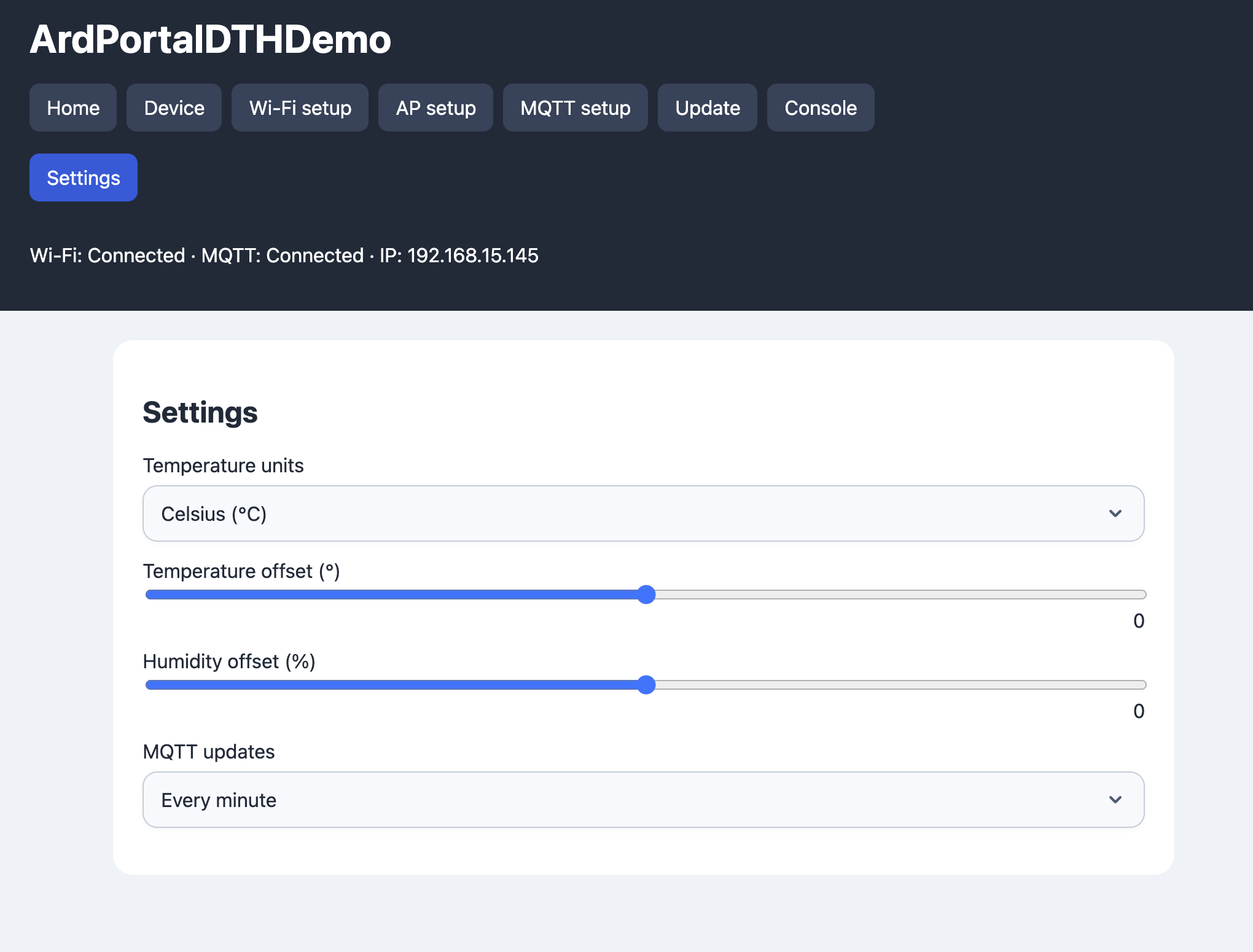
The DHT example registers Home for its two measurements and a separate Settings page for units, calibration and MQTT update rate. Field IDs are unique across pages; move a field into Home rather than registering the same field twice.
static const char LIGHTING_PAGE[] PROGMEM = R"JSON({
  "id":"lighting", "name":"Lighting", "order":10,
  "fields":[
    {"id":"brightness","type":"slider","name":"Brightness",
     "min":0,"max":100,"step":1,"default":50},
    {"id":"enabled","type":"switch","name":"Enabled","default":false}
  ]
})JSON";
// Queue this page only once the preceding registration has completed.
portal.startAppConfigPageRegistration(FPSTR(LIGHTING_PAGE));
portal.onAppConfigValueChanged([](const String& key, const ArdJSON::JSONVar& value,
                                 ArdPortal::ChangeSource source) {
  // Apply the current value to your hardware here; keep the callback short.
  // Sources: Application, Portal, Mqtt, FactoryReset.
});
Dynamic pages appear in a separate second navigation row with a slightly different
button colour. order sorts that row; built-in pages keep their existing order.
Pages have URLs /p/<id>. name is the default label. Optional names translations
use the selected language (or its base code), then fall back to name. Without name, it tries English then the first
available translation. Changing language preserves unsaved edits.
Add labels under additional language codes to support your own portal languages.
A page added at runtime appears after refreshing the browser.
Every page requires id, integer order, a nonempty fields array, and a title.
Every field requires id, type and a title. Prefer name as the default title
and add optional names translations; a nonempty names object alone is also
accepted. default is optional.
Select options use value, name and optional names in the same way.
IDs contain 1–48 ASCII letters, digits, underscores or hyphens. Field IDs must be
unique across all pages; they are application keys and MQTT command names.
availability and status are reserved; climate command suffixes must not collide
with other field IDs. The completion callback reports false for invalid definitions, duplicate IDs,
unsupported controls or resource limits. Only immediate rejection returns false from startAppConfigPageRegistration(). Limits: 16 pages, 1024 fields in total across all pages,
256 KiB of total definitions by default (configurable; no separate 32 KiB page limit), 80-byte labels, 16 select options, 128-byte editable
text values (512 bytes for read-only text),
and the 8 KiB application configuration payload. The 1024-field limit
does not guarantee that all values fit in persistent AppConfig or available heap.
The storage budget is designed for a 128 KiB region: serialized PortalConfig is
limited to 5 KiB (MaxPortalConfigBytes), including a CA certificate of up to
4096 bytes, and serialized AppConfig to 8192 bytes (MaxAppConfigBytes). These
budgets count JSON keys, quotes and escaping. Certificate and remaining network/
device settings must fit together within the PortalConfig budget. Both parts,
including the outer JSON object, fit within MaxConfigDocumentBytes (13376 bytes).
Even worst-case journal escaping fits each record in seven 4 KiB sectors; two
journal slots fit within one 64 KiB bank after its 4 KiB header. Additional ArdFS
files consume the remaining space and can still cause capacity errors. This is a
flash-size guarantee for the portal document, not a guarantee of available heap.
Configure at least 128 KiB of filesystem/storage space in the board flash layout
(or ESP32 partition table) to use the full budgets. ArdPortal does not resize it.
Field tracking uses fixed masks covering all 1024 fields, including MQTT and HA
dependencies. Each discovery message
must fit the bounded MQTT buffer, including space for a future device name.
type |
Value and definition | HA entity |
|---|---|---|
slider |
Number; required min/max, optional positive step (default 1) |
MQTT number, slider mode |
text |
Number or string; read-only in portal and MQTT, writable from code | MQTT sensor |
select |
String; required options: [{"value":"eco","names":{"en":"Eco"}}]
|
MQTT select |
switch |
Boolean | MQTT switch, ON/OFF payloads |
edit |
Editable string | MQTT text |
climate |
Object described below | MQTT climate |
An undefined key uses its declared default. Without default, sliders start at
min, switches at false, selects at their first option, and text controls empty.
Defaults do not trigger flash writes. Saved values that no longer match a field
schema use its default when read/rendered. Setters validate registered fields;
unregistered application keys remain general JSON values. Portal form saves are
atomic and reject writes to read-only fields. Dynamic controls apply changes automatically, without Save or Cancel buttons.
Typing and slider input are coalesced for 200 ms. WebSocket change notifications through /api/events
refresh displayed values after changes from code, MQTT or HA; a three-second poll
also recovers missed notifications. Active edits are preserved until submitted.
Climate example:
{
  "id":"thermostat", "type":"climate", "name":"Thermostat", "names":{"en":"Thermostat"},
  "min":10, "max":30, "step":0.5,
  "modes":["off","heat","cool","auto"],
  "fan_modes":["auto","low","medium","high"],
  "icon":"mdi:thermostat",
  "default":{"temperature":21,"current_temperature":20,"mode":"off","fan_mode":"auto"}
}
modes and fan_modes are independently optional: omit either to omit its portal
control and HA command/state topics. Supported climate modes are off, heat,
cool, auto, dry, fan_only; fan modes are application-defined IDs.
Both lists must be nonempty when supplied. Climate values require temperature;
current_temperature may be a number, null or omitted. Include mode/fan_mode
only when their corresponding lists exist. Without an explicit default, the target
starts at min, current temperature is null, and optional controls use their
first listed values. The default temperature step is 0.5 °C. Portal and MQTT
commands preserve the measured temperature and optional action (a string up
to 32 bytes); update these reported values from code.
The library exposes controls and values; the application operates the actual
heater, cooler and fan.
startAppConfigPageRegistration() returns false only when the job cannot be accepted. Inspect the
error after a rejected call and inside onAppConfigPageRegistrationFinished(false) for later
validation, memory or Discovery failures:
auto reportError = []() {
  const auto& error = portal.appConfigRegistrationError();
  Serial.printf("Registration: stage=%s field=%s reason=%s\n",
                error.stage, error.fieldId.c_str(), error.reason.c_str());
};
portal.onAppConfigPageRegistrationFinished([reportError](bool success) {
  if (!success) reportError();
});
if (!portal.startAppConfigPageRegistration(FPSTR(PAGE_DEFINITION))) reportError();
The result contains stage, fieldId and reason. Stages distinguish input,
JSON parsing, page/field validation, descriptor normalization, limits, registry
allocation, serialization, field indexing, command collisions and HA Discovery.
Parser errors include the byte offset and distinguish memory exhaustion from
input/node/depth/string/container limits. Discovery overflow reports payload
size and MQTT capacity. fieldId is empty when no field can be identified, for
example a JSON parse error or page allocation failure. A successful page
registration clears the previous error; copy the result if retaining it across
another registration. The getter works even with Console diagnostics disabled.
Failures are also sent to Console > Messages when
ARDPORTAL_ENABLE_CONSOLE_MESSAGES is enabled. Rejected pages are rolled back and do not
restart Discovery.
The existing startAppConfigPageRegistration(const __FlashStringHelper*) overload keeps the page source in flash for the portal lifetime. HA topic overrides may contain $device, for example "state_topic":"stat/$device/temperature". Only ha.topic and HA properties ending in _topic expand this token, using the current normalized MQTT device name. Names, payloads and Jinja templates are unchanged. Identity changes are resolved when a field is read; field IDs and HA unique IDs are unchanged.
For conditional pages and fields, see Dependent fields. For field values and composite schemas, see Controls.