Repository navigation
Control switch
Control catalogue · Documentation home
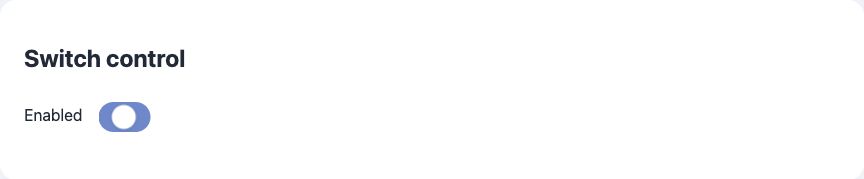
Minimal field JSON:
{
  "id": "enabled",
  "type": "switch",
  "name": "Enabled"
}
Full field JSON:
{
  "id": "enabled",
  "type": "switch",
  "name": "Enabled",
  "default": false
}
Properties in the full example:
| Property | Required? | Meaning / default |
|---|---|---|
id |
Required | Stable application key; unique across registered pages. |
type |
Required | Enabled field type. |
name |
Required title¹ | Display title; may be replaced by a nonempty names object. |
default |
Optional | Omit to use the built-in initial value. |
¹ name can be replaced by names. Other shared optional properties are listed in the catalogue.
Appearance: Graphical on/off switch
Value: Boolean
Code uses true/false; MQTT commands use unquoted ON/OFF.
MQTT component: switch. Requires the control’s feature flag, dynamic pages, MQTT and HA support to be enabled. ArdPortal registers MQTT Discovery and routes state/commands; the sketch implements device behavior. Action callbacks acknowledge acceptance, not physical completion.
Supported by ArdPortal: Boolean application state is published as ON/OFF; HA commands accept those two payloads. Discovery supplies state/command topics and a toggle icon unless explicitly overridden.
Not provided by the built-in integration / limits: No automatic GPIO/relay control or power/energy measurement. ArdPortal does not force an optimistic setting; an accepted command is not proof of the physical relay state.
Explicit ha properties can override Discovery metadata. They do not create additional hardware behavior, application value properties or command handlers by themselves. See HA integration for the shared setup.
Native mapping: On/Off (0x0006). Requires ESP32-C5/C6/H2, ARDPORTAL_ENABLE_ZIGBEE=1, enabled dynamic pages and the control’s feature flag, with the matching End Device/Router board mode. MQTT/HA is not required. Register the initial pages before endpoint startup; later endpoint changes require restart. persist retains its AppConfig meaning.
Supported by ArdPortal: On/off reports and incoming on/off state changes. Boolean state is shared with the portal and HA.
Not provided / limits: No extra power/energy measurement, switch groups/scenes management or physical relay driver.
visibleWhen does not dynamically add/remove Zigbee endpoints: they remain registered, and Zigbee commands remain accepted regardless of field visibility. Gateway presentation depends on its support for the mapped clusters. ArdPortal can export a Zigbee2MQTT converter or ZHA quirk; see the validation scope.
See Zigbee integration for pairing, endpoint lifecycle, gateway limitations and OTA requirements.
These examples use the field ID from the JSON above and an existing ArdPortal portal. Run them after page registration has finished and portal.portalAndAppConfigReady() is true. Call portal.loop() frequently. Register callbacks once in setup(); do not repeat setters on every loop iteration.
Set "persist": true on this field in its page JSON. It is optional for editable fields whose preset already persists settings, but required to override a RAM-only preset such as a sensor. Calling setAppConfigValue() sets the control value and ArdPortal automatically saves AppConfig through its integrated ArdFS storage. Do not create an ArdFS object or call a separate write/flush method. The automatic save is coalesced and advanced by subsequent portal.loop() calls.
// Use this path when the value is a setting that should survive restart.
ArdJSON::JSONVar next = false;
if (!next.isValid() || !portal.setAppConfigValue("enabled", next)) {
  Serial.println("Setting rejected or storage temporarily unavailable");
}
true from the setter means acceptance, not a completed flash write. Configure this callback once to observe the result:
portal.onPortalAndAppConfigSaved([](bool ok, const String& error) {
  if (!ok) Serial.println(error);
});// Use this alternative for live readings/status; never writes ArdFS.
ArdJSON::JSONVar next = false;
if (!next.isValid() || !portal.setAppConfigStateValue("enabled", next, false)) {
Serial.println("Runtime value rejected");
}The third argument false avoids queuing an immediate MQTT publication. Use true or omit it to queue changed state. RAM updates work regardless of persist. Alternatively, with "persist": false, setAppConfigValue() also follows the RAM-only path.
const ArdJSON::JSONVar current = portal.getAppConfigValue("enabled");
if (!current.isUndefined() && current.isValid()) {
  Serial.println(ArdJSON::JSON.stringify(current));
}
The getter returns the effective field value: RAM override first, then saved AppConfig, then the definition default. A RAM-only update is lost on restart; the saved value/default becomes effective again. Choose the persistent or RAM path for a given value. A RAM override can mask a later persistent change for the same ID; there is no API to clear just that override. Prefer separate setting and telemetry IDs when both are needed.