Repository navigation
IPAM
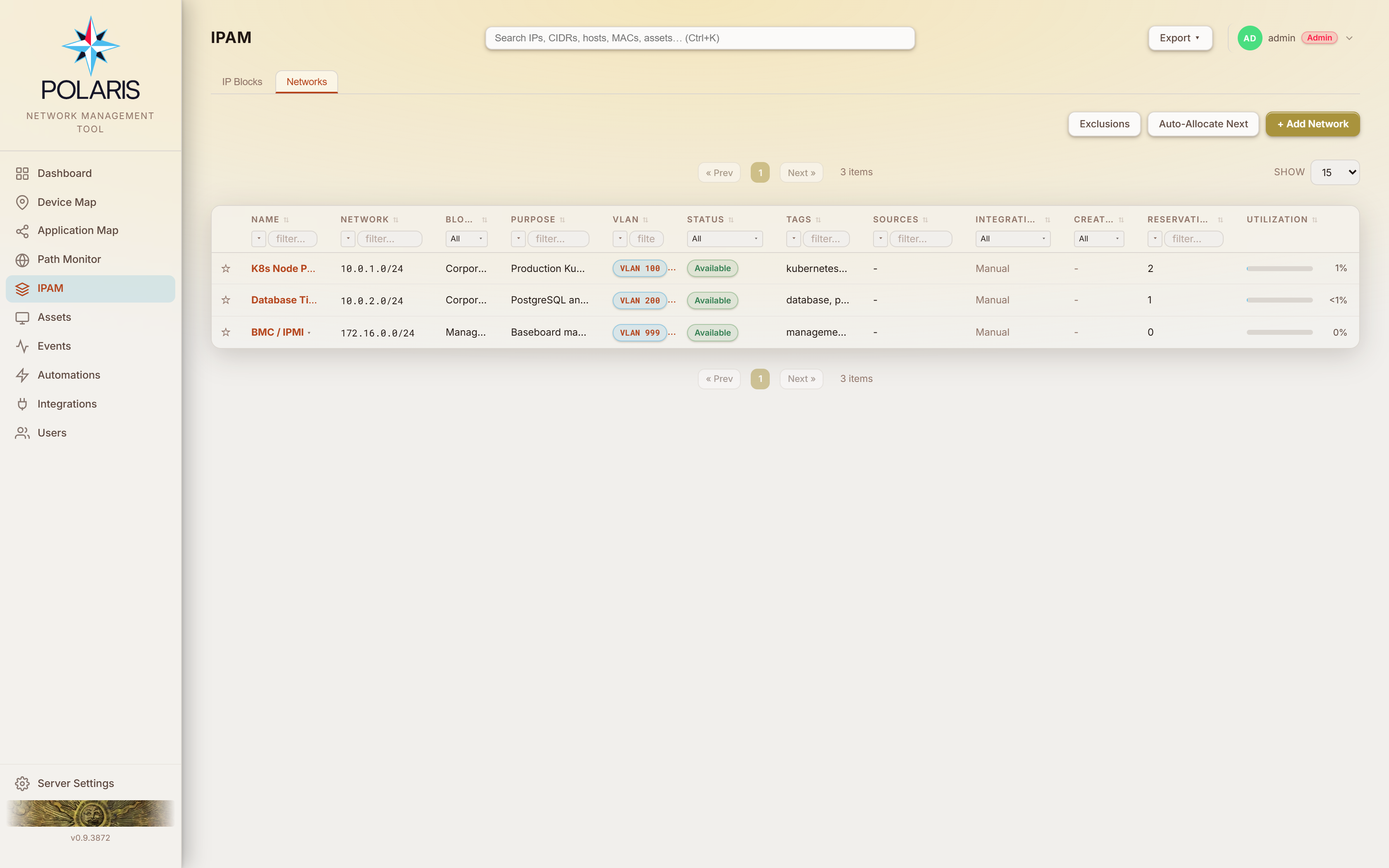
The address registry, labelled IP Management in the sidebar and page header. Two tabs — IP Blocks and Networks — plus the address panel you reach by opening a network.
| Gate | Grants |
|---|---|
ipBlocks:read / subnets:read
|
see the page |
ipBlocks:write |
add, edit and delete blocks |
subnets:write |
create, edit and move your own rows |
subnets:fullwrite |
edit anyone's, plus archive and exclusions |
reservations:write / :fullwrite
|
same ownership split on reservations |
subnets, reservations, contacts and credentials carry an ownership
dimension: at write you reach only rows whose createdBy is you. A
discovered row has createdBy = null and is therefore unowned — only
fullwrite reaches it. That is deliberate, and it is why archiving a network is
fullwrite: retiring a site's address space is not an own-rows action.
A block is the outermost container — a CIDR you own.
Columns: favourite · Name · CIDR · Version (IPv4 / IPv6) · Description · Tags · Networks (count) · Utilization · Created.
Utilization is how much of the block's address space is already carved into networks — a /22 holding two /24s is 50%. Sort on it to see which blocks are nearly full. The bar uses the same colour bands as the Networks tab; a block with any network in it never reads 0% (it shows <1%). The PDF and CSV exports carry the same figure.
+ Add Block takes a name, CIDR, version, description and tags.
A block's name opens a menu; Open shows the networks inside it in a slide-over. Click a network's name there to open that network's address table over it. Both panels open from any page — a search result for a block or a network opens them in place.
Deleting a block is refused with a 409 while it still contains any network (rule 4) — deprecated and empty networks count too. Move the networks to another block (Moving a network), archive or delete them first.
The same utilisation figure is what the Block Utilization dashboard widget ranks on. Deprecated networks are excluded from it — an archived network frees its space as far as this column is concerned.
A network is a CIDR inside a block. This is the row that says a broadcast domain exists.
Columns: favourite · Name · Network · Block · Purpose · VLAN · Status · Tags · Sources · Integration · Creator · Reservations · Utilization.
Status is available, reserved or deprecated.
Reservations counts the addresses the network is holding right now — reservations that are active and sit on an address. Released and expired reservations are kept as history and are not counted, so on a busy DHCP-discovered network this number is smaller than the number of rows the address list has ever had. (Deleting a network still removes that history, and the delete confirmation names the full row count it will take with it.)
A network holding active reservations cannot be deleted — the firewall's own interface IP excepted — until they are released. An administrator instead sees a second warning and can delete it anyway; see rule 4.
Utilization is that count over the addresses the CIDR can hand out — a /24
has 254, network and broadcast excluded. It draws as a bar so a page of
networks reads as a shape: blue up to 50%, amber above it, red above 75%, the
same bands as the Block utilization dashboard widget. Click the column
heading to sort, and the networks about to run out come to the top. Hover a bar
for the exact figure ("200 of 254 usable addresses reserved (78.7%)"). A
network with something in it but under half a percent reads <1%, never 0%.
IPv6 networks show an em dash — a /64 is not a thing anyone fills.
Both columns are in the PDF and CSV exports.
Sources is the same column the Assets page carries: location || learnedLocation, and which source supplies the learned half is
operator-ordered (rule 22). The order lives in the
Assets page's Settings modal → Sources, and it feeds the projection, not just
the rendering — the column's own filter, its sort, "behind FortiGate X"
criteria and Device Map narrowing all read it.
- Contained — a network must sit inside its parent block.
-
No overlap — two networks may not overlap inside one block. Backed by a
unique index on
(blockId, cidr). -
Normalised — host bits are zeroed on write.
10.1.1.5/24stores as10.1.1.0/24.
Overlap checking is check-then-insert, so every path that creates a network takes a per-block advisory lock while it does so (rule 20a). This is why manual create, auto-allocate, bulk allocate and discovery's own create all go through one function — and it is why two operators adding a network to the same block at the same moment cannot both win.
| Button | Does |
|---|---|
| + Add Network | type the CIDR yourself |
| Auto-Allocate Next | ask for "the next free /N in this block" and get it |
| Exclusions | manage the excluded-CIDR registry |
+ Add Network never asks for a block. The network is placed in the most
specific block whose range contains its CIDR — with a 10.0.0.0/8 block and
a 10.90.0.0/16 block, 10.90.4.0/24 lands in the /16 and 10.91.0.0/24 in
the /8. The dialog's Block field shows the choice as you type and cannot be
edited; if no block contains the CIDR it says so, and saving is refused until a
covering block exists. The same holds for Add Network in a block's panel: a
CIDR that falls inside a narrower block nested in that one lands in the
narrower block. To put a network somewhere else afterwards, use
Move to block….
Auto-allocation is IPv4 only. An allocator treats an excluded range as taken space, not as a refusal — asking for "any free /24" steps over an exclusion rather than 409-ing on it.
Bulk allocation packs into an anchor (default /24 when not stated) and is
all-or-nothing in one transaction. A single subnet.bulk-allocated audit Event
is written after the transaction commits, not one per network.
Integrations create networks too: FortiManager and FortiGate DHCP scopes, Windows DHCP scopes, and the network queries of a Generic API integration. They follow the same rules: a network lands only inside an existing block, never over an overlapping, excluded or retired one. A Generic API integration never takes over a network another integration discovered, and never writes addresses into one.
Move to block… in the row menu re-parents a network onto a different block.
The same permission as Edit applies (subnets:write moves networks you
created; fullwrite moves any). The network keeps its identity, so its
reservations, conflicts and history move with it, and an integration-managed
network stays managed — discovery finds networks by CIDR, not by block.
The dialog lists only blocks whose range contains the network's CIDR. A block
that already holds an overlapping network is shown greyed out, naming the
network in the way. The move is re-checked on the server under both blocks'
locks: containment and IP version are 400, an overlap is 409.
Archive in the row menu (subnets:fullwrite) moves the network and its
reservations to ArchivedSubnet / ArchivedReservation. This is not the same
as deprecating.
A deprecated row still holds the (blockId, cidr) unique index while being
invisible to discovery's lookup — so its CIDR is unrecordable rather than
reusable: every run skips it with a self-overlap message, and address lookups
drop every lease, DHCP reservation, VIP and interface IP inside it.
Moving the row out is the only thing that frees the index, and it makes the
retired rows locked by construction. See rule 41.
Archiving is deliberately exempt from the active-reservation protection that guards deletion: that rule guards against destruction, and this preserves.
Networks → Exclusions. An exclusion is a CIDR you have declared out of scope for the networks list. See rule 42.
It exists because a Polaris network is one row per CIDR, while some address
space is genuinely the same at every site — a management VLAN, an
out-of-band range, an appliance's fixed subnet. The first site discovered
claims the row and every other site collides with it; that collision is raised
as a chassis-replaced conflict about a box nobody swapped, with a fresh
serial pair each run so dedup never catches it.
| Property | Behaviour |
|---|---|
| Scope | global, never per block — the CIDR needs excluding precisely because several sites serve it |
| Identity | the CIDR, normalised on write and frozen after create. The edit form takes name and notes only |
| Containment | one-directional — a /16 excludes the /24s inside it, and deliberately not a wider discovered CIDR. The most specific match is reported so a refusal names the row to delete |
| Effect on existing rows | destroys nothing. Networks already listed that it covers come back as a match count and are left in place |
| Version | IPv4 only, refused at the door |
| Permission | read at subnets:read, mutate at subnets:**fullwrite**
|
Changing an exclusion's range is a delete plus an add. Re-pointing one in place would un-exclude what you excluded and exclude what you never named, in one edit.
Open a network to get the address panel: every address in the range, what is on it, and what you can do about it.
Where the network came from a FortiManager or FortiGate integration, the panel header carries a Discover button. It queries that one gate for this one network — its DHCP scope (reservations and live leases) and its firewall VIP table — and reconciles the result, then updates the "Discovered N minutes ago" line beside it. Manual reservations are not touched.
It is deliberately narrower than a full integration discovery: it does not revisit assets, decommissions or map regions, which reconcile on the next full cycle. If the gate answers for DHCP but refuses the firewall VIP table — an API token scoped away from the firewall config is the usual reason — the DHCP half still completes and the result says the VIPs were not read. That is never reported as "there are no VIPs", so nothing already recorded is retired on a failed read.
Three separate facts live on every row, and conflating them is the mistake this design exists to prevent (rule 23, rule 77):
sourceTypeanswers who owns the address.-
dhcpBindinganswers how the gate hands it out —null,"lease"or"reservation". vipInfoanswers what the firewall translates for it.
So a managed FortiAP's address can be sourceType: fortinap (a managed device
holds it) with dhcpBinding: "lease" (the gate hands it out dynamically). Those
are both true, and they call for different handling. In the same way an address
can carry a VIP and be leased to a client — which is why the Status column
reports two facts where two exist.
Only one active reservation may exist per address per network. Creating one on an address that already shows something is either refused or a takeover, depending on what is there:
| Existing row | Creating over it |
|---|---|
dhcp_lease |
takeover — the lease is observed presence, not a claim |
dns_resolved |
takeover — it defers to everything |
fortiswitch / fortinap with dhcpBinding: "lease"
|
takeover |
vip |
takeover — the VIP is kept, see below (rule 77) |
manual, dhcp_reservation, interface_ip, external
|
409 — authoritative |
| infra rows not backed by a lease | 409 |
A takeover is a plain create gated on your reservations:write, not a
release of someone else's row. On a push-enabled network the gate's lease is
expired for you as part of it; on a read-only network it is a pure database
release.
Polaris auto-creates a reservation for any asset whose primary IP falls inside a known, non-deprecated network with no active reservation on that address (rule 11). It carries the asset's hostname and MAC where available.
These rows are deliberately meek: IPv4 only, never pushed to a FortiGate, and they never raise a conflict — they defer silently to anything authoritative.
A DHCP reservation whose client has not held the address recently is a cleanup candidate, and the Stale Reservations widget ranks them.
Polaris keeps statically-configured and ICMP-silent devices out of that list
using ARP evidence: when a gate's ARP table binds an active reservation's IP to
its reserved MAC, lastSeenArp is stamped
(rule 17). MAC match is required, matching is scoped
per (gate, IP), and absence of an ARP entry is never negative evidence.
There is an optional cache-priming ARP presence sweep per Fortinet integration. It is off by default because it fires a datagram at every reserved address, which is IDS-visible.
The address panel can allocate several addresses at once (up to 64). Contiguous allocation is refused, never downgraded: when no run of that length exists, you get a 409 naming the largest run that does, rather than a scattered set. A partial bulk allocation is not a success.
The taken set is every active reservation regardless of source type — a VIP, an interface IP, a lease and an infra row are all simply never offered. An address something answers on is not free.
A FortiGate virtual IP says what happens to traffic for an address. It does not say the address is unavailable, and it is not the same fact as who holds the address or how the gate hands it out (rule 77).
You can reserve one. The external address of a VIP, its mapped addresses and a virtual server's realserver pool members are all reservable — the last two are ordinary hosts, and a web server behind a DNAT is exactly the kind of thing that wants a DHCP reservation. Saving one keeps the VIP: the address goes on reporting it, and the Status column reads VIP / Reserved. What you still cannot do from Polaris is edit or release a VIP row itself, because the mapping belongs to the device. An interface address is different again and stays refused: that address is live on an interface right now.
Deleting the VIP on the gate clears it here. On the next discovery, the VIP drops off your reservation and off the VIP row of any asset at that address. The reservation itself, and everything you typed on it, stays. This works in a network you built by hand, such as a WAN, as well as in one discovery found. When several VIPs share one external address, deleting one clears only that one. A VIP is only cleared once its gate's VIP table has actually been read.
The Status column reports both facts. An address that carries a VIP shows the VIP first and what is happening to the address second:
| Reads | Means |
|---|---|
VIP |
a VIP, and nothing is holding the address |
VIP / Leased |
a client is also holding it on a dynamic DHCP lease |
VIP / Reserved |
you reserved it, or the gate has a MAC-to-IP reservation for it |
VIP / Conflict |
a VIP, and a conflict that needs resolving |
VS / … |
the same, where the mapping is a load-balance virtual server |
Hovering the row names the VIP, the role the address plays in it, the gate it lives on and its external address. The same wording is used in the PDF and CSV exports of the address list.
Where a network was discovered through a Fortinet integration and that
integration has DHCP Push enabled, creating a manual reservation writes a
real reserved-address entry on the FortiGate at create time.
- The transport follows the integration's proxy setting — via FortiManager's
/sys/proxy/json, or direct to each FortiGate's REST API. - The push is verified by reading the entry back. Any failure aborts the create entirely — no row is persisted. You do not end up with a Polaris reservation the gate has never heard of.
- Releasing a reservation expires the gate's lease.
On a pushing network the Reservation notes field is not a private Polaris comment — it is the body of the entry's description on the FortiGate, written as
Polaris/<your username>: <your notes> [<hostname>]
so that a FortiGate admin can see which reserved addresses Polaris owns, who created them and what device is meant to be there.
FortiOS holds 255 characters of that field, wrapper included. Your username and the hostname are spent out of the same 255, so the room left for notes moves with them — the counter under the field tells you how much is left as you type, and recounts when you edit the hostname. Go over it and the save is refused with the number of characters to cut (rule 74); Polaris does not quietly shorten the note on its way to the gate, because a comment cut in half on a production firewall is a comment nobody can trust.
The limit applies only where Polaris actually writes to a device. On a network with no DHCP Push, notes are ordinary free text and the counter does not appear.
Two further toggles ride on top of DHCP Push, both off by default:
- Auto-reserve Fortinet infrastructure — each discovery cycle pins the address a managed FortiSwitch or FortiAP is already holding by lease. Occupancy does not change. Off by default because every other DHCP write Polaris makes is one operator acting on one address, and this one runs on a schedule across a fleet.
-
Adopt discovered MAC — replaces a synthetic placeholder MAC with the real
MAC of whatever now answers at that address, and re-pushes the corrected
binding. It only ever overwrites a MAC matching the configured placeholder
prefix (default
02:0F:5E); an operator-typed MAC is never touched. See rule 26.
A generated MAC is a placeholder until the network proves otherwise, and the prefix is the only marker — one that is visible on the gate's own reserved-address table. The prefix must be a locally-administered unicast address, so no factory MAC can fall inside it. Changing it is not retroactive in either direction.
Both tabs export to PDF and CSV, at three scopes: the current page, all filtered results, or the entire list.