Repository navigation


StableGen 0.4.0 replaces the sidebar with a new StableGen panel and adds Masked Edit for repainting part of a texture, automatic rigging with SkinTokens, and the Qwen Image 2.1 architecture, along with three experimental ones: Qwen Image 2.1 Turbo, MOSS Image and FIBO 2.0 Edit. PBR extraction gains Marigold V2, the projection pipeline was reworked for cleaner seams and occlusion, and the installer can now set up every package unattended. StableGen also has full user documentation for the first time.
New: the StableGen user guide
Until now, the README was the only documentation. This release comes with a complete user guide in the wiki: 15 pages that explain every feature, setting and workflow, with screenshots of the panel and examples of the results.
| Getting started | Texturing | Mesh generation and rigging | Output and automation |
|---|---|---|---|
| Installation | Architectures and presets | TRELLIS.2 mesh generation | Export |
| Manual installation | Generation modes | Rigging and animation | Batch processing and the Scene Queue |
| Quick start | Masked Edit | Output files | |
| Cameras | Troubleshooting | ||
| Blending and projection | |||
| PBR maps |
New to StableGen? Start with Installation and the Quick start.
StableGen now has a Discord server for questions, results and release news. You can also ask in Discussions; report bugs in Issues.
Before you upgrade
- Download the ZIP for your system. The add-on now comes as one ZIP per platform,
windows-x64,linux-x64ormacos-arm64(Apple Silicon), each about 65 to 90 MB instead of one 230 MB file. Blender refuses a ZIP built for another platform. - Run the installer again. It has new packages for Marigold V2 (12), Qwen Image 2.1 (13), SkinTokens (14) and the experimental architectures (15 to 17), and it now pins every custom node to a tested commit. Use
--update-nodesto move nodes you installed earlier to those commits. See Installation. - Qwen Image 2.1 is for non-commercial use only under the Qwen Research License. The installer shows the license before downloading it.
- The experimental architectures need a recent ComfyUI. MOSS Image needs ComfyUI 0.42.3 or newer and FIBO 2.0 Edit a build with native FIBO 2.0 support (master, October 2026). Qwen Image 2.1 Turbo shares the Qwen Research License, and FIBO 2.0 Edit is CC BY-NC 4.0, so both are non-commercial. See Experimental architectures.
- FLUX.1 and FLUX.2 Klein are deprecated. They are hidden, along with their presets, unless Enable Deprecated Architectures is turned on in the add-on preferences. Files that use them still open.
- Blender: 4.2 to 4.5, and 5.1 or later (tested up to 5.2). Blender 5.0 is still not supported.
The StableGen panel
The sidebar has a new panel with page tabs (Texture, Cameras, Blending, Tools, and Mesh for TRELLIS.2), a toolbar for the camera tools, a search for any setting (Ctrl K), and a footer with progress, Reproject, Bake and Export. Tags beside each architecture show whether it textures the scene or generates an asset, and mark experimental and deprecated ones; preset tags show the workflow (new texture, refine, local edit, UV inpaint, mesh + texture or mesh only), and the panel lists only the presets for the selected architecture. Setting labels and tooltips were rewritten throughout. The original panel is still available with Use Legacy Panel in the preferences. See Quick start.
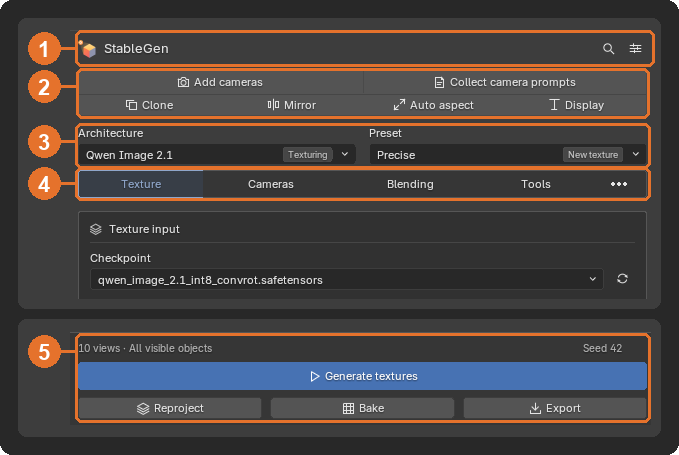 Header, camera toolbar, architecture and preset tags, page tabs, footer | 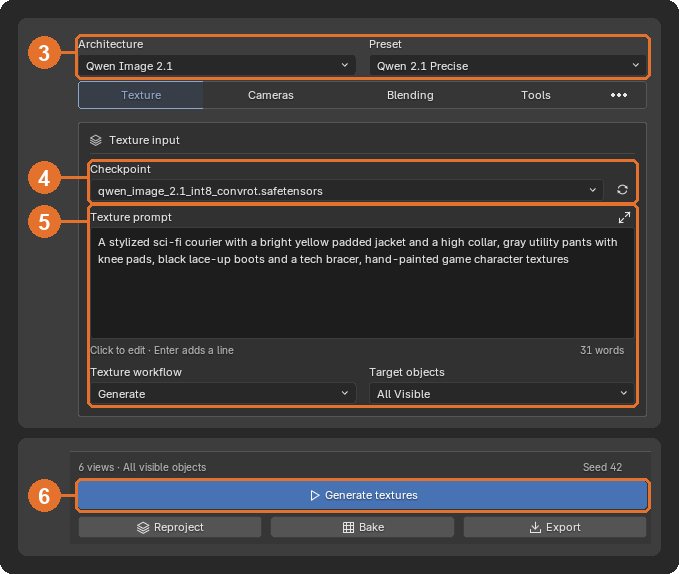 The Texture page |
Qwen Image 2.1
A new architecture with its own presets (Qwen 2.1 Precise, Precise+, Safe, Context + Reference, Local Edit and Refine). It supports its native 2K resolution, about 4 MP per view: raise Target megapixels under Sampling & resolution (the default is 1 MP, and higher budgets take longer per view). It also continues fine detail, such as thin trim lines on a dark fabric, from one view to the next more cleanly. It generates RGBA views, so transparent pixels stay out of the projection, and its driving prompts can be edited as templates. Requests can be exported as ComfyUI workflows. See Architectures and presets.
Experimental architectures
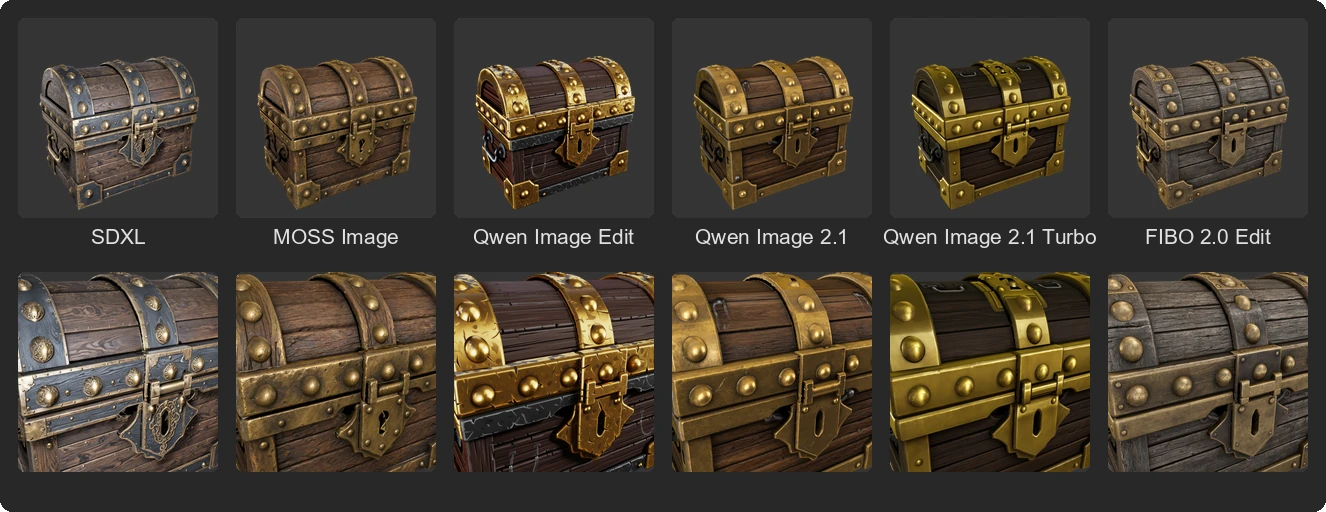
Three new architectures, each with its own presets. They are tagged Experimental, since their results and settings may still change, and are shown by default; Enable Experimental Architectures in the add-on preferences hides them and their presets.
- Qwen Image 2.1 Turbo runs the Qwen Image 2.1 workflows with the few-step Turbo model at 8 steps, about three times faster than Qwen 2.1 Precise on the same scene.
- MOSS Image runs the SDXL workflows, including Generate Sequentially, Local Edit and UV Inpaint, and follows the geometry with its own depth control adapter instead of ControlNet. Its Apache-2.0 license allows commercial use.
- FIBO 2.0 Edit (Bria) runs the Qwen workflows with FIBO 2.0 Edit Turbo at 4 steps and 1 MP per view.
Masked Edit
Paint a selection on the model and describe the change; StableGen regenerates only that region through the cameras that see it and leaves the rest of the texture untouched. Works with every texturing architecture except the deprecated FLUX ones, keeps the edit as a preview until you apply or discard it, and on PBR materials updates the material maps of the edited region too, including new emission for glowing details. See Masked Edit.
 Before |  Black neon tech jacket |  Desert camo |  Chrome racing jacket |
Rigging and animation
Auto-rig selected character adds a skeleton and skin weights with SkinTokens on the ComfyUI server, for any mesh or as a step of TRELLIS.2 generation. Animations from FBX or BVH files can then be retargeted onto the rig, with a reference pose matched to the source, elbows and wrists that follow the source's motion, and arms kept clear of the body. See Rigging and animation.
 Mecha |  Courier |  Inventor |  Adventurer |
Four characters auto-rigged with SkinTokens, all driven by the same Mixamo walk
PBR maps
- Marigold V2 as an albedo and normal source: sharper detail and better color than Marigold v1, at up to 2048 px.
- Albedo saturation correction now measures only the object, not the background. Choosing Marigold V2 turns it off, since the V2 albedo already keeps the generated colors.
- A tile inference option for tiled PBR extraction.
- Re-baking removes maps of channels you switched off, so they are not wired in again.
See PBR maps.
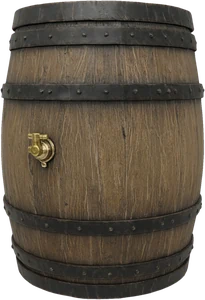 Generated view |  Marigold V1 albedo |  Marigold V2 albedo |  Rendered with V1 |  Rendered with V2 |
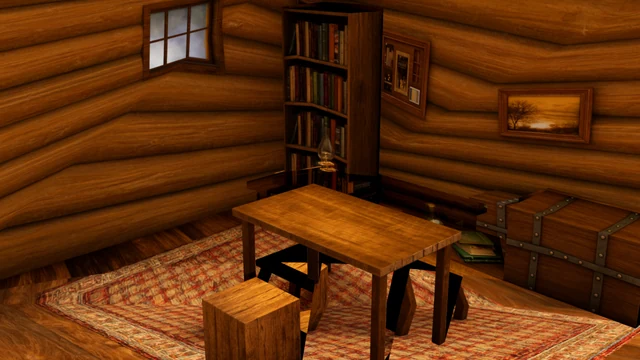
Texturing: a reworked projection pipeline
 v0.3.1 | 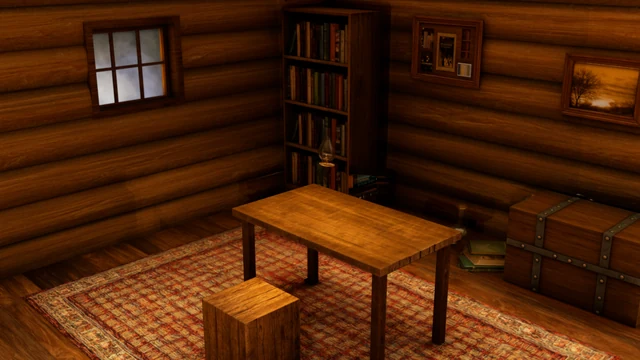 v0.4.0 |
How generated views are projected and blended was rebuilt for cleaner seams, edges and occlusion:
- Depth/Part Projection Guard (DPPG). Stops a view's foreground colors from spilling onto the surfaces behind them, such as an arm's skin onto the dress behind it, at depth and object or material boundaries. Depth-Aware Margins set separate foreground and background widths, Coverage Rescue relaxes the guard where only much weaker views are left, and the guard edge can be feathered with several methods, including Surface Blend, and rendered at a higher scale for smoother boundaries.
- Protect reliable context. In sequential Qwen generation, surfaces that earlier views already covered reliably are protected, and only unreliable areas are sent to the model for repair. Optional cleanup removes fragmented repair-mask islands, holes and strips.
- Weight by view quality. Blending prefers the views that see a surface most directly and with the most projected detail.
- Perspective-correct projection. Images no longer shift or stretch on large or low-poly faces.
- No projection through back faces by default, so a camera cannot write onto the far side of a closed mesh.
- Automatic view sequence. Sequential generation orders the cameras through overlapping neighbors, starting from an anchor camera, so each new view continues from the last.
- Joint resolution fitting. Camera resolutions are chosen together for aspect ratio, pixel budget and model alignment.
- The Precise+ presets combine DPPG, protected context and view-quality weighting.
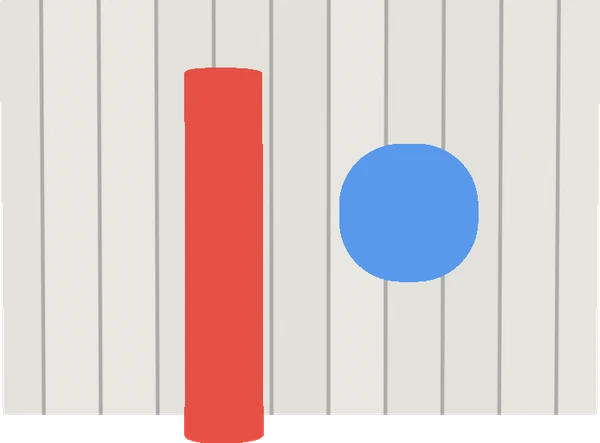 One generated view: the objects painted a little too wide | 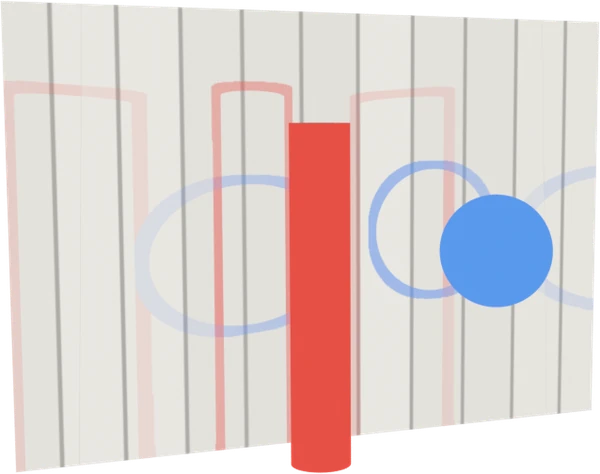 Guard off: every view leaves outlines on the wall | 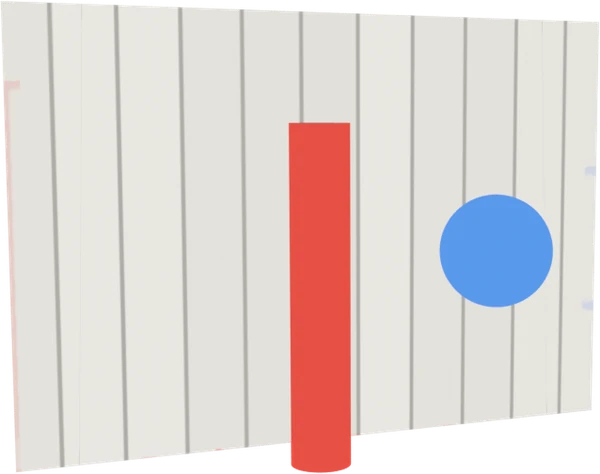 Guard on: the wall stays clean |
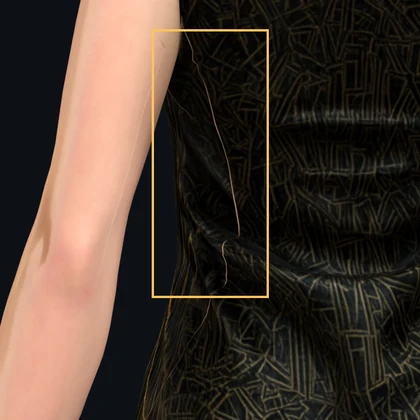 On a character: the compared area | 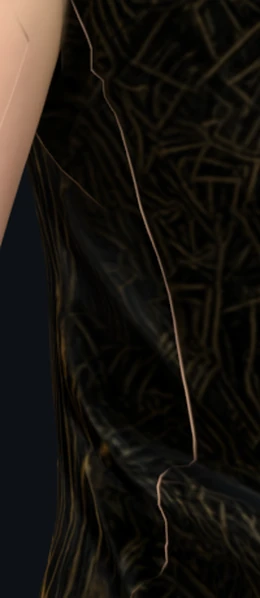 Guard off: the arm outline lands on the dress | 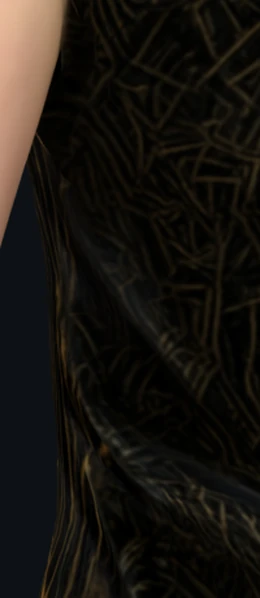 Depth/Part Projection Guard on |
A readable projection shader
The projection material is now organized into labelled frames (surface geometry, image and UV, camera frustum, raycast visibility, facing angle, guard, per-view sections) and the main blending controls are exposed as shader inputs, so you can follow and adjust what the material does in the Shader Editor. It also stays within Cycles' shader stack and EEVEE's attribute limit, so scenes with many cameras no longer render black or magenta.
Faster, and the interface stays responsive
Guidance renders, visibility and projection builds now run without blocking Blender, and progress is reported for every ComfyUI stage. On the same six-view SDXL scene, StableGen's own work per run (everything except model inference) dropped from 27.1 s to 13.6 s, and the longest interface freeze from 4.4 s to 0.8 s.

Diagnostics and animated characters
- The Diagnostics page (with debug settings enabled) inspects a projection interactively: which view writes where, what each camera discards, and the context sent to the model, with replayable records.
- Texturing Frame sets the frame used for posed geometry, visibility, projection and baking, so rigged and animated characters texture in a consistent pose.
Cameras
Viewport cameras show their generated images and numbered labels, and a view prompt can be edited directly on a camera's label. Camera displays shrink so they do not reach into the subject. See Cameras.
Batch processing, export and printing
- DAE/GLB batch texturing can be driven by a CSV manifest and recovers from failures during unattended runs.
- FBX export puts the baked UV map first and leaves out unused material slots, so engines such as Unreal map baked textures correctly.
- 3D printing: a new dithering method, a more reliable Make Solid, printable mesh checks and textured OBJ export.
Installer
New command-line options (--packages, --yes, --list, --dry-run, --verify, --verify-hashes, --update-nodes) for unattended runs. Downloads resume, retry and are size-checked. The installer checks disk space, Git and the ComfyUI version first, repairs the TRELLIS.2 environments after ComfyUI updates, and installs the Nunchaku wheel that matches ComfyUI's Python and torch.
Fixes
- Generation failed on Blender 5.2 with a
Color2error (#113). - The
AngleThresholderror and the missingraycast.oslon Blender 4.x (#109). - Long generations stopped with
KeyErrorwhen the progress connection dropped; StableGen now recovers from the ComfyUI queue (#92). - Blender 4.5 crashed while exporting depth maps.
- Masked Edit found no selection on Blender 4.x.
- The projection guard failed on Blender 4.2 to 4.4.
- Retargeted animations raised the shoulders on rigs with clavicle bones.
- The Add Cameras and Bake dialogs cut off their labels.
- Clear Preview on the 3D printing page always failed.
- The installer no longer pins NumPy below 2.0, and no longer warns about invalid escape sequences on Python 3.12 or later.